ETSI TS 104 175 V1.1.1 (2026-09)

Reference
DTS/DATA-00104175
Keywords
API ARCHITECTURE data interoperability Digital Twins INTEROPERABILITY NGSI-LD smart agriculture Smart Cities smart industry smart manufacturing smart water WoT
ETSI
650 Route des Lucioles
F-06921 Sophia Antipolis Cedex - FRANCE
Tel.: +33 4 92 94 42 00 Fax: +33 4 93 65 47 16
Siret N° 348 623 562 00017 - APE 7112B
Association à but non lucratif enregistrée à la
Sous-préfecture de Grasse (06) N° w061004871
Important notice
The present document can be downloaded from the ETSI Search & Browse Standards application.
The present document may be made available in electronic versions and/or in print. The content of any electronic and/or print versions of the present document shall not be modified without the prior written authorization of ETSI. In case of any existing or perceived difference in contents between such versions and/or in print, the prevailing version of an ETSI deliverable is the one made publicly available in PDF format on ETSI deliver repository.
Users should be aware that the present document may be revised or have its status changed, this information is available in the Milestones listing.
If you find errors in the present document, please send your comments to the relevant service listed under Committee Support Staff.
If you find a security vulnerability in the present document, please report it through our Coordinated Vulnerability Disclosure (CVD) program.
Notice of disclaimer & limitation of liability
The information provided in the present deliverable is directed solely to professionals who have the appropriate degree of experience to understand and interpret its content in accordance with generally accepted engineering or other professional standard and applicable regulations.
No recommendation as to products and services or vendors is made or should be implied.
No representation or warranty is made that this deliverable is technically accurate or sufficient or conforms to any law and/or governmental rule and/or regulation and further, no representation or warranty is made of merchantability or fitness for any particular purpose or against infringement of intellectual property rights.
In no event shall ETSI be held liable for loss of profits or any other incidental or consequential damages.
Any software contained in this deliverable is provided "AS IS" with no warranties, express or implied, including but not limited to, the warranties of merchantability, fitness for a particular purpose and non-infringement of intellectual property rights and ETSI shall not be held liable in any event for any damages whatsoever (including, without limitation, damages for loss of profits, business interruption, loss of information, or any other pecuniary loss) arising out of or related to the use of or inability to use the software.
Copyright Notification
No part may be reproduced or utilized in any form or by any means, electronic or mechanical, including photocopying and microfilm except as authorized by written permission of ETSI. The content of the PDF version shall not be modified without the written authorization of ETSI. The copyright and the foregoing restriction extend to reproduction in all media.
© ETSI 2026.
All rights reserved.
Intellectual Property Rights
IPRs essential or potentially essential to normative deliverables may have been declared to ETSI. The declarations pertaining to these essential IPRs, if any, are publicly available for ETSI members and non-members, and can be found in ETSI SR 000 314: "Intellectual Property Rights (IPRs); Essential, or potentially Essential, IPRs notified to ETSI in respect of ETSI standards", which is available from the ETSI Secretariat. Latest updates are available on the ETSI IPR online database.
Pursuant to the ETSI Directives including the ETSI IPR Policy, no investigation regarding the essentiality of IPRs, including IPR searches, has been carried out by ETSI. No guarantee can be given as to the existence of other IPRs not referenced in ETSI SR 000 314 (or the updates on the ETSI Web server) which are, or may be, or may become, essential to the present document.
The present document may include trademarks and/or tradenames which are asserted and/or registered by their owners. ETSI claims no ownership of these except for any which are indicated as being the property of ETSI, and conveys no right to use or reproduce any trademark and/or tradename. Mention of those trademarks in the present document does not constitute an endorsement by ETSI of products, services or organizations associated with those trademarks.
DECT™, PLUGTESTS™, UMTS™ and the ETSI logo are trademarks of ETSI registered for the benefit of its Members. 3GPP™, LTE™ and 5G™ logo are trademarks of ETSI registered for the benefit of its Members and of the 3GPP Organizational Partners. oneM2M™ logo is a trademark of ETSI registered for the benefit of its Members and of the oneM2M Partners. GSM® and the GSM logo are trademarks registered and owned by the GSM Association.
Foreword
This Technical Specification (TS) has been produced by ETSI Technical Committee Data Solutions (TC DATA).
Modal verbs terminology
In the present document "should", "should not", "may", "need not", "will", "will not", "can" and "cannot" are to be interpreted as described in clause 3.2 of the ETSI Drafting Rules (Verbal forms for the expression of provisions).
"must" and "must not" are NOT allowed in ETSI deliverables except when used in direct citation.
Executive summary
The present document formally describes the abstract part of the NGSI-LD API specification, independent of any particular binding to protocols supporting the operations of the API. The binding of the API operations to the HTTP protocol is defined in [i.16]. The NGSI-LD API allows users to provide, consume and subscribe to context information in multiple scenarios and involving multiple stakeholders. Context information is modelled as attributes (properties and relationships) of context entities, also referred to as "digital twins", representing real-world assets. It enables close to real-time access to information coming from many different sources (not only IoT data sources).
Introduction
The present document defines the NGSI-LD API Specification. The NGSI-LD API allows users to provide, consume and subscribe to context information in multiple scenarios and involving multiple stakeholders. Context information is modelled as attributes of context entities, also referred to as "digital twins", representing real-world assets (e.g. a bus in a city or a luggage claim ticket). Because of that, the NGSI-LD API is often used to bring standardized access to digital twin data.
The ongoing status of the NGSI-LD API can be found in [i.1]. The binding of the API operations to the HTTP protocol is defined in [i.16].
The ETSI TC DATA has decided to use the name "NGSI-LD API". The rationale is to reinforce the fact that the present document leverages on the former OMA NGSI 9 and 10 interfaces [i.2] and FIWARE® NGSIv2 [i.3] to incorporate the latest advances from Linked Data.
The NGSI-LD API and information model benefited from contributions developed in the context of the following research projects:
- No. 101136799 (MARCLAIMED)
- No. 101180452 (URBAQUANTUM)
- No. 101270878 (DYNACITY)
- No. 101081802 (CONSERWA)
- No. G69J18001180007 (Data Highway)
- No. FTE0000471 (GeminiPort)
- No. PE00000001 (DUSTAR, RESTART SPOKE 6)
- No. 101069732 (aerOS)
- No. 101135784 (ARISE)
- No. 101189589 (O-CEI)
and from contributions developed by members of the FIWARE® Community.
1 Scope
The present document defines a standardized API for context information management (NGSI-LD API), enabling close to real-time (right-time) access to context information/digital twins coming from many different sources (not only IoT data sources). The present document defines how such an API enables applications to perform updates on context, register context sources which can be queried to get updates on context, query information on current and historic context information and subscribe to receive notifications of context changes. The criteria for choice of the API characteristics are based on requirements resulting from the Use Cases ETSI GR CIM 002 [i.4] and other work items ETSI GR CIM 007 [i.5] (security) and ETSI TS 104 178 [i.6] (information model). The present document supersedes prior versions, including ETSI GS CIM 009 [i.7] and ETSI GS CIM 004 [i.8].
2 References
2.1 Normative references
References are either specific (identified by date of publication and/or edition number or version number) or non-specific. For specific references, only the cited version applies. For non-specific references, the latest version of the referenced document (including any amendments) applies.
Referenced documents which are not found to be publicly available in the expected location might be found in the ETSI docbox.
While any hyperlinks included in this clause were valid at the time of publication, ETSI cannot guarantee their long-term validity.
The following referenced documents are necessary for the application of the present document.
[1] IETF RFC 3987: "Internationalized Resource Identifiers (IRIs)". [3] IETF RFC 8259: "The JavaScript Object Notation (JSON) Data Interchange Format". [5] ISO 8601: "Date and time --- Representations for information interchange" (2019). [7] W3C® Recommendation 25 February 2014: "RDF 1.1: Concepts and Abstract Syntax". [8] W3C® Recommendation 16 July 2020: JSON-LD Specification: "JSON-LD 1.1 - A JSON-based Serialization for Linked Data". [9] ETSI TS 104 179: "Data Solutions (DATA); NGSI-LD Provenance and Integrity".
[12] IETF RFC 7230: "Hypertext Transfer Protocol (HTTP/1.1): Message Syntax and Routing". [13] IEEE 1003.2™-1992: "IEEE Standard for Information Technology - Portable Operating System Interfaces (POSIX™) - Part 2: Shell and Utilities". [16] IETF RFC 5234: "Augmented BNF for Syntax Specifications: ABNF". [18] IETF RFC 3986: "Uniform Resource Identifier (URI): Generic Syntax". [21] Open Geospatial Consortium Inc. OGC 06-103r4: "OpenGIS® Implementation Standard for Geographic information - Simple feature access - Part 1: Common architecture". [24] ETSI TS 104 243: "Data Solutions (DATA); NGSI-LD MQTT Notification Binding".
2.2 Informative references
References are either specific (identified by date of publication and/or edition number or version number) or non-specific. For specific references, only the cited version applies. For non-specific references, the latest version of the referenced document (including any amendments) applies.
While any hyperlinks included in this clause were valid at the time of publication, ETSI cannot guarantee their long-term validity.
The following referenced documents may be useful in implementing an ETSI deliverable or add to the reader's understanding, but are not required for conformance to the present document.
[i.1] ngsild.org: "Overview of status of NGSI-LD". [i.4] ETSI GR CIM 002: "Context Information Management (CIM); Use Cases (UC)" (V1.1.1). [i.5] ETSI GR CIM 007: "Context Information Management (CIM); Security and Privacy". [i.6] ETSI TS 104 178: "Data Solutions (DATA); NGSI-LD Information Model".
[i.7] ETSI GS CIM 009: "Context Information Management (CIM); NGSI-LD API" (V1.9.1). [i.8] ETSI GS CIM 004: "Context Information Management (CIM); Application Programming Interface (API)" (V1.1.2). [i.9] Graph Databases: "New Opportunities for Connected Data". O'Reilly 2nd Edition. Webber, Robinson, et al. ISBN:1491930896 9781491930892.
[i.10] ETSI TS 103 264: "SmartM2M; Smart Applications; Reference Ontology and oneM2M Mapping" (V4.1.1). [i.12] W3C® Recommendation 16 July 2020: JSON-LD Specification:"JSON-LD 1.1 - A JSON-based Serialization for Linked Data". [i.13] GeoJSON-LD 1.0. Base context for processing GeoJSON according to the JSON-LD processing model. [i.16] ETSI TS 104 176: "Data Solutions (DATA); NGSI-LD API Bindings".
[i.17] Regulation (EU) 2016/679 of the European Parliament and of the Council of 27 April 2016 on the protection of natural persons with regard to the processing of personal data and on the free movement of such data, and repealing Directive 95/46/EC (General Data Protection Regulation).
3 Definition of terms, symbols and abbreviations
3.1 Terms
For the purposes of the present document, the following terms apply:
The letters "NGSI-LD" were added to most terms to confirm that they are distinct from other terms of similar/same name in use in other organizations, however, in the present document the letters "NGSI-LD" are generally omitted for brevity.
The use of URI in the context of the present document also includes the use of International Resource Identifiers (IRIs) as defined in IETF RFC 3987 [1], which extends the use of characters to Unicode® 15.0.0 [2] beyond the ASCII character set, enabling the support of languages other than English.
NGSI-LD Attribute: reference to both an NGSI-LD Property and to an NGSI-LD Relationship
NGSI-LD Attribute Instance (in the case of temporal representation of NGSI-LD Entities): reference to an NGSI-LD Attribute, at a specific moment in time of its temporal evolution, usually identified by its instanceId
NGSI-LD Central Broker: NGSI-LD Context Broker that only uses a local storage when serving NGSI-LD requests, without involving any external Context Sources
NGSI-LD Context Broker: architectural component that implements all the NGSI-LD interfaces
NGSI-LD Context Consumer: agent that uses the query and subscription functionality of NGSI-LD to retrieve context information
NGSI-LD Context Producer: agent that uses the NGSI-LD context provision and/or registration functionality to provide or announce the availability of its context information to an NGSI-LD Context Broker
NGSI-LD Context Registry: software functional element where Context Sources register the information that they can provide
It is used by Distribution Brokers and Federation Brokers to find the appropriate Context Sources which can provide the information required for serving an NGSI-LD request.
NGSI-LD Context Source: source of context information which implements the NGSI-LD consumption and subscription (and possibly provision) interfaces defined by the present document
It is usually registered with an NGSI-LD Context Registry so that it can announce what kind of information it can provide, when requested, to Context Consumers and Brokers.
NGSI-LD Context Source Registration: description of the information that can be provided by a Context Source, which is used when registering the Context Source with the Context Registry
NGSI-LD Core API: core part of the NGSI-LD API that has to be implemented by all Brokers, including operations for providing or managing Entities and Attributes, operations for consuming Entities and checking which Entity Types and Attributes Entities are available in the system and operations for subscribing to Entities, receiving notifications and managing subscriptions
NGSI-LD Distribution Broker: NGSI-LD Context Broker that uses both local context information and registration information from an NGSI-LD Context Registry, to access matching context information from a set of distributed Context Sources
NGSI-LD Element: any JSON element that is defined by the NGSI-LD API
NGSI-LD Entity: informational representative of something that is supposed to exist in the real world, physically or conceptually
In the NGSI-LD API, any instance of such an entity is uniquely identified by a URI , and characterized by reference to one or more NGSI-LD Entity Type(s) .
NGSI-LD Entity Map: mapping of NGSI-LD Entity ids to Context Source Registrations used in maintaining atomicity of transactions performed by Distribution Brokers and Federation Brokers
NGSI-LD Entity Type: categorization of an NGSI-LD Entity as belonging to a class of similar entities, or sharing a set of characteristic properties
In the NGSI-LD API, an NGSI-LD Entity Type is uniquely identified by a URI.
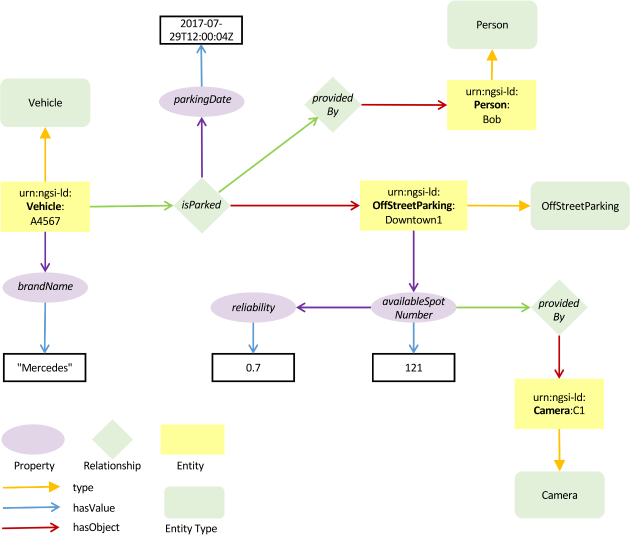
"Vehicle" is an NGSI-LD Entity Type and is identified with a proper URI.
Bob's private car, whose plate number is "ABCD1234", is an NGSI-LD Entity whose NGSI-LD Entity Type name is "Vehicle".
Alice's motorhome has a unique URI as id, but can be assigned multiple NGSI-LD Entity types, e.g. "Vehicle" and "Home".
NGSI-LD External Linked Entity: Linked Entity that is identified through a dereferenceable URI which does not exist within the current NGSI-LD system
It can exist within another NGSI-LD system or within a non-NGSI-LD system.
An NGSI-LD Entity, whose Entity Type name is "Book" , can be externally linked, through the "wasWrittenBy" relationship, to a resource identified by the URI "http://dbpedia.org/resource/Mark_Twain".
NGSI-LD Federation Broker: Distribution Broker that federates information from multiple underlying NGSI-LD Context Brokers and across domains
NGSI-LD GeoProperty: subclass of NGSI-LD Property which is a description instance which associates a main characteristic, i.e. an NGSI-LD Value, to either an NGSI-LD Entity, an NGSI-LD Relationship or another NGSI-LD Property, that uses the special hasValue property to define its target value and holds a geographic location in GeoJSON format
NGSI-LD Internal Linked Entity: Linked Entity that exists within the current NGSI-LD system
An NGSI-LD Entity, whose Entity Type name is "Vehicle", can be internally linked, through the "isParkedAt" relationship, to another NGSI-LD Entity, of Type name "Parking", identified by the URI "urn:ngsi-ld:Parking:Downtown1".
NGSI-LD JSONLDContext API: part of the NGSI-LD API that is used to host, serve and manage JSON-LD @contexts
NGSI-LD JsonProperty: subclass of NGSI-LD Property which is a description instance which associates a raw JSON literal value as a defined main characteristic to an NGSI-LD Entity, an NGSI-LD Relationship or another NGSI-LD Property and that uses the special hasJson (a subproperty of hasValue) property to define its target value
The target value contains data which is not available for interpretation.
NGSI-LD LanguageProperty: subclass of NGSI-LD Property which is a description instance which associates a set of strings in different natural languages as a defined main characteristic, i.e. an NGSI-LD Map, to an NGSI-LD Entity, an NGSI-LD Relationship or another NGSI-LD Property and that uses the special hasLanguageMap (a subproperty of hasValue) property to define its target value
NGSI-LD Linked Entity: NGSI-LD Entity referenced from another NGSI-LD Entity (the linking NGSI-LD Entity) via an NGSI-LD Relationship
NGSI-LD Linking Entity: NGSI-LD Entity which is the subject of a Relationship to another NGSI-LD Entity (the NGSI-LD Linked Entity) or an external resource (identified by a URI)
NGSI-LD ListProperty: description instance which associates an ordered array of main characteristics, i.e. NGSI-LD Values, to either an NGSI-LD Entity, an NGSI-LD Relationship or another NGSI-LD Property, and that uses the special hasValueList property to define its target value
NGSI-LD ListRelationship: description of an ordered array of directed links between a subject, which is either an NGSI-LD Entity, an NGSI-LD Property or another NGSI-LD Relationship, on one hand, and a series of objects, which are NGSI-LD Entities, on the other hand, and which uses the special hasObjectList property to define its target objects
"A bus route services the following bus stops" can be represented by an NGSI-LD ListRelationship whose name is "route" which holds an array of directed links towards a series of NGSI-LD Entities of type (Type name) "BusStop".
NGSI-LD Map: JSON-LD language map in the form of key-value pairs holding the string representation of a main characteristic in a series of natural languages
"Bob's vehicle is currently parked on a street which is known as 'Grand Place' in French and 'Grote Markt' in Dutch" can be represented by an NGSI-LD LanguageProperty whose name is "street" which holds an NGSI-LD Map of two key-value pairs containing both the French ("fr" ) and Dutch ( "nl" ) exonyms of the street name.
NGSI-LD Null: "urn:ngsi-ld:null" or {"@none": "urn:ngsi-ld:null"} used as an encoding for null values
NGSI-LD Property: description instance which associates a main characteristic, i.e. an NGSI-LD Value, to either an NGSI-LD Entity, an NGSI-LD Relationship or another NGSI-LD Property and that uses the special hasValue property to define its target value
"Bob's vehicle's speed is 40 km/h" can be represented by an NGSI-LD Property, whose name is "speed", and which characterizes an NGSI-LD Entity, whose NGSI-LD Type is "Vehicle". Such a name can be expanded to a fully qualified name in the form of a URI , for instance "http://example.org/Vehicle" or "http://example.org/speed".
NGSI-LD Query: collection of criteria used to select a sub-set of NGSI-LD Elements, matching the criteria
NGSI-LD Registry API: part of the NGSI-LD API that is implemented by the Context Registry, including operations for registering Context Sources and managing Context Source Registrations (CSRs), operations for retrieving and discovering CSRs, and operations for subscribing to CSRs and receiving notifications
NGSI-LD Relationship: description of a directed link between a subject which is either an NGSI-LD Entity, an NGSI-LD Property or another NGSI-LD Relationship, on one hand, and an object, or an unordered array of objects, each of which is an NGSI-LD Entity, on the other hand, and which uses the special hasObject property to define its target object
An NGSI-LD Entity of type "Vehicle" can be the subject of an NGSI-LD Relationship whose object is an NGSI-LD Entity of type "Parking".
An NGSI-LD Entity of type "Vehicle" can be the subject of an NGSI-LD Relationship whose object is an array of NGSI-LD Entities of type "Passenger".
NGSI-LD Scope: hierarchical structuring of Entities that enables restricting query results and notifications
NGSI-LD Snapshot: set of NGSI-LD Entities, retrieved through one or more NGSI-LD Queries, which are locally persisted, providing a relatively consistent view of the situation when the queries were executed, and on which Context Consumers can execute further local NGSI-LD Operations
NGSI-LD Temporal API: part of the NGSI-LD API pertaining to the Temporal Evolution of Entities, including operations for providing and managing the Temporal Evolution of Entities and Attributes, and operations for consuming the Temporal Evolution of Entities
NGSI-LD Temporal Evolution of an Entity: sequence of values attributed to an NGSI-LD Entity over time, i.e. its history or future predictions
NGSI-LD Tenant: user or group of users that utilize a single instance of a system implementing the NGSI-LD API (NGSI-LD Context Source or NGSI-LD Broker) in isolation from other users or groups of users of the same instance, so that any information related to one Tenant (e.g. Entities, Subscriptions, Context Source Registrations) are only visible to users of the same Tenant, but not to users of a different Tenant
NGSI-LD Value: JSON value (i.e. a string, a number, true or false, an object, an array), or JSON-LD typed value (i.e. a string as the lexical form of the value together with a type, defined by an XSD base type or more generally an IRI), or JSON-LD structured value (i.e. a set, a list, a language-tagged string)
Bob's private car 'speed' NGSI-LD Value is the number 100 (kilometres per hour).
NGSI-LD VocabProperty: subclass of NGSI-LD Property, which is a description instance which associates a string value, which can be coerced to a URI, as a defined main characteristic to an NGSI-LD Entity, an NGSI-LD Relationship or another NGSI-LD Property and that uses the special hasVocab (a subproperty of hasValue) property to define its target value
"Bob's car is a non-commercial vehicle" can be represented by an NGSI-LD VocabProperty whose name is "category" which holds the string value "non-commercial". If the associated JSON-LD context defines the term "non-commercial" as "http://example.com/non-commercial", then the returned value shall be expanded using JSON-LD type coercion into the URI "http://example.com/non-commercial".
3.2 Symbols
Void.
3.3 Abbreviations
For the purposes of the present document, the following abbreviations apply:
ABNF
Augmented Backus-Naur Form
ALG1
ALGorithm for transforming an NGSI-LD Entity into a JSON-LD document
API
Application Programming Interface
ASCII
American Standard Code for Information Interchange
CSR
Context Source Registration
ECMA
European Computer Manufacturers Association
GDPR
General Data Protection Regulation
GeoJSON
Geographic JavaScript Object Notation
GeoJSON-LD
Geographic JavaScript Object Notation - Linked Data
GIS
Geographic Information System
GPS
Global Positioning System
HTTP
Hypertext Transfer Protocol
HTTPS
Hypertext Transfer Protocol Secure
IANA
Internet Assigned Numbers Authority
ICU
International Components for Unicode
IEEE
Institute of Electrical and Electronics Engineers
IETF
Internet Engineering Task Force
IRI
Internationalized Resource Identifier
ISG
Industry Specification Group
ISO
International Organization for Standardization
JSON
JavaScript Object Notation
LWM2M
LightWeight Machine to Machine
MIME
Multi-purpose Internet Mail Extensions
MQTT
Message Queuing Telemetry Transport
NGSI
Next Generation Service Interfaces
NGSILD
Next Generation Service Interfaces Linked Data (same as NGSI-LD)
NSS
Namespace Specific String
OAS
Open API Specification
oneM2M
oneM2M Partnership Project
POSIX
Portable Operating System Interface
RDF
Resource Description Format
REST
REpresentational State Transfer
SAREF
Smart Applications REFerence ontology
TCP
Transport Control Protocol
TS
Technical Specification
UCA
Unicode Collation Algorithm
UML
Unified Modelling Language
URI
Uniform Resource Identifier
URL
Universal Resource Locator
UTC
Coordinated Universal Time
UTF
Unicode (or Universal Coded Character Set) Transformation Format
4 NGSI-LD conceptual overview informative
4.1 Introduction
Clause 4 gives an introduction to the technical design principles behind the context information management framework supported by NGSI-LD. It provides an overview of the information model, architectural assumptions and supported architectures, the representation in JSON-LD, and a high-level overview of the API and its most important features. The clause is informative as it provides an overview only, leaving out many details. The goal is to put the reader into a better position to understand the following normative clauses that provide all the details of the NGSI-LD API.
As stated in clause 3.1, the letters "NGSI-LD" which are part of most terms, to confirm that they are distinct from other terms of similar/same name in use in other organizations, are generally omitted in the present document for brevity. In the present document, a number of rather obvious typographic conventions and syntax guidelines are followed, and the reader is referred to annex E for details.
4.2 NGSI-LD information model
4.2.1 Introduction
The NGSI-LD Information Model specifies the structure of context information to be supported by an NGSI-LD system. It is defined in ETSI TS 104 178 [i.6]. It specifies the data representation mechanisms to be used by the NGSI-LD API itself. In addition, it specifies the structure of the Context Information Management vocabularies to be used in conjunction with the API.
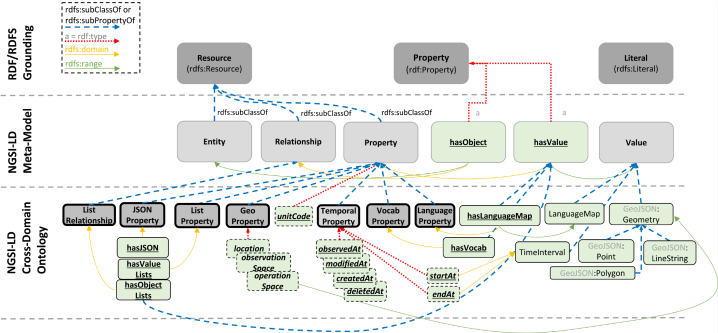
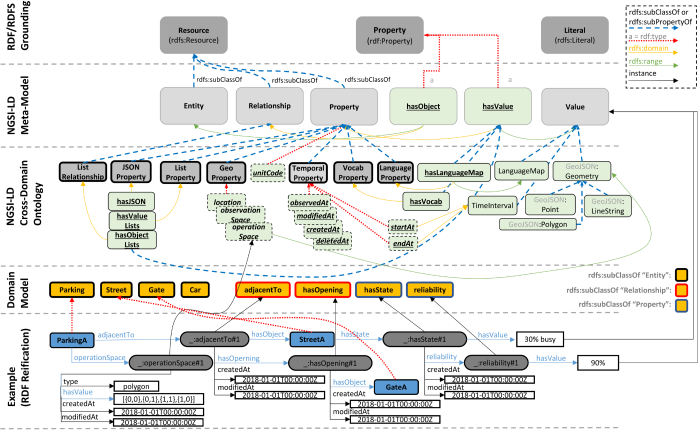
The NGSI-LD Information Model is defined at two levels (see Figure 4.2.1-1): the foundation classes, which correspond to the Core Meta-model and the Cross-Domain Ontology. The former amounts to a formal specification of the "property graph" model (Graph Databases [i.9]). The latter is a set of generic, transversal classes which are aimed at avoiding conflicting or redundant definitions of the same classes in each of the domain-specific ontologies. Below these two levels, domain-specific ontologies or vocabularies can be devised. For instance, the SAREF Ontology ETSI TS 103 264 [i.10] can be mapped to the NGSI-LD Information Model, so that smart home applications will benefit from this Context Information Management API specification.
The version of the cross-domain model shown in the present document is a minimal one, aimed at defining the classes used in this release of the API specification. It has been extended in ETSI TS 104 178 [i.6], with classes defining extra concepts such as mobile vs. stationary entities, instantaneous vs. static properties, etc.
Figure 4.2.1‑1: Overview of the NGSI-LD information model structure
4.2.2 NGSI-LD meta model
Figure 4.2.2-1 provides a graphical representation of the NGSI-LD Meta-Model in terms of classes and their relationships. To provide additional clarity, an informal (non-normative) mapping to the property graph model is also presented.
Implementations support the NGSI-LD Meta-model as follows:
- An NGSI-LD Entity is a subclass of rdfs:Resource (RDF Schema 1.1 [i.11]).
- An NGSI-LD Relationship is a subclass of rdfs:Resource (RDF Schema 1.1 [i.11]).
- An NGSI-LD Property is a subclass of rdfs:Resource (RDF Schema 1.1 [i.11]).
- An NGSI-LD Value is either a rdfs:Literal or a node object (in JSON-LD syntax) to represent complex data structures (RDF Schema 1.1 [i.11]).
- An NGSI-LD Property has a value, stated through
hasValue, which is of type rdf:Property (RDF Schema 1.1 [i.11]).
- An NGSI-LD Relationship has an object stated through
hasObject which is of type rdf:Property (RDF Schema 1.1 [i.11]).
4.2.3 Cross-domain ontology
Figure 4.2.3-1 describes the concepts introduced by the NGSI-LD Cross-Domain Ontology to be supported by implementations as follows:
- Geo Properties: Are intended to convey geospatial information as defined in clause 5.2.6.4.5.
- Temporal Properties: Are non-reified Properties (represented only by their Value) that convey temporal information for capturing the time series evolution of other Properties; they are defined in clause 5.2.4.
- Language Properties: Are intended to convey different versions of the same textual values, whenever a version for each language (for instance: English, Spanish) is needed.
- "unitCode" Property: Is a Property intended to provide the units of measurement of an NGSI-LD Value as defined in clause 5.2.6.4.3.
- "scope" Property: Is a Property that enables putting Entities into a hierarchical structure as defined in clause 5.2.7.
- LanguageMaps: Are a special type of NGSI-LD Value intended to convey the different values of Language Properties, stated through an
hasLanguageMap, which is of type rdf:Property (RDF Schema 1.1 [i.11]) and is itself a subproperty of hasValue.
- Geometry Values: Are a special type of NGSI-LD Value intended to convey geometries corresponding to geospatial properties as defined in clause 5.2.6.4.5.
- Time Values: Are a special type of NGSI-LD Value intended to convey time instants or intervals representations as defined in clause 5.2.2.4.
Clause 4.3.4.3 introduces the core JSON-LD @context which includes the URIs which correspond to the concepts introduced above.
4.2.4 NGSI-LD domain-specific models and instantiation
This clause is intended to illustrate the relationship between the NGSI-LD Information Model and NGSI-LD Domain-specific models.
Figure 4.2.4-1 shows an example of an NGSI-LD domain-specific model. Domain-specific models introduce the specific entity types required for a particular domain. Figure 4.2.4-1 shows the types "Car", "Parking", "Street", "Gate". Entity types can have further subtypes, e.g. "OffStreetParking" as subtype of "Parking".
Figure 4.2.4‑1: Cross-domain ontology and instantiation
In addition, two different NGSI-LD Properties are introduced (hasState and reliability).
The adjacentTo Relationship links entities of type "Parking" with entities of type "Street".
4.2.5 UML representation
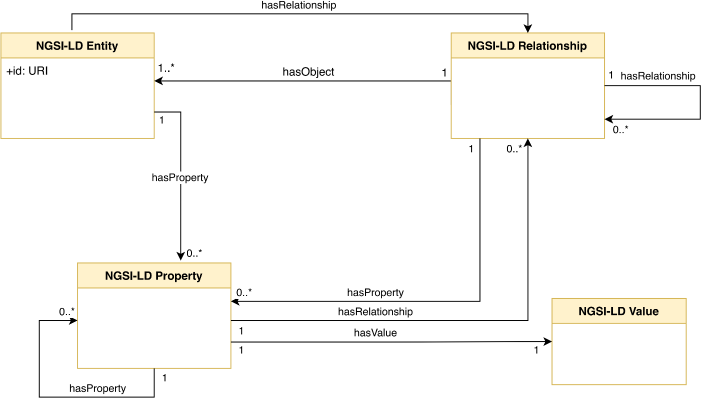
This clause is intended to show how the NGSI-LD information model could be described using UML diagrams. The aim of this diagram is to help those readers less familiar with ontology representations or RDF (RDF Schema 1.1 [i.11]) to understand the NGSI-LD Information Model.
In Figure 4.2.5-1 NGSI-LD Entity, Relationship, Property and Value are represented as UML classes. UML associations are used to interrelate these classes while keeping the structure and semantics defined by the NGSI-LD Information Model.
Figure 4.2.5‑1: NGSI-LD information model as UML
4.3 NGSI-LD architectures
4.3.1 Introduction
Originally, the NGSI-LD API has been intended to define an API without prescribing a specific architecture and thus the NGSI-LD API can be used in different architectural settings. In the course of time, the distributed architecture has been described in more details, partially specifying interactions and behaviours of components in more details to ensure interoperability between different NGSI-LD systems, partially with recommendations on how to best implement distributed functionality for efficiency or scalability reasons.
In the following, the three main architectural setups are described, in which the NGSI-LD API is being used. Nevertheless, there may be additional architectural setups in which the NGSI-LD API can also be used. The design decisions for the NGSI-LD API take the three described architectural setups into consideration to enable the efficient and scalable operation of NGSI-LD systems. A real system architecture utilizing the NGSI-LD API can map to one, take elements from multiple or combine all of them.
The NGSI-LD API implicitly defines two views of Entities:
- the "current state";
- the "temporal evolution" (both the past and possibly future predictions).
The NGSI-LD API is structured into a Core API and an optional Temporal API. The Core API manages the current state of Entities. The Temporal API is optional and manages the Temporal Evolution of Entities. NGSI-LD systems that intend to implement the Temporal API can consider updating the Temporal Evolution of an Entity whenever the "current state" is modified via the Core API.
4.3.2 Centralized architecture
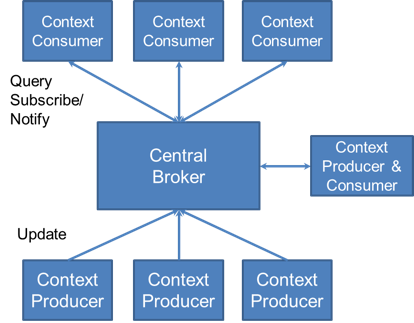
Figure 4.3.2-1 shows a centralized architecture. In the centre is a Central Broker that stores all the context information. There are Context Producers that use update operations to update the context information in the Central Broker and there are Context Consumers that request context information from the Central Broker, either using synchronous one-time query or asynchronous subscribe/notify operations. The Central Broker answers all requests from its storage. Figure 4.3.2-1 shows one component that acts as both Context Producer and Context Consumer. The general assumption is that components can have multiple roles, so such components are not explicitly shown in clause 4.3.3.
Figure 4.3.2‑1: Centralized architecture
4.3.3 Distributed and federated architectures
4.3.3.1 Introduction
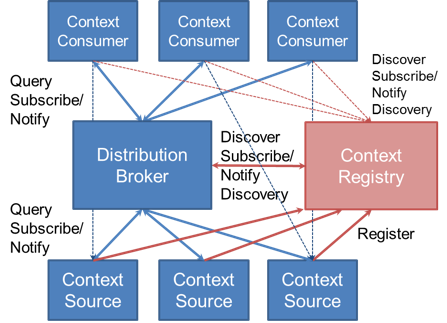
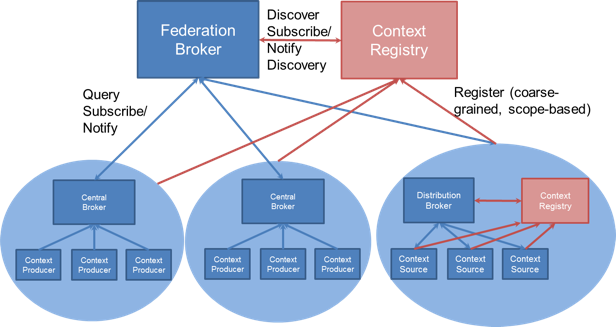
Figure 4.3.3.1-1 shows a distributed architecture. The underlying idea here is that all information is stored by the Context Sources. Context Sources implement the query and subscription part of the NGSI-LD API as a Context Broker does. They register themselves with the Context Registry, providing information about what context information they can provide, but not the context information itself, e.g. a certain Context Source registers that it can provide the indoor temperature for Building A and Building B or that it can provide the speed of cars in a geographic region covering the centre of a city.
Figure 4.3.3.1‑1: Distributed architecture
Context Consumers can query or subscribe to the Distribution Broker. On each request, the Distribution Broker discovers or does a discovery subscription to the Context Registry for relevant Context Sources, i.e. those that may provide context information relevant to the respective request from the Context Consumer. The Distribution Broker then queries or subscribes to each relevant Context Source. If possible, it aggregates the context information retrieved from the Context Sources and provides them to the Context Consumer. In this mode of operation, it is not visible to the Context Consumer, whether the Context Broker is a Central Broker or a Distribution Broker. Alternatively, the architecture allows Context Consumers to discover Context Sources through the Context Registry themselves and then directly request from Context Sources. This is shown in Figure 4.3.3-1 with the fine dashed arrows.
The federated architecture shown in Figure 4.3.3.1-2 is a variation of the distributed architecture above. It is used in cases where existing domains are to be federated. For example, different departments in a city operate their own Context Broker-based NGSI-LD infrastructure, but applications are to enabled to easily access all available information using just one point of access. The architecture works in the same way as the distributed architecture, except that instead of simple Context Sources, whole domains are registered with the respective Context Broker as a point of access. Typically, the domains will be registered in the federation Context Registry at a more coarse-grained level, providing scopes, in particular geographic scopes, that can then be matched to the scopes provided in the requests. For example, instead of registering individual entities like buildings, the domain would be registered with having information about entities of type building within a geographic area. Applications then query or subscribe for entities within a geographic scope, e.g. buildings in a certain area of the city. The Federation Broker discovers the domain Context Brokers that can provide relevant information, forwards the request to these Context Brokers and aggregates the results, so the application gets the result in the same way as in the centralized and distributed cases.
Figure 4.3.3.1‑2: Federated architecture
A domain itself can use a centralized or distributed architecture or could even utilize a federated architecture that federates sub-domains.
As in the distributed case, it is also possible that applications discover relevant domains through the federation-level Context Registry and directly contact the Context Brokers in the individual domains.
4.3.3.2 Registrations
Context Source Registrations provide the basis for enabling distributed and federated architectures. They need to contain all the relevant information that allows Context Brokers to find the right Context Source for consuming or provisioning Context information.
To find suitable Context Sources for an NGSI-LD request, it has to be checked whether a Context Source manages potentially relevant Entity information. Thus, Context Sources specify what Entity information they manage, which is then matched with what is specified in the request. Context Source Registrations can specify Entities on different granularity levels. The highest granularity is to specify each Entity with its identifier, type and the names of available Attributes. Depending on the dynamics of the Entities stored in the Context Source this may require many updates to the respective Context Source Registration. On the other hand, the Context Source is only contacted regarding information it actually has. Further levels of granularity only provide Entity id and type. If the identifier of different Entities follow a common pattern, this pattern can be provided instead of a specific identifier, or only the Entity Type. It is also possible to specify only the names of the Attributes. If the level of granularity is coarse-grained as in the last examples, there will be few updates to the Context Source Registration, but there may be many requests for Entities that would fit according to Entity Type or Attribute Name, which are not actually available in the Context Source. Thus, the granularity level relates to a trade-off between Context Source Registration and unsuccessful requests for Entity information to Context Source.
Beyond the specification of Entities, Context Source Registrations can include additional information for filtering, e.g. a geographic area specified by coordinates in which all Entities can be found. This can be matched to queries in which a geographic filter is specified. Only in case there is an overlap, the Context Source has to be contacted.
One fundamental concept underpinning all of the prototypical architectures described above is the idea that Entity data, even regarding the same Entity, does not need to be centralized within a single Context Broker. When reading context information, a Context Broker can be used as a single point of access to retrieve Entity data found distributed across multiple associated Context Brokers, each receiving a context consumption request. Similarly, when modifying an Entity, a single request to a Context Broker may result in the operation being distributed and different parts of that Entity being updated across multiple Context Brokers each receiving a context provision request.
As indicated above, it is possible to have mixed architectures, i.e. Distribution and Federation Brokers can also store Entity information locally, as in the centralized case.
However, there are cases where some more control is needed where Entity data is stored. To enable this, there are different types of registrations:
additive registrations: For additive registrations, the Context Broker is permitted to hold context data about the Entities and Attributes locally itself, and also obtain data from external sources. Context provisioning operations are serviced both locally by the Context Broker itself, and also distributed on-to the registered sources. There a two different sub-types of additive registrations:
- An inclusive Context Source Registration specifies that the Context Broker considers all registered Context Sources as equals and will distribute operations to those Context Sources even if relevant context data is available directly within the Context Broker itself (in which case, all results will be integrated in the final response). This is the default mode of operation.
- An auxiliary Context Source Registration never overrides data held directly within a Context Broker. Auxiliary distributed operations are limited to context information consumption operations (see clause 4.4). Context data from auxiliary Context Sources is only included if it is supplementary to the context data otherwise available to the Context Broker.
proxied registrations: For proxied registrations, the Context Broker itself is not permitted to hold context data about the registered Entities and Attributes locally (thus all registered context data is obtained from the external registered sources). Unregistered Attributes of an Entity are permitted to be held locally; when context provisioning operations are received, registered Attributes are distributed on-to the registered sources and never serviced directly by the Context Broker itself. There a two different sub-types of proxied registrations:
- An exclusive Context Source Registration specifies that all of the registered context data is held in a single location external to the Context Broker. The Context Broker itself holds no data locally about the registered Attributes and no overlapping proxied Context Source Registrations are to be supported for the same combination of registered Attributes on the Entity. An exclusive registration always relates to specific Attributes of a single Entity.
- A redirect Context Source Registration also specifies that the registered context data is held in a location external to the Context Broker. Redirect registrations can also refer to whole Entities or all Entities of certain Entity Types. Unlike in the exclusive case, multiple distinct redirect registrations can apply at the same time.
A more detailed specification of registration types can be found in clause 9.3.
4.3.3.3 Distributed request execution
4.3.3.3.1 Introduction
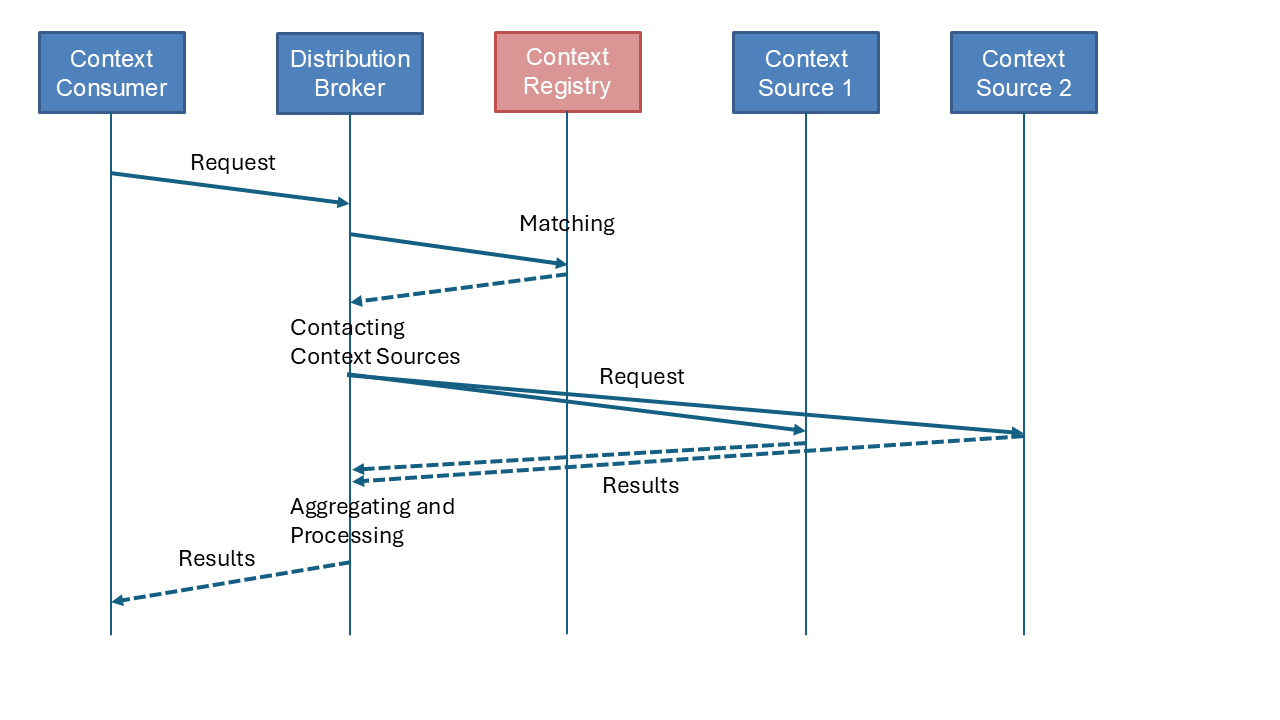
Figure 4.3.3.3.1-1 sketches the different steps of a request from a Context Consumer that requires a distributed execution. The Distribution Broker (or Federation Broker) sends a discovery request to the Context Registry. The Context Registry matches the discovery request with its Context Source Registrations and returns the fitting ones. Based on the information in the Context Source Registrations, the Distribution Broker]{.HTML-Keyboard} contacts Context Sources, forwarding adapted requests to the Context Sources. They return their results. The Distribution Broker aggregates the results, possibly retrieves additional information and filters the results, before returning the final result to the Context Consumer.
Figure 4.3.3.3.1‑1: Executing distributed operations
In case the request from the Context Consumer is a Subscription, the request to the Context Registry is a Context Source Registration Subscription to the Context Registry, which will send a Notification with the currently relevant Context Source Registrations. On any change regarding the relevant Context Source Registrations, it will send another Notification with the updates.
4.3.3.3.2 Matching registrations
When querying Context Source Registrations, the Entities and/or Attributes specified in the request have to be matched against the set of Context Source Registrations, extracting the matching ones.
The relevant specification information in the query for Context Source Registrations is the selector of Entity Types (if present), the list of Entity identifiers (if present), the id pattern (if present) and the list of Attribute names (if present).
At least one of the following elements has to be present: a. selector of Entity Types; or b. list of Attribute names.
There is a match, if the following conditions apply:
- If present, the selector of Entity Types, Entity identifiers and id pattern match at least one of those specified in the Context Source Registrations.
- If present, the Attribute identifiers match the Attributes (combination of Properties and Relationships) specified in the Context Source Registrations.
If a condition is not present, it is considered to apply.
The detailed conditions of matching can be found in clause 9.4.
The Context Source Registrations that have been successfully matched, are then filtered according to further conditions specified in the query, e.g. the geographic location specified in geographic coordinates. Only those matching all filter conditions are returned as a result.
4.3.3.3.3 Contacting context sources
Based on the information in the Context Source Registrations, the Distribution Broker adapts the request. Only information actually provided by the Context Source is to be retrieved, e.g. if the original requests targets Attributes a, b and c, but the Context Source, according to its Context Source Registrations, only provides a and c, then only Attributes a and c are requested.
If Entities can be distributed across multiple Context Sources, filters are not forwarded, as Entities first need to be assembled before filters can be applied. If, however, it is known that each Entity is in its entirety stored in a single Context Source, the filters can be forwarded, making the overall processing more efficient.
The adapted request can only be forwarded to the Context Sources, if the required operation is supported. If not, a possible alternative request based on a different operation or multiple requests using different operations can be used by the Distribution Broker. If there is no alternative in such a case, the overall request partially fails, as requests to other Context Sources can be successful.
In some cases, the Context Source Registration contains additional information, e.g. headers to be added. Finally, the request(s) are sent to the endpoint given in the Context Source Registration.
Additional information on what needs to be done when contacting Context Sources is specified in clause 9.5.
4.3.3.3.4 Aggregating and processing of results
The Entity information retrieved from the Context Sources is aggregated. In case individual Entities can be distributed across different Context Sources, additional retrieval steps can be necessary to ensure that the relevant Entity information is there before applying the filters. If the same Entity information is available from different Context Sources, timestamps are compared to provide the most recent one. Once all information has been aggregated and filtered, the result is returned to the Context Consumer.
4.3.4 JSON-LD
4.3.4.1 Introduction
NGSI-LD serialization is based on JSON-LD Specification [i.12], a JSON-based format for serializing Linked Data and a representation of RDF. The @context in JSON-LD is used to expand terms, provided as short-hand strings, to concepts, specified as URIs, and vice versa, to compact URIs into terms. The motivation is to have, on the one hand, unique terms, on the other hand, a compact, easily readable representation based on short terms. NGSI-LD defines the terms of its vocabulary in the core @context, users can define further terms relevant for their data model in a user @context, in particular the Entity Types and Attribute names they need.
4.3.4.2 Expansion and compaction
NGSI-LD API operations allow clients to use short-hand strings as non-qualified names, particularly for Attribute or Entity Type names. For instance, an API client can refer to the term "Store" as a non-qualified type name. When executing API operations where content is provided in the body, NGSI-LD systems expand terms to URIs based on a provided user @context, or, as a fall-back, on the NGSI-LD core @context, in order to obtain and store Fully Qualified Names, e.g. "https://uri.etsi.org/ngsi-ld/example/Store". The originally used short name is not stored anywhere, nor is the user @context provided as part of the request.
Likewise, when returning results, NGSI-LD systems compact URIs (Fully Qualified Names) to short terms in order to provide short-hand strings to Context Consumers, based on the user @context provided as part of the request, not any previously used user @context.
The term "URI expansion" or "compaction" is performed using an @context as described by the JSON-LD Specification [i.12], clause 5.1.
The following NGSI-LD Entity is provided as input:
{
  "id": "urn:ngsi-ld:Store:001",
  "type": "Store",
  "storeName": {
    "type": "Property",
    "value": "Checker Market"
  }
}
together with the following user @context that contains the NGSI-LD core @context:
{
  "@context": [
    {
      "Store": "https://uri.etsi.org/ngsi-ld/example/Store",
      "storeName": "https://uri.etsi.org/ngsi-ld/example/storeName"
    },
    "https://uri.etsi.org/ngsi-ld/v1/ngsi-ld-core-context-v1.9.jsonld"
  ]
}
the NGSI-LD content will be expanded to the following representation:
[
  {
    "@id": "urn:ngsi-ld:Store:001",
    "@type": [
      "https://uri.etsi.org/ngsi-ld/example/Store"
    ],
    "https://uri.etsi.org/ngsi-ld/example/storeName": [
      {
        "@type": [
          "https://uri.etsi.org/ngsi-ld/Property"
        ],
        "https://uri.etsi.org/ngsi-ld/hasValue": [
          {
            "@value": "Checker Market"
          }
        ]
      }
    ],
  }
]
which is only used internally and is not visible to the user.
Using the following user @context when retrieving the Entity:
{
  "@context": [
    {
      "Shop": "https://uri.etsi.org/ngsi-ld/example/Store",
      "shopName": "https://uri.etsi.org/ngsi-ld/example/storeName"
    },
    "https://uri.etsi.org/ngsi-ld/v1/ngsi-ld-core-context-v1.9.jsonld"
  ]
}
results in the following compacted representation, where "store" has been replaced by "shop":
{
  "id": "urn:ngsi-ld:Store:001",
  "type": "Shop",
  "shopName": {
    "type": "Property",
    "value": "Checker Market"
  }
}
4.3.4.3 Core @context
The core NGSI-LD (JSON-LD) @context is defined as a JSON-LD @context which contains:
- The core terms needed to uniquely represent the key concepts defined by the NGSI-LD Information Model.
- The terms needed to uniquely represent all the members that define the API-related Data Types.
- A fallback
@vocab rule to expand or compact user-defined terms to a default URI, in case there is no other possible expansion or compaction as per the current @context.
- The core NGSI-LD
@context defines the term "id", which is mapped to @id, and the term "type", which is mapped to @type. Since @id and @type are what is typically used in JSON-LD, they may also be used in NGSI-LD requests instead of "id" and "type" respectively, wherever this is applicable. In NGSI-LD responses, only "id" and "type" are used.
NGSI-LD compliant implementations support such core @context, which is considered implicitly present when processing or generating context information. Furthermore, the core @context is protected and remains immutable and invariant during expansion or compaction of terms. Therefore, and as per the JSON-LD processing rules (JSON-LD Specification [i.12]), when processing NGSI-LD content, implementations are to consider the core @context as if it were in the last position of the @context array. Nonetheless, for the sake of compatibility and cleanness, data providers are expected to generate JSON-LD content that conveys the core @context in the last position.
For the avoidance of doubt, when rendering NGSI-LD Elements, the core @context is always treated as if it had been originally placed in the last position, so that, if needed, upstream JSON-LD processors can properly expand as NGSI-LD or override the resulting JSON-LD documents provided by API implementations.
The NGSI-LD core @context is publicly available at https://uri.etsi.org/ngsi-ld/v1/ngsi-ld-core-context-v1.9.jsonld and contains all the terms as specified in annex B.
4.3.4.4 User @context
In addition to the terms defined by the core NGSI-LD @context (as specified in annex B), a user @context is to be provided that contains the following terms:
- One term associated with the Entity Type, mapping the Entity Type name with its Type Identifier (URI).
- One term associated with the name of each Attribute or any of its subclasses, mapping the Property name with its Property Identifier (URI).
Generally, a user @context is provided with each request. However, in addition to the core @context, NGSI-LD systems can allow the specification of a user default @context that then is to be used as @context, if no user @context is provided with the request.
4.4 API overview
The NGSI-LD API provides operations to manage, find and access both the current state of Entities, as well as the Temporal Evolution of Entities. Table 4.4-1 introduces the structure of the NGSI-LD API. It is structured into the Core API, the Temporal API, the Distributed API, the Registry API, the Snapshot API and the Table 4.4-1 introduces the structure of the NGSI-LD API. It is structured into the Core API, the Temporal API, the Distributed API, the Registry API, the Snapshot API and the JSON-LDContext API. These APIs are substructured into functional groups that are further described in Table 4.4-1. Each of the functional groups consists of a number of operations, which are described in detail in clause 6.
The Distributed API includes the distributed versions of the Core API and the Temporal API operations, plus a number of supporting operations needed in the distributed case, e.g. for enabling efficient pagination across Entity information distributed across multiple Context Sources. The provided distributed functionalities are generally the same from a user perspective, but implementing them can require taking into account additional aspects, and, unlike most of their local counterparts, their execution can possibly only be partially successful.
The Registry API provides operations to manage and discover Context Sources that can be relevant to a distributed request.
The Snapshot API includes all operations related to snapshots. Snapshots allow creating a consistent (within the limits of the possibly distributed NGSI-LD system) view of the Entities selected by the queries. It allows consuming these Entities, but also using provision operations for making available predicted and simulated information, e.g. as needed for digital twins.
The JSONLDContext API implements the capability of storing and serving @contexts to clients. The stored @contexts can be managed by clients directly. Clients can store custom user @contexts at the Context Broker, effectively using the Context Broker as an @context server.
Table 4.4‑1: NGSI-LD API structure
API |
Functionality |
| Core API |
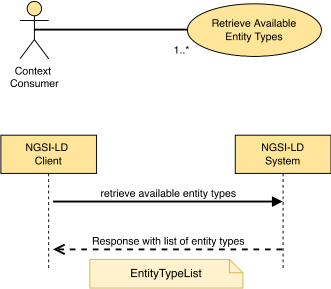
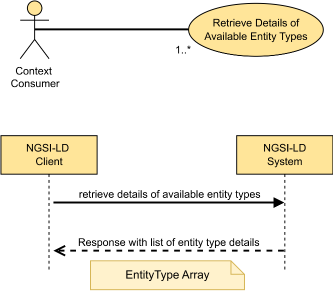
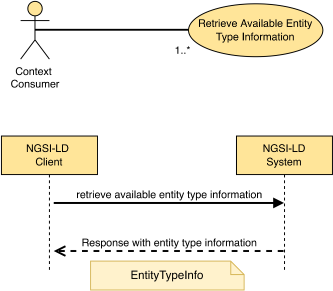
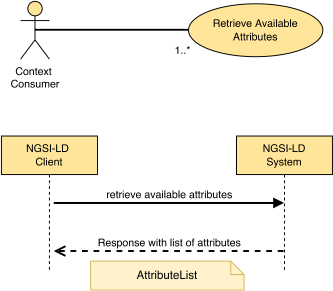
Context Information Provision - The provision operations allow Context Producers to provide context information, i.e. to create Entities and Attributes, to update Attributes and to delete Entities and Attributes. The operations are typically implemented by Context Brokers. Furthermore, there are operations for checking for which Entity Types and Attributes there are Entities available in the NGSI-LD system. |
| Context Information Consumption - The consumption operations allow Context Consumers to consume context information, i.e. to retrieve a specific Entity or to query for Entities that fulfil the specified criteria, thus discovering and retrieving these Entities in a single step. |
| Context Information Subscription - The subscription operations allow Context Consumers to subscribe to context information and to receive notifications as specified in the conditions, i.e. when new matching Entities or Attributes become available, when Attributes are updated, or when Entities or Attributes are no longer available. In addition, there are operations for managing subscriptions. |
| Temporal API (optional) |
Temporal Context Information Provision - The temporal provision operations allow Context Producers to provide temporal context information, i.e. to create the Temporal Evolution of Entities and Attributes, to append information to the Temporal Evolution of Entities and Attributes, to delete the Temporal Evolution of Entities and Attributes, and to correct or delete elements of the Temporal Evolution of Attributes. In many cases Context Brokers automatically add changes to an Entity received through the Core API to the Temporal Evolution of the same Entity. |
| Temporal Context Information Consumption - The temporal consumption operations allow Context Consumers to consume temporal context information, i.e. to retrieve the Temporal Evolution of a specific Entity or to query for the Temporal Evolution of Entities that fulfil the specified criteria, thus discovering and retrieving the Temporal Evolution of Entities in a single step. |
| Distributed API (optional) |
Distributed Context Information Provision - The distributed provision operations support the same general functionality as the corresponding ones in the Core API. They need to be implemented by Context Brokers that can act as Distribution Brokers or Federation Brokers. |
| Distributed Context Information Consumption - The distributed consumption operations support the same general functionality as the corresponding ones in the Core API. They need to be implemented by Context Brokers that can act as Distribution Brokers or Federation Brokers. |
| Distributed Context Information Subscription - The distributed subscription operations support the same general functionality as the corresponding ones in the Core API. They need to be implemented by Context Brokers that can act as Distribution Brokers or Federation Brokers. |
| Distributed Temporal Context Information Provision - The distributed temporal provision operations support the same general functionality as the corresponding ones in the Core API. They need to be implemented by Context Brokers that can act as Distribution Brokers or Federation Brokers. |
| Distributed Temporal Context Information Consumption - The distributed temporal consumption operations support the same general functionality as the corresponding ones in the Core API. They need to be implemented by Context Brokers that can act as Distribution Brokers or Federation Brokers. |
| Support operations for distributed operations - The support operations enable more consistent pagination in the distributed case and the prevention of request loops. |
| Registry API (optional, required for distributed operations) |
Context Source Registration - The registration operations allow the registration of Context Source and updating and deleting Context Source Registrations. |
| Context Source Discovery - The discovery operations allow retrieving and discovering Context Source Registrations. |
| Context Source Registration Subscription - The subscription operations allow subscribing to Context Source Registrations and receiving notifications. They support distributed subscriptions as any relevant changes in the Context Sources needs to be taken into account when monitoring subscription. In addition, there are operations for updating and deleting Context Source Registration Subscriptions. |
| Snapshot API (optional) |
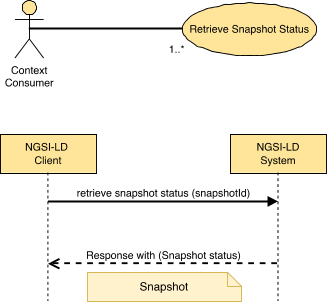
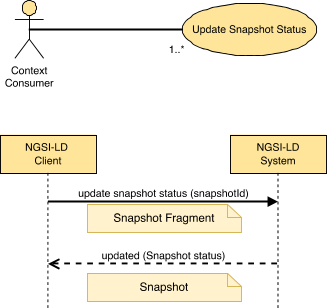
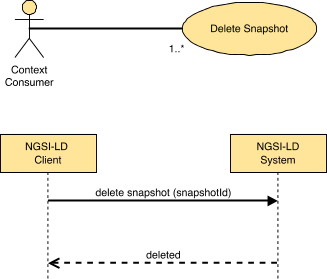
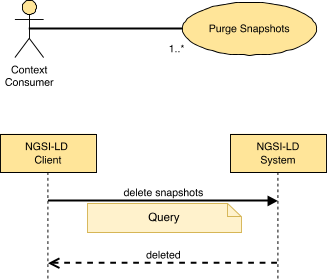
Snapshot Management - The snapshot management operations enable creating snapshots, retrieving the snapshot status, updating the expiration time, deleting snapshots, and cloning snapshots, i.e. duplicating the snapshot, e.g. to update them separately based on simulations making different assumptions.
The information contained in a snapshot is updated using the Core API operations, but applied to the respective snapshot. |
| JSONLDContext API (optional) |
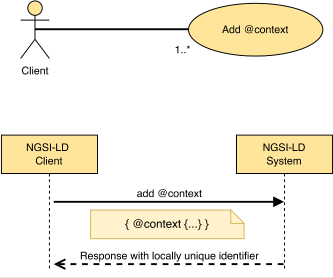
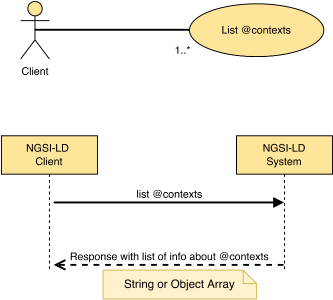
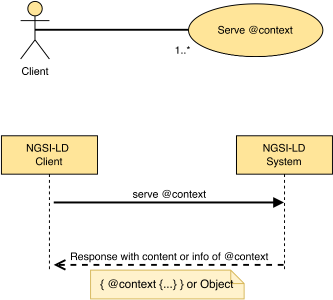
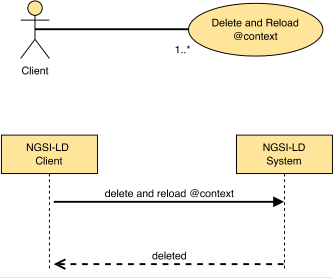
JSON-LD @context Management - The @context management operations allow storing user JSON-LD @context, listing available @context, serving stored JSON-LD @context and deleting user JSON-LD @context. In addition, a Context Broker can make cached JSON-LD @context visible, which can then be deleted, or deleted and updated in a single step, in case the source JSON-LD @context has changed. |
5 Context information and representation
5.1 Introduction
Clause 5 defines data structures and operations of the NGSI-LD API. No specific binding is assumed.
5.2 NGSI-LD modelling, data types and data representation
5.2.1 Introduction
Clause 5.2 describes how to represent data within NGSI-LD implementations.
5.2.2 Data representation
5.2.2.1 Introduction
Clause 5.2.2 defines the general requirements for data representation across the NGSI-LD API.
5.2.2.2 Supported text encodings
NGSI-LD implementations shall support the UTF-8 text encoding format. To avoid interoperability problems, applications shall provide JSON content encoded using UTF-8 and NGSI-LD systems shall also expose such JSON content using UTF-8.
5.2.2.3 Supported names
Even though the JSON serialization format allows inclusion of any character in the Unicode space, NGSI-LD restricts Entity Type names, Property names and Relationship names to the following ABNF grammar:
nameChar = unicodeNumber / unicodeLetter
nameChar =/ %x5F                         ; Representing the underscore character _
name = unicodeLetter *nameChar
- unicodeNumber is any Unicode character that has Number as a Category (Unicode® 15.0.0 [2]). With Unicode-capable regular expression (RegEx) parsers, such a character may be matched by \p{N}.
- unicodeLetter is any Unicode character that has Letter as a Category (Unicode® 15.0.0 [2]). With Unicode-capable regular expression (RegEx) parsers, such a character may be matched by \p{L}.
In order to avoid name clashing, names can be prefixed as specified by the following BNF grammar:
prefix = unicodeLetter *nameChar
name =/ prefix %x3A unicodeLetter *nameChar ; prefix:name
When receiving a JSON-LD object with a name (Type, Property, Relationship) including characters different than those expressed above, implementations should raise an error of type BadRequestData.
5.2.2.4 Supported data types for Values
Compliant NGSI-LD implementations shall support the following data types for representing Values:
- All the JSON native data types as mandated by IETF RFC 8259 [3], section 3.
- All the GeoJSON Geometries (IETF RFC 7946 n.4 with the exception of GeometryCollection.
DateTime string for encoding a timestamp, i.e. a calendar date together with a time of day, expressed in UTC, using the ISO 8601 [5] Complete Representation and in particular using the 'Extended Format', as described below:
- The timestamp shall be a string containing Year, Month, Day, Hours, Minutes, Seconds and time zone components using the format YYYY-MM-DDThh:mm:ssZ as defined in ISO 8601 [5]. In this representation, the character "-" is used to separate the calendar date components, the character "T" is used to indicate the start of the time-of-day portion, the character ":" is used to separate the time-of-day components, and the trailing character "Z" is used to convey the time zone.
- All the referred components shall appear in the string; reduced representations are not permitted.
- The Seconds component may optionally contain a decimal fraction. In this case the string shall contain two integer digits, followed by a decimal point and then one or more fractional digits, up to a maximum of six. For example, YYYY-MM-DDThh:mm:ss.ssssssZ. In requests, also a comma instead of a decimal point may be used as separator for compatibility reasons.
In previous versions of NGSI-LD, only the comma was supported as ISO 8601 [5] states that it is the preferred option. However, in practice the decimal point is more commonly used .
- The trailing timestamp component shall contain the time zone related information and shall always be equal to the character "Z". Therefore, all timestamps shall be expressed in UTC.
Date string for encoding a calendar date. It uses ISO 8601 [5] Complete Representation using the 'Extended Format', as described below:
- It shall be a string containing Year, Month, Day components using the format YYYY-MM-DD as defined in ISO 8601 [5]. In this representation, the character "-" is used to separate the calendar date components.
- All the referred components shall appear in the string; reduced representations are not permitted.
Time string for encoding a local time expressed in UTC. It uses ISO 8601 [5] Complete Representation using the 'Extended Format', as described below:
- It shall be a string containing Hours, Minutes and Seconds components using the format hh:mm:ssZ as defined in ISO 8601 [5]. In this representation, the character ":" is used to separate the local time components.
- All the referred components shall appear in the string; reduced representations are not permitted.
- The Seconds component may optionally contain a decimal fraction. In this case the string shall contain two integer digits, followed by a decimal point and then one or more fractional digits, up to a maximum of six. For example, hh:mm:ss.ssssssZ. In requests, also a comma instead of a decimal point may be used as separator for compatibility reasons.
In previous versions of NGSI-LD, only the comma was supported as ISO 8601 [5] states that it is the preferred option. However, in practice the decimal point is more commonly used.
- The string shall not contain expressions of the difference between local time and UTC. All representations shall be interpreted as being expressed in UTC.
- URI as mandated by ISO 8601 [5], Appendix A, production rule named 'URI'.
Implementations may support additional data types different to those enumerated above, for instance:
- JSON-LD typed value (i.e. a string as the lexical form of the value together with a type, defined by an XSD base type or more generally an IRI).
- JSON-LD structured value (e.g. a set, a list).
5.2.2.5 Supported content
In principle, context information providers can publish any kind of data serialized in JSON and encoded in UTF-8. Nonetheless, to avoid security problems caused by script injection attacks or other attack vectors, implementations should consider that the incoming data from a client may contain the following characters:
- %x3C; <
- %x3E; >
- %x22; "
- %x27; '
- %x3D; =
- %x3B; ;
- %x28; (
- %x29; )
When receiving entities (context information) encoded in JSON format and containing values that include the above characters, implementations should decide how to resolve the possible security problems that may be generated by the data. In all cases, implementations shall preserve the representation of the content of the values provided by the context information providers and return the original content when replying to context consumption requests.
If implementations decide to raise an error, the error shall be BadRequestData.
5.2.3 Entity Types
All NGSI-LD Entities have at least one Entity Type. From NGSI-LD API version 1.5.1 onwards, multiple Entity Types for any Entity are supported. An Entity is uniquely identified by its id, so whenever information is provided for an Entity with a given id, it is considered part of the same Entity, regardless of the Entity Type(s) specified. To avoid unexpected behaviour, Entity Types can be implicitly added by all operations that update or append attributes. There is no operation to remove Entity Types from an Entity. The philosophy here is to assume that an Entity always had all Entity Types, but possibly not all Entity Types have previously been known in the system. The only option to remove an Entity Type is to delete the Entity and re-create it with the same id. Alternatively, a batch upsert with "replace" update mode can be used, as described in clause 10.3.3.
Users should name and define Entity types relevant to their own data model in a user @context. These term definitions should avoid the use of the terms already defined within the core @context, as such terms are reserved to be used as data types within the NGSI-LD Core API itself, and therefore cannot be redefined elsewhere.
"Attribute", "Notification", "Query", "Relationship"
GeoJSON-LD type definitions (GeoJSON-LD 1.0 [i.13]) are also defined in the core @context and reserved for use in geographic operations:
"Feature", "FeatureCollection", "Point", "Polygon"
The following names are defined in the core @context and are reserved for temporal definitions:
"Date", "DateTime", "Time"
A full list of terms defined for use by the NGSI-LD API can be discovered through reading the core NGSI-LD @context found in annex B.
5.2.4 Simple Attributes / temporal Attributes
NGSI-LD defines the following Properties of type TemporalProperty that shall be supported by implementations:
- "observedAt" is defined as the temporal Property at which a certain Attribute became valid or was observed. For example, a temperature Value was measured by the sensor at this point in time.
- "createdAt" is defined as the temporal Property at which the Entity or Attribute was entered into an NGSI-LD system.
- "modifiedAt" is defined as the temporal Property at which the Entity or Attribute was last modified in an NGSI-LD system, e.g. in order to correct a previously entered incorrect value.
- "deletedAt" is defined as the temporal Property at which the Entity or Attribute was deleted from an NGSI-LD system.
- "expiresAt" is defined as the temporal Property at which the Entity, Attribute, CSourceRegistration, Subscription or Snapshot should be deleted from an NGSI-LD system.
- "lastUsedAt" is defined as the temporal Property at which a Snapshot has been most recently used, i.e. when the most recent operation has been executed on this Snapshot.
Temporal Properties in NGSI-LD shall be represented based on the DateTime data type as mandated by clause 5.2.2.4.
For simplicity reasons, a TemporalProperty is represented only by its Value, i.e. no Properties of TemporalProperty nor Relationships of TemporalProperty can be conveyed. In more formal language, a TemporalProperty does not allow reification.
It is important to remark that the term TemporalProperty has been reserved for the semantic tagging of non-reified structural timestamps (observedAt, createdAt, modifiedAt, deletedAt, expiresAt), which capture the temporal evolution of Attributes. Only such structural timestamps can be used as timeproperty in Temporal Queries as mandated by clause 7.2.6 .
User-defined Properties whose value is a time value (Date, DateTime or Time) are defined as Property, not as TemporalProperty, and are serialized in NGSI-LD as shown in annex C.5.
Whenever a TemporalProperty value is unknown by a registered Context Source, the Property shall be omitted rather than sending an error response.
In some cases, it is desirable to create an Entity (or Attribute) which is only expected to be stored for a defined period of time. Thereafter, such an Entity (or Attribute) should be removed, and can be safely deleted from the context via an automatic garbage collection process.
In this regard, NGSI-LD defines the following system Property of type TemporalProperty that shall be supported by implementations:
- "expiresAt" is defined as the system temporal Property at which a certain Entity or Attribute shall become invalid and may be automatically removed from the Context Broker. For example, an Alert Entity was created to last for 24 hours and should be removed after this period of time.
It should be noted that clean-up processes will only run periodically, and will be dependent upon the Context Broker implementation, therefore final deletion will always lag the expiresAt timestamp to a certain extent. Furthermore, expiresAt only applies to the local storage, i.e. the Entity or Attribute is to be deleted locally, but not on other Context Sources or Context Broker hosting such Entity information, where no expiresAt timestamp is present. Thus expiresAt is not considered to be intrinsic to the Entity or Attribute, but only applies to the storage of the Entity or Attribute respectively. As it pertains to a system function (the deletion from storage after the expiration time), it is considered to be a system attribute.
5.2.5 Matrix of all Attributes
Table 5.2.5-1 gives a list of all attribute names used within NGSI-LD data types. The core @context provides term definitions for all of these attribute names. Where possible, users should avoid the repurposing of these attribute names when creating their own user-defined term definitions in the user @context.
Unscoped term definitions for attribute names within the core @context, can never be overridden, since the core @context definition always has priority over any user @context definition. core @context definitions for attribute names which are defined as Property-scoped or Type-scoped (as described by the JSON-LD Specification [8], section 1.4) may be overridden where necessary, although this usage is still discouraged.
Table 5.2.5‑1: Matrix of all Attributes
Name |
Data Type using the attribute |
Core @context Definition |
accept |
Endpoint |
Property-scoped definition within endpoint |
aggrParams |
Query |
Type-scoped definition within type="Query" |
aggrMethods |
AggregationParams, TemporalParams |
Property-scoped definition within aggrParams and temporalQ |
aggrPeriodDuration |
AggregationParams, TemporalParams |
Property-scoped definition within aggrParams and temporalQ |
attributeCount |
Attribute |
Type-scoped definition within type="Attribute" |
attributeDetails |
EntityTypeInfo |
Type-scoped definition within type="EntityTypeInfo" |
attributeList |
AttributeList |
Type-scoped definition within type="AttributeList" |
attributeName |
Attribute, NotUpdatedResult |
Type-scoped definition within type="Attribute", property-scoped definition within notUpdated |
attributeNames |
EntityType, RegistrationInfo |
Type-scoped definition within type="EntityType", property-scoped definition within 'information' |
attributeTypes |
Attribute |
Type-scoped definition within type="Attribute" |
attributes |
NotificationParams |
Property-scoped definition within notification |
attrs |
Query |
Type-scoped definition within type="Query" |
cacheDuration |
RegistrationManagementInfo |
Property-scoped definition within management |
collation |
OrderingParams |
Property-scoped definition within ordering |
containedBy |
Query |
Type-scoped definition within type="Query" |
contextSourceAlias |
ContextSourceIdentity, CSourceRegistration |
|
contextSourceExtras |
ContextSourceIdentity |
Type-scoped definition within type="ContextSourceIdentity" |
contextSourceInfo |
CSourceRegistration |
|
contextSourceTimeAt |
ContextSourceIdentity |
Type-scoped definition within type="ContextSourceIdentity" |
contextSourceUptime |
ContextSourceIdentity |
Type-scoped definition within type="ContextSourceIdentity" |
cooldown |
Endpoint, RegistrationManagementInfo |
Property-scoped definition within management and endpoint |
coordinates |
GeoParams, OrderingParams, GeoProperty |
|
createdAt |
Property, Relationship, GeoProperty, ListProperty, ListRelationship, LanguageProperty, JsonProperty, VocabProperty, Entity, Snapshot |
|
createEntityMap |
Query |
Type-scoped definition within type="Query" |
csf |
Query, Subscription |
|
data |
CSourceNotification, Notification |
Type-scoped definition within type="CSourceNotification" and type="Notification" |
datasetId |
Property, Relationship, GeoProperty, ListProperty, ListRelationship, LanguageProperty, JsonProperty, VocabProperty, Subscription, CSourceRegistration, Query |
|
deletedAt |
Property, Relationship, GeoProperty, ListProperty, ListRelationship, LanguageProperty, JsonProperty, VocabProperty, Subscription |
|
description |
CSourceRegistration, Subscription |
|
endAt |
TimeIntervalParams |
Property-scoped definition within managementInterval and observationInterval |
endTimeAt |
TemporalParams |
Property-scoped definition within temporalQ |
endpoint |
CSourceRegistration, Snapshot, NotificationParams |
|
entities |
Query, RegistrationInfo, Subscription |
|
entity |
Relationship |
|
entityCount |
EntityTypeInfo |
Type-scoped definition within type="EntityTypeInfo" |
entityId |
EntityError |
|
entityList |
ListRelationship |
|
entityMap |
EntityMap |
|
entityMapLifetime |
Query |
Type-scoped definition within type="Query" |
error |
EntityError |
|
errors |
OperationResult |
|
expandValues |
Query, Subscription |
|
expiresAt |
Property, Relationship, GeoProperty, ListProperty, ListRelationship, LanguageProperty, JsonProperty, VocabProperty, Subscription, CSourceRegistration, SnapshotNotification, EntityMap, Entity, Snapshot |
|
features |
FeatureCollection |
Type-scoped definition within type="FeatureCollection" |
firstN |
TemporalParams |
Property-scoped definition within temporalQ |
format |
NotificationParams |
Property-scoped definition within notification |
geoQ |
Query, Subscription |
|
geometry |
Feature, OrderingParams, GeoParams |
Type-scoped within type="Feature", property-scoped definition within geoQ, ordering |
geoproperty |
GeoParams |
Property-scoped definition within geoQ |
georel |
GeoParams |
Property-scoped definition within geoQ |
idPattern |
EntitySelector, EntityInfo |
|
information |
CSourceRegistration |
|
instanceId |
Property, Relationship, GeoProperty, ListProperty, ListRelationship, LanguageProperty, JsonProperty, VocabProperty |
|
isActive |
Subscription |
|
join |
Query, NotificationParams |
Type-scoped definition within type="Query", property-scoped definition within notification |
joinLevel |
Query, NotificationParams |
Type-scoped definition within type="Query", property-scoped definition within notification |
json |
JsonProperty |
|
jsonKeys |
Query, Subscription |
|
jsonldContext |
Subscription |
|
jsons |
JsonProperty |
|
key |
KeyValuePair |
|
lang |
Query, Subscription |
|
languageMap |
LanguageProperty |
|
languageMaps |
LanguageProperty |
|
lastFailure |
CSourceRegistration, NotificationParams |
Type-scoped definition within type="ContextSourceRegistration", property-scoped definition within notification |
lastN |
TemporalParams |
Property-scoped definition within temporalQ |
lastNotification |
NotificationParams |
Property-scoped definition within notification |
lastSuccess |
CSourceRegistration, NotificationParams |
Type-scoped definition within type="ContextSourceRegistration", property-scoped definition within notification |
lastUsedAt |
Snapshot |
|
linkedMaps |
EntityMap |
|
localOnly |
Query, RegistrationMangementInfo, Subscription |
|
location |
Entity, CSourceRegistration |
|
management |
CSourceRegistration |
|
managementInterval |
CSourceRegistration |
|
mode |
CSourceRegistration |
|
modifiedAt |
Property, Relationship, GeoProperty, ListProperty, ListRelationship, LanguageProperty, JsonProperty, VocabProperty, Snapshot |
|
ngsildproof |
Property, Relationship, GeoProperty, ListProperty, ListRelationship, LanguageProperty, JsonProperty, VocabProperty |
|
ngsildConformance |
Subscription |
|
notification |
Subscription |
|
notificationTrigger |
Subscription |
|
notifiedAt |
CSourceNotification, Notification, SnapshotNotification |
|
notifierInfo |
Endpoint |
Property-scoped definition within endpoint |
notUpdated |
UpdateResult |
|
object |
Relationship |
|
objectList |
ListRelationship |
|
objectLists |
ListRelationship |
|
objects |
Relationship |
|
objectType |
Relationship, ListRelationship |
|
observationInterval |
CSourceRegistration |
|
observationSpace |
CSourceRegistration, Entity |
|
observedAt |
Property, Relationship, GeoProperty, ListProperty, ListRelationship, LanguageProperty, JsonProperty, VocabProperty |
|
offsetN |
TemporalParams |
Property-scoped definition within temporalQ |
omit |
Query, NotificationParams |
Type-scoped definition within type="Query", property-scoped definition within notification |
operations |
CSourceRegistration |
|
operationSpace |
CSourceRegistration, Entity |
|
orderBy |
OrderingParams |
Property-scoped definition within ordering |
ordering |
Query |
Type-scoped definition within type="Query" |
pick |
Query, NotificationParams |
Type-scoped definition within type="Query", property-scoped definition within notification |
previousJson |
JsonProperty |
|
previousLanguageMap |
LanguageProperty |
|
previousObject |
Relationship |
|
previousObjectList |
ListRelationship |
|
previousValue |
Property, GeoProperty |
|
previousValueList |
ListProperty |
|
previousVocab |
VocabProperty |
|
problemDetails |
ExecutionResult |
|
properties |
Feature |
Type-scoped definition within type="Feature" |
propertyNames |
RegistrationInfo |
property-scoped definition within 'information' |
q |
Query, Subscription |
|
reason |
NotUpdatedResult |
Property-scoped definition within notUpdated |
receiverInfo |
Endpoint, Snapshot |
|
refreshRate |
CSourceRegistration |
|
registrationId |
NotUpdatedResult, EntityError |
|
registrationName |
CSourceRegistration |
|
relationshipNames |
RegistrationInfo |
property-scoped definition within 'information' |
resultStatus |
ExecutionResult |
|
scope |
CSourceRegistration, Entity |
|
scopeQ |
Query, Subscription |
|
showChanges |
NotificationParams |
Property-scoped definition within notification |
snapshotId |
SnapshotNotification |
|
snapshotLifetime |
Snapshot |
|
snapshotPriority |
SnapshotNotification, Snapshot |
|
snapshotQueries |
Snapshot |
|
snapshotQueriesDetails |
Snapshot, SnapshotNotification |
|
snapshotStatus |
Snapshot, SnapshotNotification |
|
snapshotTemporalQueries |
Snapshot |
|
snapshotTemporalQueriesDetails |
Snapshot |
|
splitEntities |
Query |
Type-scoped definition within type="Query" |
startAt |
TimeIntervalParams |
Property-scoped definition within managementInterval and observationInterval |
status |
CSourceRegistration, NotificationParams, Subscription |
Type-scoped definitions within type="ContextSourceRegistration" and type="Subscription", property-scoped definition within notification |
subscriptionId |
CSourceNotification, Notification |
|
subscriptionName |
Subscription |
|
success |
OperationResult |
|
sysAttrs |
NotificationParams |
Property-scoped definition within notification |
temporalQ |
Query, Subscription |
|
temporalSnapshotQueriesDetails |
SnapshotNotification |
|
tenant |
CSourceRegistration |
|
throttling |
Subscription |
|
timeAt |
TemporalParams |
Property-scoped definition within temporalQ |
timeInterval |
Subscription |
|
timeout |
Endpoint, RegistrationManagementInfo |
Property-scoped definition within managementInterval and observationInterval |
timeproperty |
TemporalParams |
Property-scoped definition within temporalQ |
timerel |
TemporalParams |
Property-scoped definition within temporalQ |
timesFailed |
CSourceRegistration, NotificationParams |
Type-scoped definition within type="Query", property-scoped definition within notification |
timesSent |
CSourceRegistration, NotificationParams |
Type-scoped definition within type="Query", property-scoped definition within notification |
triggerReason |
CSourceNotification |
|
typeList |
EntityTypeList |
Type-scoped definition within type="EntityTypeList" |
typeName |
EntityType, EntityTypeInfo |
Type-scoped definition within type="EntityType" and type="EntityTypeInfo" |
typeNames |
Attribute |
Type-scoped definition within type="Attribute" |
unitCode |
Property, ListProperty |
|
updated |
UpdateResult |
|
uri |
Endpoint |
Property-scoped definition within endpoint |
value |
Property, GeoProperty, KeyValuePair |
|
valueList |
ListProperty |
|
valueLists |
ListProperty |
|
values |
Property, GeoProperty |
|
valueType |
Property, GeoProperty, ListProperty, LanguageProperty, JsonProperty, VocabProperty |
|
vocab |
VocabProperty |
|
vocabs |
VocabProperty |
|
watchedAttributes |
Subscription |
|
Furthermore, the following additional attribute names are also defined in the core @context:
- "detail" and "title" are used in Error responses and retain their definitions from IETF RFC 7807 [6]. See clause 8.3.3.
- "avg", "distinctCount", "max", "min", "stddev", "sum", "sumsq", "totalCount" are used by the Aggregated temporal representation of an Entity. See clause 5.3.2.7.
- "bbox", "properties", "coordinates" are used in geographic operations and retain their standard GeoJSON-LD definitions (GeoJSON-LD 1.0 [i.13]).
- "dataset" is used in the representation of an Entity in the simplified format to separate the
datasetId of multi-attributes. see clause 5.3.2.4
- "langString" is defined to retain its standard RDF datatype (RDF 1.1 [7]).
The full list of attribute names defined as terms can be discovered through reading the core NGSI-LD @context found in annex B.
5.2.6 Data types
5.2.6.1 Introduction
Implementations shall support the data types defined by the clauses below. For each member defined by each data type (including nested ones) a term shall be added to the core @context, as mandated by clause 5.3.2.1.
None of the members described admit a null value directly, as when a JSON-LD processor encounters null, the associated entry or value is always removed when expanding the JSON-LD document.
However, in the context of a partial update or merge operation (see clause 8.4.2 and clause 8.4.3), an NGSI-LD Null shall be used to indicate the removal of a target member, as explained in clause 8.4.3. In all other cases, implementations shall raise an error of type BadRequestData if an NGSI-LD Null value is encountered.
As null cannot be used as a value in JSON-LD, there is still the possibility of using a JSON null literal {"@type": "@json", "@value": null} instead. JSON literals are not to be expanded in JSON-LD and thus the respective element is not removed during JSON-LD expansion.
Non-normative JSON Schema Validation [i.14] definitions of the referred data types are also available at NGSI-LD JSON Schemas [i.15].
The use of URI in the context of the present document also includes the use of International Resource Identifiers (IRIs) as defined in IETF RFC 3987 [1], which extends the use of characters to Unicode characters (Unicode® 15.0.0 [2]) beyond the ASCII character set, enabling the support of languages other than English.
5.2.6.2 Common members
The JSON-LD representation of NGSI-LD Entity, Attribute, Context Source Registration and Subscription can include the common members described by Table 5.2.6.2-1.
Those members are read-only, and shall be automatically generated by NGSI-LD implementations. They shall not be provided by Context Producers. In the event that they are provided (in update or create operations) NGSI-LD implementations shall ignore them.
In query or retrieve operations implementations shall only generate common members (Table 5.2.6.2-1) when the Context Consumer explicitly asks for their inclusion.
ETSI TS 104 176 [i.16] clause 6.4.5 defines the mechanism offered by the HTTP binding for such purpose.
Table 5.2.6.2‑1: Common members of NGSI-LD elements
Name |
Data Type |
Restriction |
Cardinality |
Description |
| createdAt |
string |
DateTime (clause 5.2.2.4). |
0..1 |
Entity creation timestamp. See clause 5.2.4. |
| deletedAt |
string |
DateTime (clause 5.2.2.4). |
0..1 |
Entity deletion timestamp. See clause 5.2.4. It is only used in notifications reporting deletions and in the temporal representation of Entities, Properties and Relationships (clause 5.3.2.5). |
| modifiedAt |
string |
DateTime (clause 5.2.2.4). |
0..1 |
Entity last modification timestamp. See clause 5.2.4. |
5.2.6.3 @context
When encoding NGSI-LD Entities, Context Source Registrations, Subscriptions and Notifications, as pure JSON-LD (MIME type "application/ld+json"), an array (flattened to a single string if necessary), containing a user @context where present, and the core @context (as described in clause 5.3.2.1) shall be included as a special member of the corresponding JSON-LD Object. Table 5.2.6.3-1 gives a precise definition of this special member.
Table 5.2.6.3‑1: JSON-LD @context tagged member
Name |
Data Type |
Restriction |
Cardinality |
Description |
| @context |
URI, JSON Object, or JSON Array |
See JSON-LD Specification [8], clause 5.1 |
0..1 |
JSON-LD @context. |
5.2.6.4 Representational data types
5.2.6.4.1 Entity
This type represents the data needed to define an NGSI-LD Entity to be represented as in clause 5.3.
On an Entity, NGSI-LD defines the following Attributes of type GeoProperty (clause 5.2.6.4.5). Preferably, these Attribute names should be used if they semantically fit, but if necessary, additional Attribute names of type GeoProperty can be defined by Context Producers:
- "location" is defined as the geospatial Property representing the geographic location of the Entity, e.g. the location of a building or the current location of a car.
- "observationSpace" is defined as the geospatial Property representing the geographic location that is being observed, e.g. by a sensor.
In the case of a camera, the location of the camera and the observation space are different and can be disjoint.
- "operationSpace" is defined as the geospatial Property representing the geographic location in which an Entity, e.g. an actuator is active.
A crane can have a certain operation space.
The defined GeoProperties can also be used as part of Context Source Registrations (clause 5.2.6.5.3). In this case they represent locations in which Entities with the respective geospatial Properties are contained. For example, a Context Source that monitors the location of cars in a city may be represented by a Context Source Registration whose Attribute location corresponds to the space of the city in which the location of cars is monitored.
The supported JSON members shall comply with the requirements provided in Table 5.2.6.4.1-1.
Table 5.2.6.4.1‑1: NGSI-LD Entity data type definition
Name |
Data Type |
Restriction |
Cardinality |
Description |
| id |
String |
Valid URI |
1 |
Entity ID. |
| type |
String or String[] |
|
1 |
Entity Type(s). Both short hand string(s) (type name) or URI(s) are allowed. |
| expiresAt |
String |
DateTime (clause 5.2.2.4). |
0..1 |
System temporal Property representing the expiration date for the storage of the Entity. See clause 5.2.4. |
| location |
GeoProperty |
See the datatype definition in clause 5.2.6.4.5. |
0..1 |
Default geospatial Property of an entity. representing the geographic location of the Entity itself. |
| observationSpace |
GeoProperty |
See the datatype definition in clause 5.2.6.4.5. |
0..1 |
Geospatial Property representing the geographic area that is being observed by the Entity. |
| operationSpace |
GeoProperty |
See the datatype definition in clause 5.2.6.4.5. |
0..1 |
Geospatial Property representing the geographic area in which an Entity is active |
| scope |
String or String[] |
See clause 5.2.7 |
0..1 |
Scope. |
| <Attribute name> |
Property or Property[]
(see note) |
See the datatype definition in clause 5.2.6.4.3. |
0..N |
Properties of an Entity. |
GeoProperty or GeoProperty[]
(see note) |
See the datatype definition in clause 5.2.6.4.5. |
0..N |
GeoProperties of an Entity. |
LanguageProperty or LanguageProperty[]
(see note) |
See the datatype definition in clause 5.2.6.4.6. |
0..N |
LanguageProperties of an Entity. |
JsonProperty or JsonProperty[]
(see note) |
See the datatype definition in clause 5.2.6.4.10. |
0..N |
JsonProperties of an Entity. |
VocabProperty or VocabProperty[]
(see note) |
See the datatype definition in clause 5.2.6.4.7. |
0..N |
VocabProperties of an Entity. |
ListProperty or ListProperty[]
(see note) |
See the datatype definition in clause 5.2.6.4.8. |
0..N |
ListProperties of an Entity. |
Relationship or Relationship[]
(see note) |
See the datatype definition in clause 5.2.6.4.4. |
0..N |
Relationships of an Entity. |
ListRelationship or ListRelationship[]
(see note) |
See the datatype definition in clause 5.2.6.4.9. |
0..N |
ListRelationships of an Entity. |
For each Property, Relationship, or subclasses thereof, identified by the same Attribute name, there can be one or more instances, each identified by a unique datasetId.
|
5.2.6.4.2 EntityTemporal
This datatype represents the Temporal Evolution of an Entity.
This is the same datatype as mandated by clause 5.2.6.4.1, with the only deviation that the representation of Properties and Relationships shall be the temporal one, as defined in clause 5.3.2.5. Alternatively, it is possible to specify the EntityTemporal by using the "Simplified temporal representation of an Entity", as defined in clause 5.3.2.6.
5.2.6.4.3 Property
This type represents the data needed to define an NGSI-LD Property.
The supported JSON members shall comply with the requirements provided in Table 5.2.6.4.3-1. The datatype definition defines all the required attributes for the normalized format. In the concise format, the Attribute type member can be omitted as type="Property" can be inferred from the presence of the value member. Furthermore, in the concise format of a Property, the value member cannot be a GeoJSON Object (as defined in clause 5.2.6.4.5) as it would be interpreted as a GeoProperty (see clause 5.2.6.4.5).
Table 5.2.6.4.3‑1: NGSI-LD Property data type definition
Name |
Data Type |
Restriction |
Cardinality |
Description |
| type |
String |
It shall be equal to "Property" |
1 |
Node type. |
value
(see note 1) |
Any JSON value as defined by IETF RFC 8259 [3] |
See NGSI-LD Value definition in clause 3.1 |
1 |
Property Value. |
| datasetId |
String |
Valid URI |
0..1 |
It allows identifying a set or group of property values. |
| expiresAt |
String |
DateTime (clause 5.2.2.4). |
0..1 |
System temporal Property representing the expiration date for the storage of the Property. See clause 5.2.4. |
| ngsildproof |
Property |
Property with the non-reified subproperties "entityIdSealed" and "entityTypeSealed" as specified in ETSI TS 104 179 [9]. The value of its "value" element shall be an object containing the W3C® Data integrity "proof" structure (ETSI TS 104 179 [9]). |
0..1 |
Cryptographic signature of the Property guaranteeing its integrity. See annex C.9 for an example. |
| observedAt |
String |
DateTime (clause 5.2.2.4). |
0..1 |
Timestamp. See clause 5.2.4. |
| unitCode |
String |
As mandated by Codes for Units of Measure used in International Trade Revision 9 [10] |
0..1 |
Property Value's unit code. |
| valueType |
String |
|
0..1 |
The native JSON-LD @type for the Property Value. A String Value which shall be type coerced to a URI based on the supplied @context. See annex C.5. |
| <Attribute name> |
Property or Property[]
(see note 2) |
See the datatype definition in clause 5.2.6.4.3. |
0..N |
Properties of the Property. |
GeoProperty or GeoProperty[]
(see note 2) |
See the datatype definition in clause 5.2.6.4.5. |
0..N |
GeoProperties of the Property. |
LanguageProperty or LanguageProperty[]
(see note 2) |
See the datatype definition in clause 5.2.6.4.6. |
0..N |
LanguageProperties of the Property. |
JsonProperty or JsonProperty[]
(see note 2) |
See the datatype definition in clause 5.2.6.4.10. |
0..N |
JsonProperties of the Property. |
VocabProperty or VocabProperty[]
(see note 2) |
See the datatype definition in clause 5.2.6.4.7. |
0..N |
VocabProperties of the Property. |
ListProperty or ListProperty[]
(see note 2) |
See the datatype definition in clause 5.2.6.4.8. |
0..N |
ListProperties of the Property. |
Relationship or Relationship[]
(see note 2) |
See the datatype definition in clause 5.2.6.4.4. |
0..N |
Relationships of the Property. |
ListRelationship or ListRelationship[]
(see note 2) |
See the datatype definition in clause 5.2.6.4.9. |
0..N |
ListRelationships of the Property. |
In the simplified temporal representation of a Property, the value member is replaced with a values member, which is an array of tuples, each consisting of a DateTime timestamp, and the associated Property value at that time.
For each Property, Relationship, or subclasses thereof, identified by the same Attribute name, there can be one or more instances, each identified by a unique datasetId.
|
The following output only members (defined by Table 5.2.6.4.3-2) of the Property data structure are also defined. They are read-only and shall be generated by NGSI-LD implementations. They shall not be provided by Context Producers. In the event that they are provided (in update or create operations), NGSI-LD implementations shall ignore them.
Table 5.2.6.4.3‑2: Output only members of the NGSI-LD Property data type
Name |
Data Type |
Restrictions |
Cardinality |
Description |
| createdAt |
String |
DateTime (clause 5.2.2.4). |
0..1 |
System generated creation timestamp. See clause 5.2.4. |
| deletedAt |
String |
DateTime (clause 5.2.2.4)
It is only used in notifications reporting deletions |
0..1 |
System generated deletion timestamp. See clause 5.2.4. |
| instanceId |
String |
Valid URI. Only used in temporal representation of Properties |
0..1 |
URI uniquely identifying a Property instance as mandated by clause 5.3.2.5 |
| modifiedAt |
String |
DateTime (clause 5.2.2.4). |
0..1 |
System generated last modification timestamp. See clause 5.2.4. |
| previousValue |
Any JSON value as defined by IETF RFC 8259 [3] |
Only used in Notifications, if the showChanges option is explicitly requested. |
0..1 |
Previous Property Value. |
Furthermore, a Property shall never include the following members:
Prohibited
- "entity" shall never be present, as it is used during inline Linked Entity retrieval to define the target Entity of a Relationship's object.
- "entityIdSealed" and "entityTypeSealed" shall never be present, unless the Property name is "ngsildproof".
- "entityList" shall never be present, as it is used during inline Linked Entity retrieval to define the target Entities of a ListRelationship's object.
- "json" and "previousJson" shall never be present, as they define a JsonProperty value.
- "languageMap" and "previousLanguageMap" shall never be present, as they define a LanguageProperty value.
- "object" and "previousObject" shall never be present, as they define a Relationship's object URI.
- "objectList" and "previousObjectList" shall never be present, as they define an ordered array of Relationship object URIs.
- "valueList" and "previousValueList" shall never be present, as they define an ordered array of Property values.
- "vocab" and "previousVocab" shall never be present, as they define a VocabProperty value.
5.2.6.4.4 Relationship
This type represents the data needed to define an NGSI-LD Relationship.
The supported JSON members shall comply with the requirements provided in Table 5.2.6.4.4-1. The datatype definition defines all the required attributes for the normalized format. In the concise format, the Attribute type member can be omitted, as type="Relationship" can be inferred from the presence of the object member. See clause 5.2.6.4.6.
Table 5.2.6.4.4‑1: NGSI-LD Relationship data type definition
Name |
Data Type |
Restriction |
Cardinality |
Description |
| type |
String |
It shall be equal to "Relationship" |
1 |
Node type. |
object
(see note 1) |
String or String[] |
Valid URI or an Array of Valid URIs "Relationship" |
1 |
Relationship's target object. |
| datasetId |
String |
Valid URI |
0..1 |
It allows identifying a set or group of property values. |
| expiresAt |
String |
DateTime (clause 5.2.2.4). |
0..1 |
System temporal Property representing the expiration date for the storage of the Property. See clause 5.2.4. |
| ngsildproof |
Property |
Property with the non-reified subproperties "entityIdSealed" and "entityTypeSealed" as specified in ETSI TS 104 179 [9] The value of its "value" element shall be an object containing the W3C® Data integrity "proof" structure (ETSI TS 104 179 [9]). |
0..1 |
Cryptographic signature of the Relationship guaranteeing its integrity. See annex C.9 for an example. |
| objectType |
String or String[] |
|
0..1 |
Node Type of the Relationship's target object. Both short-hand string(s) (type name) or URI(s) are allowed. |
| observedAt |
String |
DateTime (clause 5.2.2.4). |
0..1 |
Timestamp. See clause 5.2.4. |
| <Attribute name> |
Property or Property[]
(see note 2) |
See the datatype definition in clause 5.2.6.4.3. |
0..N |
Properties of the Relationship. |
GeoProperty or GeoProperty[]
(see note 2) |
See the datatype definition in clause 5.2.6.4.5. |
0..N |
GeoProperties of the Relationship. |
LanguageProperty or LanguageProperty[]
(see note 2) |
See the datatype definition in clause 5.2.6.4.6. |
0..N |
LanguageProperties of the Relationship. |
JsonProperty or JsonProperty[]
(see note 2) |
See the datatype definition in clause 5.2.6.4.10. |
0..N |
JsonProperties of the Relationship. |
VocabProperty or VocabProperty[]
(see note 2) |
See the datatype definition in clause 5.2.6.4.7. |
0..N |
VocabProperties of the Relationship. |
ListProperty or ListProperty[]
(see note 2) |
See the datatype definition in clause 5.2.6.4.8. |
0..N |
ListProperties of the Relationship. |
Relationship or Relationship[]
(see note 2) |
See the datatype definition in clause 5.2.6.4.4. |
0..N |
Relationships of the Relationship. |
ListRelationship or ListRelationship[]
(see note 2) |
See the datatype definition in clause 5.2.6.4.9. |
0..N |
ListRelationships of the Relationship. |
In the simplified temporal representation of a Relationship, the object member is replaced with an objects member, which is an array of tuples, each consisting of a DateTime timestamp, and the associated Relationship object at that time.
For each Property, Relationship, or subclasses thereof, identified by the same Attribute name, there can be one or more instances, each identified by a unique datasetId.
|
The following output only members (defined by Table 5.2.6.4.4-2) of the Relationship data structure are also defined. They are read-only and shall be generated by NGSI-LD implementations. They shall not be provided by Context Producers. In the event that they are provided (in update or create operations), NGSI-LD implementations shall ignore them.
Table 5.2.6.4.4‑2: Output only members of the NGSI-LD Relationship data type
Name |
Data Type |
Restrictions |
Cardinality |
Description |
| createdAt |
String |
DateTime (clause 5.2.2.4). |
0..1 |
System generated creation timestamp. See clause 5.2.4. |
| deletedAt |
String |
DateTime (clause 5.2.2.4).
It is only used in notifications reporting deletions |
0..1 |
System generated deletion timestamp. See clause 5.2.4. |
| entity |
Entity or Entity[]
(see note) |
See the datatype definition in clause 5.2.6.4.1.
Only used in Linked Entity Retrieval, if the join=inline option is explicitly requested |
0..1 |
An inline Entity obtained by Linked Entity Retrieval, corresponding to the Relationship's target object. See clause 7.7.2. |
| instanceId |
String |
Valid URI. Only used in the temporal representation of Properties |
0..1 |
URI uniquely identifying a Relationship instance as mandated by clause 5.3.2.5 |
| modifiedAt |
String |
DateTime (clause 5.2.2.4). |
0..1 |
System generated last modification timestamp. See clause 5.2.4. |
| previousObject |
String |
Valid URI. Only used in Notifications, if the showChanges option is explicitly requested |
0..1 |
Previous Relationship's target object. |
one-to-N Relationships expand to an array of Entity elements, since there can be more than one target object URI specified.
|
Furthermore, a Relationship shall never include the following members:
Prohibited
- "entityIdSealed" and "entityTypeSealed" shall never be present.
- "entityList" shall never be present, as it is used during inline Linked Entity retrieval to define the target Entities of a ListRelationship's object.
- "languageMap" and "previousLanguageMap" shall never be present, as they define a LanguageProperty value.
- "json" and "previousJson" shall never be present, as they define a JsonProperty value.
- "objectList" and "previousObjectList" shall never be present, as they define an ordered array of Relationship object URIs.
- "unitCode" shall never be present, as Relationships are unitless.
- "value" and "previousValue" shall never be present, as they define a Property value.
- "valueList" and "previousValueList" shall never be present, as they define an ordered array of Property values.
- "vocab" and "previousVocab" shall never be present, as they define a VocabProperty value.
5.2.6.4.5 GeoProperty
This type represents the data needed to define an NGSI-LD GeoProperty.
Geospatial Properties in NGSI-LD shall be represented using GeoJSON Geometries (IETF RFC 7946 [4]). With the aim of highlighting and encoding those Properties which convey geospatial characteristics, NGSI-LD defines a special type of Property named GeoProperty.
When dealing with NGSI-LD Entities, implementations shall interpret JSON-LD nodes of type GeoProperty just as conventional Properties, but with the additional requirement that the Value corresponding to such Property shall be a GeoJSON Geometry. All the Geometries defined by (IETF RFC 7946 [4]) are allowed except GeometryCollection. In addition, implementations should take the necessary steps to create the corresponding geo-indexes so that information can be properly returned when geo-queries are executed.
Representation of GeoJSON Geometries in JSON-LD
There are certain types of GeoJSON geometries, for instance GeoJSON Polygon, whose coordinates are represented using nested array structures (through the coordinates member). Such representation may introduce serialization problems when transforming JSON-LD content into RDF graphs.
Also, when using whole GeoJSON geometries (consisting of type and coordinates) in an NGSI-LD document, its JSON syntax is only preserved in the regular JSON-LD representation (with separate @context), but not in an expanded representation. To handle resulting problems, optionally, whole GeoJSON geometries can be represented as a JSON string.
Implementations shall accept the referred encoded string value, if and only if, it can be parsed into a JSON Object, as mandated by IETF RFC 8259 [3], meeting the syntax and restrictions mandated by IETF RFC 7946 [4] when representing a valid Geometry of the type specified.
For the avoidance of doubt, regular encodings of GeoJSON geometries (as JSON Object) shall also be accepted by implementations, but Context Producers should consider the implications in terms of RDF compatibility.
GeoJSON coordinates shall be considered as consisting of values of a JSON-LD floating point number data type. The degree of precision of a latitude and longitude (and optional altitude) held within a Context Broker will depend upon the implementation. Implementors should note that the GeoJSON specification itself recommends 6 decimal places for latitude and longitude which equates to roughly 10cm of precision.
The supported JSON members shall comply with the requirements provided in Table 5.2.6.4.5-1. The datatype definition defines all the required attributes for the normalized format. In the concise format, the Attribute type member can be omitted as type="GeoProperty" can be inferred from the presence of the value member holding a GeoJSON Geometry (IETF RFC 7946 [4]). See clause 5.2.6.4.6.
Table 5.2.6.4.5‑1: NGSI-LD GeoProperty data type definition
Name |
Data Type |
Restriction |
Cardinality |
Description |
| type |
String |
It shall be equal to "GeoProperty" |
1 |
Node type. |
value
(see note 1) |
Any JSON value as defined by IETF RFC 8259 [3] |
See NGSI-LD Value definition in clause 3.1 |
1 |
Geolocation encoded as GeoJSON (IETF RFC 7946 [4]). |
| datasetId |
String |
Valid URI |
0..1 |
It allows identifying a set or group of property values. |
| expiresAt |
String |
DateTime (clause 5.2.2.4). |
0..1 |
System temporal Property representing the expiration date for the storage of the Property. See clause 5.2.4. |
| ngsildproof |
Property |
Property with the non-reified subproperties "entityIdSealed" and "entityTypeSealed" as specified in ETSI TS 104 179 [9] The value of its "value" element shall be an object containing the W3C® Data integrity "proof" structure (ETSI TS 104 179 [9]). |
0..1 |
Cryptographic signature of the GeoProperty guaranteeing its integrity. See annex C.9 for an example. |
| observedAt |
String |
DateTime (clause 5.2.2.4). |
0..1 |
Timestamp. See clause 5.2.4. |
| valueType |
String |
|
0..1 |
The native JSON-LD @type for the GeoProperty Value. A String Value which shall be type coerced to a URI based on the supplied @context. See annex C.5. |
| <Attribute name> |
Property or Property[]
(see note 2) |
See the datatype definition in clause 5.2.6.4.3. |
0..N |
Properties of the GeoProperty. |
GeoProperty or GeoProperty[]
(see note 2) |
See the datatype definition in clause 5.2.6.4.5. |
0..N |
GeoProperties of the GeoProperty. |
LanguageProperty or LanguageProperty[]
(see note 2) |
See the datatype definition in clause 5.2.6.4.6. |
0..N |
LanguageProperties of the GeoProperty. |
JsonProperty or JsonProperty[]
(see note 2) |
See the datatype definition in clause 5.2.6.4.10. |
0..N |
JsonProperties of the GeoProperty. |
VocabProperty or VocabProperty[]
(see note 2) |
See the datatype definition in clause 5.2.6.4.7. |
0..N |
VocabProperties of the GeoProperty. |
ListProperty or ListProperty[]
(see note 2) |
See the datatype definition in clause 5.2.6.4.8. |
0..N |
ListProperties of the GeoProperty. |
Relationship or Relationship[]
(see note 2) |
See the datatype definition in clause 5.2.6.4.4. |
0..N |
Relationships of the GeoProperty. |
ListRelationship or ListRelationship[]
(see note 2) |
See the datatype definition in clause 5.2.6.4.9. |
0..N |
ListRelationships of the GeoProperty. |
In the simplified temporal representation of a GeoProperty, the value member is replaced with a values member, which is an array of tuples, each consisting of a DateTime timestamp, and the associated Property value at that time.
For each Property, Relationship, or subclasses thereof, identified by the same Attribute name, there can be one or more instances, each identified by a unique datasetId.
|
The following output only members (defined by Table 5.2.6.4.5-2) of the GeoProperty data structure are also defined. They are read-only and shall be generated by NGSI-LD implementations. They shall not be provided by Context Producers. In the event that they are provided (in update or create operations) NGSI-LD implementations shall ignore them.
Table 5.2.6.4.5‑2: Output only members of the NGSI-LD GeoProperty data type
Name |
Data Type |
Restrictions |
Cardinality |
Description |
| createdAt |
String |
DateTime (clause 5.2.2.4). |
0..1 |
System generated creation timestamp. See clause 5.2.4. |
| deletedAt |
String |
DateTime (clause 5.2.2.4)
It is only used in notifications reporting deletions |
0..1 |
System generated deletion timestamp. See clause 5.2.4. |
| instanceId |
String |
Valid URI. Only used in temporal representation of GeoProperties |
0..1 |
URI uniquely identifying a GeoProperty instance as mandated by clause 5.3.2.5 |
| modifiedAt |
String |
DateTime (clause 5.2.2.4). |
0..1 |
System generated last modification timestamp. See clause 5.2.4. |
| previousValue |
Any JSON value as defined by IETF RFC 8259 [3] |
Only used in Notifications, if the showChanges option is explicitly requested |
0..1 |
Previous GeoProperty Value. |
In addition to the list of prohibited attribute names for a Property described in in clause 5.2.6.4.3, GeoProperties shall never include the following members:
Prohibited
- "unitCode" shall never be present, as GeoProperties are unitless.
5.2.6.4.6 LanguageProperty
This type represents the data needed to define an NGSI-LD LanguageProperty. Note that in the case of the concise format, the type can be omitted as type="LanguageProperty" can be inferred from the presence of the languageMap member. See clause 5.2.6.4.6.
The supported JSON members shall comply with the requirements provided in Table 5.2.6.4.6-1.
Note that the value of the LanguageProperty languageMap member, shall be a JSON object consisting of a series of key-value pairs where the keys shall be JSON strings representing IETF RFC 5646 [11] language codes or the JSON-LD "@none" for representing the default when no more specific language is found. The value of each key-value pair be JSON strings or arrays of JSON strings.
Additionally, the languageMap encoding {"@none": "urn:ngsi-ld:null"} shall be used to represent an NGSI-LD Null during partial update patch and merge patch (see clause 8.4.2 and clause 8.4.3) and for representing deleted Language Properties in notifications and in temporal evolutions.
Table 5.2.6.4.6‑1: NGSI-LD LanguageProperty data type definition
Name |
Data Type |
Restriction |
Cardinality |
Description |
| type |
String |
It shall be equal to "LanguageProperty". |
1 |
Node type. |
languageMap
(see note 1) |
JSON Object |
A set of key-value pairs whose keys shall be strings representing IETF RFC 5646 [11] language codes and whose values shall be JSON strings or arrays of JSON strings. |
1 |
String Property Values defined in multiple natural languages. |
| datasetId |
String |
Valid URI |
0..1 |
It allows identifying a set or group of property values. |
| expiresAt |
String |
DateTime (clause 5.2.2.4). |
0..1 |
System temporal Property representing the expiration date for the storage of the Property. See clause 5.2.4. |
| ngsildproof |
Property |
Property with the non-reified subproperties "entityIdSealed" and "entityTypeSealed" as specified in ETSI TS 104 179 [9]. The value of its "value" element shall be an object containing the W3C® Data integrity "proof" structure (ETSI TS 104 179 [9]). |
0..1 |
Cryptographic signature of the LanguageProperty guaranteeing its integrity. See annex C.9 for an example. |
| observedAt |
String |
DateTime (clause 5.2.2.4). |
0..1 |
Timestamp. See clause 5.2.4. |
| valueType |
String |
It shall be equal to "langString" |
0..1 |
The native JSON-LD @type for the languageMap attribute. A String Value which shall be type coerced to a URI based on the supplied @context. See annex C.5.
(see note 2) |
| <Attribute name> |
Property or Property[]
(see note 3) |
See the datatype definition in clause 5.2.6.4.3. |
0..N |
Properties of the LanguageProperty. |
GeoProperty or GeoProperty[]
(see note 3) |
See the datatype definition in clause 5.2.6.4.5. |
0..N |
GeoProperties of the LanguageProperty. |
LanguageProperty or LanguageProperty[]
(see note 3) |
See the datatype definition in clause 5.2.6.4.6. |
0..N |
LanguageProperties of the LanguageProperty. |
JsonProperty or JsonProperty[]
(see note 3) |
See the datatype definition in clause 5.2.6.4.10. |
0..N |
JsonProperties of the LanguageProperty. |
VocabProperty or VocabProperty[]
(see note 3) |
See the datatype definition in clause 5.2.6.4.7. |
0..N |
VocabProperties of the LanguageProperty. |
ListProperty or ListProperty[]
(see note 3) |
See the datatype definition in clause 5.2.6.4.8. |
0..N |
ListProperties of the LanguageProperty. |
Relationship or Relationship[]
(see note 3) |
See the datatype definition in clause 5.2.6.4.4. |
0..N |
Relationships of the LanguageProperty. |
ListRelationship or ListRelationship[]
(see note 3) |
See the datatype definition in clause 5.2.6.4.9. |
0..N |
ListRelationships of the LanguageProperty. |
In the simplified temporal representation of a LanguageProperty, the languageMap member is replaced with a languageMaps member, which is an array of tuples, each consisting of a DateTime timestamp, and the associated LanguageProperty languageMap at that time.
The assigned @type for language tagged strings is datatype URI: http://www.w3.org/1999/02/22-rdf-syntax-ns#langString RDF 1.1 [7].
For each Property, Relationship, or subclasses thereof, identified by the same Attribute name, there can be one or more instances, each identified by a unique datasetId.
|
The following output only members (defined by Table 5.2.6.4.6-2) of the LanguageProperty data structure are also defined. They are read-only and shall be generated by NGSI-LD implementations. They shall not be provided by Context Producers. In the event that they are provided (in update or create operations), NGSI-LD implementations shall ignore them.
Table 5.2.6.4.6‑2: Output only members of the NGSI-LD LanguageProperty data type
Name |
Data Type |
Restrictions |
Cardinality |
Description |
| createdAt |
String |
DateTime (clause 5.2.2.4). |
0..1 |
System generated creation timestamp. See clause 5.2.4. |
| deletedAt |
String |
DateTime (clause 5.2.2.4)
It is only used in notifications reporting deletions |
0..1 |
System generated deletion timestamp. See clause 5.2.4. |
| instanceId |
String |
Valid URI. Only used in temporal representation of LanguageProperties |
0..1 |
URI uniquely identifying a LanguageProperty instance as mandated by clause 5.3.2.5 |
| modifiedAt |
String |
DateTime (clause 5.2.2.4). |
0..1 |
System generated last modification timestamp. See clause 5.2.4. |
| previousLanguageMap |
JSON Object |
A set of key-value pairs whose keys shall be strings representing IETF RFC 5646 [11] language codes and whose values shall be JSON strings.
Only used in Notifications, if the showChanges option is explicitly requested |
0..1 |
Previous LanguageProperty's languageMap. |
In addition to the list of prohibited attribute names for a Property described in in clause 5.2.6.4.3, LanguageProperty data structures shall never include the following members:
Prohibited
- "value" and "previousValue" shall never be present, as they define a Property value, they are replaced by "languageMap" and "previousLanguageMap" respectively.
- "unitCode" shall never be present, as LanguageProperties are unitless.
5.2.6.4.7 VocabProperty
This type represents the data needed to define an NGSI-LD VocabProperty. In the case of the concise format, the type can omitted as type="VocabProperty" can be inferred from the presence of the vocab member. See clause 5.2.6.4.6.
The supported JSON members shall comply with the requirements provided in Table 5.2.6.4.7-1.
Table 5.2.6.4.7‑1: NGSI-LD VocabProperty data type definition
Name |
Data Type |
Restriction |
Cardinality |
Description |
| type |
String |
It shall be equal to "VocabProperty" |
1 |
Node type. |
vocab
(see note 1) |
String or String[] |
|
1 |
String Values which shall be type coerced to URIs based on the supplied @context. |
| datasetId |
String |
Valid URI |
0..1 |
It allows identifying a set or group of property values. |
| expiresAt |
String |
DateTime (clause 5.2.2.4). |
0..1 |
System temporal Property representing the expiration date for the storage of the VocabProperty. See clause 5.2.4. |
| ngsildproof |
Property |
Property with the non-reified subproperties "entityIdSealed" and "entityTypeSealed" as specified in ETSI TS 104 179 [9] The value of its "value" element shall be an object containing the W3C® Data integrity "proof" structure (ETSI TS 104 179 [9]). |
0..1 |
Cryptographic signature of the VocabProperty guaranteeing its integrity. See annex C.9 for an example. |
| observedAt |
String |
DateTime (clause 5.2.2.4). |
0..1 |
Timestamp. See clause 5.2.4. |
| valueType |
String |
|
0..1 |
The native JSON-LD @type for the VocabProperty Value. A String Value which shall be type coerced to a URI based on the supplied @context. See annex C.5. |
| <Attribute name> |
Property or Property[]
(see note 2) |
See the datatype definition in clause 5.2.6.4.3. |
0..N |
Properties of the VocabProperty. |
GeoProperty or GeoProperty[]
(see note 2) |
See the datatype definition in clause 5.2.6.4.5. |
0..N |
GeoProperties of the VocabProperty. |
LanguageProperty or LanguageProperty[]
(see note 2) |
See the datatype definition in clause 5.2.6.4.6. |
0..N |
LanguageProperties of the VocabProperty. |
JsonProperty or JsonProperty[]
(see note 2) |
See the datatype definition in clause 5.2.6.4.10. |
0..N |
JsonProperties of the VocabProperty. |
VocabProperty or VocabProperty[]
(see note 2) |
See the datatype definition in clause 5.2.6.4.7. |
0..N |
VocabProperties of the VocabProperty. |
ListProperty or ListProperty[]
(see note 2) |
See the datatype definition in clause 5.2.6.4.8. |
0..N |
ListProperties of the VocabProperty. |
Relationship or Relationship[]
(see note 2) |
See the datatype definition in clause 5.2.6.4.4. |
0..N |
Relationships of the VocabProperty. |
ListRelationship or ListRelationship[]
(see note 2) |
See the datatype definition in clause 5.2.6.4.9. |
0..N |
ListRelationships of the VocabProperty. |
In the simplified temporal representation of a VocabProperty, the vocab member is replaced with a vocabs member, which is an array of tuples, each consisting of a DateTime timestamp, and the associated VocabProperty vocab at that time.
For each Property, Relationship, or subclasses thereof, identified by the same Attribute name, there can be one or more instances, each identified by a unique datasetId.
|
The following output only members (defined by Table 5.2.6.4.7-2) of the VocabProperty data structure are also defined. They are read-only and shall be generated by NGSI-LD implementations. They shall not be provided by Context Producers. In the event that they are provided (in update or create operations) NGSI-LD implementations shall ignore them.
Table 5.2.6.4.7‑2: Output only members of the NGSI-LD VocabProperty data type
Name |
Data Type |
Restrictions |
Cardinality |
Description |
| createdAt |
String |
DateTime (clause 5.2.2.4). |
0..1 |
System generated creation timestamp. See clause 5.2.4. |
| deletedAt |
String |
DateTime (clause 5.2.2.4)
It is only used in notifications reporting deletions |
0..1 |
System generated deletion timestamp. See clause 5.2.4. |
| instanceId |
String |
Valid URI. Only used in temporal representation of VocabProperties |
0..1 |
URI uniquely identifying a VocabProperty instance as mandated by clause 5.3.2.5 |
| modifiedAt |
String |
DateTime (clause 5.2.2.4). |
0..1 |
System generated last modification timestamp. See clause 5.2.4. |
| previousVocab |
String or String[] |
Only used in Notifications, if the showChanges option is explicitly requested |
0..1 |
Previous VocabProperty's vocab. |
In addition to the list of prohibited attribute names for a Property described in clause 5.2.6.4.3, VocabProperty data structures shall never include the following members:
Prohibited
- "value" and "previousValue" shall never be present, as they define a Property value, they are replaced by "vocab" and "previousVocab": respectively.
- "unitCode" shall never be present, as VocabProperties are unitless.
5.2.6.4.8 ListProperty
This type represents the data needed to define an NGSI-LD ListProperty. Note that in the case of the concise format, the type can be omitted as type="ListProperty" can be inferred from the presence of the valueList member. See clause 5.2.6.4.6.
The supported JSON members shall comply with the requirements provided in Table 5.2.6.4.8-1.
Table 5.2.6.4.8‑1: NGSI-LD ListProperty data type definition
Name |
Data Type |
Restriction |
Cardinality |
Description |
| type |
String |
It shall be equal to "ListProperty" |
1 |
Node type. |
valueList
(see note 1) |
An array of JSON values as defined by IETF RFC 8259 [3] |
See NGSI-LD Value definition in clause 3.1 |
1 |
Ordered array of Property Values |
| datasetId |
String |
Valid URI |
0..1 |
It allows identifying a set or group of property values. |
| expiresAt |
String |
DateTime (clause 5.2.2.4). |
0..1 |
System temporal Property representing the expiration date for the storage of the ListProperty. See clause 5.2.4. |
| ngsildproof |
Property |
Property with the non-reified subproperties "entityIdSealed" and "entityTypeSealed" as specified in ETSI TS 104 179 [9] The value of its "value" element shall be an object containing the W3C® Data integrity "proof" structure (ETSI TS 104 179 [9]). |
0..1 |
Cryptographic signature of the ListProperty guaranteeing its integrity. See annex C.9 for an example. |
| observedAt |
String |
DateTime (clause 5.2.2.4). |
0..1 |
Timestamp. See clause 5.2.4. |
| valueType |
String |
|
0..1 |
The native JSON-LD @type for the ListProperty Value. A String Value which shall be type coerced to a URI based on the supplied @context. See annex C.5. |
| <Attribute name> |
Property or Property[]
(see note 2) |
See the datatype definition in clause 5.2.6.4.3. |
0..N |
Properties of the ListProperty. |
GeoProperty or GeoProperty[]
(see note 2) |
See the datatype definition in clause 5.2.6.4.5. |
0..N |
GeoProperties of the ListProperty. |
LanguageProperty or LanguageProperty[]
(see note 2) |
See the datatype definition in clause 5.2.6.4.6. |
0..N |
LanguageProperties of the ListProperty. |
JsonProperty or JsonProperty[]
(see note 2) |
See the datatype definition in clause 5.2.6.4.10. |
0..N |
JsonProperties of the ListProperty. |
VocabProperty or VocabProperty[]
(see note 2) |
See the datatype definition in clause 5.2.6.4.7. |
0..N |
VocabProperties of the ListProperty. |
ListProperty or ListProperty[]
(see note 2) |
See the datatype definition in clause 5.2.6.4.8. |
0..N |
ListProperties of the ListProperty. |
Relationship or Relationship[]
(see note 2) |
See the datatype definition in clause 5.2.6.4.4. |
0..N |
Relationships of the ListProperty. |
ListRelationship or ListRelationship[]
(see note 2) |
See the datatype definition in clause 5.2.6.4.9. |
0..N |
ListRelationships of the ListProperty. |
In the simplified temporal representation of a ListProperty, the valueList member is replaced with a valueLists member, which is an array of tuples, each consisting of a DateTime timestamp, and the associated ListProperty valueList at that time.
For each Property, Relationship, or subclasses thereof, identified by the same Attribute name, there can be one or more instances, each identified by a unique datasetId.
|
The following output only members (defined by Table 5.2.6.4.8-2) of the ListProperty data structure are also defined. They are read-only and shall be generated by NGSI-LD implementations. They shall not be provided by Context Producers. In the event that they are provided (in update or create operations), NGSI-LD implementations shall ignore them.
Table 5.2.6.4.8‑2: Output only members of the NGSI-LD ListProperty data type
Name |
Data Type |
Restrictions |
Cardinality |
Description |
| createdAt |
String |
DateTime (clause 5.2.2.4). |
0..1 |
System generated creation timestamp. See clause 5.2.4. |
| deletedAt |
String |
DateTime (clause 5.2.2.4)
It is only used in notifications reporting deletions |
0..1 |
System generated deletion timestamp. See clause 5.2.4. |
| instanceId |
String |
Valid URI. Only used in temporal representation of VocabProperties |
0..1 |
URI uniquely identifying a ListProperty instance as mandated by clause 5.3.2.5 |
| modifiedAt |
String |
DateTime (clause 5.2.2.4). |
0..1 |
System generated last modification timestamp. See clause 5.2.4. |
| previousValueList |
String or String[] |
Only used in Notifications, if the showChanges option is explicitly requested. |
0..1 |
Previous ListProperty's valueList. |
In addition to the list of prohibited attribute names for a Property described in in clause 5.2.6.4.3, ListProperty data structures shall never include the following members:
Prohibited
- "value" and "previousValue" shall never be present, as they define a Property value, they are replaced by "valueList" and "previousValueList": respectively.
5.2.6.4.9 ListRelationship
This type represents the data needed to define an NGSI-LD ListRelationship. Note that in the case of the concise format, the type can be omitted as type="ListRelationship" can be inferred from the presence of the objectList member. See clause 5.2.6.4.6.Note that the objectList may also be represented as an ordered array of Strings.
The supported JSON members shall comply with the requirements provided in Table 5.2.6.4.9-1.
Table 5.2.6.4.9‑1: NGSI-LD ListRelationship data type definition
Name |
Data Type |
Restriction |
Cardinality |
Description |
| type |
String |
It shall be equal to "Relationship" |
1 |
Node type. |
objectList
(see note 1) |
JSON Object[] or String[] |
In the normalized form, each array element holds a JSON object containing a single Attribute with a key called "object" where the value is a valid URI |
1 |
Ordered array of Relationship target objects. |
| datasetId |
String |
Valid URI |
0..1 |
It allows identifying a set or group of property values. |
| expiresAt |
String |
DateTime (clause 5.2.2.4). |
0..1 |
System temporal Property representing the expiration date for the storage of the ListRelationship. See clause 5.2.4. |
| ngsildproof |
Property |
Property with the non-reified subproperties "entityIdSealed" and "entityTypeSealed" as specified in ETSI TS 104 179 [9] The value of its "value" element shall be an object containing the W3C® Data integrity "proof" structure (ETSI TS 104 179 [9]). |
0..1 |
Cryptographic signature of the ListRelationship guaranteeing its integrity. See annex C.9 for an example. |
| objectType |
String or String[] |
|
0..1 |
Node Type of the ListRelationship's target objects. Both short hand string(s) (type name) or URI(s) are allowed. |
| observedAt |
String |
DateTime (clause 5.2.2.4). |
0..1 |
Timestamp. See clause 5.2.4. |
| <Attribute name> |
Property or Property[]
(see note 2) |
See the datatype definition in clause 5.2.6.4.3. |
0..N |
Properties of the ListRelationship. |
GeoProperty or GeoProperty[]
(see note 2) |
See the datatype definition in clause 5.2.6.4.5. |
0..N |
GeoProperties of the ListRelationship. |
LanguageProperty or LanguageProperty[]
(see note 2) |
See the datatype definition in clause 5.2.6.4.6. |
0..N |
LanguageProperties of the ListRelationship. |
JsonProperty or JsonProperty[]
(see note 2) |
See the datatype definition in clause 5.2.6.4.10. |
0..N |
JsonProperties of the ListRelationship. |
VocabProperty or VocabProperty[]
(see note 2) |
See the datatype definition in clause 5.2.6.4.7. |
0..N |
VocabProperties of the ListRelationship. |
ListProperty or ListProperty[]
(see note 2) |
See the datatype definition in clause 5.2.6.4.8. |
0..N |
ListProperties of the ListRelationship. |
Relationship or Relationship[]
(see note 2) |
See the datatype definition in clause 5.2.6.4.4. |
0..N |
Relationships of the ListRelationship. |
ListRelationship or ListRelationship[]
(see note 2) |
See the datatype definition in clause 5.2.6.4.9. |
0..N |
ListRelationships of the ListRelationship. |
In the simplified temporal representation of a ListRelationship, the objectList member is replaced with an objectLists member, which is an array of tuples, each consisting of a DateTime timestamp, and the associated ListRelationship objectList at that time.
For each Property, Relationship, or subclasses thereof, identified by the same Attribute name, there can be one or more instances, each identified by a unique datasetId.
|
The following output only members (defined by Table 5.2.6.4.9-2) of the Relationship data structure are also defined. They are read-only and shall be generated by NGSI-LD implementations. They shall not be provided by Context Producers. In the event that they are provided (in update or create operations), NGSI-LD implementations shall ignore them.
Table 5.2.6.4.9‑2: Output only members of the NGSI-LD ListRelationship data type
Name |
Data Type |
Restrictions |
Cardinality |
Description |
| createdAt |
String |
DateTime (clause 5.2.2.4). |
0..1 |
System generated creation timestamp. See clause 5.2.4. |
| deletedAt |
String |
DateTime (clause 5.2.2.4).
It is only used in notifications reporting deletions |
0..1 |
System generated deletion timestamp. See clause 5.2.4. |
| entityList |
Entity[]
(see note) |
See the datatype definition in clause 5.2.6.4.1.
Only used in Linked Entity Retrieval, if the join=inline option is explicitly requested |
0..1 |
An array of inline Entities obtained by Linked Entity Retrieval, corresponding to the ListRelationship's target objects. See clause 7.7.2. |
| instanceId |
String |
Valid URI. Only used in a temporal representation of Properties |
0..1 |
URI uniquely identifying a ListRelationship instance as mandated by clause 5.3.2.5 |
| modifiedAt |
String |
DateTime (clause 5.2.2.4). |
0..1 |
System generated last modification timestamp. See clause 5.2.4. |
| previousObjectList |
String |
Valid URI. Only used in Notifications, if the showChanges option is explicitly requested. |
0..1 |
Previous ListRelationship's target objects. |
one-to-N Relationships expand to an array of Entity elements, since there can be more than one target object URI specified.
|
In addition to the list of prohibited attribute names for a Relationship described in in clause 5.2.6.4.4, ListRelationship data structures shall never include the following members:
Prohibited
- "object" and "previousObject" shall never be present, as they define a Relationship value, they are replaced by "objectList" and "previousObjectList": respectively.
- "entity" shall never be present, as it is used for Linked Entity retrieval of Relationship, it is replaced by "entityList".
5.2.6.4.10 JsonProperty
This type represents the data needed to define an NGSI-LD JsonProperty. Note that in the case of the concise format, the type can be omitted as type="JsonProperty" can be inferred from the presence of the json member. See clause 5.2.6.4.6.
The supported JSON members shall comply with the requirements provided in Table 5.2.6.4.10-1.
Table 5.2.6.4.10‑1: NGSI-LD JsonProperty data type definition
Name |
Data Type |
Restriction |
Cardinality |
Description |
| type |
String |
It shall be equal to "JsonProperty" |
1 |
Node type. |
json
(see note 1) |
JSON |
See NGSI-LD Value definition in clause 3.1 |
1 |
Raw unexpandable JSON which shall not be interpreted as JSON-LD using the supplied @context. |
| datasetId |
String |
Valid URI |
0..1 |
It allows identifying a set or group of property values. |
| expiresAt |
String |
DateTime (clause 5.2.2.4). |
0..1 |
System temporal Property representing the expiration date for the storage of the JsonProperty. See clause 5.2.4. |
| ngsildproof |
Property |
Property with the non-reified subproperties "entityIdSealed" and "entityTypeSealed" as specified in ETSI TS 104 179 [9]. The value of its "value" element shall be an object containing the W3C® Data integrity "proof" structure (ETSI TS 104 179 [9]). |
0..1 |
Cryptographic signature of the JsonProperty guaranteeing its integrity. See annex C.9 for an example. |
| observedAt |
String |
DateTime (clause 5.2.2.4). |
0..1 |
Timestamp. See clause 5.2.4. |
| valueType |
String |
|
0..1 |
The native JSON-LD @type for the JsonProperty Value. A String Value which shall be type coerced to a URI based on the supplied @context. See annex C.5. |
| <Attribute name> |
Property or Property[]
(see note 2) |
See the datatype definition in clause 5.2.6.4.3. |
0..N |
Properties of the JsonProperty. |
GeoProperty or GeoProperty[]
(see note 2) |
See the datatype definition in clause 5.2.6.4.5. |
0..N |
GeoProperties of the JsonProperty. |
LanguageProperty or LanguageProperty[]
(see note 2) |
See the datatype definition in clause 5.2.6.4.6. |
0..N |
LanguageProperties of the JsonProperty. |
JsonProperty or JsonProperty[]
(see note 2) |
See the datatype definition in clause 5.2.6.4.10. |
0..N |
JsonProperties of the JsonProperty. |
VocabProperty or VocabProperty[]
(see note 2) |
See the datatype definition in clause 5.2.6.4.7. |
0..N |
VocabProperties of the JsonProperty. |
ListProperty or ListProperty[]
(see note 2) |
See the datatype definition in clause 5.2.6.4.8. |
0..N |
ListProperties of the JsonProperty. |
Relationship or Relationship[]
(see note 2) |
See the datatype definition in clause 5.2.6.4.4. |
0..N |
Relationships of the JsonProperty. |
ListRelationship or ListRelationship[]
(see note 2) |
See the datatype definition in clause 5.2.6.4.9. |
0..N |
ListRelationships of the JsonProperty. |
In the simplified temporal representation of a JsonProperty, the json member is replaced with a jsons member, which is an array of tuples, each consisting of a DateTime timestamp, and the associated JsonProperty json at that time.
For each Property, Relationship, or subclasses thereof, identified by the same Attribute name, there can be one or more instances, each identified by a unique datasetId.
|
The following output only members (defined by Table 5.2.6.4.10-2) of the JsonProperty data structure are also defined. They are read-only and shall be generated by NGSI-LD implementations. They shall not be provided by Context Producers. In the event that they are provided (in update or create operations) NGSI-LD implementations shall ignore them.
Table 5.2.6.4.10‑2: Output only members of the NGSI-LD JsonProperty data type
Name |
Data Type |
Restrictions |
Cardinality |
Description |
| createdAt |
String |
DateTime (clause 5.2.2.4). |
0..1 |
System generated creation timestamp. See clause 5.2.4. |
| deletedAt |
String |
DateTime (clause 5.2.2.4)
It is only used in notifications reporting deletions |
0..1 |
System generated deletion timestamp. See clause 5.2.4. |
| instanceId |
String |
Valid URI. Only used in temporal representation of VocabProperties |
0..1 |
URI uniquely identifying a JsonProperty instance as mandated by clause 5.3.2.5 |
| modifiedAt |
String |
DateTime (clause 5.2.2.4). |
0..1 |
System generated last modification timestamp. See clause 5.2.4. |
| previousJson |
String or String[] |
Only used in Notifications, if the showChanges option is explicitly requested |
0..1 |
Previous JsonProperty's json. |
In addition to the list of prohibited attribute names for a Property described in in clause 5.2.6.4.3, JsonProperty data structures shall never include the following members:
Prohibited
- "value" and "previousValue" shall never be present, as they define a Property value, they are replaced by "json" and "previousJson": respectively.
- "unitCode" shall never be present, as JsonProperties are unitless.
5.2.6.5 Operational data types
5.2.6.5.1 Query
This datatype represents the information that is required in order to convey a query when a "Query Entities" operation or a "Query Temporal Evolution of Entities" operation is to be performed (as per clause 10.4.3 and clause 11.3.3, respectively).
The supported JSON members shall comply with the requirements provided in Table 5.2.6.5.1-1.
Table 5.2.6.5.1‑1: Query data type definition
Name |
Data Type |
Restrictions |
Cardinality |
Description |
| type |
String |
It shall be equal to "Query" |
1 |
JSON-LD @type |
| entities |
EntitySelector[] |
See the datatype definition in clause 5.2.6.6.2. Empty array (0 length) is not allowed |
0..1 |
Entity IDs, id pattern and Entity types that shall be matched by Entities in order to be retrieved. |
| q |
String |
A valid query string as per clause 7.2.3 |
0..1 |
Query that shall be matched by Entities in order to be retrieved. |
| geoQ |
GeoParams |
See the datatype definition in clause 5.2.6.5.2 |
0..1 |
Geoquery that shall be matched by Entities in order be retrieved. |
| scopeQ |
String |
See clause 7.2.5 |
0..1 |
Scope query. |
| temporalQ |
TemporalParams |
See the datatype definition in clause 5.2.6.7.4 |
0..1 |
Temporal Query to be present only for "Query Temporal Evolution of Entities" operation (clause 11.3.3). |
| attrs |
String[] |
Attribute name as short hand strings or URIs.
Empty array (0 length) is not allowed |
0..1 |
A synonym for a combination of the pick and q members. Deprecated
List of Attributes that shall be matched by Entities in order to be retrieved. If not present all Attributes will be retrieved. |
| omit |
String[] |
Entity member ("id", "type", "scope" or a projected Attribute name) as a valid attribute projection language string as per clause 7.3.2. Empty array (0 length) is not allowed |
0..1 |
When defined, the specified Entity members are removed from each Entity within the payload. |
| pick |
String[] |
Entity member ("id", "type", "scope" or a projected Attribute name) as a valid attribute projection language string as per clause 7.3.2. Empty array (0 length) is not allowed |
0..1 |
When defined, every Entity within the payload body is reduced down to only contain the specified Entity members. |
| aggrParams |
AggregationParams |
See the datatype definition in clause 5.2.6.7.6. |
0..1 |
Aggregation parameters required for supporting aggregation methods in to be present only for "QueryTemporal Evolution of Entities " operation (clause 11.3.3).
Only applicable if "aggregatedValues" is present in the format or options parameter. |
| csf |
String |
A valid query string as per clause 7.2.3 |
0..1 |
Context source filter that shall be matched by Context Source Registrations describing Context Sources to be used for retrieving Entities. |
| containedBy |
String[] |
Comma separated list of URIs. Empty array (0 length) is not allowed |
0..1 |
List of entity ids which have previously been encountered whilst retrieving the Entity Graph.
Only applicable if joinLevel is present.
Only applicable for the "Retrieve Entity" (clause 10.4.2) and "Query Entities" operations (clause 10.4.3). |
| createEntityMap |
Boolean |
|
0..1 |
If true, the location of the EntityMap used in the operation is returned in the response. |
| datasetId |
String[] |
Valid URIs,"@none" for including the default Attribute instances. |
0..1 |
Specifies the datasetIds of the Attribute instances to be selected for each matched Attribute as per clause 8.5. |
| expandValues |
String |
Comma separated list of attribute names |
0..1 |
Values of the identified attributes should be expanded against the supplied @context using JSON-LD type coercion prior to executing the query. |
| entityMapLifetime |
String |
String representing a duration in ISO 8601 [5] format |
0..1 |
Suggested duration for which the requester wants the EntityMap to exist. The actual expiresAt time of the EntityMap shall be set by the Context Broker or Context Source, possibly overriding the requested duration. Only applicable if entityMap is set to true |
| jsonKeys |
String |
Comma separate list of attribute names |
0..1 |
Values of the identified attributes are to be considered uninterpretable as JSON-LD and should not be expanded against the supplied @context using JSON-LD type coercion prior to executing the query. |
| join |
String |
It shall be one of: "flat", "inline", "@none" |
0..1 |
String representing the type of Linked Entity retrieval to apply.
By default, it will be "@none". |
| joinLevel |
Number |
Positive Integer |
0..1 |
Depth of Linked Entity retrieval to apply. Default is 1. Only applicable if join parameter is "flat", or "inline". |
| lang |
String |
A natural language filter in the form of a IETF RFC 5646 [11] language code |
0..1 |
Language filter to be applied to the query (clause 7.2.7). |
| ordering |
OrderingParams |
See the datatype definition in clause 5.2.6.7.5 |
0..1 |
When defined, the Entities returned in the payload shall be ordered according to the members defined.
This only applies if the operation is limited to the local scope. |
| splitEntities |
Boolean |
default decided by implementation; it should be configurable. The parameter does not apply in case the parameter local is true or the query applies to a Snapshot |
0..1 |
If true it is assumed that single Entities are distributed between different Context Brokers and/or Context Sources and this has to be taken into account when applying any kind of filters (q, geoQ, scopeQ, Attributes etc.). If false it is expected that Context Broker and/or Context Source always have complete Entities, which allows applying filters locally. |
5.2.6.5.2 Subscription
This datatype represents a Context Subscription.
The supported JSON members shall comply with the requirements provided in Table 5.2.6.5.2-1.
Table 5.2.6.5.2‑1: Subscription data type definition
Name |
Data Type |
Restrictions |
Cardinality |
Description |
| id |
String |
Valid URI |
0..1 |
Subscription identifier (JSON-LD @id). Generated at creation time, if it is not provided, it will be assigned during subscription process and returned to client.
It cannot be later modified in update operations. |
| type |
String |
It shall be equal to "Subscription" |
1 |
JSON-LD @type. |
| entities |
EntitySelector[] |
See the datatype definition in clause 5.2.6.6.2. Empty array (0 length) is not allowed.
Mandatory if timeInterval is present, unless the execution of the request is limited to local scope (see clause 8.6) |
0..1 |
Entities subscribed. |
| notification |
NotificationParams |
See the datatype definition in clause 5.2.6.7.3 |
1 |
Notification details. |
| notificationTrigger |
String[] |
Valid notification triggers are "entityCreated", "entityUpdated", "entityDeleted", "attributeCreated", "attributeUpdated", "attributeDeleted" |
0..1 |
The notification triggers listed indicate what kind of changes shall trigger a notification. If not present, the default is the combination "attributeCreated" and "attributeUpdated". "entityUpdated" is equivalent to the combination "attributeCreated", "attributeUpdated" and "attributeDeleted".
This parameter is not applicable and shall be ignored if the Subscription data type is used for a Context Source Registration Subscription as described in clause 12.4. |
| watchedAttributes |
String[] |
Attribute name as short hand strings or URIs. Empty array (0 length) is not allowed.
if timeInterval is present it shall not appear (0 cardinality) |
0..1 |
Watched Attributes (Properties or Relationships). If not defined it means any Attribute. |
| q |
String |
A valid query string as per clause 7.2.3 |
0..1 |
Query that shall be met by subscribed entities in order to trigger the notification.
This parameter is not applicable and shall be ignored if the Subscription data type is used for a Context Source Registration Subscription as described in clause 12.4. |
| geoQ |
GeoParams |
See the datatype definition in clause 5.2.6.7.2 |
0..1 |
Geoquery that shall be met by subscribed entities in order to trigger the notification.
This parameter is matched against the specified Context Source Registration GeoJSON attributes, e.g. location, observationSpace or operationSpace, if the Subscription data type is used for a Context Source Registration Subscription as described in clause 12.4. |
| scopeQ |
String |
See clause 7.2.5 |
0..1 |
Scope query.
This parameter is matched against the Context Source Registration's scope attribute, if the Subscription data type is used for a Context Source Registration Subscription as described in clause 12.4. |
| temporalQ |
TemporalParams |
See the datatype definition in clause 5.2.6.7.4 |
0..1 |
Temporal Query to be used only in Context Source Registration Subscriptions for matching Context Source Registrations of Context Sources providing temporal information. In this case, it is matched against the relevant time interval, i.e. observationInterval, if the temporal attribute of interest is observedAt, or managementInterval, if the temporal attribute of interest is createdAt or modifiedAt. |
| csf |
String |
A valid query string as per clause 7.2.3 |
0..1 |
Context source filter that shall be met by Context Source Registrations describing Context Sources to be used for Entity Subscriptions.
This parameter is matched against the Context Source Registration attributes, if the Subscription data type is used for a Context Source Registration Subscription as described in clause 12.4. In other cases it is ignored. |
| datasetId |
String[] |
Valid URIs,"@none" for including the default Attribute instances. |
0..1 |
Specifies the datasetIds of the Attribute instances to be selected for each matched Attribute as per clause 8.5. |
| description |
String |
|
0..1 |
Subscription description. |
| expandValues |
String |
Comma separated list of attribute names |
0..1 |
Values of the identified attributes should be expanded against the supplied @context using JSON-LD type coercion prior to executing the query.
This parameter is not applicable and shall be ignored if the Subscription data type is used for a Context Source Registration Subscription as described in clause 12.4. |
| expiresAt |
String |
DateTime (clause 5.2.2.4). |
0..1 |
Expiration date for the subscription. |
| isActive |
Boolean |
true by default |
0..1 |
Allows clients to temporarily pause the subscription by making it inactive. true indicates that the Subscription is under operation. false indicates that the subscription is paused, and notifications shall not be delivered. |
| jsonKeys |
String |
Comma separate list of attribute names |
0..1 |
Values of the identified attributes are to be considered uninterpretable as JSON-LD and should not be expanded against the supplied @context using JSON-LD type coercion prior to executing the query.
This parameter is not applicable and shall be ignored if the Subscription data type is used for a Context Source Registration Subscription as described in clause 12.4. |
| jsonldContext |
String |
Dereferenceable URI |
0..1 |
The dereferenceable URI of the JSON-LD @context to be used when sending a notification resulting from the subscription. If not provided, the @context used for the subscription shall be used as a default. |
| lang |
String |
A natural language filter in the form of a IETF RFC 5646 [11] language code |
0..1 |
Language filter to be applied to the query (clause 7.2.7).
This parameter is not applicable and shall be ignored if the Subscription data type is used for a Context Source Registration Subscription as described in clause 12.4. |
| localOnly |
Boolean |
|
0..1 |
If localOnly=true then the subscription only pertains to the Entities stored locally. In case the Subscription pertains to a Snapshot it is always local, regardless of whether localOnly is set to true or not.
This parameter is not applicable and shall be ignored if the Subscription data type is used for a Context Source Registration Subscription as described in clause 12.4. |
| ngsildConformance |
String |
A semantically versioned string in the form major.minor, which conforms to a version of the NGSI-LD specification |
0..1 |
If provided the notification shall undergo a backwards compatibility operation as defined by clause 9.5.3 and be amended to conform to the supplied version of the NGSI-LD specification. |
| splitEntities |
Boolean |
default decided by implementation; it should be configurable. The parameter does not apply in case localOnly is true.
This parameter is not applicable if the Subscription data type is used for a Context Source Registration Subscription as described in clause 12.4. |
0..1 |
If true it is assumed that single Entities are distributed between different Context Brokers and/or Context Sources and this has to be taken into account when a applying any kind of filters (q, geoQ, scopeQ, Attributes etc.). If false it is expected that Context Broker and/or Context Source always have complete Entities, which allows applying filters locally.
This parameter is not applicable and shall be ignored if the Subscription data type is used for a Context Source Registration Subscription as described in clause 12.4. |
| subscriptionName |
String |
|
0..1 |
A (short) name given to this Subscription. |
| throttling |
Number |
Greater than 0. Fractional values are allowed. If timeInterval is present it shall not appear (0 cardinality) |
0..1 |
Minimal period of time in seconds which shall elapse between two consecutive notifications.
This parameter is not applicable and shall be ignored if the Subscription data type is used for a Context Source Registration Subscription as described in clause 12.4. |
| timeInterval |
Number |
Greater than 0
if watchedAttributes is present it shall not appear (0 cardinality) |
0..1 |
Indicates that a notification shall be delivered periodically regardless of attribute changes. Actually, when the time interval (in seconds) specified in this value field is reached.
This parameter is not applicable if the Subscription data type is used for a Context Source Registration Subscription as described in clause 12.4. |
At least one of (a) entities or (b) watchedAttributes shall be present, unless the member localOnly is set to true, in which case the execution of the request is limited to local scope (see clause 8.6).
The members (defined by Table 5.2.6.5.2-2) of the Subscription data structure are also defined. They are read-only and shall be automatically generated by NGSI-LD implementations. They shall not be provided by Context Subscribers. In the event that they are provided (in update or create operations) NGSI-LD implementations shall ignore them.
Table 5.2.6.5.2‑2: Additional members of the Subscription data type
Name |
Data Type |
Restrictions |
Cardinality |
Description |
| status |
String |
Allowed values: "active", "paused", "expired" |
0..1 |
Read-only. Provided by the system when querying the details of a subscription. |
5.2.6.5.3 CSourceRegistration
This type represents the data needed to register a new Context Source.
The supported JSON members shall follow the indications provided in Table 5.2.6.5.3-1.
Table 5.2.6.5.3‑1: CSourceRegistration data type definition
Name |
Data Type |
Restriction |
Cardinality |
Description |
| id |
String |
Valid URI.
Unique registration identifier. (JSON-LD @id). |
0..1 |
Generated at creation time, if it is not provided, it will be assigned during registration process and returned to client.
It cannot be later modified in update operations. |
| type |
String |
It shall be equal to "ContextSourceRegistration" |
1 |
JSON-LD @type
Use reserved type for identifying Context Source Registration. |
| endpoint |
String |
It shall be a dereferenceable URI |
1 |
Endpoint expressed as dereferenceable URI through which the Context Source exposes its NGSI-LD interface. |
| contextSourceInfo |
KeyValuePair[] |
|
0..1 |
Generic {key, value} array to convey optional information to provide when contacting the registered Context Source. |
| information |
RegistrationInfo[] |
See the datatype definition in clause 5.2.6.6.4 Empty array (0 length) is not allowed |
1 |
Describes the Entities, Properties and Relationships for which the Context Source may be able to provide information. |
| contextSourceAlias |
String |
Non-empty string. Pseudonym field as defined in IETF RFC 7230 [12] |
0..1 |
A previously retrieved unique id for a registered Context Source which is used to identify loops.
In the multi-tenancy use case (see clause 7.8), this id shall be used to identify a specific Tenant within a registered Context Source. |
| description |
String |
Non-empty string |
0..1 |
A description of this Context Source Registration. |
| datasetId |
String[] |
Valid URIs,"@none" for including the default Attribute instances. |
0..1 |
Specifies the datasetIds of Attributes that the Context Source can provide, defined as per clause 8.5. |
| expiresAt |
String |
DateTime (clause 5.2.2.4). |
0..1 |
Provides an expiration date. When passed the Context Source Registration will become invalid and the Context Source might no longer be available. |
| location |
GeoJSON Geometry as mandated by clause 5.2.6.4.5. |
|
0..1 |
Location for which the Context Source may be able to provide information. |
| management |
RegistrationManagementInfo |
See the datatype definition in clause 5.2.6.6.5 |
0..1 |
Holds additional optional registration management information that can be used to limit unnecessary distributed operation requests. |
| managementInterval |
TimeIntervalParams |
See the datatype definition in clause 5.2.6.7.1 |
0..1 |
If present, the Context Source can be queried for Temporal Entity Representations. (If latest Entity information is also provided, a separate Context Registration is needed for this purpose). The managementInterval specifies the time interval for which the Context Source can provide Entity information as specified by the createdAt, modifiedAt and deletedAt Temporal Properties. A temporal query based on the createdAt, modifiedAt or deletedAt Temporal Property is matched against the managementInterval for overlap. |
| mode |
String |
It shall be one of:
"inclusive","exclusive","redirect" or "auxiliary"
The mode is assumed to be "inclusive" if not explicitly defined |
0..1 |
The definition of the mode of distributed operation (see clause 9) supported by the registered Context Source. |
| observationInterval |
TimeIntervalParams |
See the datatype definition in clause 5.2.6.7.1 |
0..1 |
If present, the Context Source can be queried for Temporal Entity Representations. (If latest Entity information is also provided, a separate Context Registration is needed for this purpose). The observationInterval specifies the time interval for which the Context Source can provide Entity information as specified by the observedAt Temporal Property. A temporal query based on the observedAt Temporal Property, which is the default, is matched against the observationInterval for overlap. |
| observationSpace |
GeoJSON Geometry as mandated by clause 5.2.6.4.5. |
|
0..1 |
Geographic location that includes the observation spaces of all entities as specified by their respective observationSpace GeoProperty for which the Context Source may be able to provide information. |
| operations |
String[] |
Entries are limited to the named API operations and named operation groups, see clause 9.2 |
0..1 |
The definition limited subset of API operations supported by the registered Context Source.
If undefined, the default set of operations is "federationOps" (see clause 9.2). |
| operationSpace |
GeoJSON Geometry as mandated by clause 5.2.6.4.5. |
|
0..1 |
Geographic location that includes the operation spaces of all entities as specified by their respective operationSpace GeoProperty for which the Context Source may be able to provide information. |
| refreshRate |
String |
String representing a duration in ISO 8601 [5] format |
0..1 |
An indication of the likely period of time to elapse between updates at this registered endpoint.
Brokers may optionally use this information to help implement caching. |
| registrationName |
String |
Non-empty string |
0..1 |
A name given to this Context Source Registration. |
| scope |
String or
String[] |
Scope(s) |
0..1 |
Scopes (see clause 5.2.7) for which the Context Source has Entities. |
| tenant |
String |
|
0..1 |
Identifies the Tenant that has to be specified in all requests to the Context Source that are related to the information registered in this Context Source Registration. If not present, the default Tenant is assumed. Should only be present in systems supporting multi-tenancy. |
The members (defined by Table 5.2.6.5.3-2) of the CSourceRegistration data structure are also defined. They are read-only and shall be automatically generated by NGSI-LD implementations. In the event that they are provided (in update or create operations), NGSI-LD implementations shall ignore them.
Table 5.2.6.5.3‑2: Additional members of the CSourceRegistration data type
Name |
Data Type |
Restrictions |
Cardinality |
Description |
| lastFailure |
String |
DateTime (clause 5.2.2.4). |
0..1 |
Timestamp corresponding to the instant when the last distributed operation resulting in a failure (for instance, in the HTTP binding, an HTTP response code other than 2xx) was returned. |
| status |
String |
Allowed values:
"ok"
"failed" |
0..1 |
Read-only., Status of the Registration. It shall be "ok" if the last attempt to perform a distributed operation succeeded. It shall be "failed" if the last attempt to perform a distributed operation failed. |
| timesFailed |
Number |
0 or greater value |
0..1 |
Number of times that the registration triggered a distributed operation request that failed. |
| timesSent |
Number |
0 or greater value |
0..1 |
Number of times that the registration triggered a distributed operation, including failed attempts. |
| lastSuccess |
String |
DateTime (clause 5.2.2.4). |
0..1 |
Timestamp corresponding to the instant when the last successfully distributed operation was sent. Created on first successful operation. |
5.2.6.5.4 Snapshot
This type represents the data needed to create and manage an NGSI-LD Snapshot.
The supported JSON members shall comply with the requirements provided in Table 5.2.6.5.4-1.
Table 5.2.6.5.4‑1: Snapshot data type definition
Name |
Data Type |
Restriction |
Cardinality |
Description |
| id |
String |
Valid URI |
0..1 |
System-generated at creation time, if it is not provided. It cannot be later modified in update operations. |
| type |
String |
It shall be equal to "Snapshot" |
1 |
JSON-LD @type. |
| snapshotQueries |
Query[] |
List of Query (clause 5.2.6.5.1), where no Query has "temporalQ" element. |
0..1 |
Allows clients to specify a list of queries whose results are to be part of the Snapshot. This member can only be set when creating a snapshot, after that it becomes read-only. At least one of "snapshotQueries" or "snapshotTemporalQueries" shall be present when creating the snapshot and both shall be omitted when updating the Snapshot status or cloning the Snapshot. |
| snapshotTemporalQueries |
Query[] |
List of Query (clause 5.2.6.5.1), where each Query has "temporalQ" element. |
0..1 |
Allows clients to specify a list of temporal queries whose results are to be part of the Snapshot. This member can only be set when creating a snapshot, after that it becomes read-only. At least one of "snapshotQueries" or "snapshotTemporalQueries" shall be present when creating the snapshot and both shall be omitted when updating the Snapshot status. |
| snapshotLifetime |
String |
String representing a duration in ISO 8601 [5] format |
0..1 |
Suggested duration for which the requester wants the Snapshot to exist with respect to the current point in time. The actual expiresAt time of the Snapshot shall be set by the NGSI-LD system, possibly overriding the requested duration. |
| snapshotPriority |
Number |
Positive Integer between 1 and 10 |
0..1 |
The priority of a snapshot ranges from 1 (minimum) to 10 (maximum), with 5 being the default priority. It can be used when deciding which snapshot is to be deleted if an implementation determines that it is low on resources. |
| endpoint |
String |
Dereferenceable URI |
0..1 |
URI to which notifications regarding changes in the status of the Snapshot are to be sent. The information contained in the receiverInfo member shall be considered. |
| receiverInfo |
KeyValuePair[] |
|
0..1 |
Generic {key, value} array to convey optional information to the receiver. |
The following output only members (defined by Table 5.2.6.5.4-2) of the Snapshot data structure are also defined. They are read-only and shall be generated by NGSI-LD implementations. They shall not be provided by Context Consumers. In the event that they are provided (in update or create operations), NGSI-LD implementations shall ignore them.
Table 5.2.6.5.4‑2: Output only members of the Snapshot data type
Name |
Data Type |
Restrictions |
Cardinality |
Description |
| snapshotStatus |
String |
It shall be one of: "preparing","success","partial", "failure" or "empty"
The initial status shall be "preparing"*. |
1 |
Allows clients to check the status of the Snapshot. |
| snapshotQueriesDetails |
ExecutionResultDetails[] |
List of ExecutionResultDetails (clause 5.2.6.7.5) |
0..1 |
List with one result per Snapshot query execution, in the same order as Snapshot queries. |
| snapshotTemporalQueriesDetails |
ExecutionResultDetails[] |
List of ExecutionResultDetails (clause 5.2.6.7.5) |
0..1 |
List with one result per temporal Snapshot query execution, in the same order as temporal Snapshot queries. |
| createdAt |
String |
DateTime (clause 5.2.2.4). |
0..1 |
System generated creation timestamp. See clause 5.2.4. |
| modifiedAt |
String |
DateTime (clause 5.2.2.4). |
0..1 |
System generated last modification timestamp. See clause 5.2.4. |
| expiresAt |
String |
DateTime (clause 5.2.2.4). |
1 |
Expiration time for the snapshot - it is possible to indirectly update the member by updating snapshotLifetime.
See clause 5.2.4. |
| lastUsedAt |
String |
DateTime (clause 5.2.2.4). |
0..1 |
System generated timestamp identifying the point in time when the snapshot was most recently used. It is initialized at creation time.
See clause 5.2.4. |
5.2.6.5.5 EntityMap
This type represents the data needed to define an NGSI-LD Entity Map.
The supported JSON members shall comply with the requirements provided in Table 5.2.6.5.5-1.
Table 5.2.6.5.5‑1: EntityMap data type definition
Name |
Data Type |
Restriction |
Cardinality |
Description |
| id |
String |
Valid URI |
1 |
EntityMap ID. |
| type |
String |
It shall be equal to "EntityMap" |
1 |
Node type. |
| expiresAt |
String |
DateTime (clause 5.2.2.4). |
1 |
Expiration date for the EntityMap. |
The following output-only members (defined in Table 5.2.6.5.5-2) of the EntityMap data structure are also defined. They are read-only and shall be generated by NGSI-LD implementations. They shall not be provided by Context Consumers. In the event that they are provided in update operations, NGSI-LD implementations shall ignore them.
Table 5.2.6.5.5‑2: Additional members of the NGSI-LD EntityMap data type
Name |
Data Type |
Restrictions |
Cardinality |
Description |
| entityMap |
EntityMap |
A set of key-value pairs whose keys shall be strings representing Entity ids and whose values shall be an array holding every CSourceRegistration id which is relevant to the ongoing Context Information Consumption request (see clause 5.2.6.5.5).
The key "@none" shall be used to refer to an Entity that is held locally. |
1 |
System generated mapping of Entities to CSourceRegistrations. |
| linkedMaps |
JSON |
A set of key-value pairs whose keys shall be strings representing CSourceRegistration ids which are relevant to the ongoing Context Information request and whose values shall represent the associated EntityMap id used by the ContextSource. |
1 |
System generated mapping of Context CSourceRegistrations to a URI indicating which EntityMaps was used by the Context Source. |
5.2.6.5.6 ContextSourceIdentity
This type represents the data uniquely identifying a Context Source, and if the Context Source supports multi-tenancy (see clause 7.8), uniquely identifying a Tenant within that Context Source.
The supported JSON members shall comply with the requirements provided in Table 5.2.6.5.6-1.
Table 5.2.6.5.6‑1: ContextSourceIdentity data type definition
Name |
Data Type |
Restriction |
Cardinality |
Description |
| id |
String |
Valid URI |
1 |
Context Source ID. |
| type |
String |
It shall be equal to "ContextSourceIdentity" |
1 |
JSON-LD @type. |
| contextSourceAlias |
String |
Non-empty string. Pseudonym field as defined in IETF RFC 7230 [12] |
1 |
A unique id for a Context Source which can be used to identify loops. In the multi-tenancy use case (see clause 7.8), this id shall be identifying a specific Tenant within a registered Context Source. |
| contextSourceUptime |
String |
String representing a duration in ISO 8601 [5] format |
1 |
Total Duration that the Context Source has been available. |
| contextSourceTimeAt |
String |
DateTime (clause 5.2.2.4). |
1 |
Current time observed at the Context Source. Timestamp See clause 5.2.4. |
| contextSourceExtras |
JSON |
|
0..1 |
Instance specific information relevant to the configuration of the Context Source itself in raw un-expandable JSON which shall not be interpreted as JSON-LD using the supplied @context. |
5.2.6.6 Structural data types
5.2.6.6.1 Endpoint
This datatype represents the parameters that are required in order to define an endpoint for notifications. This can include, in addition the endpoint's URI, a generic{key, value} array, named receiverInfo, which contains, in a generalized form, whatever extra information the Context Broker shall convey to the receiver in order for the Context Broker to successfully communicate with receiver (e.g. Authorization material), or for the receiver to correctly interpret the received content (e.g. the Link URL to fetch an @context). Additionally, it can include another generic{key, value} array, named notifierInfo, which contains the configuration that the Context Broker needs to know in order to correctly set up the communication channel towards the receiver (e.g. MQTT-Version, MQTT-QoS, in case of MQTT binding, as defined in ETSI TS 104 243 [24] clause 14.2).
The supported JSON members shall comply with the requirements provided in Table 5.2.6.6.1-1.
Table 5.2.6.6.1‑1: Endpoint data type definition
Name |
Data Type |
Restrictions |
Cardinality |
Description |
| uri |
String |
Dereferenceable URI |
1 |
URI which conveys the endpoint which will receive the notification. |
| accept |
String |
MIME type. It shall be one of: "application/json", "application/ld+json", "application/geo+json" |
0..1 |
Intended to convey the MIME type of the notification payload body (JSON, or JSON-LD, or GeoJSON). If not present, default is "application/json". |
| cooldown |
Number |
Greater than 0 |
0..1 |
Once a failure has occurred, minimum period of time in milliseconds which shall elapse before attempting to make a subsequent notification to the same endpoint after failure. If requests are received before the cooldown period has expired, no notification is sent. |
| notifierInfo |
KeyValuePair[] |
|
0..1 |
Generic {key, value} array to set up the communication channel. |
| receiverInfo |
KeyValuePair[] |
|
0..1 |
Generic {key, value} array to convey optional information to the receiver. |
| timeout |
Number |
Greater than 0 |
0..1 |
Maximum period of time in milliseconds which may elapse before a notification is assumed to have failed. The NGSI-LD system can override this value. This only applies if the binding protocol always returns a response. |
5.2.6.6.2 EntityInfo
This type represents what Entities, Entity Types or group of Entity IDs (as a regular expression pattern mandated by IEEE 1003.2™-1992 [13]) can be provided (by Context Sources).
The supported JSON members shall comply with the requirements provided in Table 5.2.6.6.2-1. id takes precedence over idPattern.
Notice that Cardinality of type being 1 implies that it is not possible to register what Entities can be provided by a Context Source just by their id or idPattern (i.e. without specifying their type).
Table 5.2.6.6.2‑1: EntityInfo data type definition
Name |
Data Type |
Restrictions |
Cardinality |
Description |
| type |
String or String[] |
Fully Qualified Name of an Entity Type or the Entity Type name as a short-hand string. See clause 5.2.2.3 |
1 |
Entity Type (or JSON array, in case of Entities with multiple Entity Types). |
| id |
String |
Valid URI |
0..1 |
Entity identifier. |
| idPattern |
String |
Regular expression as per IEEE 1003.2™-1992 [13] |
0..1 |
A regular expression which denotes a pattern that shall be matched by the provided or subscribed Entities. |
5.2.6.6.3 EntitySelector
This type selects which entity or group of entities are queried or subscribed to by Context Consumers. Entities can be specified by their id, Entity Types or group of Entity IDs (as a regular expression pattern mandated by IEEE 1003.2™-1992 [13]).
The supported JSON members shall follow the indications provided in Table 5.2.6.6.3-1. id takes precedence over idPattern.
Table 5.2.6.6.3‑1: EntitySelector data type definition
Name |
Data Type |
Restrictions |
Cardinality |
Description |
| type |
String |
A valid type selection string as per clause 7.2.2. To indicate a request for all Entities (with implied local scope), "*" is also allowed as a value. |
1 |
Selector of Entity Type(s); If type is specified as "*", implying local scope, local scope shall not be explicitly set to be false (clause 8.6) for the execution of the corresponding operation. |
| id |
String or String[] |
Valid URI(s) |
0..1 |
Entity identifier(s). |
| idPattern |
String |
Regular expression as per IEEE 1003.2™-1992 [13] |
0..1 |
A regular expression which denotes a pattern that shall be matched by the provided or subscribed Entities. |
5.2.6.6.4 KeyValuePair
This datatype represents the optional information that is required when contacting an endpoint for notifications.
The supported members shall follow the indications provided in Table 5.2.6.6.4-1. They are intended to represent a key/value pair.
Example optional information includes additional HTTP Headers such as:
- The HTTP Authentication Header.
- The HTTP Prefer Header (IETF RFC 7240 [14]) used when notifying the GeoJSON Endpoint.
Table 5.2.6.6.4‑1: KeyValuePair data type definition
Name |
Data Type |
Restrictions |
Cardinality |
Description |
| key |
String |
Binding-dependent |
1 |
The key of the key/value pair. |
| value |
String |
Binding-dependent |
1 |
The value of the key/value pair. |
5.2.6.6.5 RegistrationInfo
The supported JSON members shall comply with the requirements provided in Table 5.2.6.6.5-1.
Table 5.2.6.6.5‑1: RegistrationInfo data type definition
Name |
Data Type |
Restrictions |
Cardinality |
Description |
| entities |
EntityInfo[] |
See the datatype definition in clause 5.2.6.6.2 Empty array (0 length) is not allowed. Restrictions in clause 9 apply as well |
0..1 |
Describes the entities for which the CSource may be able to provide information. |
| attributeNames |
String[] |
Attribute names as short hand strings or URIs. Empty array is not allowed. Restrictions in clause 9 apply as well |
0..1 |
Describes the Attributes that the CSource may be able to provide. A synonym for the combination of propertyNames and relationshipNames. |
| propertyNames |
String[] |
It is only used if attributeNames is not present. Property names as short hand strings or URIs. Empty array is not allowed. Restrictions in clause 9 apply as well |
0..1 |
Deprecated The field is included in attributeNames.
Describes the Properties that the CSource may be able to provide. |
| relationshipNames |
String[] |
It is only used if attributeNames is not present. Relationship names as short hand strings or URIs. Empty array is not allowed. Restrictions in clause 9 apply as well |
0..1 |
Deprecated The field is included in attributeNames.
Describes the Relationships that the CSource may be able to provide. |
At least one element of RegistrationInfo shall be present.
5.2.6.6.6 RegistrationManagementInfo
This type represents the data to alter the default behaviour of a Context Broker when making a distributed operation request to a registered Context Source. The supported JSON members shall follow the indications provided in Table 5.2.6.6.6-1. Brokers may override these recommendations.
Table 5.2.6.6.6‑1: RegistrationManagementInfo data type definition
Name |
Data Type |
Restrictions |
Cardinality |
Description |
| cacheDuration |
String |
String representing a duration in ISO 8601 [5] format |
0..1 |
Minimal period of time which shall elapse between two consecutive context information consumption operations (as defined in clause 10.4) related to the same context data will occur.
If the cacheDuration latency period has not been reached, a cached value for the entity or its attributes shall be returned where available. |
| cooldown |
Number |
Greater than 0 |
0..1 |
Minimum period of time in milliseconds which shall elapse before attempting to make a subsequent forwarded request to the same endpoint after failure.
If requests are received before the cooldown period has expired, a timeout error response for the registration is automatically returned. |
| localOnly |
Boolean |
|
0..1 |
If localOnly=true then distributed operations associated with this Context Source Registration will act only on data held directly by the registered Context
Source itself (see clause 9.7). |
| timeout |
Number |
Greater than 0 |
0..1 |
Maximum period of time in milliseconds which may elapse before a forwarded request is assumed to have failed. |
5.2.6.7 Parameter data types
5.2.6.7.1 TimeIntervalParams
The supported JSON members shall comply with the requirements provided in Table 5.2.6.7.1-1.
Table 5.2.6.7.1‑1: TimeIntervalParams data type definition
Name |
Data Type |
Restrictions |
Cardinality |
Description |
| startAt |
String |
DateTime (clause 5.2.2.4). |
1 |
Describes the start of the time interval |
| endAt |
String |
DateTime (clause 5.2.2.4). |
0 |
Describes the end of the time interval. If not present the interval is open |
5.2.6.7.2 GeoParams
This datatype represents a geoquery used for Subscriptions.
The supported JSON members shall comply with the requirements provided in Table 5.2.6.7.2-1.
Table 5.2.6.7.2‑1: GeoParams data type definition
Name |
Data Type |
Restrictions |
Cardinality |
Description |
| coordinates |
JSON Array or String |
A JSON Array coherent with the geometry type as per IETF RFC 7946 [4] |
1 |
Coordinates of the reference geometry. For the sake of JSON-LD compatibility It can be encoded as a string as described in clause 5.2.6.4.5. |
| geometry |
String |
A valid GeoJSON (IETF RFC 7946 [4]) geometry type excepting GeometryCollection |
1 |
Type of the reference geometry. |
| georel |
String |
A valid geo-relationship as defined by clause 7.2.4 |
1 |
Geo-relationship ("near", "within", etc.). |
| geoproperty |
String |
Attribute name as short hand string or URI |
0..1 |
Specifies the GeoProperty to which the GeoQuery is to be applied. If not present, the default GeoProperty is location. |
5.2.6.7.3 NotificationParams
This datatype represents the parameters that allow for conveying the details of a notification.
The supported JSON members shall comply with the requirements provided in Table 5.2.6.7.3-1.
Table 5.2.6.7.3‑1: NotificationParams data type definition
Name |
Data Type |
Restrictions |
Cardinality |
Description |
| endpoint |
Endpoint |
See the datatype definition in clause 5.2.6.6.1 |
1 |
Notification endpoint details. |
| attributes |
String[] |
Attribute name as short-hand strings or URIs. Empty array (0 length) is not allowed |
0..1 |
A synonym for pick, except that id, type, scope are not allowed. Deprecated
Attribute names to be included in the notification payload body. If undefined it will mean all Attributes. |
| format |
String |
It shall be one of: "normalized", "concise", "simplified" (or its synonym "keyValues") |
0..1 |
Conveys the representation format of the entities delivered at notification time. By default, it will be in the normalized format.
This parameter is not applicable and shall be ignored if the Notification is used as part of a Context Source Registration Subscription as described in clause 12.4. |
| join |
String |
It shall be one of: "flat", "inline", "@none" |
0..1 |
String representing the type of Linked Entity retrieval to apply.
By default, it will be "@none".
This parameter is not applicable and shall be ignored if the Notification is used as part of a Context Source Registration Subscription as described in clause 12.4. |
| joinLevel |
Number |
Positive Integer |
0..1 |
Depth of Linked Entity retrieval to apply. Default is 1. Only applicable if the join parameter is "flat", or "inline".
This parameter is not applicable and shall be ignored if the Notification is used as part of a Context Source Registration Subscription as described in clause 12.4. |
| omit |
String[] |
Entity member ("id", "type", "scope" or a projected Attribute name) as a valid attribute projection language string as per clause 7.3.2. An empty array (0 length) is not allowed |
0..1 |
When defined, the specified Entity members are removed from each Entity within the payload. |
| pick |
String[] |
Entity member ("id", "type", "scope" or a projected Attribute name as a valid attribute projection language string as per clause 7.3.2. An empty array (0 length) is not allowed |
0..1 |
When defined, every Entity within the payload body is reduced down to only contain the specified Entity members. |
| showChanges |
Boolean |
false by default |
0..1 |
If true the previous value (previousValue) of Properties or languageMap (previousLanguageMap) of Language Properties or object (previousObject) of Relationships is provided in addition to the current one. This requires that it exists, i.e. in case of modifications and deletions, but not in the case of creations.
showChanges cannot be true in case format is "keyValues".
This parameter is not applicable and shall be ignored if the Notification is used as part of a Context Source Registration Subscription as described in clause 12.4. |
| sysAttrs |
Boolean |
false by default |
0..1 |
If true, the system generated attributes createdAt and modifiedAt and the system attribute expiresAt are included in the response payload body, in the case of a deletion also deletedAt.
This parameter is not applicable and shall be ignored if the Notification is used as part of a Context Source Registration Subscription as described in clause 12.4. |
The following output only members (defined by Table 5.2.6.7.3-2) of the NotificationParams data structure are also defined. They are read-only and shall be automatically generated by NGSI-LD implementations. They shall not be provided by Context Subscribers. In the event that they are provided (in update or create operations), NGSI-LD implementations shall ignore them.
In query or retrieve operations involving Subscriptions, implementations shall generate them as part of their representation.
Table 5.2.6.7.3‑2: Output only members of the NotificationParams data structure
Name |
Data Type |
Restrictions |
Cardinality |
Description |
| lastFailure |
String |
DateTime (clause 5.2.2.4). |
0..1 |
Timestamp corresponding to the instant when the last notification resulting in failure (for instance, in the HTTP binding, an HTTP response code different than 200) has been sent. Provided by the system when querying the details of a subscription. |
| lastNotification |
String |
DateTime (clause 5.2.2.4). |
0..1 |
Timestamp corresponding to the instant when the last notification has been sent. Provided by the system when querying the details of a subscription. |
| lastSuccess |
String |
DateTime (clause 5.2.2.4). |
0..1 |
Timestamp corresponding to the instant when the last successful (200 OK response) notification has been sent. Provided by the system when querying the details of a subscription. |
| status |
String |
Allowed values:
"ok", "failed" |
0..1 |
Status of the Notification. It shall be "ok" if the last attempt to notify the subscriber succeeded. It shall be "failed" if the last attempt to notify the subscriber failed. |
| timesFailed |
Number |
Greater than 0 |
0..1 |
Number of times an unsuccessful response (or timeout) has been received when delivering the notification. Provided by the system when querying the details of a subscription. |
| timesSent |
Number |
Greater than 0 |
0..1 |
Number of times that the notification has been sent. Provided by the system when querying the details of a subscription. |
5.2.6.7.4 TemporalParams
This datatype represents a temporal query.
The supported JSON members shall comply with the requirements provided in Table 5.2.6.7.4-1.
Table 5.2.6.7.4‑1: TemporalParams data type definition
Name |
Data Type |
Restrictions |
Cardinality |
Description |
| timeAt |
String representing the timeAt parameter as defined by clause 7.2.6 |
It shall be a DateTime |
1 |
|
| timerel |
String |
Allowed values: "before", "after" and "between" |
1 |
Represents the temporal relationship as defined by clause 7.2.6 |
| aggrMethods |
Comma separated list of string |
It shall be 1 if aggregatedValues is present in the options parameter |
0..1 |
Each String represents an aggregation method, as defined by clause 5.3.2.7. Only applicable if "aggregatedValues" is present in the format or options parameter. |
| aggrPeriodDuration |
String |
|
0..1 |
It represents the duration of each period used for the aggregation as defined by clause 5.3.2.7. If not specified, it defaults to a duration of 0 seconds and is interpreted as a duration spanning the whole time-range specified by the temporal query.
Only applicable if "aggregatedValues" is present in the format or options parameter. |
| endTimeAt |
String representing the endTimeAt parameter as defined by clause 7.2.6 |
It shall be a DateTime. Cardinality shall be 1 if timerel is equal to "between" |
0..1 |
|
| lastN |
Positive integer |
|
0..1 |
Only the last n instances, per Attribute, per Entity (under the specified time interval) shall be retrieved. |
| timeproperty |
String representing a Temporal Property name |
Allowed values: "observedAt", "createdAt", "modifiedAt" and "deletedAt". If not specified, the default is "observedAt". (See clause 5.2.4) |
0..1 |
Only applicable if "aggregatedValues" is present in the format or options parameter. |
5.2.6.7.5 OrderingParams
This datatype represents the parameters that convey the definition used whilst ordering Entities.
The supported JSON members shall comply with the requirements provided in Table 5.2.6.7.5-1.
Table 5.2.6.7.5‑1: OrderingParams data type definition
Name |
Data Type |
Restriction |
Cardinality |
Description |
| collation |
String |
An ICU collation (see IETF RFC 6067 [15]). |
0..1 |
The Entities returned in the payload shall be ordered according to the collation given. By default, it shall be ICU "root" collation order ("und-x-icu"). |
| coordinates |
JSON Array |
A JSON Array coherent with the geometry type as per IETF RFC 7946 [4]. |
0..1
It shall be one if orderBy uses order by distance |
Coordinates of a Geometry used when sorting by distance. |
| geometry |
String |
A valid GeoJSON (IETF RFC 7946 [4]) geometry type excepting GeometryCollection. |
0..1 |
The type of geometry whose coordinates are used when sorting by distance. By default, it shall be a "Point" geometry. |
| orderBy |
String[] |
Each String is an Entity member ("id", "type", "scope" or an Attribute name) appended with an optional sorting style ("asc", "desc", "dist-asc", "dist-desc") as per clause 7.6.2. |
1 |
When defined, the Entities returned in the payload shall be ordered according to members defined. |
5.2.6.7.6 AggregationParams
This datatype represents the parameters required for supporting aggregation methods in temporal requests.
The supported JSON members shall comply with the requirements provided in Table 5.2.6.7.6-1.
Table 5.2.6.7.6‑1: AggregationParams data type definition
Name |
Data Type |
Restriction |
Cardinality |
Description |
| aggrMethods |
Comma separated list of strings |
Each String represents an aggregation method, as defined by clause 5.3.2.7. |
1 |
- |
| aggrPeriodDuration |
String |
It represents the duration of each period used for the aggregation as defined by clause 5.3.2.7
If not specified, it defaults to a duration of 0 seconds and is interpreted as a duration spanning the whole time-range specified by the temporal query. |
0..1 |
- |
5.2.6.8 Results and errors data types
5.2.6.8.1 OperationResult
This datatype represents the result of a batch or distributed operation.
The supported JSON members shall comply with the requirements provided in Table 5.2.6.8.1-1.
Table 5.2.6.8.1‑1: OperationResult data type definition
Name |
Data Type |
Restrictions |
Cardinality |
Description |
| errors |
BatchEntityError[] |
|
1 |
One array item per Element in error. Empty Array if no errors happened. |
| success |
String[] |
Array of valid URIs |
1 |
An array of Entity IDs corresponding to the Elements that were successfully treated by the concerned operation. An empty array if no Element was successfully treated. |
5.2.6.8.2 EntityError
This datatype represents an error raised (associated to a particular Entity) during the execution of a batch or distributed operation.
The supported JSON members shall comply with the requirements provided in Table 5.2.6.8.2-1.
Table 5.2.6.8.2‑1: EntityError data type definition
Name |
Data Type |
Restrictions |
Cardinality |
Description |
| entityId |
String |
Valid URI |
1 |
Entity ID corresponding to the Entity in error. |
| error |
ProblemDetails (see IETF RFC 7807 [6]) |
|
1 |
One instance per Entity in error. |
| registrationId |
String |
Valid URI |
0..1 |
Registration Id corresponding to a failed distributed operation (optional). |
5.2.6.8.3 ExecutionResult
This type represents the details of the result of execution a request, e.g. a Query.
The supported JSON members shall comply with the requirements provided in Table 5.2.6.8.3-1.
Table 5.2.6.8.3‑1: ExecutionResult data type definition
Name |
Data Type |
Restriction |
Cardinality |
Description |
| problemDetails |
JSON |
ProblemDetails (see IETF RFC 7807 [6]) |
0..1 |
Provides more details regarding the result status, especially when reporting an error. |
| resultStatus |
String |
It shall be one of: "success", "failure", or "empty" |
1 |
Describes the status of the result. "failure", if an error is reported, "success" in case of a non-empty result and "empty" otherwise. |
5.2.6.8.4 NotUpdatedResult
This datatype represents additional information provided by an implementation when an Attribute update did not happen. See also clause 5.2.6.8.5.
The supported JSON members shall comply with the requirements provided in Table 5.2.6.8.4-1.
Table 5.2.6.8.4‑1: NotUpdatedResult data type definition
Name |
Data Type |
Restrictions |
Cardinality |
Description |
| attributeName |
String |
|
1 |
Attribute name. |
| reason |
String |
|
1 |
Reason for not having changed such Attribute. |
| registrationId |
String |
Valid URI |
0..1 |
Registration Id corresponding to a failed distributed operation (optional). |
5.2.6.8.5 UpdateResult
This datatype represents the result of Attribute update (append or update) operations in the NGSI-LD API regardless of whether local or distributed.
The supported JSON members shall comply with the requirements provided in Table 5.2.6.8.5-1.
Table 5.2.6.8.5‑1: UpdateResult data type definition
Name |
Data Type |
Restrictions |
Cardinality |
Description |
| notUpdated |
NotUpdatedResult[] |
See clause 5.2.6.8.4 |
1 |
List which contains the Attributes (represented by their name) that were not updated, together with the reason for not being updated. |
| updated |
String[] |
|
1 |
List of Attributes (represented by their name) that were appended or updated. |
5.2.6.9 Notificational data types
5.2.6.9.1 Notification
This datatype represents the parameters that allow building a notification to be sent to a subscriber. How to build this notification is detailed in clause 10.5.7.
The supported JSON members shall comply with the requirements provided in Table 5.2.6.9.1-1.
Table 5.2.6.9.1‑1: Notification data type definition
Name |
Data Type |
Restrictions |
Cardinality |
Description |
| id |
String |
Valid URI |
1 |
Notification identifier (JSON-LD @id). It shall be automatically generated by the implementation. |
| type |
String |
It shall be equal to "Notification" |
1 |
JSON-LD @type. |
| data |
NGSI-LD Entity[] or FeatureCollection |
|
1 |
The content of the notification as NGSI-LD Entities. See clause 5.2.6.4.1.
If the notification has been triggered from a Subscription that has the notification. endpoint.accept field set to application/geo+json then data is returned as a FeatureCollection. In this case, if the notification.endpoint.receiverInfo contains the key "Prefer" and it is set to the value "body=json", then the FeatureCollection will not contain an @context field.
If endpoint.accept is not set or holds another value then Entity[] is returned. |
| notifiedAt |
String |
DateTime (clause 5.2.2.4). |
1 |
Timestamp corresponding to the instant when the notification was generated by the system. |
| subscriptionId |
String |
Valid URI |
1 |
Identifier of the subscription that originated the notification. |
5.2.6.9.2 CSourceNotification
This datatype represents the parameters that allow building a Context Source Notification to be sent to a subscriber. How to build this notification is detailed in clause 12.4.7.
The supported JSON members shall comply with the requirements provided in Table 5.2.6.9.2-1.
Table 5.2.6.9.2‑1: CSourceNotification data type definition
Name |
Data Type |
Restrictions |
Cardinality |
Description |
| id |
String |
Valid URI |
1 |
CSource notification identifier (JSON-LD @id). |
| type |
String |
It shall be equal to "ContextSourceNotification" |
1 |
JSON-LD @type. |
| data |
CSource
Registration[] |
|
1 |
The content of the notification as NGSI-LD CSourceRegistrations. See clause 5.2.6.5.3. |
| notifiedAt |
String |
DateTime (clause 5.2.2.4). |
1 |
Timestamp corresponding to the instant when the notification was generated by the system. |
| subscriptionId |
String |
Valid URI |
1 |
Identifier of the subscription that originated the notification. |
| triggerReason |
String |
TriggerReasonEnumeration (clause 5.2.6.9.4) |
1 |
Indicates whether the CSources in the CSourceRegistration(s) in data are newly matching (initial notification or creation), have been updated (but still match) or do not match any longer. |
5.2.6.9.3 SnapshotNotification
This datatype represents the parameters that allow building a snapshot notification to be sent to a subscriber. How to build this notification is detailed in clause 16.8.
The supported JSON members shall comply with the requirements provided in Table 5.2.6.9.3-1.
Table 5.2.6.9.3‑1: SnapshotNotification data type definition
Name |
Data Type |
Restrictions |
Cardinality |
Description |
| Id |
String |
Valid URI |
1 |
Notification identifier (JSON-LD @id). It shall be automatically generated by the implementation. |
| type |
String |
It shall be equal to "SnapshotNotification" |
1 |
JSON-LD @type. |
| expiresAt |
String |
DateTime (clause 5.2.2.4). |
1 |
Expiration time for the snapshot - if expiresAt is before notifiedAt, the notification indicates that the snapshot has been deleted. In this case, snapshotReady shall be set to false. |
| notifiedAt |
String |
DateTime (clause 5.2.2.4). |
1 |
Timestamp corresponding to the instant when the notification was generated by the system. |
| snapshotId |
String |
Valid URI |
1 |
Identifier of the snapshot whose status change triggered the notification. |
| snapshotPriority |
Number |
Positive Integer between 1 and 10 |
1 |
The priority of a snapshot ranges from 1 (minimum) to 10 (maximum) with 5 being the default priority. It is used when deciding which snapshot is to be deleted if an implementation determines that it is low on resources. |
| snapshotQueriesDetails |
ExecutionResultDetails[] |
List of ExecutionResultDetails (clause 5.2.6.8.3) |
0..1 |
List with one result per Snapshot query execution, in the same order as Snapshot queries. |
| snapshotStatus |
String |
It shall be one of: "success", "partial", "failure" or "empty" |
1 |
Indicates the status of the Snapshot, enabling the user to decide whether the snapshot is ready for querying. |
| temporalSnapshotQueriesDetails |
ExecutionResultDetails[] |
List of ExecutionResultDetails (clause 5.2.6.8.3) |
0..1 |
List with one result per temporal Snapshot query execution, in the same order as temporal Snapshot queries. |
5.2.6.9.4 TriggerReasonEnumeration
The enumeration can take one of the following values:
- "newlyMatching" - describes the case that the notified Context Source Registration(s) newly match(es) the identified subscription. This value is used in the first notification and whenever a new Context Source Registration matching the Subscription has been registered, or an existing Context Source Registration that did not match before has been updated in such a way that it matches now.
- "updated" - describes the case that the notified Context Source Registration that was part of a previous notification has been updated, but still matches the Subscription.
- "noLongerMatching" - describes the case that the notified Context Source Registration that was part of a previous notification no longer matches the Subscription, i.e. as a result of an update or because it was deleted.
5.2.6.10 Availability data types
5.2.6.10.1 Attribute
This type represents the data needed to define the attribute information needed as:
- part of the entity type information representation as mandated by clause 5.2.6.10.4;
- the detailed attribute list representation;
- the attribute information representation.
The supported JSON members shall comply with the requirements provided in Table 5.2.6.10.1-1.
The attribute list representation is used to consume information about attributes whereas the detailed attribute list representation is used to consume detailed information about attributes including the names of entity types that have instances with attributes, which have the respective attribute name.
Table 5.2.6.10.1‑1: Attribute data type definition
Name |
Data Type |
Restriction |
Cardinality |
Description |
| id |
String |
Valid URI |
1 |
Full URI of attribute name. |
| type |
String |
It shall be equal to "Attribute" |
1 |
JSON-LD @type. |
| attributeName |
String |
|
1 |
Name of the attribute, short name if contained in @context. |
| attributeCount |
Number |
Unsigned integer |
0..1 |
Number of attribute instances with this attribute name. |
| attributeTypes |
String[] |
|
0..1 |
List of attribute types (e.g. Property, Relationship, GeoProperty) for which entity instances exist, which contain an attribute with this name. |
| typeNames |
String[] |
|
0..1 |
List of entity type names for which entity instances exist containing attributes that have the respective name. |
5.2.6.10.2 AttributeList
This type represents the data needed to define the attribute list representation. The attribute list representation is used to consume information about attributes.
The supported JSON members shall comply with the requirements provided in Table 5.2.6.10.2-1.
Table 5.2.6.10.2‑1: AttributeList data type definition
Name |
Data Type |
Restriction |
Cardinality |
Description |
| id |
String |
Valid URI |
1 |
URI that is unique within the system scope. Identifier for the attribute list. |
| type |
String |
It shall be equal to "AttributeList" |
1 |
JSON-LD @type. |
| attributeList |
String[] |
|
1 |
List containing the attribute names. |
5.2.6.10.3 EntityType
This type represents the data needed to define the elements of the detailed entity type list representation. The detailed entity type list representation is used to consume detailed information about entity types including the names of attributes that instances of each entity type can have.
The supported JSON members shall comply with the requirements provided in Table 5.2.6.10.3-1.
Table 5.2.6.10.3‑1: EntityType data type definition
Name |
Data Type |
Restriction |
Cardinality |
Description |
| id |
String |
Valid URI |
1 |
Fully Qualified Name (FQN) of the entity type being described. |
| type |
String |
It shall be equal to "EntityType" |
1 |
JSON-LD @type. |
| attributeNames |
String[] |
|
1 |
List containing the names of attributes that instances of the entity type can have. |
| typeName |
String |
|
1 |
Name of the entity type, short name if contained in @context. |
5.2.6.10.4 EntityTypeInfo
This type represents the data needed to define the detailed entity type information representation.
The supported JSON members shall comply with the requirements provided in Table 5.2.6.10.4-1.
Table 5.2.6.10.4‑1: EntityTypeInfo data type definition
Name |
Data Type |
Restriction |
Cardinality |
Description |
| id |
String |
Valid URI |
1 |
Fully Qualified Name (FQN) of the entity type being described. |
| type |
String |
It shall be equal to "EntityTypeInfo" |
1 |
JSON-LD @type. |
| attributeDetails |
Attribute[] |
See the datatype definition in clause 5.2.6.10.1. Attribute with only the elements "id", "type", "attributeName" and "attributeTypes" |
1 |
List of attributes that entity instances with the specified entity type can have. |
| entityCount |
Number |
Unsigned integer |
1 |
Number of entity instances of this entity type. |
| typeName |
String |
|
1 |
Name of the entity type, short name if contained in @context. |
5.2.6.10.5 EntityTypeList
This type represents the data needed to define the entity type list representation. The entity type list representation is used to consume information about entity types.
The supported JSON members shall comply with the requirements provided in Table 5.2.6.10.5-1.
Table 5.2.6.10.5‑1: EntityTypeList data type definition
Name |
Data Type |
Restriction |
Cardinality |
Description |
| id |
String |
Valid URI |
1 |
URI that is unique within the system scope. Identifier for the entity type list. |
| type |
String |
It shall be equal to "EntityTypeList" |
1 |
JSON-LD @type. |
| typeList |
String[] |
|
1 |
List containing the entity type names. |
5.2.6.11 Geographical data types
5.2.6.11.1 Feature
This data type represents a spatially bounded Entity in GeoJSON format, as mandated by IETF RFC 7946 [4].
The supported JSON members shall comply with the requirements provided in Table 5.2.6.11.1-1.
Table 5.2.6.11.1‑1: Feature data type definition
Name |
Data Type |
Restriction |
Cardinality |
Description |
| id |
String |
Valid URI |
1 |
Entity ID. |
| type |
String |
It shall be equal to "Feature" |
1 |
GeoJSON Type. |
| geometry |
GeoJSON Object |
The value field from the matching GeoProperty (as specified in clause 5.3.3) or null |
1 |
null if no matching GeoProperty. |
| properties |
FeatureProperties |
See the datatype definition |
1 |
List of attributes as mandated by clause 5.2.6.11.3. |
| @context |
URI, JSON Object, or JSON Array |
See JSON-LD Specification [8], section 5.1. |
0..1 |
JSON-LD @context. This field is only present if requested in the payload by the HTTP Prefer Header (IETF RFC 7240 [14]). |
5.2.6.11.2 FeatureCollection
This data type represents a list of spatially bounded Entities in GeoJSON format, as mandated by IETF RFC 7946 [4].
The supported JSON members shall comply with the requirements provided in Table 5.2.6.11.2-1.
Table 5.2.6.11.2‑1: FeatureCollection data type definition
Name |
Data Type |
Restriction |
Cardinality |
Description |
| type |
String |
It shall be equal to "FeatureCollection" |
1 |
GeoJSON Type. |
| features |
Feature[] |
See the datatype definition |
1..N |
In the case that no matches are found, features will be an empty array. |
| @context |
URI, JSON Object, or JSON Array |
See JSON-LD Specification [8], section 5.1. |
0..1 |
JSON-LD @context. This field is only present if requested in the payload by the HTTP Prefer Header (IETF RFC 7240 [14]). |
5.2.6.11.3 FeatureProperties
This data type represents the type and the associated attributes (Properties and Relationships) of an Entity in GeoJSON format.
The supported JSON members shall comply with the requirements provided in Table 5.2.6.11.3-1.
Table 5.2.6.11.3‑1: FeatureProperties data type definition
Name |
Data Type |
Restriction |
Cardinality |
Description |
| type |
String or String[] |
Entity Type |
1 |
Entity Type (or JSON array, in case of Entities with multiple Entity Types). Both short hand string (type name) or URI are allowed. |
| <Attribute name> |
Property or Property[]
(see note) |
See the datatype definition in clause 5.2.6.4.3. |
0..N |
Properties of the Entity. |
GeoProperty or GeoProperty[]
(see note) |
See the datatype definition in clause 5.2.6.4.5. |
0..N |
GeoProperties of the Entity. |
LanguageProperty or LanguageProperty[]
(see note) |
See the datatype definition in clause 5.2.6.4.6. |
0..N |
LanguageProperties of the Entity. |
JsonProperty or JsonProperty[]
(see note) |
See the datatype definition in clause 5.2.6.4.10. |
0..N |
JsonProperties of the Entity. |
VocabProperty or VocabProperty[]
(see note) |
See the datatype definition in clause 5.2.6.4.7. |
0..N |
VocabProperties of the Entity. |
ListProperty or ListProperty[]
(see note) |
See the datatype definition in clause 5.2.6.4.8. |
0..N |
ListProperties of the Entity. |
Relationship or Relationship[]
(see note) |
See the datatype definition in clause 5.2.6.4.4. |
0..N |
Relationships of the Entity. |
ListRelationship or ListRelationship[]
(see note) |
See the datatype definition in clause 5.2.6.4.9. |
0..N |
ListRelationships of the Entity. |
For each Property, Relationship, or subclasses thereof, identified by the same Attribute name, there can be one or more instances, each identified by a unique datasetId.
|
5.2.7 Scopes
An NGSI-LD Scope enables putting Entities into a hierarchical structure and restrict results of queries and notifications accordingly. The hierarchical structure is user-defined, e.g. according to (logical) location or organization. The use of Scopes is optional and an Entity can be assigned to one or more Scopes at the same time. The Scope is represented as a special scope Property that is non-reified in the normalized Entity representation and reified in the temporal representation of an Entity. In the latter case, it is restricted to having the non-reified Temporal Properties createdAt, modifiedAt and deletedAt as sub-Properties. There shall at most be one instance of the scope property per Entity. In case multiple representations of the same Entity have to be merged, e.g. when combining the results of distributed queries, the values of scope are merged. The value of scope is represented as a JSON array in case there is more than one Scope. For the Temporal Evolution a given Scope is considered valid from the time it has been set until the time it has been explicitly removed by an update or delete operation (for an example see annex C.10).
The grammar that encodes the syntax of the Scope is expressed in ABNF format (IETF RFC 5234 [16]). It is described below (it has been validated using https://github.com/ietf-tools/bap), and it shall be supported by implementations. The special string "urn:ngsi-ld:null" (i.e. the NGSI-LD Null) shall be only used and only appear in case of deleted scopes.
Scope = [%x2F] ScopeLevel *(%x2F ScopeLevel)              ; [/] ScopeLevel *(/ScopeLevel)
Scope =/ "urn:ngsi-ld:null"                               ; the literal string "urn:ngsi-ld:null"
ScopeLevel = unicodeLetter *ScopeLevelChar
ScopeLevelChar = unicodeNumber / unicodeLetter
ScopeLevelChar =/ %x5F                                    ; _
/Madrid/Gardens/ParqueNorte
/CompanyA/OrganizationB/UnitC
5.3 Data interchange formats
5.3.1 Introduction
This clause defines the representation of Entity data, for both input and output. Implementations shall be able to represent Entity data using multiple media types (JSON-LD, GeoJSON). The Attributes of an Entity can be returned in three different formats (normalised, concise, simplified). When representing the Temporal Evolution of an Entity, three additional attribute formats are defined (normalised, simplified, aggregated).
Unless otherwise specified, the default interchange format of Entities shall use JSON-LD representation with Attributes in the normalised format.
5.3.2 JSON-LD
5.3.2.1 Core and User @context
NGSI-LD serialization is based on JSON-LD Specification [8], a JSON-based format to serialize Linked Data. The @context in JSON-LD is used to expand terms, provided as short-hand strings, to concepts, specified as URIs, and vice versa, to compact URIs into terms. The core NGSI-LD (JSON-LD) @context is defined as a JSON-LD @context which contains:
- The core terms needed to uniquely represent the key concepts defined by the NGSI-LD Information Model, as mandated by clause 8.2.4.
- The terms needed to uniquely represent all the members that define the API-related Data Types, as mandated by clause 5.2.6.
- A fallback
@vocab rule to expand or compact user-defined terms to a default URI, in case there is no other possible expansion or compaction as per the current @context.
- The core NGSI-LD
@context defines the term "id", which is mapped to @id, and the term "type", which is mapped to @type. Since @id and @type are what are typically used in JSON-LD, they may also be used in NGSI-LD requests instead of "id" and "type" respectively, wherever this is applicable. In NGSI-LD responses, only "id" and "type" shall be used.
NGSI-LD compliant implementations shall support such core @context, which shall be implicitly present when processing or generating context information. Furthermore, the core @context is protected and shall remain immutable and invariant during expansion or compaction of terms. Therefore, and as per the JSON-LD processing rules (JSON-LD Specification [8]), when processing NGSI-LD content, implementations shall consider the core @context as if it were in the last position of the @context array. Nonetheless, for the sake of compatibility and cleanness, data providers should generate JSON-LD content that conveys the core @context in the last position.
For the avoidance of doubt, when rendering NGSI-LD Elements, the core @context shall always be treated as if it had been originally placed in the last position, so that, if needed, upstream JSON-LD processors can properly expand as NGSI-LD or override the resulting JSON-LD documents provided by API implementations.
The NGSI-LD core @context is publicly available at <https://uri.etsi.org/ngsi-ld/v1/ngsi-ld-core-context-v1.9.jsonld> and shall contain all the terms as mandated by annex B.
In addition to the terms defined by the core NGSI-LD @context (mandatory as per annex B), a user @context should be provided and it should contain the following terms:
- One term associated with the Entity Type, mapping the Entity Type name with its Type Identifier (URI).
- One term associated with the name of each Attribute or any of its subclasses mapping the Property name with its Property Identifier (URI).
Whereas the core NGSI-LD @context contains JSON-LD Scoped Contexts, the user @context shall not contain JSON-LD Scoped Contexts (see JSON-LD Specification [8], section 4.1.8), as described in clause 8.2.4, because this would enable overwriting terms defined in the core NGSI-LD @context.
Depending on the binding, the @context may not just be provided embedded with the rest of the JSON content, but there could be other options. For example, in the HTTP binding, the @context can be made available through a Link header (see JSON-LD Specification [8], section 6.2).
5.3.2.2 Entities Normalized
An NGSI-LD Entity shall be represented by an object encoded using JSON-LD Specification [8]. The rules described below state the default encoding (known as the normalized format) that shall be supported by implementations. An example of this representation can be found in annex C.2.2.1.
The JSON-LD object that contains the following members:
Mandatory
- "id" whose value shall be a URI that identifies the Entity.
- "type" whose value shall be equal to the Entity Type name or an unordered JSON array with multiple Entity Type names in case of an Entity that has multiple Entity Types.
Optional
- "expiresAt": a string as mandated by clause 5.2.4.
- "scope" whose value shall be a Scope as defined in clause 5.2.7 or an unordered JSON array with multiple Scopes in case of an Entity that has multiple Scopes.
- "@context" a JSON-LD
@context as described in clause 5.3.2.1.
- One member for each Attribute (each Property, Relationship, or subclasses thereof) as per the rules stated in clause 5.2.6.4. In case of multiple Attribute instances with the same Property name as described in clause 8.5, all instances are provided as an unordered JSON array, and
datasetId (see clause 8.5) shall be used to distinguish them.
Terms defined in the core Context as non-reified Properties (such as "datasetId", "instanceId", etc.) shall not be used as Attribute names.
Attributes of an Entity
Each Attribute in normalized format shall be represented by a member whose key is the Attribute name (a term) and whose value is a JSON-LD object (or JSON-LD array with such JSON-LD objects, if there are multiple instances with the same Attribute name, as described in clause 8.5), which includes the following members:
Mandatory
For Each Attribute, the following member is mandatory:
One of the following members shall also be present:
- "value" indicating a Property - further members shall follow the data type described in clause 5.2.6.4.3
- "object" indicating a Relationship - further members shall follow the data type described in clause 5.2.6.4.4
- "value" indicating a GeoProperty - further members shall follow the data type described in clause 5.2.6.4.5
- "languageMap" indicating a LanguageProperty - further members shall follow the data type described in clause 5.2.6.4.6.
- "vocab" indicating a VocabProperty - further members shall follow the data type described in clause 5.2.6.4.7
- "valueList" indicating a ListProperty - further members shall follow the data type described in clause 5.2.6.4.8
- "objectList" indicating a ListRelationship - further members shall follow the data type described in clause 5.2.6.4.9
- "json" indicating a JsonProperty - further members shall follow the data type described in clause 5.2.6.4.10
Attributes shall not contain any embedded @context, as described in clause 8.2.4.
An NGSI-LD Null (explained in clause 5.3.1 and defined in clause 3.1) can be used as the right-hand side of the member described above during partial update patch and merge patch (see clause 8.4.2 and clause 8.4.3) to indicate a deletion of the Attribute, as well as in notifications and in temporal evolutions (for encoding a deleted Attribute).
It should be noted that in the JSON-LD serialization, a number data type does not allow for leading zeros, and octal and hexadecimal formats are not used. In the Context Broker's internal representation, a number is equivalent to either an integer or a floating-point number, depending on whether the number has a non-zero fractional part. The degree of precision of a floating-point number held within a Context Broker will depend upon the implementation, and insignificant digits may be lost during the deserialization and serialization process.
Multi-Attribute Representation
In the multi-attribute case (see clause 8.5), the values of a multi-Attribute are held as an array of JSON-LD objects separated by datasetId. An example of this representation can be found in annex C.2.2.4.1
5.3.2.3 Entities Concise
Attributes, their values and their sub-attributes can be represented in two equally valid lossless formats. The normalized format is a JSON-LD document that is complete with respect to mandatory members. The concise format is a terser JSON-LD alternative, which makes various implicit assumptions against the payloads and removes redundancy from them.
Although normalized format is to be considered as the default, both normalized and concise lossless formats of Attributes shall be supported by implementations and can be selected by Context Consumers through specific request parameters. An example of this representation can be found in annex C.2.2.2.
Normalized-to-Concise Compaction
The compaction algorithm for normalized-to-concise can be achieved in the following steps.
For Each Attribute:
- Every Attribute is formed as a key-value pair, the key (left-hand-side) being the Attribute Name and the value (right hand side) being a JSON object. In the multi-attribute case (see clause 8.5), this becomes a series of values (an array of JSON objects) and the operation shall be run on each element of the array.
- The
type sub-attribute of the JSON object (which is used to define the Attribute's data type) is removed.
Where the JSON object contains only one single sub-attribute "value";
- If that sub-attribute's
value is a JSON primitive, the JSON object's sub-attribute value, replaces the JSON object as a whole.
- If that sub-attribute's
value parses as a GeoJSON object, the JSON object's sub-attribute value, replaces the JSON object as a whole.
- If that sub-attribute's
value is a JSON Object, no further changes are made.
Where the JSON object has more than one sub-attribute, or the sub-attribute indicates a data type other than a Property (i.e. "object", "languageMap", "vocab", "valueList", "objectList", "json") the following compaction is applied:
- Any sub-attributes of the JSON object, that match attribute names of the defined Attribute data type (clause 5.2.6.4) are left unchanged.
- Any remaining sub-attributes of the JSON object, that do not match the defined attribute names of the Attribute's data type are considered as Attributes of the Attribute - recursively go to step 1.
Concise-to-Normalized Expansion
The expansion algorithm for concise to normalized can be achieved in the following steps.
For Each Attribute:
- Every Attribute is formed as a key-value pair, the key (left-hand-side) being the Attribute Name and the value (right hand side) being the Attribute value. In the multi-attribute case (see clause 8.5), this becomes a series of values (an array of JSON objects) and the operation shall be run on each element of the array.
If the Attribute value parses as a valid GeoJSON object, the Attribute is expanded to a GeoProperty:
- The GeoProperty
type is assigned "type=GeoProperty".
- The GeoProperty
value is assigned to the GeoJSON object.
"location": {
  "type": "Point",
  "coordinates": [
    54.112,
    0.334
  ]
}
If the Attribute value is a JSON primitive the Attribute is expanded to a Property:
- The Property
type is assigned "type=Property".
- The Property
value is assigned to the JSON primitive.
"name": "David Robert Jones"
The concise format of a Property without sub-attributes matches that of the simplified format.
If the Attribute value is a JSON object which contains the sub-attribute "value" and that value parses as a valid GeoJSON object, the Attribute is expanded to a GeoProperty:
- The GeoProperty
type is assigned "type=GeoProperty".
- The GeoProperty
value is assigned to the value sub-attribute of the JSON object.
- Sub-attributes of the JSON object that match attribute names of the GeoProperty data type (clause 5.2.6.4.5) are assigned accordingly.
- Any remaining sub-attributes are considered as Attributes of the GeoProperty - recursively go to step 1.
"location": {
  "value": {
    "type": "Point",
    "coordinates": [
      54.112,
      0.334
    ]
  },
  "observedAt": "2022-08-09T18:25:02Z"
}
If the Attribute value is a JSON object which contains the sub-attribute "value" and that value does not parse as a valid GeoJSON object, the Attribute is expanded to a Property:
- The Property
type is assigned "type=Property".
- The Property
value is assigned to the value sub-attribute of the JSON object.
- Sub-attributes of the JSON object that match attribute names of the Property data type (clause 5.2.6.4.3) are assigned accordingly.
- Any remaining sub-attributes are considered as Attributes of the Property recursively go to step 1.
"rainfall": {
  "value": 0,
  "unitCode": "MMT",
  "observedAt": "2022-08-09T18:25:02Z"
}
"address": {
  "value": {
    "city": "Berlin",
    "street": "Ulrich Strasse"
  }
}
If "object" is present, the Attribute is expanded to a Relationship:
- The Relationship
type is assigned "type=Relationship".
- The Relationship
object is assigned to the object sub-attribute of the JSON object.
- Sub-attributes of the JSON object that match attribute names of the Relationship data type (clause 5.2.6.4.4) are assigned accordingly.
- Any remaining other sub-attributes are considered as Attributes of the Relationship - recursively go to step 1.
"locatedAt": {
  "object": "urn:ngsi-ld:Place:0001",
  "observedAt": "2022-08-09T18:25:02Z"
}
If "languageMap" is present, the Attribute is expanded to a LanguageProperty:
- The LanguageProperty
type is assigned "type=LanguageProperty".
- The LanguageProperty
languageMap is assigned to the languageMap sub-attribute of the JSON object.
- Sub-attributes of the JSON object that match attribute names of the LanguageProperty data type (clause 5.2.6.4.6) are assigned accordingly.
- Any remaining other sub-attributes are considered as Attributes of the LanguageProperty - recursively go to step 1.
"says": {
  "languageMap": {
    "en": "yes",
    "fr": "oui"
  },
  "observedAt": "2022-08-09T18:25:02Z"
}
If "vocab" is present, the Attribute is expanded to a VocabProperty:
- The VocabProperty
type is assigned "type=VocabProperty".
- The VocabProperty
vocab is assigned to the vocab sub-attribute of the JSON object.
- Further sub-attributes of the JSON object that match attribute names of the VocabProperty data type (clause 5.2.6.4.7) are assigned accordingly.
- Any remaining other sub-attributes are considered as Attributes of the VocabProperty - recursively go to step 1.
"status": {
  "vocab": "Active",
  "observedAt": "2022-08-09T18:25:02Z"
}
If "valueList" is present, the Attribute is expanded to a ListProperty:
- The ListProperty
type is assigned "type=ListProperty".
- The ListProperty
valueList is assigned to the valueList sub-attribute of the JSON object.
- Further sub-attributes of the JSON object that match attribute names of the ListProperty data type (clause 5.2.6.4.8) are assigned accordingly.
- Any remaining other sub-attributes are considered as Attributes of the ListProperty - recursively go to step 1.
"hourlyTemperature": {
  "valueList": [9, 14, 17, 16, 12, 10, 9, 8],
  "unitCode": "CEL",
}
If "objectList" is present, the Attribute is expanded to a ListRelationship
- The ListRelationship
type is assigned "type=ListRelationship".
- The ListRelationship
objectList is assigned to the objectList sub-attribute of the JSON object.
- Further sub-attributes of the JSON object that match attribute names of the ListRelationship data type (clause 5.2.6.4.9) are assigned accordingly.
- Any remaining other sub-attributes are considered as Attributes of the ListRelationship - recursively go to step 1.
"devices": {
  "objectList": [
    "urn:ngsi-ld:Device:14142",
    "urn:ngsi-ld:Device:13562",
    "urn:ngsi-ld:Device:37309"
  ],
  "objectType": "urn:ngsi-ld:WeatherStation"
}
If "json" is present, the Attribute is expanded to a JsonProperty:
- The JsonProperty
type is assigned "type=JsonProperty".
- The JsonProperty
json is assigned to the json sub-attribute of the JSON object.
- Further sub-attributes of the JSON object that match attribute names of the JsonProperty data type (clause 5.2.6.4.10) are assigned accordingly.
- Any remaining other sub-attributes are considered as Attributes of the JsonProperty - recursively go to step 1.
"parkingTickets": {
  "json": {
    "id": "85a6cc52-0589-45f9",
    "value": "Overstay 60 minutes"
  },
  "providedBy": {
    "object": "urn:ngsi-ld:traffic-warden:001"
  }
}
- If none of the above apply, the Attribute is an invalid payload.
5.3.2.4 Entities Simplified
The NGSI-LD specification defines an abbreviated, lossy representation of Entities, which allows consuming only entity data (the target object of each Relationship or the value of each Property) corresponding to the Attributes whose subject is the Entity itself. The representation of Entities in the simplified format shall be supported by implementations and can be selected by Context Consumers through specific request parameters. An example of this representation can be found in annex C.2.2.3.
The representation of an Entity in the simplified format shall be a JSON-LD object containing the following members:
Mandatory
- "id" whose value shall be a URI that identifies the Entity.
- "type" whose value shall be equal to the Entity Type name or an unordered JSON array with multiple Entity Type names in case of an Entity that has multiple Entity Types.
Optional
- "expiresAt": a string as mandated by clause 5.2.4.
- "scope" whose value shall be a Scope as defined in clause 5.2.7 or an unordered JSON array with multiple Scopes in case of an Entity that has multiple Scopes.
- "@context", a JSON-LD
@context as described in clause 5.3.2.1.
- For each Attribute, a key-value pair, the key (left-hand-side) being the Attribute Name and the value (right hand side) being the Attribute value. the format of the value is defined below, but shall vary for multi-attributes and during Linked Entity retrieval.
Attribute Representation
For Each Attribute:
- For each Property, a member whose key is the Property name (a term) and whose value is the Property Value.
"name": "David Robert Jones"
- For each GeoProperty, a member whose key is the Property name (a term) and whose value is the Property Value.
"location": {
  "type": "Point",
  "coordinates": [
    13.3986,
    52.5547
  ]
}
- For each LanguageProperty, a member whose key is the Property name (a term) and whose value is a JSON Object containing a single Attribute with a key called "languageMap" where the value shall correspond to a LanguageProperty
languageMap.
"says": {
  "languageMap": {
    "en": "yes",
    "fr": "oui"
  }
}
- For each JsonProperty, a member whose key is the Property name (a term) and whose value is a JSON Object containing a single Attribute with a key called "json" where the value shall correspond to the raw JSON data that cannot be held in JSON-LD format. Within the example below, the id attribute is never expanded to @id and therefore does not have to be defined as a URI, and the value attribute is never expanded to ngsi-ld:hasValue.
"parkingTickets": {
  "json": {
    "id": "85a6cc52-0589-45f9",
    "value": "Overstay 60 minutes"
  }
}
- For each VocabProperty, a member whose key is the Property name (a term) and whose value is a JSON Object containing a single Attribute with a key called "vocab" where the value shall correspond to a VocabProperty vocab.
"gender": {
  "vocab": "Male"
}
- For each Relationship, a term whose key is the Relationship name (a term) and whose value is the Relationship's Object (represented as a URI or array of URIs).
"providedBy": "urn:ngsi-ld:Device:31415"
"devices": [
  "urn:ngsi-ld:Device:14142",
  "urn:ngsi-ld:Device:13562",
  "urn:ngsi-ld:Device:37309"
]
- For each ListProperty, a member whose key is the Property name (a term) and whose value is an ordered array holding the Property Values.
"periods": [
  "First",
  "Second",
  "Third",
  "Fourth"
]
- For each ListRelationship, a term whose key is the Relationship name (a term) and whose value is an ordered array holding the ListRelationship's Objects (represented as URIs).
"route": [
  "urn:ngsi-ld:BusStop:0101",
  "urn:ngsi-ld:BusStop:0102",
  "urn:ngsi-ld:BusStop:9912"
]
Multi-Attribute Representation
In the multi-attribute case (see clause 8.5), the simplified format of Attributes changes. An example of this representation can be found in annex C.2.2.4.2.
For Each Attribute:
- Each Attribute consists of a key-value pair, the key being the Attribute name and the value being a JSON Object, which contains a single Attribute with a key called "dataset", and its value in turn is a JSON Object holding a series of key-value pairs, one for each
datasetId, where the value corresponds to the simplified format of the Attribute value described above. The default datasetId (where present) is represented by the JSON-LD keyword "@none".
"name": {
  "dataset": {
    "@none": "David Robert Jones",
    "urn:ngsi-ld:datasetId:001": "David Bowie",
    "urn:ngsi-ld:datasetId:002": "Ziggy Stardust"
  }
}
"parkingTickets": {
  "dataset": {
    "@none": {
      "json": {
        "id": "85a6cc52-0589-45f9",
        "value": "Overstay 60 minutes"
      }
    },
    "urn:ngsi-ld:datasetId:001": {
      "json": {
        "id": "6663664-1234-4ee1",
        "value": "Overstay 90 minutes"
      }
    },
    "urn:ngsi-ld:datasetId:002": {
      "json": {
        "id": "345560-8996-53f9",
        "value": "Overstay 120 minutes"
      }
    }
  }
}
"says": {
  "dataset": {
    "@none": {
      "languageMap": {
        "en": "yes",
        "fr": "oui"
      }
    },
    "urn:ngsi-ld:datasetId:001": {
      "languageMap": {
        "en": "certainly",
        "fr": "certainement"
      }
    },
    "urn:ngsi-ld:datasetId:002": {
      "languageMap": {
        "en": "of course",
        "fr": "bien sûr"
      }
    }
  }
}
Representations of Linked Entities
In the Linked Entity retrieval case, the simplified format of Relationships and Relationship subclasses changes.
For Each Relationship (or subclass):
- In the inline Linked Entity retrieval case (see clause 7.7.3), any Relationship which targets an Entity stored locally or includes an
objectType Attribute is returned as a JSON object holding key-value pairs corresponding to the data from the Relationship's object URI in simplified format.
"providedBy": {
  "id": "urn:ngsi-ld:Device:31415",
  "type": "Device",
  "brandName": "Anemometer",
  "manufacturerName": "Cyberdyne Systems",
  "windSpeed": 60
}
"devices": [
  {
    "id": "urn:ngsi-ld:Device:14142",
    "type": "Device",
    "brandName": "Anemometer",
    "manufacturerName": "Cyberdyne Systems",
    "windSpeed": 60
  },
  {
    "id": "urn:ngsi-ld:Device:13562",
    "type": "Device",
    "brandName": "Hygromometer",
    "manufacturerName": "Acme Corporation",
    "humidity": 64
  },
  {
    "id": "urn:ngsi-ld:Device:37309",
    "type": "Device",
    "brandName": "Barometer",
    "manufacturerName": "Trask Industries",
    "pressure": 760
  }
]
- In the flattened Linked Entity retrieval case (see clause 7.7), the simplified representation of a Relationship changes to return multiple Entities. Any Relationships which target Entities stored locally or include an
objectType Attribute are returned as part of the array as an additional JSON object holding key-value pairs corresponding to the data from the Relationship's object URI in simplified format.
[
  // ENTITY WITH A RELATIONSHIP ATTRIBUTE
  {
    … etc
    "providedBy": "urn:ngsi-ld:Device:31415"
  },
  // ADDITIONAL LINKED ENTITY
  {
    "id": "urn:ngsi-ld:Device:31415",
    "type": "Device",
    "brandName": "Anemometer",
    "manufacturerName": "Cyberdyne Systems",
    "windSpeed": 60
  }
]
[
  // ENTITY WITH A RELATIONSHIP ATTRIBUTE
  {
  … etc
  "providedBy":  [
      "urn:ngsi-ld:Device:14142",
      "urn:ngsi-ld:Device:13562",
      "urn:ngsi-ld:Device:37309"
    ]
  },
  // ADDITIONAL LINKED ENTITIES
  {
    "id": "urn:ngsi-ld:Device:14142",
    "type": "Device",
    "brandName": "Anemometer",
    "manufacturerName": "Cyberdyne Systems",
    "windSpeed": 60
  },
  {
    "id": "urn:ngsi-ld:Device:13562",
    "type": "Device",
    "brandName": "Hygromometer",
    "manufacturerName": "Acme Corporation",
    "humidity": 64
  },
  {
    "id": "urn:ngsi-ld:Device:37309",
    "type": "Device",
    "brandName": "Barometer",
    "manufacturerName": "Trask Industries",
    "pressure": 760
  }
]
- In the inline Linked Entity retrieval case (see clause 7.7.3), any ListRelationship which targets Entities stored locally or includes an
objectType Attribute is returned as an ordered array of JSON objects holding key-value pairs corresponding to the data from the ListRelationship's target objectList URIs in simplified format.
"route": [
  {
    "id": "urn:ngsi-ld:BusStop:0101",
    "type": "BusStop",
    "stopName": "High Street",
    "location": {
      "type": "Point",
      "coordinates": [
        54.112,
        13.334
      ]
    }
  },
  {
    "id": "urn:ngsi-ld:BusStop:0102",
    "type": "BusStop",
    "stopName": "Station Road",
    "location": {
      "type": "Point",
      "coordinates": [
        54.101,
        13.302
      ]
    }
  },
  {
    "id": "urn:ngsi-ld:BusStop:9912",
    "type": "BusStop",
    "stopName": "Mornington Cresent",
    "location": {
      "type": "Point",
      "coordinates": [
        54.142,
        13.332
      ]
    }
  }
]
- In the flattened Linked Entity retrieval case (see clause 7.7), the simplified format of a ListRelationship changes to return multiple Entities. Any ListRelationships which target Entities stored locally or include an
objectType Attribute are returned as additional JSON objects holding key-value pairs corresponding to the data from the ListRelationship's target objectList URIs in simplified format.
[
  // ENTITY WITH A LIST RELATIONSHIP ATTRIBUTE
  {
    … etc
    "route": [
      "urn:ngsi-ld:BusStop:0101",
      "urn:ngsi-ld:BusStop:0102",
      "urn:ngsi-ld:BusStop:9912"
      ]
  },
  // ADDITIONAL LINKED ENTITIES
  {
    "id": "urn:ngsi-ld: BusStop:0101",
    "type": "BusStop",
    "stopName": "High Street",
    "location": {
      "type": "Point",
      "coordinates": [54.112, 13.334]
    }
  },
  {
    "id": "urn:ngsi-ld: BusStop:0102",
    "type": "BusStop",
    "stopName": "Station Road",
    "location": {
      "type": "Point",
      "coordinates": [54.101, 13.302]
    }
  },
  {
    "id": "urn:ngsi-ld:BusStop:9912",
    "type": "BusStop",
    "stopName": "Mornington Cresent",
    "location": {
      "type": "Point",
      "coordinates": [54.142, 13.332]
    }
  }
]
5.3.2.5 Temporal Normalized
The temporal representation of an Entity is the way to represent the Temporal Evolution of an Entity: the Entity shall be as mandated by clause 5.3.2.2, but for each Property and Relationship, their temporal representation shall be provided and the Scope (if present) shall be represented as a temporal representation of a Property that can only have the non-reified Temporal Properties createdAt, modifiedAt, deletedAt and observedAt as sub-Properties. This is required to represent the Scope of a Temporal Evolution of an Entity. In case the Temporal Evolution of the Scope is updated as a result of a change from the Core API, the observedAt sub-Property should be set as a copy of the modifiedAt sub-Property.
Temporal Representation of Entity Attributes
The temporal evolution of an Attribute (for instance, its historical evolution or future predictions) is composed of the sequence of instances of the referred Attribute during a period of time within its lifetime.
The temporal representation of an Attribute shall be provided as an Array of JSON-LD objects (or a single JSON-LD object in case only one is present), each one representing an instance of the Attribute (as mandated by clause 5.2.6.4) at a particular point in time, which is recorded as a Temporal Property of the instance (typically observedAt). See example in annex A.6. In case the Attribute is deleted, an instance of the Property is recorded with its value set to the URI "urn:ngsi-ld:null" and the deletedAt Temporal Property set.
Systems should maintain an instanceId for each such Attribute instance. Without such an instanceId, it is not possible to selectively modify or delete temporal information via the NGSI-LD API. The consequences of this may be severe in the case of modification or deletion requests for legal reasons, e.g. GDPR (Regulation (EU) 2016/679 [i.17]). When implementing the NGSI-LD API on storage systems that do NOT allow modification or deletion, similar problems may be encountered.
Mandatory
Within the Array of JSON-LD objects, for every instance of an Attribute, the following member is mandatory:
One of the following members shall also be present:
- "value" indicating a Property - further members shall follow the data type described in clause 5.2.6.4.3
- "object" indicating a Relationship - further members shall follow the data type described in clause 5.2.6.4.4
- "value" indicating a GeoProperty - further members shall follow the data type described in clause 5.2.6.4.5
- "languageMap" indicating a LanguageProperty - further members shall follow the data type described in clause 5.2.6.4.6.
- "vocab" indicating a VocabProperty - further members shall follow the data type described in clause 5.2.6.4.7
- "valueList" indicating a ListProperty - further members shall follow the data type described in clause 5.2.6.4.8
- "objectList" indicating a ListRelationship - further members shall follow the data type described in clause 5.2.6.4.9
- "json" indicating a JsonProperty - further members shall follow the data type described in clause 5.2.6.4.10
"speed": [
  {
    "type": "Property",
    "value": 120,
    "unitCode": "KMH",
    "observedAt": "2018-08-01T12:03:00Z",
    "instanceId": "urn:ngsi-ld:instance:14141732",
  },
  {
    "type": "Property",
    "value": 80,
    "unitCode": "KMH",
    "observedAt": "2018-08-01T12:05:00Z",
    "instanceId": "urn:ngsi-ld:instance:2236646",
  }
]
Multi-Attribute Representation
In the multi-attribute case (see clause 8.5), the temporal values of a multi-Attribute are held as an array of JSON-LD objects separated by datasetId. An example of this representation can be found in annex C.2.2.4.3.
5.3.2.6 Temporal Simplified
The NGSI-LD specification defines an alternative, abbreviated temporal representation of Temporal Evolution of Entities, which allows consuming temporal Entity data in a more straightforward manner. The simplified temporal representation of Entities shall be supported by implementations and can be selected by Context Consumers through specific request parameters. An example can be found in annex A.5.6.
The simplified temporal representation of an Entity shall be a JSON-LD object containing the following members:
Mandatory
- "id" whose value shall be a URI that identifies the Entity.
- "type" whose value shall be equal to the Entity Type name or an unordered JSON array with multiple Entity Type names in case of an Entity that has multiple Entity Types.
Optional
For Each Attribute, one of the following members shall be present:
- For each Property, a member whose key is the Property name (a term), the member value shall be a JSON-LD object labelled with the type "Property". Such JSON-LD object shall only contain a member whose key shall be "values". The value of the referred "values" member shall be a JSON-LD Array that shall contain as many array elements as Property instances (i.e. data points of the concerned Property) being represented. Each array element shall be another Array containing exactly two array elements: the first element shall be a Property value and the second element shall correspond to the associated Temporal Property (for instance
observedAt).
"name": {
  "type": "Property",
  "values": [
    [
      "Joe Bloggs",
      "2022-08-09T18:25:02Z"
    ],
    [
      "Bill Smith",
      "2022-08-10T18:25:02Z"
    ]
  ]
}
- For each GeoProperty, a member whose key is the Property name (a term), the member value shall be a JSON-LD object labelled with the type "GeoProperty". Such JSON-LD object shall only contain a member whose key shall be "values". The value of the referred "values" member shall be a JSON-LD Array that shall contain as many array elements as GeoProperty instances (i.e. data points of the concerned GeoProperty) being represented. Each array element shall be another Array containing exactly two array elements: the first element shall be a GeoProperty
value, and the second element shall correspond to the associated Temporal Property (for instance observedAt).
"location": {
  "type": "GeoProperty",
  "values": [
    [
      {
        "type": "Point",
        "coordinates": [
          54.112,
          0.334
        ]
      },
      "2022-08-09T18:25:02Z"
    ],
    [
      {
        "type": "Point",
        "coordinates": [
          54.11,
          0.338
        ]
      },
      "2022-08-10T18:25:02Z"
    ]
  ]
}
- For each LanguageProperty, a member whose key is the Property name (a term), the member value shall be a JSON-LD object labelled with the type "LanguageProperty". Such JSON-LD object shall only contain a member whose key shall be "languageMaps". The value of the referred "languageMaps" member shall be a JSON-LD Array that shall contain as many array elements as LanguageProperty instances (i.e. data points of the concerned LanguageProperty) being represented. Each array element shall be another Array containing exactly two array elements: the first element shall be a JSON Object containing a single Attribute with a key called "languageMap", where the value shall correspond to a LanguageProperty
languageMap and the second element shall correspond to the associated Temporal Property (for instance, observedAt).
"says": {
  "type": "LanguageProperty",
  "languageMaps": [
    [
      {
        "languageMap": {
          "en": "yes",
          "fr": "oui"
        }
      },
      "2022-08-09T18:25:02Z"
    ],
    [
      {
        "languageMap": {
          "en": "no",
          "fr": "non"
        }
      },
      "2022-08-10T18:25:02Z"
    ]
  ]
}
- For each ListProperty, a member whose key is the Property name (a term), the member value shall be a JSON-LD object labelled with the type "ListProperty". Such JSON-LD object shall only contain a member whose key shall be "valueLists". The value of the referred "valueLists" member shall be a JSON-LD Array that shall contain as many array elements as ListProperty instances (i.e. data points of the concerned ListProperty) being represented. Each array element shall be another array containing exactly two elements: the first element shall be an ordered array of Property values, and the second element shall correspond to the associated Temporal Property (for instance,
observedAt).
"period": {
  "type": "ListProperty",
  "valueLists": [
    [
      [
        "First",
        "Second",
        "Third",
        "Fourth"
      ],
      "2022-08-09T18:25:02Z"
    ],
    [
      [
        "1st",
        "2nd",
        "3rd",
        "4th"
      ],
      "2022-08-10T18:25:02Z"
    ]
  ]
}
- For each JsonProperty, a member whose key is the Property name (a term), the member value shall be a JSON-LD object labelled with the type "JsonProperty". Such JSON-LD object shall only contain a member whose key shall be "jsons". The value of the referred "jsons" member shall be a JSON-LD Array that shall contain as many array elements as JsonProperty instances (i.e. data points of the concerned JsonProperty) being represented. Each array element shall be another Array containing exactly two array elements: the first element shall be a JSON Object containing a single Attribute with a key called "json", where the value shall correspond to raw JSON data that cannot be held in JSON-LD format and the second element shall correspond to the associated Temporal Property (for instance,
observedAt).
"parkingTickets": {
  "type": "JsonProperty",
  "jsons": [
    [
      {
        "json": [
          {
            "id": "85a6cc52-0589-45f9",
            "value": "Overstay 60 minutes"
          }
        ],
      },
      "2022-08-09T18:25:02Z"
    ],
    [
      {
        "json": [
          {
            "id": "85a6cc52-0589-45f9",
            "value": "Overstay 60 minutes"
          },
          {
            "id": "x5c56s-0589-45f9",
            "value": "Overstay 45 minutes"
          }
        ]
      },
      "2022-08-10T18:25:02Z"
    ]
  ]
}
- For each VocabProperty, a member whose key is the Property name (a term), the member value shall be a JSON-LD object labelled with the type "VocabProperty". Such JSON-LD object shall only contain a member whose key shall be "vocabs". The value of the referred "vocabs" member shall be a JSON-LD Array that shall contain as many array elements as VocabProperty instances (i.e. data points of the concerned VocabProperty) being represented. Each array element shall be another Array containing exactly two array elements: the first element shall be a JSON Object containing a single Attribute with a key called "vocab", where the value shall correspond to a VocabProperty
vocab and the second element shall correspond to the associated Temporal Property (for instance, observedAt).
"gender": {
  "type": "VocabProperty",
  "vocabs": [
    [
      {"vocab": "Male"},
      "2022-08-09T18:25:02Z"
    ],
    [
      {"vocab": "Female"},
      "2022-08-10T18:25:02Z"
    ]
  ]
- For each Relationship, a term whose key is the Relationship name (a term). The member value shall be a JSON-LD object labelled with the type "Relationship". Such JSON-LD object shall only contain a member whose key shall be "objects". The value of the referred "objects" member shall be a JSON-LD Array that shall contain as many array elements as Relationship instances (i.e. data points of the concerned Relationship) being represented. Each array element shall be another array containing exactly two elements: the first element shall be a Relationship object (a URI or array of URIs) and the second element shall correspond to the associated Temporal Property (for instance,
observedAt).
"locatedAt": {
  "type": "Relationship",
  "objects": [
    [
      "urn:ngsi-ld:Place:123455",
      "2022-08-09T18:25:02Z"
    ],
    [
      "urn:ngsi-ld:Place:999999",
      "2022-08-10T18:25:02Z"
    ]
  ]
}
"activeDevices": {
  "type": "Relationship",
  "objects": [
    [
      [
        "urn:ngsi-ld:Device:14142",
        "urn:ngsi-ld:Device:13562"
      ],
      "2022-08-09T18:25:02Z"
    ],
    [
      [
        "urn:ngsi-ld:Device:14142",
        "urn:ngsi-ld:Device:13562",
        "urn:ngsi-ld:Device:37309"
      ],
      "2022-08-10T18:25:02Z"
    ]
  ]
}
- For each ListRelationship, a term whose key is the Relationship name (a term), the member value shall be a JSON-LD object labelled with the type "ListRelationship". Such JSON-LD object shall only contain a member whose key shall be "objectLists". The value of the referred"objectLists" member shall be a JSON-LD Array that shall contain as many array elements as ListRelationship instances (i.e. data points of the concerned ListRelationship) being represented. Each array element shall be another array containing exactly two elements: the first element shall be an ordered array of Relationship objects (URIs) and the second element shall correspond to the associated Temporal Property (for instance,
observedAt).
"membersPresent": {
  "type": "ListRelationship",
  "objectLists": [
    [
      [
        "urn:ngsi-ld:Person:Alice",
        "urn:ngsi-ld:Person:Bob"
      ],
      "2022-08-09T18:25:02Z"
    ],
    [
      [
        "urn:ngsi-ld:Person:Alice",
        "urn:ngsi-ld:Person:Eve",
        "urn:ngsi-ld:Person:Mallory"
      ],
      "2022-08-10T18:25:02Z"
    ]
  ]
}
Multi-Attribute Representation
In the multi-attribute case (see clause 8.5), the temporal values of a multi-Attribute are held as an array of JSON-LD objects separated by datasetId. An example of this representation can be found in annex C.2.2.4.4.
5.3.2.7 Temporal Aggregated
The NGSI-LD specification defines an alternative temporal representation of Entities, called aggregated temporal representation, which allows consuming temporal Entity data after applying an aggregation function on the values of the Attribute instances. The aggregated temporal representation of Entities shall be supported by implementations supporting the temporal representation of Entities and can be selected by Context Consumers through specific request parameters.
The aggregation function is applied according to the following principles:
- An aggregation method specifies the function used to aggregate the values (e.g. sum, mean, etc.). A Context Consumer can ask for many aggregation methods in one request.
- The duration of an aggregation period specifies the duration of each period to be used when applying the aggregation function on the values of a Temporal Entity.
The aggregated temporal representation of an Entity shall include the following:
Supported behaviours for aggregation functions
In order to support such aggregation functions, two parameters are defined:
aggrMethods, to express the aggregation methods to apply.aggrPeriodDuration to express the duration of the period to consider in each step of the aggregation.
The duration is expressed using the ISO 8601 [5] Duration Representation and, in particular, using the following format and conventions:
- The duration shall be a string in the format P[n]Y[n]M[n]DT[n]H[n]M[n]S or P[n]W, where [n] is replaced by the value for each of the date and time elements that follow the [n], P is the duration designator and T is the time designator. For example, "P3Y6M4DT12H30M5S" represents a duration of "three years, six months, four days, twelve hours, thirty minutes, and five seconds".
- Date and time elements, including their designator, may be omitted if their value is zero.
- Lower-order elements may be omitted for reduced precision.
- A duration of 0 second (e.g. expressed as "PT0S" or "P0D") is valid and is interpreted as a duration spanning the whole time range specified by the temporal query.
- Alternative representations based on combined date and time representations are not allowed.
The values supported by the aggrMethods parameter are the following:
- aggrMethods = "avg" / "distinctCount" / "max" / "min" / "stddev" / "sum" / "sumsq" / "totalCount"
The semantics of the different aggregation methods defined above is as follows, and shall be supported by compliant implementations:
Table 5.3.2.7‑1: Semantics of aggregation methods for Properties on JSON native data types
Aggregation Method |
JSON String |
JSON Number |
JSON Object |
JSON Array |
|
| avg |
N/A |
Calculate the average of the values inside the period |
N/A |
Calculate the average number of the sizes of the arrays inside the period |
Calculate the average of the values inside the period |
| distinctCount |
Calculate the count of distinct values inside the period |
| max |
Calculate the last value in lexicographical order inside the period |
Calculate the maximum value inside the period |
N/A |
Calculate the maximum size of the arrays inside the period |
Calculate the maximum value inside the period |
| min |
Calculate the first value in lexicographical order inside the period |
Calculate the minimum value inside the period |
N/A |
Calculate the minimum size of the arrays inside the period |
Calculate the minimum value inside the period |
| stddev |
N/A |
Calculate the standard deviation of the values inside the period |
N/A |
N/A |
Calculate the standard deviation of the values inside the period |
| sum |
N/A |
Calculate the sum of the values inside the period |
N/A |
Calculate the sum of the sizes of the arrays inside the period |
Calculate the sum of the values inside the period |
| sumsq |
N/A |
Calculate the sum of the square of the values inside the period |
N/A |
N/A |
Calculate the sum of the square of the values inside the period |
| totalCount |
Calculate the number of times the value has been updated inside the period |
For the purpose of aggregation, true is considered as a value of 1, false is considered as a value of 0.
|
Table 5.3.2.7‑2: Semantics of aggregation methods for Properties on other supported data types
Aggregation Method |
DateTime |
Date |
Time |
URI |
| avg |
N/A |
N/A |
Calculate the average time inside the period (e.g. to apply on an event that occurs at non fixed times, like the time a car enters a given parking) |
N/A |
| distinctCount |
Calculate the count of distinct values inside the period |
| max |
Calculate the maximum value inside the period |
Calculate the maximum value inside the period |
Calculate the maximum value inside the period |
N/A |
| min |
Calculate the minimum value inside the period |
Calculate the minimum value inside the period |
Calculate the minimum value inside the period |
N/A |
| stddev |
N/A |
N/A |
N/A |
N/A |
| sum |
N/A |
N/A |
N/A |
N/A |
| sumsq |
N/A |
N/A |
N/A |
N/A |
| totalCount |
Calculate the number of times the value has been updated inside the period |
Table 5.3.2.7‑3: Semantics of aggregation methods for Relationships
Aggregation Method |
Relationship |
| avg |
N/A
|
| distinctCount |
Calculate the count of distinct relationships targets inside the period
|
| max |
N/A
|
| min |
N/A
|
| stddev |
N/A
|
| sum |
N/A
|
| sumsq |
N/A
|
| totalCount |
Calculate the number of times the relationship has been updated inside the period
|
"speed": {
  "type": "Property",
  "max": [
    [
      120,
      "2018-08-01T12:00:00Z",
      "2018-08-01T12:04:00Z"
    ],
    [
      100,
      "2018-08-01T12:04:00Z",
      "2018-08-01T12:08:00Z"
    ]
  ],
  "avg": [
    [
      120,
      "2018-08-01T12:00:00Z",
      "2018-08-01T12:04:00Z"
    ],
    [
      90,
      "2018-08-01T12:04:00Z",
      "2018-08-01T12:08:00Z"
    ]
  ]
}
Multi-Attribute Representation
In the multi-attribute case (see clause 8.5), the aggregated values of a multi-Attribute are held as an array of JSON-LD objects separated by datasetId. An example of this representation can be found in annex C.2.2.4.5.
5.3.3 GeoJSON
5.3.3.1 Introduction
The NGSI-LD specification defines an alternative output only representation of Entities, to make NGSI-LD responses compatible with GIS (Geographic Information System) applications which support the GeoJSON format (IETF RFC 7946 [4]) and/or GeoJSON-LD (GeoJSON-LD 1.0 [i.13]).
Every NGSI-LD Entity can be represented as a GeoJSON Feature object, where a Feature object represents any spatially bounded thing as defined by its geometry.
5.3.3.2 Top-level "geometry" field selection algorithm
A parameter of the request (named geometryProperty) may be used to indicate the name of the GeoProperty to be selected. If this parameter is not present, then the default name of "location" shall be used.
If the selected GeoProperty has multiple instances as described in clause 8.5, either a datasetId shall be specified, in order to define which instance of the value is to be selected, or a default attribute instance exists, which is then selected, if no datasetId was specified.
If an entity lacks the GeoProperty as specified or the value does not hold a valid GeoJSON geometry object then the geometry shall be undefined and returned with a value of null - which is syntactically valid GeoJSON.
5.3.3.3 Entities Normalized
5.3.3.3.1 Representation of an individual Entity
The GeoJSON representation of a spatially bounded Entity in the normalized format is defined as a single GeoJSON Feature object including the following members:
Mandatory
Optional
- A JSON-LD
@context as described in clause 5.3.2.1 if requested as part of the payload body.
This representation shall be fully compliant with Feature as defined within IETF RFC 7946 [4].
An example can be found in annex C.2.3.1.2.
5.3.3.3.2 Representation of multiple Entities
The GeoJSON representation of a list of spatially bounded Entities in the normalized format is defined as a single GeoJSON FeatureCollection object containing an array of GeoJSON Feature objects as follows:
Mandatory
- "type": the fixed value "FeatureCollection".
- "features": a JSON array of GeoJSON Feature objects as defined in clause 5.3.3.3.1. Note that separate
@context elements for each Feature will not be present in the payload body.
Optional
- A JSON-LD
@context as described in clause 5.3.2.1 if requested as part of the payload body.
This representation shall be fully compliant with FeatureCollection as defined within IETF RFC 7946 [4].
An example can be found in annex C.2.3.1.2.
5.3.3.4 Entities Concise
5.3.3.4.1 Representation of an individual Entity
The GeoJSON representation of a spatially bounded Entity in the concise format is defined as a single GeoJSON Feature object, it differs from the normalized format defined in clause 5.3.3.3.1 only in one respect, in that within the "properties" attribute, each Attribute (including the selected GeoProperty) is generated in the concise format according to the rules defined in clause 5.3.2.3.
An example can be found in annex C.2.3.2.2.
5.3.3.4.2 Representation of multiple Entities
The GeoJSON representation of a list of spatially bounded Entities in the concise format is defined as a single GeoJSON FeatureCollection object containing an array of GeoJSON Feature objects as follows:
Mandatory
- "type": the fixed value "FeatureCollection".
- "features": a JSON array of GeoJSON Feature objects as defined in clause 5.3.3.4.1. Note that separate
@context elements for each Feature will not be present in the payload body.
Optional
- A JSON-LD
@context as described in clause 5.3.2.1 if requested as part of the payload body.
This representation shall be fully compliant with FeatureCollection as defined within IETF RFC 7946 [4].
An example can be found in annex C.2.3.2.2.
5.3.3.5 Entities Simplified
5.3.3.5.1 Representation of an individual Entity
The GeoJSON representation of a spatially bounded Entity in the simplified format is defined as a single GeoJSON Feature object, it differs from the normalized format defined in clause 5.3.3.3.1 only in one respect, in that within the "properties" attribute, each Attribute (including the selected GeoProperty) is generated in the simplified format according to the rules defined in clause 5.3.2.4.
An example can be found in annex C.2.3.3.3.
5.3.3.5.2 Representation of multiple Entities
The GeoJSON representation of a list of spatially bounded Entities in the simplified format is defined as a single GeoJSON FeatureCollection object containing an array of GeoJSON Feature objects as follows:
Mandatory
- "type": the fixed value "FeatureCollection".
- "features": a JSON array of GeoJSON Feature objects as defined in clause 5.3.3.5.1. Note that separate
@context elements for each Feature will not be present in the payload body.
Optional
- A JSON-LD
@context as described in clause 5.3.2.1 if requested as part of the payload body.
This representation shall be fully compliant with FeatureCollection as defined within IETF RFC 7946 [4].
An example can be found in annex C.2.3.3.3.
5.4 NGSI-LD fragments
5.4.1 Element fragments
When updating NGSI-LD Elements (Entities, TemporalEntities, Context Source Registrations, Snapshots or Subscriptions) it is necessary to have a means of describing a set of modifications to their content.
An NGSI-LD Element Fragment is a JSON Merge Patch document (IETF RFC 7396 [17] and IETF RFC 6902 [i.18]) which describes changes to be made to a target JSON-LD document using a syntax that closely mimics the document being modified.
An NGSI-LD Element Fragment is a JSON-LD Object which shall include the following members:
- id": (optional for certain bindings where it can be determined from the operation signature). It shall be equal to the
id of the target (mutated) NGSI-LD Element.
- "type": (optional for certain bindings where it can be determined from the operation signature). It shall contain the Type name(s) of the target NGSI-LD Element.
- A member (following the same data representation and nesting structure) for each new member to be added to the target NGSI-LD Element.
- A member (following the same data representation and nesting structure) for each new member to be modified in the target NGSI-LD Element, which value shall correspond to the new member value to be given.
The following Subscription Fragment allows the modification of a Subscription by changing its endpoint's URI:
{
  "id": "urn:ngsi-ld:Subscription:MySubscription",
  "type": "Subscription",
  "endpoint": {
    "uri": "http://example.org/newNotificationEndPoint"
  }
}
When an Entity Fragment is received in the concise format (see clause 5.3.2.3), it is first expanded into a normalized fragment before being applied.
The following Entity Fragment in the concise format allows the modification of a Place Entity by changing elements of its address Property value i.e a modification of a JSON Object which forms a Property. value.
{
  "id": "urn:ngsi-ld:Place:001",
  "type": "Place",
  "address": {
    "value": {
      "city": "Berlin",
      "street": "Ulrich Strasse"
    }
  }
}
The following Entity Fragment in the concise format allows the modification of a Place Entity by changing the value of the verified Property of the address Property. i.e a modification of a Property of a Property.
{
  "id": "urn:ngsi-ld:Place:001",
  "type": "Place",
  "address": {
    "verified": true
  }
}
- A member (following the same data representation and nesting structure) with value equal to an NGSI-LD Null shall cause for the member to be removed from the target NGSI-LD element.
The following Entity Fragment in the normalized format allows the modification of the Entity by:
- updating its
locatedAt Relationship object
- updating its
batteryLevel Property value
- updating the
observedAt Property of the batteryLevel Property
- removing the
providedBy Relationship of the batteryLevel Property
- removing the
uncharged Property
{
  "id": "urn:ngsi-ld:TemperatureSensor:001",
  "type": "TemperatureSensor",
  "locatedAt": {
    "type": "Relationship",
    "object": "urn:ngsi-ld:Place:0001"
  },
  "batteryLevel": {
    "type": "Property",
    "value": 7,
    "observedAt": "2022-03-14T12:51:02.000Z",
    "providedBy": "urn:ngsi-ld:null"
  },
  "uncharged": {
    "type": "Property",
    "value": "urn:ngsi-ld:null"
  }
}
The following Entity Fragment in the concise format allows the modification of an Entity by:
- updating its
locatedAt Relationship object
- updating its
batteryLevel Property value
- updating the
observedAt Property of the batteryLevel Property
- removing the
providedBy Relationship of the batteryLevel Property
- removing the
uncharged Property
{
  "id": "urn:ngsi-ld:TemperatureSensor:001",
  "type": "TemperatureSensor",
  "locatedAt": {
    "object": "urn:ngsi-ld:Place:0001"
  },
  "batteryLevel": {
    "value": 7,
    "observedAt": "2022-03-14T12:51:02.000Z",
    "providedBy": "urn:ngsi-ld:null"
  },
  "uncharged": "urn:ngsi-ld:null"
}
For a LanguageProperty in the normalized format an NGSI-LD Null used during partial update patch and merge patch (see clause 8.4.2 and clause 8.4.3) shall be encoded as the JSON object {"@none": "urn:ngsi-ld:null"}.
The following Entity Fragment in the normalized format removes the exonym LanguageProperty from the Entity:
{
  "id": "urn:ngsi-ld:City:001",
  "type": "City",
  "exonym": {
    "type": "LanguageProperty",
    "languageMap": {
      "@none": "urn:ngsi-ld:null"
    }
  }
}
An NGSI-LD Null "urn:ngsi-ld:null" can be used directly as the value of a key-value pair for deletion of any Attribute in the concise format.
The following Entity Fragment in the concise format removes the exonym LanguageProperty from the Entity:
{
  "id": "urn:ngsi-ld:City:001",
  "type": "City",
  "exonym": "urn:ngsi-ld:null"
}
5.4.2 Attribute fragments
It is necessary to have a means of describing the value held within an individual NGSI-LD Attribute. This is used when updating or retrieving the value directly. In these cases, it shall be assumed that Entity "id", Entity "type" and Attribute name can all be determined from the operation signature.
The value null shall not appear within Attribute fragments, with a limited exception for Attribute fragments representing a JsonProperty, such as {"json": null}.
A representation of NGSI-LD Null is only allowed within an Attribute fragment during Partial update patch operations, as described in clause 8.4.2.
An Attribute Fragment in the normalised format, shall at a minimum be a JSON Object holding the mandatory elements of an Attribute as described in clause 5.3.2.2 - i.e. "type" and one of "value", "object", "languageMap", "vocab", "valueList", "objectList" or "json". Further members (such as "datasetId", "observedAt") where present, shall follow the data types described in clause 5.2.6.4.8. An optional "@context" may also be present.
Representation of an NGSI-LD Attribute Fragment of a Property in the normalised format:
{
  "value": "Berlin",
  "type": "Property",
  "observedAt": "2022-03-14T12:51:02.000Z",
  "@context": "https://uri.etsi.org/ngsi-ld/v1/ngsi-ld-core-context-v1.9.jsonld"
}
An Attribute Fragment in the concise format, shall be a JSON Object compacted according to the Normalized-to-Concise Compaction algorithm found in clause 5.3.2.2. However where present, the "value" element shall not undergo full compaction if the property value is a JSON primitive or GeoJSON object, so that the "value" element shall remain within the Attribute Fragment.
Representation of an NGSI-LD Attribute Fragment of a Property in the concise format:
{
  "value": "Berlin",
  "observedAt": "2022-03-14T12:51:02.000Z",
  "@context": "https://uri.etsi.org/ngsi-ld/v1/ngsi-ld-core-context-v1.9.jsonld"
}
An Attribute Fragment in the simplified format, shall consist of a JSON Object holding a representation of the Attribute value alone, and following the compaction rules of the concise representation described above. An "@context", and in the Multi-attribute case "datasetId" may also be present.
Representation of an NGSI-LD Attribute Fragment of a Property in the simplified format:
{
  "value": "Berlin",
  "@context": "https://uri.etsi.org/ngsi-ld/v1/ngsi-ld-core-context-v1.9.jsonld"
}
Where a binding explicitly defines a request or response to be value only, the representation of an NGSI-LD Attribute Fragment changes, and shall be represented purely as the Attribute value itself (e.g. directly as a JSON Primitive, a JSON Object or JSON Array as necessary) rather than as a JSON object holding a series of key-value pairs as described above.
Value only representation of an NGSI-LD Attribute Fragment
An @context cannot be embedded within the Attribute fragment when using the value only representation, therefore in this case, whenever an @context is required, it shall be supplied through the use of a Link header (see JSON-LD Specification [8] Section 6.2).
6 API structure
As stated in clause 4.3.1, the NGSI-LD API is structured into a Core API and an optional Temporal API. To support the distributed and federated architectures described in clause 4.3.3, distributed versions of the operations are needed. They are listed separately under Distributed API and require the operations of the Registry API. The Registry API consists of the operations to be implemented by the Context Registry. Furthermore, the JSONLDContext API provides functionality for storing, managing, and serving JSON-LD @contexts. The APIs are structured according to their functionalities, which is also reflected in how the operations are structured in from clause 10 onwards.
Table 6-1 introduces the API structure, the respective functionalities and lists the operations for each functionality, pointing to the clauses in which they are defined. The distributed versions of the operations are separately shown in Table 6-1 under Distributed API, but there is a single clause for each of the operations describing both the centralized and distributed behaviour. In addition, the Distributed API has support operations only needed in distributed and federated architectures.
Table 6‑1: NGSI-LD API structure
API |
Functionality |
Operations |
|
Context Information Provision - operations for providing or managing Entities and Attributes |
Clause 10.2.2 Create Entity
Clause 10.2.3 Update Attributes
Clause 10.2.4 Append Attributes
Clause 10.2.5 Partial Attribute Update
Clause 10.2.7 Delete Attribute
Clause 10.2.8 Delete Entity
Clause 10.3.2 Batch Entity Creation
Clause 10.3.3 Batch Entity Upsert
Clause 10.3.4 Batch Entity Update
Clause 10.3.6 Batch Entity Delete
Clause 10.2.9 Merge Entity
Clause 10.2.10 Replace Entity
Clause 10.2.11 Replace Attribute |
| Context Information Consumption - operations for consuming Entities and checking for which Entity Types and Attributes Entities are available in the system |
Clause 10.4.2 Retrieve Entity
Clause 10.4.3 Query Entities
Clause 10.6.3 Retrieve Available Entity Types
Clause 10.6.4 Retrieve Details of Available Entity Types
Clause 10.6.5 Retrieve Available Entity Type Information
Clause 10.6.6 Retrieve Available Attributes
Clause 10.6.7 Retrieve Details of Available Attributes
Clause 10.6.8 Retrieve Available Attribute Information |
| Context Information Subscription - operations for subscribing to Entities, receiving notifications and managing subscriptions |
Clause 10.5.2 Create Subscription
Clause 10.5.3 Update Subscription
Clause 10.5.4 Retrieve Subscription
Clause 10.5.5 Query Subscription
Clause 10.5.6 Delete Subscription
Clause 10.5.7 Notification |
|
Temporal Context Information Provision - operations for providing or managing the Temporal Evolution of Entities and Attributes |
Clause 11.2.2 Upsert Temporal Evolution of an Entity
Clause 11.2.3 Add Attributes to Temporal Evolution of an Entity
Clause 11.2.4 Delete Attributes from Temporal Evolution of an Entity
Clause 11.2.5 Partial Update Attribute instance
Clause 11.2.6 Delete Attribute Instance
Clause 11.2.7 Delete Temporal Evolution of an Entity |
| Temporal Context Information Consumption - operations for consuming the Temporal Evolution of Entities |
Clause 11.3.2 Retrieve Temporal Evolution of an Entity
Clause 11.3.3 Query Temporal Evolution of Entities |
|
Distributed Context Information Provision - operations for providing or managing Entities and Attributes |
Clause 10.2.2 Create Entity (distributed)
Clause 10.2.3 Update Attributes (distributed)
Clause 10.2.4 Append Attributes (distributed)
Clause 10.2.5 Partial Attribute Update (distributed)
Clause 10.2.7 Delete Attribute (distributed)
Clause 10.2.8 Delete Entity (distributed)
Clause 10.3.2 Batch Entity Creation (distributed)
Clause 10.3.3 Batch Entity Upsert (distributed)
Clause 10.3.4 Batch Entity Update (distributed)
Clause 10.3.6 Batch Entity Delete (distributed)
Clause 10.2.9 Merge Entity (distributed)
Clause 10.2.10 Replace Entity (distributed)
Clause 10.2.11 Replace Attribute (distributed)
Clause 10.3.5 Batch Entity Merge (distributed) |
| Distributed Context Information Consumption - operations for consuming Entities and checking for which Entity Types and Attributes Entities are available in the system |
Clause 10.4.2 Retrieve Entity (distributed)
Clause 10.4.3 Query Entities (distributed)
Clause 10.6.3 Retrieve Available Entity Types (distributed)
Clause 10.6.4 Retrieve Details of Available Entity Types (distributed)
Clause 10.6.5 Retrieve Available Entity Type Information (distributed)
Clause 10.6.6 Retrieve Available Attributes (distributed)
Clause 10.6.7 Retrieve Details of Available Attributes (distributed)
Clause 10.6.8 Retrieve Available Attribute Information (distributed) |
| Distributed Context Information Subscription - operations for subscribing to Entities, receiving notifications and managing subscriptions |
Clause 10.5.2 Create Subscription (distributed)
Clause 10.5.3 Update Subscription (distributed)
Clause 10.5.4 Retrieve Subscription (distributed)
Clause 10.5.5 Query Subscription (distributed)
Clause 10.5.6 Delete Subscription (distributed)
Clause 10.5.7 Notification (distributed) |
| Distributed Temporal Context Information Provision - operations for providing or managing the Temporal Evolution of Entities and Attributes |
Clause 11.2.2 Upsert Temporal Evolution of an Entity (distributed)
Clause 11.2.3 Add Attributes to Temporal Evolution of an Entity (distributed)
Clause 11.2.4 Delete Attributes from Temporal Evolution of an Entity (distributed)
Clause 11.2.5 Partial Update Attribute instance (distributed)
Clause 11.2.6 Delete Attribute Instance (distributed)
Clause 11.2.7 Delete Temporal Evolution of an Entity (distributed) |
| Distributed Temporal Context Information Consumption - operations for consuming the Temporal Evolution of Entities |
Clause 11.3.2 Retrieve Temporal Evolution of an Entity (distributed)
Clause 11.3.3 Query Temporal Evolution of Entities (distributed) |
| Support operations for distributed operations - operations enable more consistent pagination in the distributed case (EntityMap) and the prevention of request loops (Context Source Identity Information). |
Clause 14.2 Retrieve EntityMap
Clause 14.3 Update EntityMap
Clause 14.4 Delete EntityMap
Clause 14.5 Create EntityMap for Query Entities
Clause 14.6 Create EntityMap for Query Temporal Evolution of Entities
Clause 15.2 Retrieve Context Source Identity Information |
|
Context Source Registration - operations for registering Context Sources and managing Context Source Registrations (CSRs) |
Clause 12.2.2 Register Context Source
Clause 12.2.3 Update CSR
Clause 12.2.4 Delete CSR |
| Context Source Discovery - operations for retrieving and discovering CSRs |
Clause 10.4.2 Retrieve CSR
Clause 10.4.3 Query CSRs |
| Context Source Registration Subscription - operations for subscribing to CSRs, receiving notifications and managing CSRs |
Clause 12.4.2 Create CSR Subscription
Clause 12.4.3 Update CSR Subscription
Clause 12.4.4 Retrieve CSR Subscription
Clause 12.4.5 Query CSR Subscription
Clause 12.4.6 Delete CSR Subscription
Clause 12.4.7 CSR Notification |
|
Snapshot Management - operations for creating and managing Snapshots. |
Clause 16.2 Create Snapshot
Clause 16.3 Clone Snapshot
Clause 16.4 Retrieve Snapshot Status
Clause 16.5 Update Snapshot Status
Clause 16.6 Delete Snapshot
Clause 16.8 Snapshot Status Notification |
|
JSON-LD @context Management - operations for storing, managing and serving JSON-LD @contexts |
Clause 13.2 Add @context
Clause 13.3 List @contexts
Clause 13.4 Serve @context
Clause 13.5 Delete and Reload @context |
All Context Brokers shall implement the Core API. Context Brokers supporting distributed and federated deployments shall also implement the Distributed API. Temporal API and Registry API can be implemented by a Broker or by a separate temporal component and Context Registry respectively. Table 6-2 shows the possible implementation configurations. A temporal component implementing the Temporal API can also be used completely independently of a Context Broker. The Snapshot API and the JSONLDContext API are optional. The managing and serving of @contexts can also be handled by an independent, stand-alone component.
Table 6‑2: Main implementation configurations
Description |
Temporal API |
RegistryAPI |
| Central Broker without temporal support |
none |
none |
| Central Broker with an integrated temporal component |
local |
none |
| Central Broker with a separate temporal component |
separate |
none |
| Context Broker supporting distributed and federated deployments without temporal support and with an integrated Context Registry |
none |
local |
| Context Broker supporting distributed and federated deployments with an integrated temporal component and an integrated Context Registry |
local |
local |
| Context Broker supporting distributed and federated deployments with a separate temporal component and an integrated Context Registry |
separate |
local |
| Context Broker supporting distributed and federated deployments without temporal support and a separate Context Registry |
none |
separate |
| Context Broker supporting distributed and federated deployments with an integrated temporal component and a separate Context Registry |
local |
separate |
| Context Broker supporting distributed and federated deployments with a nseparate temporal component and a separate Context Registry |
separate |
separate |
Table 6-3 shows which operations are implemented and used by the other architectural roles as introduced in clause 4.3.2 and clause 4.3.3. In addition, there are separate roles for the Temporal API, i.e. Temporal Context Producer, Temporal Context Source and Temporal Context Consumer. For completeness, the roles of Context Repository and Temporal Context Repository have been introduced, implementing the Context Information Provision and Temporal Context Information Provision functionalities, respectively. In practice, components implementing the latter roles will also implement functionalities for consuming or processing the stored information. Actual components can have multiple roles at the same time, e.g. a Context Broker can implement all roles at the same time. Context Consumers typically only interact with Context Brokers, but in alternative setups, as shown in figure 4.3.3.1-1, they can also directly interact with the Context Registry and then directly contact Context Sources.
Table 6‑3: Operations implemented by the various NGSI-LD Roles
7 API functionality
7.1 Introduction
Clause 7 describes the functionality of the Core API.
7.2 Filtering
7.2.1 Introduction
Clause 7.2 describes the syntax and operation all the various filtering operations which are available within the Core API and Temporal API.
7.2.2 Entity Type selection language
The NGSI-LD Entity Type Selection Language shall be supported by implementations. It is intended to select only those Entities that have the specified Entity Type(s), possibly among others. Entity Types are specified as a disjunction of elements, where each element can either directly be an Entity Type or a conjunction of multiple Entity Types. The logical operators are the same as in the NGSI-LD Query Language specified in clause 7.2.3. As a disjunction of Entity Types can also be seen as a list, and to be compatible with previous versions of the NGSI-LD API, a comma can be used as an alternative representation of the or operator. For logical and grouping parenthesis are needed.
EntityTypes = OrEntityType *(orOp OrEntityType)                     ; OrEntityType|OrEntityType
OrEntityType = %x28 EntityType *(andOp EntityType) %x29             ; (EntityType;EntityType)
OrEntityType = EntityType                                           ; EntityType
andOp = %x3B                                                        ; ;
orOp = %x7C / %x2C                                                  ; |  ,
EntityType is either a valid name as specified in clause 5.2.2.3 or a URI.
Entities of type Building or House:
- Building|House
- Building,House
Entities of type Home and Vehicle:
(Home;Vehicle)
Entities of type (Home and Vehicle) or Motorhome:
- (Home;Vehicle)|Motorhome
- (Home;Vehicle),Motorhome
The special characters "," , ";" , "(" and ")" used in the Entity Type Selection Language are allowed characters in URIs. The use of short names is recommended.
7.2.3 Query Language
7.2.3.1 Introduction
The NGSI-LD Query Language shall be supported by implementations. It is intended to:
- filter out Entities by Attribute Values (target is the
value member of a Property, see Table 5.2.6.4.3-1, or the object member of a Relationship, see Table 5.2.6.4.4-1);
- filter out Context Sources by the values of properties that describe them, defined when Context Sources are registered (target is the name of a Context Source Property member of the CSourceRegistration, see Table 5.2.6.5.3-1).
- filter out Snapshots by the values of the Snapshot data type members, i.e. when filtering Snapshots, only the names of the members defined for Snapshot in Table 5.2.6.7.5-1 are allowed values for AttrName.
7.2.3.2 Query Language Definition
Three string parameters are defined in order to fully specify an NGSI-LD Query:
q, to express the desired query;expandValues, to define the list of attributes whose values should be expanded against the supplied @context using JSON-LD type coercion prior to executing the query in the Context Broker.
Optional
jsonKeys, to define the list of attributes whose values uninterpretable as JSON-LD and should not be expanded against the supplied @context using JSON-LD type coercion prior to executing the query in the Context Broker. Optional.
In the case of the HTTP binding, whenever the string acting as a filter is part of the HTTP binding's URI, then it shall be URI-encoded (percent-encoded, as described in IETF RFC 3986 [18]).
The grammar that encodes the syntax of the q parameter, expressed in ABNF format (IETF RFC 5234 [16]), is the NGSI-LD Query Language. It is described below (it has been validated using https://github.com/ietf-tools/bap), and it shall be supported by implementations:
Query = (QueryTerm / QueryTermAssoc) *(LogicalOp (QueryTerm /
QueryTermAssoc))
QueryTermAssoc = %x28 QueryTerm *(LogicalOp QueryTerm) %x29         ; (QueryTerm)
QueryTerm = Attribute
QueryTerm =/ notOp Attribute
QueryTerm =/ Attribute Operator ComparableValue
QueryTerm =/ Attribute equal CompEqualityValue
QueryTerm =/ Attribute unequal CompEqualityValue
QueryTerm =/ Attribute patternOp RegExp
QueryTerm =/ Attribute notPatternOp RegExp
Attribute = LinkedEntityRelation
LinkedEntityRelation = AttrName %x7B LinkedEntityPath %x7D          ; AttrName{LinkedEntityPath}
LinkedEntityRelation =/ ValuePath
LinkedEntityPath = *1(EntityType 1*(%x2C EntityType) %x3A) AttrName %x7B
LinkedEntityPath %x7D                                               ;*1(EntityType 1*(,EntityType):)AttrName{LinkedEntityPath}
LinkedEntityPath =/ ValuePath
ValuePath = DottedPath *1(%x5B DottedPath %x5D)                     ; DottedPath
*1([DottedPath])
DottedPath = AttrName *(%x2E AttrName)                              ; AttrName *(.AttrName)
Operator = equal / unequal / greaterEq / greater / lessEq / less
ComparableValue = Number / quotedStr / dateTime / date / time
OtherValue = false / true
Value = ComparableValue / OtherValue
Range = ComparableValue dots ComparableValue
ValueList = Value 1*(%x2C Value)                                    ; Value 1*(, Value)
CompEqualityValue = OtherValue / ValueList / Range / URI
equal = %x3D %x3D                                                   ; ==
unequal = %x21 %x3D                                                 ; !=
greater = %x3E                                                      ; >
greaterEq = %x3E %x3D                                               ; >=
less = %x3C                                                         ; <
lessEq = %x3C %x3D                                                  ; <=
patternOp = %x7E %x3D                                               ; ~=
notPatternOp = %x21 %x7E %x3D                                       ; !~=
dots = %x2E %x2E                                                    ; ..
notOp = %x7E                                                        ; !
TermChar = unicodeNumber / unicodeLetter
TermChar =/ %x5F                                                    ; _
AttrName = unicodeLetter *TermChar
EntityType = unicodeLetter *TermChar
quotedStr = String                                                  ; "*char"
andOp = %x3B                                                        ; ;
orOp = %x7C                                                         ; |
LogicalOp = andOp / orOp
- unicodeNumber is any Unicode character that has Number as a Category (Unicode® 15.0.0 [2]). With Unicode-capable regular expression (RegEx) parsers, such a character may be matched by \p{N}.
- unicodeLetter is any Unicode character that has Letter as a Category (Unicode® 15.0.0 [2]). With Unicode-capable regular expression (RegEx) parsers, such a character may be matched by \p{L}.
- Number shall be a number as mandated by the JSON Specification, following the ABNF Grammar, production rule named number, section 6 of IETF RFC 8259 [3].
- String shall be a text string as mandated by the JSON Specification, following the ABNF Grammar, production rule named String, section 7 of IETF RFC 8259 [3].
- char shall be a character as mandated by the JSON Specification, ABNF Grammar, production rule named char, section 7 of IETF RFC 8259 [3].
- false shall be conformant with the JSON ABNF Grammar, production rule named false, section 3 of IETF RFC 8259 [3]. It is intended to represent the Boolean value corresponding to
false.
- true shall be conformant with the JSON ABNF Grammar, production rule named true, section 3 of IETF RFC 8259 [3]. It is intended to represent the Boolean value corresponding to
true.
- RegExp shall be a regular expression as mandated by IEEE 1003.2™ IEEE 1003.2™-1992 [13].
- dateTime shall be a DateTime value as mandated by clause 5.2.2.4.
- time shall be a Time value as mandated by clause 5.2.2.4.
- date shall be a Date value as mandated by clause 5.2.2.4.
- URI shall be a URI as mandated by IETF RFC 3986 [18] or an IRI as mandated by IETF RFC 3987 [1], appendix A, production rule named URI.
A Query Term (production rule QueryTerm) defines a predicate which serves as a matching condition for Entities. The constituent parts of a Query Term are:
- an attribute path (production rule named Attribute).
- an optional pair composed by an operator (production rule named Operator) and a value (production rule named Value).
The attribute path (production rule Attribute) is a simple name AttrName, optionally followed by a dot-separated list of more AttrName (see later example 8), optionally followed by one trailing list of more dot-separated AttrNames enclosed in one pair of square brackets (see later example 9). The attribute path is always a composition of short hand names and not a fully qualified ones, because, when the query language is used, an @context properly defining all the terms (as per clause 8.2.4) shall be issued.
?q=temperature
Checks for the existence of the attribute temperature.
?q=temperature==20
Checks for entities whose temperature Attribute equals 20. See clause 7.2.3.4 for the definition of equality.
?q=brandName!="Mercedes"
Checks for entities whose brandName Attribute does not equal "Mercedes".
?q=isParked=="urn:ngsi-ld:OffStreetParking:Downtown1".
Checks for entities whose isParked Attribute equals the given URI.
A query encoded as an HTTP Query String. Note that this is HTTP binding specific, to be used via GET method. The NGSI-LD Query Language string is conveyed by means of parameter q.
?q=speed>50;brandName!="Vauxhall%20Viva". Also note that (as stated above) URI-encoding (percent-encoding) is required if the query string contains reserved characters (see IETF RFC 3986 [5] and IETF RFC 3987 [23], for the exact list of them).
?q=!isMonitoredBy
To query for Entities that do not have the Attribute isMonitoredBy.
Query Terms may be combined through logical operators that shall be supported by implementations as follows:
- The production rule andOp defines a logical AND operator conveying that the requested entities are those which meet at the same time the conditions posed by all the Query Terms affected by such an operator.
- The production rule orOp defines a logical OR operator conveying that the requested entities are those which meet any of the conditions posed by the Query Terms affected by such an operator.
- When evaluating logical conditions, and in the absence of specific Query Term associations (see below), the logical AND operator shall take precedence over the logical OR operator.
Association of Query Terms shall be supported by implementations as per the grammar included by the present clause production rule named QueryTermAssoc). An association of Query Terms is composed of the combination of different Query Terms linked by logical operators (AND, OR) and delimited by parenthesis. The evaluation of an association of Query Terms shall always take precedence over individual, non-associated Query Terms.
?q=((speed>50|rpm>3000);brandName=="Mercedes")
Checks for entities whose speed is greater than 20 or rpm is greater than 3000 and whose brandName Attribute equals "Mercedes"
?q=(temperature>=20;temperature<=25)|capacity<=10
Checks for entities whose temperature is equal to or greater than 20 and equal to or less than 25 or whose capacity is equal to or less than 10
The following example shows the syntax of an attribute path that is defined by the production rule Attribute, as a dot-separated list of names. Such a list is intended to address a Property or Relationship included by the matching entities subjacent graph, in accordance with the following rules:
- Every name in the list shall be expanded to a URI (Fully Qualified Name) as mandated by clause 8.2.4.
- The first name shall refer to a Property or Relationship (top level element) whose subject shall be a matching Entity. Strictly speaking, and as per the JSON-LD representation rules, such (fully qualified) name shall be equal to the (fully qualified) name of the concerned Property or Relationship.
- Each other name (if present) represents a (sub)Property or (sub)Relationship, starting with the top-level element as subject and continuing through the graph traversal. The element addressed by the last name in the list is defined as the target element. If only one name is present in the attribute path, then the target element is the top level one.
?q=temperature.observedAt>=2017-12-24T12:00:00Z
Checks for entities whose temperature Attribute has an observedAt Property that matches or exceeds the given DateTime.
If the target element is a Property, the target value is defined as the Value associated to such Property. If a Property has multiple instances (identified by its respective datasetId), and no datasetId is explicitly addressed, the target value shall be any Value of such instances.
If the target element is a LanguageProperty, and no target language is specified, the target value is defined as a value from any of the key-value pairs held within the languageMap associated to such LanguageProperty.
If the target element is a ListProperty, the target value is defined as the valueList array associated to such a ListProperty.
If the target element is a LanguageProperty and a target language is specified, the target value is defined as the Value associated to the matching key-value pair held within the languageMap associated to such LanguageProperty where the key matches the target language.
If the target element is a VocabProperty, the target value shall be expanded according to the @context.
If the target element is a Relationship, the target object is defined as the object associated (represented as a URI or array of URIs) to such Relationship. If a Relationship has multiple instances (identified by its respective datasetId), and no datasetId is explicitly addressed, the target object shall be any object of such instances.
If the target element is a ListRelationship, the target object is defined as the array of objects associated (represented as URIs) to such ListRelationship.
When a Query Term only defines an attribute path (production rule named Attribute), the matching Entities shall be those which define the target element (Property or a Relationship), regardless of any target value or object.
Lastly, implementations shall support queries involving specific data subitems belonging to a Property Value (seed target value) represented by a JSON object structure (compound value). For that purpose, an attribute path may additionally contain a trailing path (enclosed in a single pair of square brackets that signal that the overall path is now entering the compound value) composed of a dot-concatenated list of JSON member names, and intended to address a specific data subitem (member) within the seed target value. When such a trailing path is present, implementations shall interpret and evaluate it (against the seed target value) as a MemberExpression of ECMA-262 Specification [19], in dot notation, as clarified therein at section Property Accessors). If the evaluation of such MemberExpression does not result in a defined value, the target element shall be considered as non-existent for the purpose of query resolution.
?q=address[city]=="Berlin".
Checks for entities whose address Attribute holds a JSON Object containing the attribute city that equals the value "Berlin"
The trailing path is [city]. It is used to refer to a particular subitem within the value of the address Property, which is a complex JSON object representing a postal address. Refer to the following NGSI-LD Entity:
{
  "id": "urn:ngsi-ld:placedescription:123",
  "type": "PlaceDescription",
  "address": {
    "type": "Property",
    "value": {
      "city": "Berlin",
      "street": "Ulrich Strasse"
    }
  }
}
?q=sensor.rawdata[airquality.particulate]==40.
Checks for entities whose sensor Attribute holds a Property of a Property called rawData. rawData holds a JSON Object with the attribute airquality which in turn holds a sub-attribute called particulate whose value is equal to 40.
The trailing path is [airquality.particulate]. The particulate Property of the compound JSON object is targeted. Refer to the following NGSI-LD Entity:
{
  "id": "urn:ngsi-ld:particulatemeasurement:345",
  "type": "ParticulateMeasurement",
  "sensor": {
    "type": "Property",
    "value": 40,
    "rawdata": {
      "type": "Property",
      "value": {
        "airquality": {
          "particulate": 40,
          "PM20": 85
        }
      }
    }
  }
}
?q=parkingTickets[value]=="Overstay 60 minutes"&jsonKeys=parkingTickets.
Checks for entities whose parkingTickets JsonProperty holds a sub-attribute called value which equals "Overstay 60 minutes".
The trailing path is parkingTickets. The parkingTickets Property of the JSON object is targeted, but the target value raw is JSON, which is not expanded to ngsi-ld:hasValue using the core @context. Refer to the following NGSI-LD Entity:
{
  "id": "urn:ngsi-ld:Car:6152s",
  "type": "Car",
  "parkingTickets": {
  "type": "JsonProperty",
  "json": {
      "id": "85a6cc52-0589-45f9",
      "value": "Overstay 60 minutes"
    }
  }
}
?q=gender==Male&expandValues=gender.
Checks for entities whose gender VocabProperty compacts down to "Male" when the supplied @context is applied.
The trailing path is gender. The gender Property of JSON object is targeted, but the target value is first expanded to a URI using the supplied @context. Refer to the following NGSI-LD Entity:
{
  "id": "urn:ngsi-ld:Person:678",
  "type": "Person",
  "gender": {
    "type": "VocabProperty",
    "vocab": "Male",
    }
  },
  "@context": {
    "Male": "http://example.org/Male",
  }
}
The filter can also apply to a Property or Relationship of an NGSI-LD Entity targeted by a (recursively) followed Relationship, for example as part of a Linked Entity retrieval (clause 7.7).
?q=sensor{humidity}==40.
Checks for entities with a sensor Relationship where the target object has a humidity Attribute whose value equals 40.
The trailing path is sensor{humidity}. The query targets entities with a sensor Relationship and makes a sub-query on matching target objects which have the matching humidity Attribute. Refer to the following NGSI-LD Entities:
{
  "id": "urn:ngsi-ld:WeatherStation:123",
  "type": "WeatherStation",
  "sensor": {
    "type": "Relationship",
    "objectType": "Device",
    "object": "urn:ngsi-ld:Device:345"
  }
}
{
  "id": "urn:ngsi-ld:Device:345",
  "type": "Device",
  "humidity": {
    "type": "Property",
    "value": 40
  }
}
As not knowing the Entity Type targeted by a Relationship could make the query significantly more expensive, a hint for the required Entity Type can be provided, so only such NGSI-LD Entities need to be considered.
?q=sensor{Device:humidity}==40. The trailing path is sensor{Device:humidity}.
Checks for entities with a sensor Relationship where the target object of type "Device" has a humidity Attribute whose value equals 40.
The query targets entities with a sensor.entityType = "Device" within a Relationship and then makes a sub-query on matching target objects which have the matching humidity Attribute. The entityType hint results in a faster lookup. Refer to the following NGSI-LD Entities.
{
  "id": "urn:ngsi-ld:WeatherStation:123",
  "type": "WeatherStation",
  "sensor": {
    "type": "Relationship",
    "objectType": "Device",
    "object": "urn:ngsi-ld:Device:345"
  }
}
{
  "id": "urn:ngsi-ld:Device:345",
  "type": "Device",
  "humidity": {
    "type": "Property",
    "value": 40
  }
}
If the target element corresponds to a Relationship or ListRelationship, the combination of such target element with any operator different than equal or unequal shall result in not matching.
7.2.3.3 Query Terms and Logical Operators
A Query Term value shall be any of the following (depending on the operator used):
- A literal value (string, number, date, etc.) (production rule named Value).
- A range of values (production rule named Range), specified as a minimum and a maximum value.
- A regular expression (production rule named RegExp).
- A URI (production rule named URI).
- A comma-separated list of literal values (production rule named ValueList).
When comparing dates or times, the order relation considered shall be a temporal one.
When it comes to comparing text strings, implementations:
- Shall follow the recommendations defined by IETF RFC 8259 [3], section 8.3.
- Should support the Unicode Collation Algorithm (UCA), as defined by Unicode® Technical Standard #10 [20].
URI comparison should be performed so that the number of false negatives is minimized, as recommended by IETF RFC 3986 [18], section 6.
The semantics of the different logical operators used by Query Terms are described as follows and shall be supported by compliant implementations:
- Existence (only attribute is specified). A matching entity shall contain the target element.
- Equal operator (production rule named equal). A matching Entity shall contain the target element and meet at least one of the conditions defined in clause 7.2.3.4
Unequal operator (production rule named unequal). A matching entity shall contain the target element and meet none of the conditions defined in clause 7.2.3.4
- If the data type of the target value and the data type of the Query Term value are different, then they shall be considered unequal.
Greater than operator (production rule named greater). For an entity to match, it shall contain the target element and the target value has to be strictly greater than the Query Term value:
- If there is no equality between the target value data type and the Query Term value data type then it shall be considered as not matching.
Less than operator (production rule named less). For an entity to match, it shall contain the target element and the target value shall be strictly less than the value:
- If there is no equality between the target value data type and the Query Term value data type then it shall be considered as not matching.
- Greater or equal than (production rule named greaterEq). A matching entity shall meet any of the Greater than or the Equal conditions for single values.
- Less or equal than (production rule named lessEq). A matching entity shall meet any of the Less than or the Equal conditions for single values.
Match pattern (production rule named patternOp). A matching entity shall contain the target element and the target value shall be in the L(R) of the regular pattern specified by the Query Term:
- If the target value data type is different than String then it shall be considered as not matching.
Do not match pattern (production rule named notPatternOp). A matching entity shall contain the target element and the target value shall not be in the L(R) of the regular pattern specified by the Query Term:
- If the target value data type is different than String then it shall be considered as not matching.
7.2.3.4 Query Term Equality
A target value shall be considered equal to a query term if any of the following conditions apply:
The Query Term value:
- Is identical or equivalent to the target value.
- Is included in the target value, and the latter is an array.
The Query Term value, color=="red":
- Matches "red" as it is identical or equivalent to the target value.
- Matches ["blue","red","green"] as the element "red" is included in an array.
The Query Term value is a list of values (production rule named ValueList) and:
- The target value is identical or equivalent to any of the list values.
- The target value includes any of the Query Term values, and the target value is an array.
The Query Term value, color=="black","red":
- Matches "red" as it is identical or equivalent to one of the list values.
- Matches ["red","blue"] as the target value includes one of the Query Term values.
The Query Term value is a range (production rule named Range), and:
- The target value is in the interval between the minimum and maximum of the range (both included).
The Query Term value, temperature==10..20:
- Matches 15 as it lies between 10 and 20.
The Query Term value target element corresponds to a LanguageProperty and a natural language is specified and:
- a match is found as the value of the key-value pair corresponding to the specified natural language of the
languageMap.
- a match is found as a single element from the array of values of the key-value pair corresponding to the specified natural language of the
languageMap.
The Query Term value, description[fr]=="pain"
- Matches the
languageMap below as the value "pain" corresponds to the key "fr":
{
  "de": "Brot",
  "en": "bread",
  "fr": "pain"
}
- Does not match the
languageMap below as the value "pain", although present in the languageMap, does not correspond to the key "fr":
{
  "de": "Schmerz",
  "en": "pain",
  "fr": "douleur"
}
- Matches the
languageMap below as the value "pain" corresponds an element withn the key "fr":
{
  "de": [
    "Brot",
    "Käse"
  ],
  "en": [
    "bread",
    "cheese"
  ],
  "fr": [
    "pain",
    "fromage"
  ]
}
- Does not match the
languageMap below as the value "pain" does not correspond to an element within the key "fr":
{
  "de": [
    "Vergnügen",
    "Schmerz"
  ],
  "en": [
    "pleasure",
    "pain"
  ],
  "fr": [
    "plaisir",
    "douleur"
  ]
}
The Query Term value target element corresponds to a LanguageProperty and no natural language is specified and:
- A match is found in any of the values of the key-value pairs of the
languageMap.
- A match is found as a single element within the arrays of values of the key-value pairs of the
languageMap.
The Query Term value, description[*]=="pain"
- Matches the
languageMap below as the value "pain" can be found:
{
  "de": "Brot",
  "en": "bread",
  "fr": "pain"
}
- Also Matches the
languageMap below as the value "pain" can be found as an element of an array:
{
  "de": [
    "Vergnügen",
    "Schmerz"
  ],
  "en": [
    "pleasure",
    "pain"
  ],
  "fr": [
    "plaisir",
    "douleur"
  ]
}
The Query Term value is a URI and the target element corresponds to a Relationship, a ListRelationship or a VocabProperty and:
- Is identical to the target value.
- Is included in the target value, if the latter is an array.
The Query Term value, color=="http://example/red":
- Matches the
object below as it is identical or equivalent to the target value:
- Matches the
objectList below as it is included in the array:
[
  "http://example.com/red"
]
- Matches to the
objectList below as the element "http://example.com/red" is included in the array:
[
  "http://example.com/blue",
  "http://example.com/red",
  "http://example.com/green"
]
If the Query Term value target element corresponds to a Relationship, a ListRelationship or a VocabProperty and is a list of URIs (production rule named ValueList):
- The target value is identical to any of the list values.
- The target value includes any of the Query Term values, if the target value is an array.
The Query Term value, color=="http://example/black","http://example/red":
- Matches the
object below as it is identical or equivalent to one of the list values:
- Matches the
object below as the element "http://example.com/red" is included as one of the elements within the array:
[
  "http://example.com/blue",
  "http://example.com/red",
  "http://example.com/green"
]
The Query Term addresses a sub-attribute within a JSON Object, the target element corresponds to a Property, ListProperty or JsonProperty and the value of sub-attribute:
- Is identical or equivalent to the target value.
- Is included in one of the JSON Objects corresponding to the target value, and the latter is an array.
The Query Term value, address[city]==Berlin:
- Matches the value below as the sub-attribute "city" of the JSON Object is identical or equivalent to the target value:
{
  "city": "Berlin",
  "country": "DE"
}
- Matches the value below as the sub-attribute "city" of at least one of the JSON Object in the array, is identical or equivalent to the target value:
[
  {
    "city": "London",
    "country": "GB"
  },
  {
    "city": "Paris",
    "country": "FR"
  },
  {
    "city": "Berlin",
    "country": "DE"
  }
]
The Query Term addresses a sub-attribute within a JSON Object, the target element corresponds to a Property, ListProperty or JsonProperty and the Query Term value is a list of values (production rule named ValueList) and:
- The sub-attribute of the JSON object corresponding to target value is identical or equivalent to any of the list values.
- The target value is an array of JSON objects, and the sub-attribute value matches target value for at least one element of the array.
The Query Term value, The Query Term value, address[city]==Berlin,Tokyo:
- Matches the value below as the sub-attribute "city" of the JSON Object is identical or equivalent to one of the list values:
{
  "city": "Berlin",
  "country": "DE"
}
- Matches the value below, as the sub-attribute "city" of at least one JSON Object in the array is included in one of the Query Term values:
[
  {
    "city": "London",
    "country": "GB"
  },
  {
    "city": "Paris",
    "country": "FR"
  },
  {
    "city": "Berlin",
    "country": "DE"
  }
]
- If there is no equality between the target value data type and the Query Term value data type, then it shall be considered as not matching.
7.2.4 GeoQuery language
The NGSI-LD GeoQuery Language shall be supported by implementations. It is intended to define predicates which allow testing whether a specific topological spatial relationship exists between a pair of geometries: a target geometry and a reference geometry. The target geometry represents a geospatial Property of an Entity, typically, the location of the Entity.
A total of four parameters are defined in order to fully specify an NGSI-LD GeoQuery:
georel, to express the desired geospatial relationship;geometry, to express the type of the reference geometry;coordinates, to express the reference geometry;geoproperty, to express the target geometry of an Entity. This parameter is optional, location is the default.
The following grammar defines the syntax for the geospatial relationships (parameter name georel):
andOp = %x3B ; ;
equal = %x3D %x3D ; ==
georel = nearRel / withinRel / containsRel / overlapsRel / intersectsRel / equalsRel / disjointRel
nearRel = nearOp andOp distance equal PositiveNumber ; near;max(min)Distance==x (in meters)
distance = "maxDistance" / "minDistance"
nearOp = "near"
withinRel = "within"
containsRel = "contains"
intersectsRel = "intersects"
equalsRel = "equals"
disjointRel = "disjoint"
overlapsRel = "overlaps
PositiveNumber shall be a non-zero positive number as mandated by the JSON Specification. Thus, it shall follow the ABNF Grammar, production rule named Number, section 6 of IETF RFC 8259 [3], excluding the 'minus' symbol and excluding the number 0.
Reference geometries shall be specified by:
- A geometry type (parameter name
geometry) as defined by the GeoJSON specification (IETF RFC 7946 [4], section 1.4), except GeometryCollection.
- A coordinates (parameter name
coordinates) element which shall represent the coordinates of the reference geometry as mandated by IETF RFC 7946 [4], section 3.1.1.
Target geometry, i.e. the target Entity's GeoProperty to which the geoquery is to be applied, can be specified by an extra parameter named geoproperty. The GeoProperty's name shall be specified as short hand name and not a fully qualified one, because, when the query language is used, an @context properly defining all the terms (as per clause 8.2.4) shall be issued. If no geoproperty is specified, the geoquery is applied to the default GeoProperty location (see clause 5.2.6.4.5).
Note that proper URL encoding shall be used by HTTP binding API clients when using these examples.
?georel=near;maxDistance==2000
&geometry=Point
&coordinates=[8,40]
&geoproperty=observationSpace
?georel=within
&geometry=Polygon
&coordinates=[[[100.0,0.0],[101.0,0.0],[101.0,1.0],[100.0,1.0],
[100.0,0.0]]]
&geoproperty=location
A query encoded as an HTTP Query String. Note that this is HTTP binding specific, to be used via GET method, as defined in clause 6.4.3.2:
?georel=near;maxDistance==2000
&geometry=Point
&coordinates=[8,40]
The semantics of the different geospatial relationships defined above is as follows, and shall be supported by compliant implementations:
When resolving geo-queries, Entities which do not convey the target GeoProperty of the query shall be considered as non-matching.
7.2.5 Scope query language
The NGSI-LD Scope Query Language shall be supported by implementations. It is intended to select only those Entities that are within the specified Scope(s). Scopes are specified as a disjunction of elements, where each element can either directly be a Scope or a conjunction of multiple Scopes. The "+" can be used as a wildcard to match a single scope level within a Scope. The "#" that can be added at the end of a Scope specification serves as a wildcard, which matches the given scope and the whole hierarchy of scopes below. The "/#" matches any non-empty scope, i.e. only explicitly specified scopes. The logical operators are the same as in the NGSI-LD Query Language specified in clause 7.2.3. As a disjunction of Scopes can also be seen as a list, a comma can be used as an alternative representation of the or operator. For logical and grouping parenthesis are needed.
ScopesQ = OrScopeQ *(orOp OrScopeQ)                         ; OrScopeQ|OrScopeQ
ScopesQ =/ %x2F %23                                         ; / #
OrScopeQ = %x28 ScopeQ *(andOp ScopeQ) %x29                 ; (ScopeQ;ScopeQ)
OrScopeQ =/ ScopeQ *1(%x2F %23)                             ; ScopeQ / #
andOp = %x3B                                                ; ;
orOp = %x7C / %x2C                                          ; |  ,
ScopeQ = %x2F ScopeQLevel *(%x2F ScopeQLevel)               ; /ScopeQLevel *(/ScopeQLevel)
ScopeQLevel = unicodeLetter *ScopeQLevelChar
ScopeQLevel =/ %x2B                                         ; +
ScopeQLevelChar = unicodeNumber / unicodeLetter
ScopeQLevelChar =/ %x5F                                     ; _
Scope /Madrid/Gardens and the whole scope tree below:
/Madrid/Gardens/#,
/Madrid/Gardens, /Madrid/Gardens/ParqueNorte, /Madrid/Gardens/ParqueNorte/Parterre1, /Madrid/Gardens/ParqueSur
Scopes /Madrid/Gardens/ParqueNorte and /Madrid/Sights/ParqueNorte, or any other Scope with Madrid as first scope level and ParqueNorte as third scope level:
/Madrid/+/ParqueNorte
Scope /Madrid/Districts and /CompanyA:
(/Madrid/Districts;/CompanyA)
Scope (/Madrid/Districts and /CompanyA) or /CompanyB:
(/Madrid/Districts;/CompanyA)|CompanyB (/Madrid/Districts;/CompanyA),CompanyB
7.2.6 Temporal query language
The NGSI-LD Temporal Query language shall be supported by implementations. It is intended to define predicates which allow testing whether Temporal Properties of NGSI-LD Entities, Properties and Relationships, are within certain temporal constraints. In particular it can be used to request historic Property values and Relationships that were valid within the specified timeframe.
The following grammar defines the syntax that shall be supported:
timerel = beforeRel / afterRel / betweenRel
beforeRel = "before"
afterRel = "after"
betweenRel = "between"
The points in time for comparison are defined as follows:
- A
timeAt parameter, which shall represent the comparison point for the before and after relation and the starting point for the between relation. It shall be represented as DateTime (mandated by clause 5.2.2.4).
- An
endTimeAt parameter, which is only used for the between relation and shall represent the end point for comparison. It shall be represented as DateTime (mandated by clause 5.2.2.4).
The Temporal Property (see clause 5.2.4) to which the temporal query is to be applied can be specified by timeproperty. If no timeproperty is specified, the temporal query is applied to the default Temporal Property observedAt.
?timerel=before&timeAt=2017-12-13T14:20:00Z
?timerel=between&timeAt=2017-12-13T14:20:00Z&endTimeAt=2017-12-13T14:40:00Z&timeproperty=modifiedAt
Temporal query encoded as HTTP Query String, note that this is HTTP binding specific, to be used via GET method.
?timerel=between
&timeproperty=observedAt
&timeAt=2017-12-13T14:20:00Z
The semantics of the different temporal relations defined above is as follows, and shall be supported by compliant implementations:
- before relationship (production rule named beforeRel). For a Temporal Property to match, the value of the specified Temporal Property (or
observedAt as default) has to be before the time specified by timeAt. The specified value is used as an exclusive bound in the Temporal Query;
- after relationship (production rule named afterRel). For a Temporal Property to match, the value of the specified Temporal Property (or
observedAt as default) has to be after the time specified by timeAt. The specified value is used as an inclusive bound in the Temporal Query;
- between relationship (production rule named betweenRel). For a Temporal Property to match, the value of the specified Temporal Property (or
observedAt as default) has to be after the time specified by timeAt and before the time specified by endTimeAt. In the Temporal Query, the value specified for the lower bound of the range is inclusive and the value specified for the upper bound of the range is exclusive.
When resolving temporal queries, Entities which do not convey the target Temporal Property of the query shall be considered as non-matching.
7.2.7 Language filter
The NGSI-LD Language Filter shall be supported by implementations. It is intended to form a mechanism which allows just one matching string value of LanguageProperties of NGSI-LD Entities to be converted to an NGSI-LD Property, where the value will be a string for the specified natural language.
The following grammar defines the syntax that shall be supported by the filter:
Where the langtag is defined according to the rules as mandated by IETF RFC 5646 [11], and IETF RFC 3282 [22]. If the Context Broker cannot serve any matching language, it shall default to any supported language. This behaviour can be triggered by specifying lang="*" in the filter (see example 3).
In any case, the attribute in question shall be augmented with an additional non-reified subproperty lang indicating the actual language returned.
Specified natural language - return LanguageProperties as strings in English only.
lang="en"
Multiple natural languages with no ranked preference - return LanguageProperties as strings in either Swiss French or French.
lang="fr-CH,fr"
Wildcard - return LanguageProperties as a string in any supported language.
lang="*"
Quality value ranking - return all LanguageProperties as a string in Swiss French or French with no ranked preference, fallback to English as a second choice and finally fallback to any other supported language.
lang="fr-CH,fr;q=0.9,en;q=0.8,*;q=0.5"
7.3 Projection
7.3.1 Introduction
This clause describes the projection language of the Core API and Temporal API, which allows clients to request payloads which only contain specified Attributes from the selected Entities.
7.3.2 Attribute projection language
The NGSI-LD Attribute Projection Language shall be supported by implementations for projection parameters (e.g. pick and omit). Its aim is to specify the Attributes to be retrieved within an Entity (or associated Linked Entities when Linked Entity Retrieval is used). Projected Attributes are specified as a disjunction of elements, where each element can either directly be an Attribute name, or in the case of Linked Entity Retrieval, a Relationship name followed by an Attribute name within the Linked Entity. Since a disjunction of Attributes is a list, either a comma or a pipe character can be used as alternative representations of the or operator. In the following, ABNF grammar for NGSI-LD Attribute Projection Language is given.
orOp = %x7C / %x2C                                  ; | ,
ProjectionTerm = AttrName *1(LinkedEntityTerm) *(orOp ProjectionTerm)
LinkedEntityTerm = %x7B ProjectionTerm %x7D         ; {ProjectionTerm}
See clause 7.2.3 for the definition of AttrName.
?pick=temperature
Return only the temperature Attribute from selected Entities.
?omit=temperature
Return the selected Entities and remove the temperature Attribute from each of the results.
?pick=id,temperature,humidity
Return only the Entity id and temperature and humidity Attributes from selected Entities.
?pick=observation{temperature,humidity}
Return only the temperature and humidity Attributes from the Linked Entity corresponding to the target object of the observation Relationship found in the selected Entities.
7.3.3 Attribute filtering (deprecated)
Prior to the introduction of the projection parameters pick and omit (see clause 7.3.2), the projection of Attributes was defined the using the attribute filtering parameter attrs.
The attrs parameter, which can only be applied to named Attributes, simultaneously combines an existence check for an attribute ?q=<Attribute name>, along with an associated pick operation ?pick=<Attribute name>, whilst also including the id and type in the response.
?attrs=temperature
Checks for the existence of the attribute temperature, and returns the id, type and the temperature Attribute from selected Entities.
?attrs=temperature,humidity
Checks for the existence of both the humidity and temperature Attributes, and returns the id, type,and the humidity and temperature Attributes from selected Entities.
In the following, an ABNF grammar for NGSI-LD Attribute filtering is given:
andOp = %x2C                                                         ; ,
FilteringTerm = AttrName *(andOp FilteringTerm)
See clause 7.2.3 for the definition of AttrName.
For backwards compatibility reasons, Context Broker implementations shall continue to support attribute filtering, although the operation has been deprecated in favour of projection and existence parameters.
7.4 Pagination
7.4.1 Introduction
This clause describes pagination operations within of the Core API and Temporal API, which allows clients to limit the number of items within a payload at to retrieve items at an offset.
7.4.2 Pagination according to Elements
7.4.2.1 Introduction
NGSI-LD operations can potentially return a result set including a large number of NGSI-LD Elements, so that pagination of query results shall be supported by compliant implementations.
The list of operations that incur this behaviour is as follows:
Nonetheless, the NGSI-LD API is agnostic about specific pagination mechanisms and only defines the behaviour that shall be observed by NGSI-LD Systems.
For each operation above, NGSI-LD Systems shall:
- provide a mechanism to iterate through the NGSI-LD Elements of a result set without exhausting NGSI-LD Client or Broker resources;
- provide a mechanism to flag NGSI-LD Clients when there are remaining NGSI-LD Elements to be traversed as part of a result set;
- allow NGSI-LD Clients specifying a limit (page size), as a parameter of API operations, to the number of NGSI-LD Elements (at a maximum) retrieved by the implementation for each pagination iteration;
- define a default limit (default page size) to the number of NGSI-LD Elements retrieved per pagination iteration;
- allow NGSI-LD Clients iterating forwards and backwards through a result set.
NGSI-LD implementations should:
- avoid Denial of Service attacks or other potential security risks, by defining a hard limit to the size of generated response payload body while paginating. For instance, certain queries can be rejected by issuing an error of type TooManyResults.
NGSI-LD implementations may:
- warn NGSI-LD Clients when result sets become invalid due to dynamic changes in NGSI-LD Elements (additions, deletions) occurred while iterating over pages.
The concrete realization of the features described above might depend on each API binding. Nonetheless, NGSI-LD Systems shall implement pagination features as mandated by the present clause, for any API binding.
7.4.2.2 General pagination behaviour
When resolving NGSI-LD Query operations, NGSI-LD Systems shall exhibit the behaviour described by the present clause:
- Let Md be equal to the default maximum number of NGSI-LD Elements to be retrieved by the API during each query pagination iteration, as defined by the NGSI-LD implementation.
- Let Mc be equal to the maximum number of NGSI-LD Elements to be retrieved as requested by the NGSI-LD Client. If Mc is undefined then it shall be equal to Md.
- Let L be the maximum number of NGSI-LD Elements to be retrieved by the API during each query pagination iteration. L shall be equal to Mc.
- During query execution and for each pagination iteration, the query resolution mechanisms of the NGSI-LD System shall ensure that only up to a maximum of L NGSI-LD Elements are retrieved and returned to the NGSI-LD client, i.e. the maximum page size per iteration shall not overpass L. Nonetheless, implementations shall take care of not overpassing a maximum size of response payload body, which, in practice, implies that, under certain circumstances, the number of Elements retrieved per page can be lower than L.
- After the retrieval of each page (containing at most L NGSI-LD Elements) implementations shall check whether there are pending NGSI-LD Elements to be retrieved in the context of the current query. If that is the case, implementations shall flag NGSI-LD Clients of the existence of such NGSI-LD Elements. Ultimately, the flagging mechanisms used shall depend on each API binding but shall be present as mandated by the present clause.
- When flagging the existence of additional NGSI-LD Elements (pages) pending to be retrieved, generally, implementations shall provide NGSI-LD Clients pointers to get access to both the following page of NGSI-LD Elements and the previous one, according to the current pagination iteration.
- The pointer to the previous page of NGSI-LD Elements shall be included for all pagination iterations excepting the first one, as, obviously, there will be no previous NGSI-LD Elements.
- When the last page of NGSI-LD Elements is reached, only the pointer to the previous page shall be provided to NGSI-LD Clients, so that they can detect that no more NGSI-LD Elements are available.
- The pointers to NGSI-LD Elements shall contain all the parameters needed to allow NGSI-LD Clients to retrieve the next and previous page, without further interactions with the API.
While iterating over a set of pages, there might be changes in the target result set, due to additions or removals of NGSI-LD Elements occurring in between. Implementations may detect those situations and may warn NGSI-LD Clients appropriately. During pagination, the same @context shall be used. An attempt to use a different @context should result in an BadRequestData error.
7.4.2.3 Pagination option using limit and offset
The general pagination behaviour described in clause 7.4.2.2 only requires pointers to the following and previous pages, which can be implemented in a completely opaque way. Pagination may also be implemented in a transparent way, giving the Context Consumer more control over the process. In this case, the parameters limit and offset should be used, allowing the Context Consumer to adapt the size of the page using limit and jump to a desired set of elements in the results using offset.
7.4.2.4 Pagination with Entity maps
In the case of queries based on Entity maps, the set of Entities considered for the result is fixed with the initial query creating the Entity map. However, the Entity information itself can be dynamic, so filters shall be rechecked before returning results. In the case of split Entities, the Entities in the Entity map can only be considered as candidate Entities, since, at the time of Entity map creation, the Entities have not been aggregated and thus the filters could not be applied. This can only be done when preparing a page for pagination. Thus, Entities not or no longer fitting the query shall be removed from the Entity map during pagination. Pages shall always be filled to the maximum, as long as Entities are available. When using the previous link, the set of Entities on the previous page may not be the same as before, due to dynamic changes resulting in Entities no longer fulfilling the filter criteria of the query. As a result, the first page when going backward, and the last page, when going forward, may have less than the maximum number of Entities.
7.4.2.5 Temporal pagination
Temporal representation of resources adds an additional dimension to the pagination. Depending on the requested time range, the response will contain multiple instances of the requested Attribute, and therefore an additional pagination mechanism for those temporal representations is required, in order to limit the time range of the response. If no limits are specified, a default limit is enforced, depending on implementation specific configurations.
Temporal pagination can be done in ascending order using the firstN parameter and in descending order using the lastN parameter, whose respective value (N) indicates the limit, i.e. the maximum number of temporal instances of any Attribute allowed on a page. If the transparent behaviour described in clause 7.4.2.3 is applied to temporal pagination, offsetN is used to select the respective page in the chosen order.
7.5 Counting results
Given that NGSI-LD Query operations can potentially return a result set including a large number of NGSI-LD Elements and that pagination of query results shall be supported (see clause 7.4), compliant implementations shall also support a mechanism for relaying to the client the number of expected resulting elements, when a query is executed.
A specific field (e.g. a custom header in the response in the case of the HTTP binding) shall be returned within the response of a query, whenever this is requested by the client.
Mechanisms for limiting the number of returned NGSI-LD Elements are independent of the counting mechanism, so that, potentially, a client can issue a query that limits to zero the number of desired results but asks for the count to be present.
This is useful for client-side planning and fine-tuning of subsequent queries and their parameters.
7.6 Ordering
7.6.1 Introduction
This clause describes Entity ordering operations within of the Core API, which allows clients to order Entities within a payload according to a specified collation, either ascending or descending.
7.6.2 Entity ordering language
7.6.2.1 Introduction
When a Context Consumer queries for Entities retrieved from a single context broker, it shall be possible to request that the array of Entities returned are ordered according to the values held within an Entity Attribute. Context Broker implementations shall interpret such requests and return the array of Entities sorted accordingly.
For each Attribute name listed, one of four types of sort order can be specified:
- Sort in ascending order by target value or target object
- Sort in descending order by target value or target object
- Sort by distance in ascending order from a specified GeoJSON geometry
- Sort by distance in descending order from a specified GeoJSON geometry
When sorting by ascending or descending order, the preferred sort order for numbers and datetimes is trivial, however for strings the default collation order shall be defined as using ICU "root" collation order ("und-x-icu") which returns a reasonable language-agnostic sort order (see IETF RFC 6067 [15]).
Sort by distance shall be limited to GeoProperties, and shall be defined as calculating spherical distance using the Haversine formula.
Sort ordering is never applied to distributed operations, and the defined sort ordering strategy may depend on implementation specific configurations.
7.6.2.2 Datatype comparison order
When sorting by value, and the values of Attributes are of mixed datatypes, the following comparison order (null values last), shall be implicitly applied:
- Numbers
- Strings
- Object
- Array
- Boolean
- Time
- Date
- DateTime
- Null
- Attribute does not exist
Additionally, when sorting by distance, the following comparison order, shall be applied:
- Attribute is a GeoProperty
- Attribute is not a GeoProperty - sorted by value as shown above
7.6.2.3 NGSI-LD Entity ordering language
The NGSI-LD Entity Ordering Language shall be supported by implementations for the order parameter (i.e. orderBy). Its aim is to specify the Attributes to be used when ordering an Array of Entities retrieved. Ordering Attributes are specified as a disjunction of elements, where each element can either directly be an Attribute name, or an Attribute name followed by a direction (either ascending or descending, where ascending shall be the default if not supplied). The comma character shall be used to separate the elements to be used for ordering which shall be applied sequentially.
In the following, ABNF grammar for NGSI-LD Entity Ordering Language is given.
thenOp = %x2C                                                       ; ,
directionOp ::= asc | desc | dist-asc|
dist-desc
OrderingTerm = AttrName *1(DirectionTerm) *(thenOp OrderingTerm)
DirectionTerm = %x3B directionOp.                                   ; ;
See clause 7.2.3 for the definition of AttrName.
?orderBy=name - applies sort ordering to rank Entities in ascending order using the value of the name Attribute.
?orderBy=name,age - applies sort ordering to rank Entities in ascending order using the value of the name Attribute and thereafter where multiple Entities have the same name, by ascending order using the age Attribute.
?orderBy=name,age;desc - applies sort ordering to rank Entities in ascending order using the value of the name Attribute and thereafter where multiple Entities have the same name, by descending order using the value of age Attribute.
?orderBy=address[city] - applies sort ordering using a sub-item within a Property Value defined as a complex JSON object. The trailing path is [city]. It is used to refer to a particular subitem within the value of the address Property.
?orderBy=name.observedAt - applies sort ordering based on an attribute path that is defined by the production rule Attribute , as a dot-separated list of names. Such a list is intended to address a Property or Relationship included by the matching entities subjacent graph.
When sorting data using a specific ICU collation order as defined by IETF RFC 6067 [15], the collation element (parameter name collation) shall represent the preferred ordering.
?orderBy=name&collation=und-u-ks-identic - applies sort ordering to rank Entities in ascending order using the case insensitive value of the name Attribute.
?orderBy=name&collation=de-u-co-phonebk - applies sort ordering to rank Entities in ascending order using the value of the name Attribute and sorted according to German phonebook collation ordering.
For sort by distance, the coordinates element (parameter name orderFrom) shall represent the coordinates of the reference geometry as mandated by IETF RFC 7946 [4], section 3.1.2.
?orderBy=location;dist-asc&orderFrom=[8,40] - applies sort ordering to rank Entities in ascending distance from a Point with respect to the location GeoProperty.
?orderBy=location;dist-desc&orderFrom=[8,40] - applies sort ordering to rank Entities in descending distance from a Point with respect to the location GeoProperty.
?orderBy=location;dist-asc
&orderFrom=[[8,40],[9,42],[9,45],[8,40]]
&orderGeometry=LineString
7.7 Linked Entity retrieval
7.7.1 Introduction
Since Entities are uniquely identifiable by a URI, it is possible to traverse across the Entity graph directly from a Linking Entity to a Linked Entity. It is therefore sometimes convenient to be able to query or retrieve data via a single Context Broker request and to receive a response including both Linking Entities and dependent Linked Entities directly.
The concept of Entity graph retrieval is a common concept amongst graph databases and it allows for more structured queries (see clause 7.2.3) and the complete serialization of an Entity and its dependents.
When retrieving Linked Entities, it is necessary to limit retrieval to avoid cascades of an excessive length, duplicates or loops. Only Relationships targeting a locally stored Entity or Relationships annotated with an objectType whose object is an Internal Linked Entity are considered to be retrievable in this manner.
7.7.2 Inline Linked Entity representation
With the inline representation, the Context Broker response shall only consist of Linking Entities - either a single Linking Entity, or an array consisting of Linking Entities. The additional Entity data from Linked Entities is returned via a Sub-Attribute added to annotated Relationships. This inline representation is generated for output only.
An example of this representation can be found in annex C, clause C.2.2.1.2.
7.7.3 Flattened Linked Entity representation
With the flattened representation, the Context Broker response shall always consist of an array of Entities. This array will consist of both Linking Entities and Linked Entities (where the retrieved Linked Entities defined by an annotated Relationship), are appended to the array. This flattened representation allows for batch operations (see clauses 10.3.2, 10.3.3, 10.3.4 and 10.3.6) be applied directly using the response from the Context Broker.
An example of this representation can be found in annex C, clause C.2.2.1.3.
7.7.4 Depth of retrieval
When retrieving Linked Entities, the Linking Entity may contain Relationships to Linked Entities which in turn may contain Relationships, to further Linked Entities. Complete traversal of a chain of linked Entities could result in payloads of an excessive length. Therefore to mitigate this, the default depth of retrieval (or joinLevel) shall be set to one, meaning that only one level of Relationships is traversed, though this may be overridden on request. Furthermore, to avoid unnecessary duplication, whenever a Linked Entity has already been previously encountered during graph traversal at a shallower depth, its Linked Entities shall not undergo further expansion for a second time.
7.8 Tenants
7.8.1 Introduction
The concept of a Tenant is that a user or group of users utilizes a single instance of an NGSI-LD system (Context Source or Context Broker) in isolation from other users or groups of users of the same instance, which are considered to be different Tenants. Thus a multi-tenant NGSI-LD system is a system where a single software instance is used by different users or groups of users, the Tenants, where any information related to one Tenant (e.g. Entities, Subscriptions, Context Source Registrations) are only visible to users of the same Tenant, but not to users of a different Tenant. Typically, multi-tenancy is used together with an access control mechanism, enforcing the isolation of Tenants, however access control and other security-related aspects are out-of-scope of the present document.
The NGSI-LD API optionally enables multi-tenant systems. To support this, Tenant information can be optionally specified in NGSI-LD API operations. The operation then only applies to the targeted Tenant. As all information of one Tenant is isolated from other Tenants, the NGSI-LD API operations for managing, retrieving and subscribing to entity information, but also any context source related operations only apply to the information of the specified Tenant in isolation and never have any effect on the information of other Tenants.
As the support and use of Tenants is optional, any operation not explicitly specifying a Tenant targets a default Tenant, which always exists. NGSI-LD systems not supporting multiple Tenants should raise an error of type NoMultiTenantSupport if a Tenant is specified. To enable Context Sources to be part of tenant-based distributed or federated systems, Tenant information can optionally be specified in Context Source Registrations. When contacting the respective Context Sources, the Tenant information from the Context Source Registration has to be used. If no Tenant information is present in the Context Source Registration, no Tenant information is to be used and thus the default Tenant is targeted on the registered Context Source. This enables integrating Context Sources not supporting multi-tenancy in a distributed system with a Tenant-based Context Broker or integrating local Tenants in a federated system using a different Tenant.
7.8.2 Multi-Tenant Behaviour
If a Tenant is specified for an NGSI-LD operation, the operation shall only be applied to information related to the specified Tenant. If no Tenant is specified, the operation shall apply to the implicitly existing default Tenant. If a Tenant is explicitly specified, but the system implementing the NGSI-LD API does not support multi-tenancy, an error of type NoMultiTenantSupport should be raised.
In case an operation applies to a Tenant, this information shall also be provided in the response to the operation. This also applies to notifications sent as a result of subscriptions (clauses 10.5 and 12.4).
A Tenant is represented in form of a String. How the Tenant is specified for an API operation is protocol binding specific. How Tenants are created, is implementation-specific.
One implementation option is to support the implicit creation of Tenants. This means that a Tenant is implicitly created when an NGSI-LD operation for creating information targets a new Tenant; this is the case for:
All other NGSI-LD operations, e.g. for retrieving, updating, appending or deleting information that target a non-existing Tenant should raise an error of type NonexistentTenant.
If the system implementing the NGSI-LD API does not support multiple Tenants, the attempt to register a Context Source with Tenant information in the Context Source Registration should also result in an error of type NoMultiTenantSupport.
7.9 Snapshots
7.9.1 Introduction
Context information can be dynamic, e.g. when a query result contains many Entities, and the user has to paginate through the result set, the values encountered later may be from a much later point in time than earlier results, making them incomparable. To get more consistent results, the Snapshot concept is introduced, which can be optionally implemented by Context Brokers. It enables "freezing" the result by retrieving all results immediately and persisting them locally. Context Consumers can then query and analyse the Snapshot in a much more consistent way.
This is especially relevant for distributed cases, where information initially was distributed across multiple Context Brokers and Context Sources.
Snapshots offer the full functionality of NGSI-LD available locally and can be used as a basis for simulations that enable making predictions or "what-if" analyses, which are often needed for digital twins.
7.9.2 Snapshot Behaviour
If a Snapshot is specified for an NGSI-LD operation, the operation shall only be applied to information related to the specific Snapshot. Operations permitted on Snapshots are the same as those specified for the Core API and, if supported, the Temporal API (see Table 6-1). This means all operations are implicitly limited to a local scope with all relaxations allowing broader operations (see clause 8.6) and there is no need to explicitly set the local scope as a request parameter. The implicit limitation to local scope also means that Context Source Registrations from the Context Registry will not be used.
Snapshots are explicitly created, and the Snapshot identifier is provided on creation. How the Snapshot identifier is specified for an API operation is protocol binding specific.
The Snapshot concept is orthogonal to the Tenant concept (see clause 7.8). Snapshots can also be created on Tenants. To execute an operation on a Snapshot created on a Tenant, both Snapshot and Tenant (see clause 7.8.2) have to be specified for an API operation.
If an implementation determines that it is low on resources, it may delete one or more snapshots. For determining the order in which snapshots are to be deleted, the snapshotPriority, ranging from 1 (minimum) to 10 (maximum) with 5 being the default priority, should be considered. An implementation may also consider other aspects like the expiresAt, or lastUsedAt timestamp for such a decision.
8 Common API behaviours
8.1 Introduction
This clause defines common behaviours for the API operations.
When comparing URIs, implementations shall follow the recommendations of IETF RFC 3986 [18], section 6.
8.2 JSON-LD processing
8.2.1 Introduction
This clause outlines the requirements and procedures for processing JSON-LD inputs, including the handling of default contexts and validation rules.
8.2.2 Default @context assignment
If the input provided by an API client does not include any @context, then the implementation shall at minimum assign the core @context to such an input. In addition, the Context Broker implementation may allow configuring a default user @context (with default terms), to be used when no user @context is provided. The core @context shall always take precedence.
8.2.3 General NGSI-LD validation
All the operations that take a JSON-LD document as input shall process such JSON-LD document as follows:
- If the request payload body is not a valid JSON document then an error of type InvalidRequest shall be raised.
- If the data included by the JSON-LD document is not syntactically correct, according to the
@context or the API data type definitions, then an error of type BadRequestData shall be raised.
- A Context Producer may supply an additional hint regarding the overall validity of the payload body and the version of the NGSI-LD specification that the API datatype definitions conform to. When receiving such an annotated context production request, a Context Broker that it is only partially capable of interpreting the datatypes held within the payload body may use this information to amend the data held within the payload through applying fallbacks (see clause 9.5.3) prior to validation.
- Any attempt to use "urn:ngsi-ld:null" as a first level member value ("<key>": "urn:ngsi-ld:null"), with the exception of NGSI-LD Fragments (see clause 5.4) used in partial update and merge operations (as mandated by clause 8.4.2 and clause 8.4.3) or to represent deleted Properties in concise representation as part of notifications, shall result in an error of type BadRequestData.
- Any attempt to use "urn:ngsi-ld:null" as the right-hand side of
value in a Property, as the right-hand side of object in a Relationship or to use {"@none": "urn:ngsi-ld:null"} as the right-hand side of languageMap, with the exception of NGSI-LD Fragments (see clause 5.4) used in update and merge operations (as mandated by clause 8.4.2 and clause 8.4.3) and the representation of deleted Properties, Relationships or Language Properties in notifications and the temporal evolution, shall result in an error of type BadRequestData.
- Any attempt to use "urn:ngsi-ld:null" as the value of a key value pair within a JSON object, which is the right-hand side of the
value of a Property, with the exception of NGSI-LD Fragments used in merge operations (see clause 8.4.3), shall result in an error of type BadRequestData.
8.2.4 Term to URI expansion or compaction
NGSI-LD API operations allow clients to use short-hand strings as non-qualified names, particularly for Property, Relationship or Type names and VocabProperty values. For instance, an API client can refer to the term "Vehicle" as a non-qualified type name. When executing API update-related operations, NGSI-LD systems shall expand terms to URIs, in order to obtain and store Fully Qualified Names. Likewise, when executing query-related operations, NGSI-LD systems shall compact URIs (Fully Qualified Names) to short terms in order to provide short-hand strings to context consumers.
The term to URI expansion or compaction shall be performed using a @context as described by the JSON-LD Specification [8], section 5.1, and in clause 5.3.2.1. In the absence of a user @context, the term expansion or compaction shall be performed according to clause 8.2.2.
For the avoidance of doubt, the @context used to perform compaction or expansion of terms shall be the one provided by each API call (or the default @context in its absence), and not any other @context which might have been supplied previously. For instance, when performing "Query Entities" operations (clause 10.4.3), the @context used to perform URI expansion and compaction shall be the one provided by the request.
In the case of the HTTP binding via GET (see ETSI TS 104 176 [i.16] clause 7.2.3.1) of the "Query Entities" operation, this means using the JSON-LD Link Header as described by the JSON-LD Specification [8], section 6.2. In the case of the HTTP binding via POST (see ETSI TS 104 176 [i.16] clause 7.12.3.1), of the "Query Entities" operation, this means giving the @context either via Link Header or within the payload body, depending on the Content-Type Header being "application/json" or "application/ld+json", respectively.
It is important to warn users that updating a @context could lead to behaviour that might be perceived as inconsistent. If, for instance, a fully qualified name that qualified a given short-hand name is changed, from that moment onwards, the short-hand name is referencing a different Attribute. This will effectively change the results of queries that use the given short name, possibly not giving back anymore the expected set of results.
Moreover, this user @context shall not:
- Contain JSON-LD Scoped Contexts (see JSON-LD Specification [8], section 4.1.8).
- Be embedded into NGSI-LD Attributes, i.e. there cannot be parts of the user
@context other than at the top level of the NGSI-LD document.
Parts of user @context that are not following the two points above should result in an error of type BadRequestData, because JSON-LD Scoped Contexts and nested embedded @context could be used to modify terms defined in the core @context or to reshape NGSI-LD Elements during the expansion of terms.
As the core @context is protected and cannot be overridden, when performing term to URI expansion or compaction, implementations shall always consider the core @context as having absolute precedence, regardless of the position of the core @context in the @context array of elements. Nonetheless, NGSI-LD data providers may use appropriate term prefixing to ensure that a proper term to URI expansion or compaction is performed.
At compaction time, in the event that no matching term is found in the current @context, implementations shall render Fully Qualified Names.
An entity of type "Vehicle" bound to a certain @context, C, will match a query by "Vehicle" type if and only if the supplied query @context, Q, maps the term "Vehicle" to the same URI as C.
The JsonProperty is designed to hold native JSON values which are by definition not available for expansion and compaction via an @context. Therefore, the given short-hand name is always used for accessing JSON keys within a JsonProperty json element.
8.2.5 Implicit creation of @context
Implicit creation of @context can happen, when processing NGSI-LD Elements (e.g. Subscriptions) that contain user @context in the body, in cases when subsequent operations need this @context, and they have to provide it in the Link header (e.g. Notification). This implicitly created @context is then stored and managed by the Context Broker, which can then serve it as needed (see clause 13).
8.3 Errors and error handling
8.3.1 Introduction
This clause defines the error types, common error handling procedures and response formats for NGSI-LD API operations.
8.3.2 Error types
Table 8.3.2-1 details a list of error types defined by NGSI-LD. The particular conditions under which error type shall be raised are defined when describing each operation supported by the API.
Table 8.3.2‑1: Error types in NGSI-LD
Error Type |
Description |
| https://uri.etsi.org/ngsi-ld/errors/AlreadyExists |
The referred element already exists. |
| https://uri.etsi.org/ngsi-ld/errors/BadRequestData |
The request includes input data which does not meet the requirements of the operation. |
| https://uri.etsi.org/ngsi-ld/errors/Conflict |
The operation conflicts with the current state of the system. |
| https://uri.etsi.org/ngsi-ld/errors/InternalError |
There has been an error during the operation execution. |
| https://uri.etsi.org/ngsi-ld/errors/InvalidRequest |
The request associated to the operation is syntactically invalid or includes wrong content. |
| https://uri.etsi.org/ngsi-ld/errors/LdContextNotAvailable |
A remote JSON-LD @context referenced in a request cannot be retrieved by the NGSI-LD Broker and expansion or compaction cannot be performed. |
| https://uri.etsi.org/ngsi-ld/errors/NoMultiTenantSupport |
The NGSI-LD API implementation does not support multiple tenants. |
| https://uri.etsi.org/ngsi-ld/errors/NonexistentTenant |
The addressed tenant does not exist. |
| https://uri.etsi.org/ngsi-ld/errors/OperationNotSupported |
The operation is not supported. |
| https://uri.etsi.org/ngsi-ld/errors/ResourceNotFound |
The referred resource has not been found. |
| https://uri.etsi.org/ngsi-ld/errors/TooComplexQuery |
The query associated to the operation is too complex and cannot be resolved. |
| https://uri.etsi.org/ngsi-ld/errors/TooManyResults |
The query associated to the operation is producing so many results that can exhaust client or server resources. It should be made more restrictive. |
8.3.3 Error response payload body
When reporting errors back to clients, NGSI-LD implementations shall generate a JSON object in accordance with IETF RFC 7807 [6], section 3.1, including, at least the following terms:
- type: Error type as per clause 8.3.2.
- title: Error title which shall be a short string summarizing the error.
- detail: A detailed message that should convey enough information about the error.
Even though IETF RFC 7807 [6] defines a specific MIME type for error payloads, NGSI-LD implementations shall use the standard JSON MIME type ("application/json") when reporting errors, so that old clients or existing tools are not broken.
{
  "type": "https://uri.etsi.org/ngsi-ld/errors/ResourceNotFound",
  "title": "Resource not found.",
  "detail": "urn:ngsi-ld:Device:widget001 was not found",
  "status": 404,
  "instance": "urn:ngsi-ld:Device:widget001"
}
8.3.4 Operation execution and generic error handling
When executing an operation if an unexpected error happens and the operation cannot be completed, implementations shall raise an error of type InternalError. This includes, as well, situations such as database timeouts, etc.
If the NGSI-LD endpoint is not capable of executing the requested operation, an error of type OperationNotSupported shall be raised. This may happen in a distributed architecture where a Context Broker might not be able to store Entities (only to forward queries to Context Sources), and as a result, certain operations such as "Create Entity" might not be supported.
When a query operation is so complex that it cannot be resolved by an NGSI-LD system, implementations shall raise an error of type TooComplexQuery.
When a query operation is producing so many results that can potentially exhaust client or server resources, or it can be just impractical to be managed, implementations shall raise an error of type TooManyResults. The threshold conditions used as criteria to raise such error is up to each implementation.
When a remote JSON-LD @context referenced by an incoming request is not available, implementations shall raise an error of type LdContextNotAvailable. If the remote JSON-LD @context is invalid, implementations shall raise an error of type BadRequestData.
8.4 Common operation behaviours
8.4.1 Introduction
Attribute data within NGSI-LD Elements can be altered using three separate mechanisms:
- Partial update patch operations of Attributes at the Attribute level
- Partial update patch operations of Attributes at the Entity level
- Merge patch operations of Attributes at the Entity level
The Partial update operation maintains the integrity of the Attribute through ensuring that all data held within a NGSI-LD Fragment at specified level is replaced, whereas Merge patch operations can be used to replace both individual attributes and sub-attributes simultaneously.
Both Partial update patch and Merge patch operations support the removal of data through setting the value within a NGSI-LD Fragment to "urn:ngsi-ld:null".
8.4.2 Partial update patch behaviour
The Partial Update Patch procedure modifies an existing NGSI-LD Element by overwriting the data at the Attribute level, replacing it with the data provided in the NGSI-LD Fragment.
When updating NGSI-LD Elements (Entities, Context Source Registrations or Context Subscriptions) using NGSI-LD Fragments, implementations shall determine the exact set of changes being requested by comparing the content of the provided Fragment (patch) against the current content (a JSON-LD object) of the target element.
With respect to update operations, implementations shall perform an algorithm equivalent to the one described below (adapted from IETF RFC 7396 [17]), in order to observe the name to URI expansion rules and the JSON-LD null processing:
- For each member of the Fragment perform the term to URI expansion.
- For Entity fragments, apply the concise to normalised expansion as defined in clause 5.3.2.3 if necessary.
- If the provided Fragment (a JSON Merge Patch document) contains members that do not appear within the target (their URIs do not match), those members are added to the target.
- For each member of the Fragment contained by the target, the target member value is replaced by the value given in the Fragment. In the case of a member representing a reified Property or Relationship including a
datasetId, such member is only replaced if the datasetId is the same, otherwise the member of the Fragment is added as a new instance to the target. If no datasetId is present, the default Attribute instance is targeted and replaced if present and otherwise added. In the case of a member type (of an entity) in Entity Fragments, all included Entity Types are added, if they are not already contained in the type member of the target.
- For each member of the Fragment, whose value is an NGSI-LD Null, contained by the target, the target member is deleted. In the case of deleting a specific Attribute instance with a
datasetId, the handling shall be in accordance with the description found in clause 10.2.7. A datasetId cannot be deleted by setting it to the value "urn:ngsi-ld:null".
Partial Update at the Attribute Level
Applying partial attribute update operation (as defined in clause 10.2.5), results in the replacement of the key-value pairs defined in payload of the Attribute Fragment.
Given an Entity containing the following Property:
{
  "temperature": {
    "type": "Property",
    "value": 25,
    "unitCode": "CEL",
    "observedAt": "2022-03-14T01:59:26.535Z"
  }
}
Applying partial attribute update operation at the Attribute level onto the temperature Attribute, with the following Attribute Fragment payload:
{
  "type": "Property",
  "value": 100,
  "observedAt": "2022-03-14T13:00:00.000Z"
}
Results in an overwrite of the value and observedAt sub-Attributes, leaving the unitCode sub-Attribute untouched as shown:
{
  "temperature": {
    "type": "Property",
    "value": 100,
    "unitCode": "CEL",
    "observedAt": "2022-03-14T13:00:00.000Z"
  }
}
Partial Update of Attributes at the Entity Level
Applying an update attributes operation (as defined in clause 10.2.3), results in the overwrite of the whole Attribute with the key-value pairs defined in payload of the Attribute Fragment.
Given an Entity containing the following Property:
{
  "temperature": {
    "type": "Property",
    "value": 25,
    "unitCode": "CEL",
    "observedAt": "2022-03-14T01:59:26.535Z"
  }
}
Applying an update attributes operation onto the Entity as a whole with the following Entity Fragment payload:
{
  "temperature": {
    "type": "Property",
    "value": 100,
    "observedAt": "2022-03-14T13:00:00.000Z"
  }
}
Results in an overwrite of the whole temperature Attribute - other Attributes would remain untouched. The result is that the value and observedAt sub-Attributes are updated and the unitCode sub-Attribute is removed as shown:
{
  "temperature": {
    "type": "Property",
    "value": 100,
    "observedAt": "2022-03-14T13:00:00.000Z"
  }
}
Given an Entity containing the following Property:
{
  "temperature": {
    "type": "Property",
    "value": 25,
    "unitCode": "CEL",
    "observedAt": "2022-03-14T01:59:26.535Z"
  }
}
Applying an update attributes operation onto the Entity as a whole, with the following Entity Fragment payload:
{
  "temperature": {
    "type": "Property",
    "value": "urn:ngsi-ld:null"
  }
}
Results in the deletion of the whole temperature Attribute - all other Attributes remain untouched.
8.4.3 Merge patch behaviour
The merge patch procedure modifies an existing NGSI-LD Element by applying the set of changes found in an NGSI-LD Fragment data to the target resource. Unlike the partial update patch behaviour (described in clause 8.4.2), which replaces the complete element on the first level, e.g. a whole Attribute, the procedure described in this clause merges the provided information with the existing information up to an arbitrary depth, e.g. including going into JSON objects representing a Property value.
When merging NGSI-LD Entities using NGSI-LD Fragments, implementations shall determine the exact set of changes being requested by comparing the content of the provided Fragment (patch) against the current content (a JSON-LD object) of the target element.
With respect to merge operations, implementations shall perform an algorithm equivalent to the one described below (adapted from IETF RFC 7396 [17], in order to observe the name to URI expansion rules and JSON-LD null processing):
- For each member of the Fragment perform the term to URI expansion.
- For Entity fragments, apply the concise to normalised expansion as defined in clause 5.3.2.3 if necessary.
- If the provided Fragment (a JSON Merge Patch document) contains members that do not appear within the target (their URIs do not match), those members are added to the target.
- For each member of the Fragment contained by the target, the target member value is merged with the value given in the Fragment. NGSI-LD Nulls within the Fragment are given special meaning to indicate the removal of existing values within the target member value. In the case of a member representing a reified Property or Relationship including a
datasetId, such member is only updated if the datasetId is the same, otherwise the member of the Fragment is added as a new instance to the target. If no datasetId is present, the default Attribute instance is targeted and merged if present and otherwise added. In the case of a member type (of an Entity) in Entity Fragments, all included Entity Types are added, if they are not already contained in the type member of the target.
- For each member of the Fragment, whose value is an NGSI-LD Null, contained by the target, the target member is removed. In the case of deleting a specific Attribute instance with a
datasetId, the handling shall be according to the description in clause 10.2.7. A datasetId cannot be deleted by setting it to the value "urn:ngsi-ld:null".
Given an Entity containing the following Property:
{
  "temperature": {
    "type": "Property",
    "value": 25,
    "unitCode": "CEL",
    "observedAt": "2022-03-14T01:59:26.535Z"
  }
}
Applying a merge entity operation (as defined in clause 10.2.9) onto the Entity as a whole, with the following Entity Fragment payload:
{
  "temperature": {
    "type": "Property",
    "value": 100,
    "observedAt": "2022-03-14T13:00:00.000Z"
  }
}
Results in the update of the value and observedAt sub-Attributes and leaves the unitCode sub-Attribute untouched, as shown:
{
  "temperature": {
    "type": "Property",
    "value": 100,
    "unitCode": "CEL",
    "observedAt": "2022-03-14T13:00:00.000Z"
  }
}
Given an Entity containing the following Property:
{
  "address": {
    "type": "Property",
    "value": {
      "street": "Straße des 17. Juni",
      "city": "Berlin",
      "country": "Germany"
    }
  }
}
Applying a merge entity operation (as defined in clause 10.2.9) onto the Entity as a whole with the following Entity Fragment payload:
{
  "address": {
    "type": "Property",
    "value": {
      "street": "Pariser Platz",
      "country": "urn:ngsi-ld:null"
    }
  }
}
Results in the updating of the address Attribute value applying the JSON Merge Patch processing rules as defined in IETF RFC 7396 [17], updating street and removing country resulting as shown:
{
  "address": {
    "type": "Property",
    "value": {
      "street": "Pariser Platz",
      "city": "Berlin"
    }
  }
}
8.5 Multi-Attribute behaviour
8.5.1 Introduction
For each Entity, there can be Attributes that simultaneously have more than one instance. In the case of Properties, there may be more than one source at a time that provides a Property instance, e.g. based on independent sensor measurements with different quality characteristics. For instance, take a speedometer and a GPS both providing the current speed of a car. In the case of Relationships, there may be non-functional Relationships requiring separate metadata attached to each object, e.g. for a room, there may be multiple "contains" Relationships to all sorts of objects currently in the room that have been put there by different people (a separate "placedBy" Relationship-of-the-Relationship) and which are dynamically changing over time.
To be able to explicitly manage such multi-attributes, the optional datasetId property is used, which is of datatype URI, or equal to the JSON-LD keyword "@none". It is introduced for Properties and Relationships in clause 5.3.2.2 and clause 5.3.2.3 respectively. If a datasetId is provided when creating, updating, appending or deleting Attributes, only instances with the same datasetId are affected, leaving instances with another datasetId or an instance without a datasetId untouched. If no datasetId is provided, or "datasetId": "@none" is supplied, it is considered as the default Attribute instance. Thus, the creation, updating, appending or deleting of Attributes without providing a datasetId only affects the default Attribute instance. There can only be one default Attribute instance for an Attribute with a given Attribute name in any request or response. An example can be found in annex C.2.2.
When requesting Entity information, if there are multiple instances of matching Attributes these are returned as arrays of Attributes, instead of a single Attribute element. The datasetId of the default Attribute instance is never explicitly included in responses, i.e. a default Attribute instance does not have a datasetId.
The datasetId can be used to create different "views" of Entities. All Attribute instances sharing the same datasetId can be seen as one "view". If one or more datasetIds are specified in the request, only the Attribute instances that match one of the datasetIds will be returned. The datasetId of the default Attribute instance can be specified as "@none" In case that no Attribute instances match the provided datasetIds, then the Attribute shall not be returned with the Entity. If no datasetId is provided, then all available Attribute instances will be returned.
There is no multi-attribute support for non-reified Attributes, in particular this applies to the Temporal Properties createdAt, modifiedAt, deletedAt, expiresAt and observedAt, and also the unitCode Property.
8.5.2 Processing of conflicting transient Entities
In the case of conflicting information when an Entity is received from a registered Context Source and marked with an expiresAt DateTime, but this expiresAt is not duplicated across all versions of the Entity received across all registered Context Sources, the following mechanism shall be used to differentiate.
For each version of the Entity received where the expiresAt non-reified attribute is present at the Entity level:
- If no
expiresAt attribute is present as a property of an Attribute, a non-reified expiresAt attribute is added as a property of that Attribute corresponding to the expiresAt found on the Entity.
- If the
expiresAt attribute is present as a property of an Attribute, and the value on the Attribute is further in the future than the expiresAt value found on the Entity, the value of the expiresAt on the Attribute is overwritten to corresponding to the earlier DateTime.
8.5.3 Processing of conflicting Attributes
In the case of conflicting information for an Attribute, where a datasetId is duplicated, but there are differences in the other attribute data, if an expiresAt DateTime is present on the Attribute and the date lies in the past, it shall be discarded. Thereafter, any attribute data where an observedAt DateTime is present shall take precedence, with the one with the most recent observedAt DateTime being provided. If no observedAt is present, the attribute data with the most recent modifiedAt DateTime shall be provided. If no other mechanism for determining the most current Attribute instance is found, the NGSI-LD system shall choose the Attribute instance at random and the result is indeterminate.
When conflicting information is received for the non-reified expiresAt attribute at an Entity level:
- If an
expiresAt attribute is missing from at least one version of the Entity received from registered Context Sources, the expiresAt attribute is removed from the Entity.
- Otherwise, the
expiresAt attribute of the Entity is set to the DateTime corresponding to the expiresAt DateTime which is furthest in the future.
8.6 Limiting operations to local scope
The API provides a binding-specific mechanism to limit the execution of operations to a local scope, i.e. to only execute it based on information available in the Context Source or Context Broker directly targeted by the request. This enables limiting cascading distributed operations (clause 9.7) and, in some cases, also enables broader local operations, e.g. pertaining to all entities, which would be too expensive in the distributed case.
The localOnly member in the Subscription (clause 5.2.6.5.2) requests that the subscription only matches Entities stored locally.
The localOnly member in the RegistrationManagementInfo (clause 5.2.6.6.6) of a Context Source Registration request that, when contacting the registered Context Source, a local scope shall be specified. Thus, the registered Context Source only provides its local information, not information from further Context Sources in its own Context Registry.
If the request limits the execution of the operation to the local scope, Context Source Registrations from the Context Registry will not be used.
Operations on a Snapshot (see clause 7.9) are always implicitly local scope, overriding setting a local scope to false, i.e. such a setting is to be ignored by implementations.
9 Distributed behaviour
9.1 Introduction
One fundamental concept underpinning all of the prototypical architectures described above (clause 4.3.2 and clause 4.3.3) is the idea that Entity data does not need to be centralized within a single Context Broker. When reading context information, a Context Broker can be used as a single point of access to retrieve Entity data found distributed across multiple associated Context Brokers each receiving a context consumption request. Similarly, when modifying an Entity, a single request to a Context Broker may result in the operation being distributed and different parts of that Entity being updated across multiple Context Brokers each receiving a context provision request.
As long as there is only a centralized Context Broker, i.e. there are no Context Sources registered, all NGSI-LD requests, with few exceptions such as Update Attributes (see clause 10.2.3) and the batch operations (see clause 10.3.2, clause 10.3.3, clause 10.3.2, clause 10.3.3, clause 10.3.5 and clause 10.3.6), can either be successfully executed completely, or result in an error. In the distributed case, all requests can be partially successful. For the centralized case described above, only specific operations, such as Update Attributes and the batch operations, can be partially successful.
It is the responsibility of the Context Broker to respect the registration parameters when issuing distributed requests. For instance, if a registration states that only Entities of a given type are offered, the distributed request does not contain additional types. Such a strict requirement is justified because Context Sources (the receivers of the distributed request) are not in a position to determine whether a request has been triggered by a registration, rendering them unable to ensure that the registration parameters are respected in the first place. This applies for any kind of context data a Context Broker can exchange such as Entity IDs, entity types, attribute names, geofenced areas, etc. Ultimately, all constraints specified in the registration shall be respected.
If two registered Context Sources are providing context data for the same Attribute, the Attribute instances can be distinguished by datasetId. The mechanism for determining which data shall be returned is defined in clause 8.5.
It is possible to restrict a registered Context Source to operate on a specific Entity type or list of Entity types. In order for Context Broker hierarchies to support and restrict the distribution of such limited operations, the Entity type selector (see clause 7.2.2) can be added as a filter on forwarded requests even where its presence initially seems redundant.
Furthermore, registered Context Sources may indicate that they are only willing to respond to a limited subset of API operations. Context Brokers shall respect this, to avoid unnecessarily sending distributed operation requests which are always guaranteed to fail. For example, a Context Source may consistently refuse certain API operations since it does not support them. Alternatively, some Context Source endpoints (such as updates) may be protected for use by authorized users only, and not accessible to a Context Broker without those rights. Limited access is likely to be the case in extended data sharing scenarios, where a registered Context Source, and the data held within it, may belong to an external third party.
For the endpoints served, all registered Context Sources shall support the normalized representation of Entities as default. Support of additional representation formats is optional and will depend on the implementation. System generated attributes such as modifiedAt and createdAt (see clause 5.2.4) should be supported by registered Context Sources, at a minimum no error shall be returned if they are not available when requested.
9.2 Distributed operation names
When registering Context Sources (see clause 5.2.6.5.3), the registrant NGSI-LD interface endpoint may optionally offer a subset of NGSI-LD operations which it accepts. Table 9.2-1 defines a list of names for each of these operations.
Table 9.2‑1: Names of implemented Operations
|
Operation name |
Implements |
| Context Information Provision |
createEntity |
10.2.2 Create Entity |
| updateEntity |
10.2.3 Update Attributes |
| appendAttrs |
10.2.4 Append Attributes |
| updateAttrs |
10.2.5 Partial Attribute update |
| deleteAttrs |
10.2.7 Delete Attribute |
| deleteEntity |
10.2.8 Delete Entity |
| mergeEntity |
10.2.9 Merge Entity |
| replaceEntity |
10.2.10 Replace Entity |
| replaceAttrs |
10.2.11 Replace Attribute |
| purgeEntity |
10.2.12 Purge Entities |
| createBatch |
10.3.2 Batch Entity Creation |
| upsertBatch |
10.3.3 Batch Entity Creation or Update (Upsert) |
| updateBatch |
10.3.4 Batch Entity Update |
| mergeBatch |
10.3.5 Batch Entity Merge |
| deleteBatch |
10.3.6 Batch Entity Delete |
| upsertTemporal |
11.2.2 Create or Update Temporal Evolution of an Entity |
| appendAttrsTemporal |
11.2.3 Add Attributes to Temporal Evolution of an Entity |
| deleteAttrsTemporal |
11.2.4 Delete Attributes from Temporal Evolution of an Entity |
| updateAttrInstanceTemporal |
11.2.5 Partial Update Attribute Instance in Temporal Evolution of an Entity |
| deleteAttrInstanceTemporal |
11.2.6 Delete Attribute Instance from Temporal Evolution of an Entity |
| deleteTemporal |
11.2.7 Delete Temporal Evolution of an Entity |
| Context Information Consumption |
retrieveEntity |
10.4.2 Retrieve Entity |
| queryEntity |
10.4.3 Query Entities (excluding batch entity queries) |
| queryBatch |
10.4.3 Query Entities (batch entity queries only) |
| retrieveEntityTypes |
10.6.3 Retrieve Available Entity Types |
| retrieveEntityTypeDetails |
10.6.4 Retrieve Details of Available Entity Types |
| retrieveEntityTypeInfo |
10.6.5 Retrieve Available Entity Type Information |
| retrieveAttrTypes |
10.6.6 Retrieve Available Attributes |
| retrieveAttrTypeDetails |
10.6.7 Retrieve Details of Available Attributes |
| retrieveAttrTypeInfo |
10.6.8 Retrieve Available Attribute Information |
| retrieveTemporal |
11.3.2 Retrieve Temporal Evolution of an Entity |
| queryTemporal |
11.3.3 Query Temporal Evolution of Entities |
| Context Information Subscription |
createSubscription |
10.5.2 Create Subscription |
| updateSubscription |
10.5.3 Update Subscription |
| retrieveSubscription |
10.5.4 Retrieve Subscription |
| querySubscription |
10.5.5 Query Subscription |
| deleteSubscription |
10.5.6 Delete Subscription |
| Support operations for distributed operations |
retrieveEntityMap |
14.2 Retrieve EntityMap |
| updateEntityMap |
14.3 Update EntityMap |
| deleteEntityMap |
14.4 Delete EntityMap |
| createEntityMapQueryEntity |
14.5 Create EntityMap for Query Entities |
| createEntityMapQueryTemporal |
14.6 Create EntityMap for Query Temporal Evolution of Entities |
| retrieveContextSourceIdentity |
15.2 Retrieve Context Source Identity Information |
In addition to these individual operations, a series of names for common groups of operations have also been defined. Table 9.2-2 defines a list of names for each of these operation groups.
Table 9.2‑2: Named Operation Groups
Operation Group name |
Implements |
| federationOps |
- retrieveEntity
- queryEntity
- queryBatch
- retrieveEntityTypes
- retrieveEntityTypeDetails
- retrieveEntityTypeInfo
- retrieveAttrTypes
- retrieveAttrTypeDetails
- retrieveAttrTypeInfo
- createSubscription
- updateSubscription
- retrieveSubscription
- querySubscription
- deleteSubscription
- retrieveEntityMap
- updateEntityMap
- deleteEntityMap
- createEntityMapQueryEntity
- retrieveContextSourceIdentity
|
| associationOps |
- retrieveEntity
- queryEntity
- queryBatch
- retrieveEntityTypes
- retrieveEntityTypeDetails
- retrieveEntityTypeInfo
- retrieveAttrTypes
- retrieveAttrTypeDetails
- retrieveAttrTypeInfo
- createSubscription
- updateSubscription
- retrieveSubscription
- querySubscription
- deleteSubscription
- retrieveContextSourceIdentity
|
| updateOps |
- updateEntity
- updateAttrs
- replaceEntity
- replaceAttrs
|
| retrieveOps |
- retrieveEntity
- queryEntity
|
| redirectionOps |
- createEntity
- updateEntity
- appendAttrs
- updateAttrs
- deleteAttrs
- deleteEntity
- mergeEntity
- replaceEntity
- replaceAttrs
- retrieveEntity
- queryEntity
- purgeEntity
- retrieveEntityTypes
- retrieveEntityTypeDetails
- retrieveEntityTypeInfo
- retrieveAttrTypes
- retrieveAttrTypeDetails
- retrieveAttrTypeInfo
- retrieveEntityMap
- updateEntityMap
- deleteEntityMap
- createEntityMapQueryEntity
- retrieveContextSourceIdentity
|
If no specific subset of operations is defined for a Context Source Registration, the default set of operations matches the group defined as "federationOps".
9.3 Registrations
9.3.1 Introduction
When a Context Source is registered, one of four modes of operation is selected. This defines the basis for distributed operations and also defines whether or not the Context Broker is permitted to hold context data about the Entities and Attributes locally itself.
9.3.2 Additive registrations
For additive registrations, the Context Broker is permitted to hold context data about the Entities and Attributes locally itself, and also obtain data from external sources. Context provisioning operations are serviced both locally by the Context Broker itself, and also distributed on to the registered sources.
An inclusive Context Source Registration specifies that the Context Broker considers all registered Context Sources as equals and will distribute operations to those Context Sources even if relevant context data is available directly within the Context Broker itself (in which case, all results will be integrated in the final response). Data from every Context Source registered by an inclusive Context Source Registration is requested with an equal priority. This is the default mode of operation.
An auxiliary Context Source Registration never overrides data held directly within a Context Broker. Auxiliary distributed operations are limited to context information consumption operations (see clause 10.4). Context data from auxiliary Context Sources is only included if it is supplementary to the context data otherwise available to the Context Broker. Auxiliary Context Source Registrations are always accepted as there can never be a conflict.
9.3.3 Proxied registrations
For proxied registrations, the Context Broker itself is not permitted to hold context data about the registered Entities and Attributes locally (thus all registered context data is obtained from the external registered sources). Unregistered Attributes of an Entity are permitted to be held locally; when context provisioning operations are received, registered Attributes are distributed on to the registered sources and never serviced directly by the Context Broker itself.
An exclusive Context Source Registration specifies that all of the registered context data is held in a single location external to the Context Broker. The Context Broker itself holds no data locally about the registered Attributes and no overlapping proxied Context Source Registrations shall be supported for the same combination of registered Attributes on the Entity. An exclusive registration shall always relate to specific Attributes found on a single Entity. Thus, the registration shall define both:
- An entity id (i.e. an id pattern or Entity type defining a group of entities is not supported for exclusive registrations).
- Attributes.
Once an exclusive Context Source Registration has been created, no further exclusive or redirect Context Source Registrations can be created for that same combination of Entity ID and Attributes.
A redirect Context Source Registration also specifies that the registered context data is held in a location external to the Context Broker. It is possible to register (any combination of):
- A whole Entity by id or id pattern (i.e. without specifying individual Attributes in the registration; in this case, all Attributes are held externally).
- Entities by Entity type only (with or without specifying individual Attributes).
- Attributes only.
Potentially multiple distinct redirect registrations can apply at the same time. The Context Broker itself holds no data locally in conflict to the registration. In the case that multiple overlapping redirect registrations are defined, operations are distributed to all registered Context Sources.
9.3.4 Precedence of distributed operations
The presence of a matching exclusive Context Source Registration indicates that no further local or distributed operations shall occur on the specified Attribute of a given Entity. Operations associated with an exclusive Context Source Registration are always processed before any other local or distributed operations.
Thereafter, distributed operations triggered by redirect Context Source Registrations shall take place. These also indicate that no additional local or distributed operations shall occur on matching Attributes.
Distributed operations triggered by inclusive Context Source Registrations can take place in parallel to local operations. When retrieving Entities, the algorithm defined in clause 8.5.3 shall apply in case of conflict.
Finally, auxiliary Context Source Registrations only apply during context information consumption operations, and any data retrieved from a distributed operation associated with an auxiliary Context Source Registration shall only be added to the payload where no matching data has been received from all previously encountered Context Sources, so that the possibility of data retrieval from local and all other matching distributed Context Sources has been exhausted.
9.4 Matching Context Source registrations
9.4.1 Introduction
When querying Context Source Registrations as described in clause 12.3.3 and subscribing to Context Source Registrations as described in clause 12.4.2, the Entities and/or Attributes specified in the request have to be matched against the set of Context Source Registrations, extracting the matching ones. This clause describes this matching.
The relevant specification information in the query for Context Source Registrations are the selector of Entity Types (if present), the list of Entity identifiers (if present), the id pattern (if present) and the list of Attribute names (if present). In the case of subscriptions to Context Source Registrations, it is the Entities as specified in the array of type EntitySelector in the Subscription, the watchedAttributes element of the Subscription and the attributes specified as part of the NotificationParams element of the Subscription. If the attributes in the NotificationParams element are empty or not present, the matching is done as if no attribute identifiers have been specified, otherwise the combination of the watchedAttributes and the attributes in the NotificationParams element are used as the specified attribute identifiers for the matching.
Even though the way relevant Entities are specified differs in queries and subscriptions, they consist of the same information, so for the purpose of this clause, the specification of Entity Types or Attributes refers to the relevant elements for matching, i.e. Entity Types, Entity identifiers, id pattern and Attribute names. A specification of Entity Types or Attributes shall contain at least one of:
- selector of Entity Types
- list of Attribute names.
9.4.2 Matching algorithm
A specification of Entity Types or Attributes matches a Context Source Registration if at least one of the RegistrationInfo elements (defined in clause 5.2.6.6.5) inside the information element matches.
A RegistrationInfo shall match the Entity specification when the following conditions apply:
- Matching Entity Types / Entity Identifiers / idPattern If present, the selector of Entity Types, Entity identifiers, and
idPattern shall match at least one of the EntityInfo elements contained in the RegistrationInfo (see "Entity matching" details below).
- Matching Attributes If present, the specified Attribute identifiers shall match the
attributeNames (or the combination of propertyNames and relationshipNames) in the RegistrationInfo (see "Attribute matching" details below).
Entity matching
An Entity specification containing a selector of Entity Types, Entity identifiers, and/or an idPattern shall match an EntityInfo element of a RegistrationInfo if:
Attribute matching
Specified Attribute names shall match the attributeNames or the combination of propertyNames and relationshipNames defined in a RegistrationInfo when any of the following holds:
- No Attribute names are specified in the request (meaning: all attributes are requested).
- The RegistrationInfo defines no
attributeNames (or combination of propertyNames and relationshipNames (meaning: only Entities are registered, and the Context Source may still provide matching Properties or Relationships).
- At least one specified Attribute name matches an
attributeName (or propertyName or relationshipName listed in the RegistrationInfo.
If the incoming request that triggered the matching includes a datasetId parameter and the Context Source Registration to be matched contains a datasetId element, the Context Source Registration should only be considered matching, if both have at least one value in common. If only one of them specifies a datasetId, it is considered a match.
In the case of distributed operations (see clause 9.7), where a listing of all previously encountered Context Sources is supplied with the request, no registration shall match if the CSourceRegistration contextSourceAlias can be found within the listing of previously encountered Context Sources.
Note that distributed queries (see clause 9.6), can be supplied with an EntityMap (see clause 5.2.6.5.5) which lists all Entity ids successfully matched during a previous request. If the location of an Entity Map is passed into a subsequent request, the retrieved Entity Map shall be used in preference to the matching algorithm described above, provided that the Entity Map is valid and has not expired.
9.5 Contacting Context Sources
9.5.1 Extra information to provide when contacting Context Sources
If the optional array (of KeyValuePair type, as defined by clause 5.2.6.6.3) contextSourceInfo of the CSourceRegistration is present, it contains, whatever extra information the Context Broker shall convey when contacting the Context Source. This can be information the Context Broker needs to successfully communicate with the Context Source (e.g. Authorization material), or for the Context Source to correctly interpret the received content (e.g. the Link URL to fetch an @context). The method for conveying this information is binding-specific, e.g. using headers in the case of HTTP. Instead of providing the actual value, the special value "urn:ngsi-ld:request" can be used to indicate that the respective value is to be taken from the request that triggered the given request, if present.
If the key value pair "user": "urn:ngsi-ld:request" is part of contextSourceInfo of the CSourceRegistration, the Context Broker checks if "user" was conveyed in the triggering request. If this is the case, e.g. "user": "abcd", "user": "abcd" is also conveyed when contacting the Context Source.
As Tenant information, if applicable, is directly specified in the CSourceRegistration, it shall not be part of contextSourceInfo. Binding-specific information that is used for setting up the connection or is specific for an interaction, e.g. Content-length in HTTP, cannot be overridden by contextSourceInfo. If present, such information shall be ignored.
9.5.2 Additional pre- and post-processing of extra information when contacting Context Sources
The following key-values have a specific well-defined meaning when defined as elements within the optional array contextSourceInfo of the CSourceRegistration.
If the key "accept" is defined:
- The value shall be a MIME type acceptable to the Context Broker (one of: "application/json", "application/ld+json").
- The response from the distributed endpoint shall be returned in this defined format and if necessary, the Context Broker shall be responsible for converting this to the desired content type when aggregating responses to the initial request.
If the key "contentType" is defined:
- The value shall be a MIME type acceptable to the Context Broker (one of: "application/json", "application/ld+json").
- The Context Broker shall provide the request and the associated
@context as required by the MIME type when distributing the request to the Context Source endpoint, regardless of how it was provided in the initial request.
If the key "jsonldContext" is defined:
- The value shall correspond to a URL reference as defined by the JSON-LD Specification [8], section 3.1.
- The Context Broker shall apply a compaction operation as defined by the JSON-LD Specification [8], section 4.1.5 over both payload and query parameters using the JSON-LD Context supplied in the value of the "jsonldContext" key-value pair, prior to distributing the request to the context source endpoint and forwarding with this JSON-LD context using an appropriate binding. Additionally, if a payload is defined in the initial request to the Context Broker, the "Content-Type" of the forwarded request shall be "application/json" and the Context Broker shall remove any
@context members from the payload prior to distributing the request to the Context Source endpoint.
If the key "ngsildConformance" is defined:
- The value shall define in the form major.minor, for example 1.5.
- The Context Broker shall apply a backwards compatibility operation over the payload (as defined by clause 9.5.3) prior to distributing the request to the context source endpoint such that the forwarded payload conforms to the specified version of the NGSI-LD specification.
9.5.3 Backwards compatibility of Context Source payloads
When retrieving Entity data found distributed across multiple associated Context Brokers each Context Source is sent a context consumption request. A Context Broker shall assume that every Context Source will return valid NGSI-LD Entity data in a format that it understands and it shall reject data that is invalid. However, since the definition of a valid NGSI-LD Entity has broadened with each version of the NGSI-LD specification, it is possible that a registered Context Source could respond with valid NGSI-LD Entity data which does not fit the narrower confines of a previous NGSI-LD specification.
Therefore, when making a context consumption request, a Context Broker may wish to indicate that it is only capable of interpreting responses which conform to a specific NGSI-LD specification, in which case the Context Source shall endeavour to amend its payload accordingly. Table 9.5.3-1 describes a minimal level of support for a NGSI-LD Entity data as specified by each version of the NGSI-LD specification, and the expected fallback behaviour required if a context consumption request is made to receive data conformant to an earlier version of the NGSI-LD specification. Table 9.5.3-2 describes conformance fallbacks for an NGSI-LD Property (and its subclasses) and table 9.5.3-3 describes conformance fallbacks for an NGSI-LD Relationship (and its subclasses).
The version of the NGSI-LD specification requested and the conformant version returned is defined in the form major.minor, for example 1.5.
Table 9.5.3‑1: NGSI-LD Entity data type attribute support
Name |
Data Type |
Definition |
|
Conformant Data Fallback |
| id |
String |
Valid URI |
1.0 |
|
| type |
String or String[] (see note 1) |
|
1.0 |
|
| expiresAt |
String |
DateTime as mandated by clause 5.2.2.4 |
1.9 |
Remove attribute from payload |
| location |
GeoProperty |
Default geospatial Property of an entity. See clause 5.2.6.4.5 |
1.0 |
|
| observationSpace |
GeoProperty |
See clause 5.2.6.4.5 |
1.0 |
|
| operationSpace |
GeoProperty |
See clause 5.2.6.4.5 |
1.0 |
|
| scope |
String or String[] |
See clause 5.2.7 |
1.4 |
Remove attribute from payload |
| <Attribute name> |
Property or Property[] (see note 2) |
Property as mandated by clause 5.2.6.4.3 |
1.0 |
|
| GeoProperty or GeoProperty[] (see note 2) |
GeoProperty as mandated by clause 5.2.6.4.5 |
1.0 |
|
| LanguageProperty or LanguageProperty[] (see note 2) |
LanguageProperty as mandated by clause 5.2.6.4.6 |
1.4 |
Reformat attribute as Property |
| JsonProperty or JsonProperty[] (see note 2) |
JsonProperty as mandated by clause 5.2.6.4.10 |
1.8 |
Reformat attribute as Property |
| VocabProperty or VocabProperty[] (see note 2) |
VocabProperty as mandated by clause 5.2.6.4.7 |
1.8 |
Reformat attribute as Property |
| ListProperty or ListProperty[] (see note 2) |
ListProperty as mandated by clause 5.2.6.4.8 |
1.8 |
Reformat attribute as Property |
Relationship
or Relationship[] (see note 2) |
Relationship as mandated by clause 5.2.6.4.4 |
1.0 |
|
| ListRelationship or ListRelationship[] (see note 2) |
ListRelationship as mandated by clause 5.2.6.4.9 |
1.8 |
Reformat attribute as Relationship |
From 1.3 onwards, an Entity type can be assigned multiple values. For 1.0 backwards compatibility only return a single element with preference to the first instance.
From 1.3 onwards, multiple instances of each Property, Relationship, or subclasses thereof, identified by the same Attribute name, can be separated by datasetId. For 1.0 backwards compatibility only return a single element of the Array with preference to the default instance.
|
Table 9.5.3‑2: NGSI-LD Property data type attribute support
Name |
Data Type |
Definition |
Version Introduced |
Conformant Data Fallback |
| type |
String |
|
1.0 |
|
| value |
Any JSON value as defined by IETF RFC 8259 [3] |
See NGSI-LD Value definition in clause 3.1 |
1.0 |
|
| datasetId |
String |
Valid URI as mandated by clause 8.5 |
1.3 |
Remove attribute from payload |
| expiresAt |
String |
DateTime as mandated by clause 5.2.2.4 |
1.9 |
Remove attribute from payload |
| observedAt |
String |
DateTime as mandated by clause 5.2.2.4 |
1.3 |
Remove attribute from payload |
| unitCode |
String |
As mandated by Codes for Units of Measure used in International Trade Revision 9 [10] |
1.3 |
Remove attribute from payload |
| valueType |
String |
See clause 5.2.6.4 |
1.9 |
Remove attribute from payload |
Table 9.5.3‑3: NGSI-LD Relationship data type attribute support
Name |
Data Type |
Definition |
Version Introduced |
Conformant Data Fallback |
| type |
String |
Valid URI |
1.0 |
|
| object |
String or String[] |
|
1.0 |
|
| datasetId |
String |
Valid URI as mandated by clause 8.5 |
1.3 |
Remove attribute from payload |
| expiresAt |
String |
DateTime as mandated by clause 5.2.2.4 |
1.9 |
Remove attribute from payload |
| objectType |
String or String[] |
See clause 5.2.6.4.4 |
1.8 |
Remove attribute from payload |
| observedAt |
String |
DateTime as mandated by clause 5.2.2.4 |
1.3 |
Remove attribute from payload |
When responding to a context consumption request to supply data conforming to a specific NGSI-LD specification, Context Sources should indicate the version of the specification the returned payload actually conforms to. In general, Context Sources will not be expected to be flexible enough to supply payloads conformant to all past and future versions of the specification, but the requesting Context Broker may use supplied version information when collating data from multiple Context Sources to validate and amend received payloads.
9.6 Querying and retrieving distributed Entities as unitary operations - Entity Maps
Context Broker architectures assume that Entity data does not need to be centralized within a single Context Broker, however, when querying context information, Entity data retrieval can be considered as a unitary operation, masking the fact that each registered Context Broker is receiving a separate distributed Context Consumption request.
To process each Context Consumption request efficiently, and to support consistent pagination, it is necessary for the Context Broker to initially make a broad request to each registered Context Source whose registration is matching the request.
In the case of a query Entities operation (clause 10.4.3) or query Temporal Evolution of Entities operation (clause 11.3.3), a list of Entity identifiers is returned and stored together with the registration information in an Entity map. Only the Entities whose identifiers are contained in the Entity map are considered when rendering the result pages. Filtering based on queries, geoqueries, scope queries or attribute filters, as provided in the original query request, is applied to the Entities before adding the Entity to a result page, i.e. identifiers of Entities not matching the filters at the time of checking are removed from the Entity map.
In the case of a retrieve Entity operation (clause 10.4.2) or retrieve Temporal Evolution of an Entity operation (clause 11.3.2), an Entity map can be used to make subsequent retrievals of the same Entity more efficient, as the Entity map provides the information about which Context Source(s) store relevant Entity information, and other Context Sources do not have to be considered.
In the case that a client wishes to indicate to a Context Broker that a request is part of a unitary sequence of requests, the Context Broker shall create and cache an Entity Map for future use and should return the location of said Entity Map in a specific field. The caching strategy and expiry time shall take into account a suggested expiry time, if present, and depend on implementation specific configurations. Context Sources should indicate that they do not support Entity Maps, through declining to return the location of an Entity Map when requested to do so.
This Entity mapping is an internal operation, not usually exposed to the end user, however it is necessary to explicitly define a consistent mechanism for Entity map creation, caching and retrieval.
A specific field pointing to the location of a cached Entity Map (e.g. a custom header in the response in the case of the HTTP binding, see ETSI TS 104 176 [i.16], Table 7.2.3.1-2) shall be returned within the response of a query, whenever this is requested by the client. Similarly, the reuse of a previously created Entity Map can be requested by passing the same specific field into a request.
If a subsequent request references an existent Entity Map, it shall be used for the purposes of Entity registration matching, and queries shall be filtered to only consider the Entities listed. Subsequent requests referencing an Entity Map shall use the same parameters as in the original request that created the Entity Map, except for the specification of Entity identifiers or parameters related to pagination, or, in the case of temporal requests, the temporal query. If an Entity Map has expired, or cannot be accessed, no inference can be made as to which entities are held within the Context Sources and a new one shall be created. An Entity Map fixes the Entities to be considered for subsequent requests based on it. The creating Context Source shall remove Entities from the Entity Map that do not match the filters of the query at the time of processing. Other components shall only be allowed to update the expiry timestamp of the Entity Map, which can optionally be extended if the Context Sources implementation allows for it.
Since an exclusive Context Source Registration already specifies that all context data is held in a single location, its relevance to a distributed query can be inferred within the Registered Context Source without the use of an Entity Map.
When executing Context Consumption or Subscription operations, a significant optimization in performance can be achieved if it is known a priori whether individual Entities are themselves distributed among Context Brokers and Context Sources, or if each Context Broker and Context Source always stores complete Entities. In the latter case all parameters used for filtering such as queries, geoqueries, scope queries or attribute filters can be forwarded and applied locally, whereas in the former case, the Entity first has to be assembled by the Context Broker and only then the filtering can be applied. Since being able to apply filters locally is significantly more efficient, a parameter can indicate that, for the given request, only Entities are to be expected that are stored in their entirety on each Context Broker and each Context Sources, and there are no Entities that are themselves stored in a distributed fashion. Such Entities are also referred to as split Entities. Context Broker implementations should enable configuring a default for this parameter, so deployments where no split Entities are to be expected can filter locally and thus be more efficient.
In the case of split Entities, Entity Maps initially only store "candidate Entities" as no filters could be applied, because only a part of the Entity was available. In the process of pagination, the filters will be (re-)checked. Any Entity not (or no longer) fulfilling the filter shall be removed from the Entity Map.
9.7 Limiting cascading distributed operations
When creating a registration, it is unknown whether the requested data is held at the distributed endpoint, or it is in turn distributed via further registrations. It is necessary to include a binding-specific mechanism to request operations only on the registered endpoint itself to avoid cascades of an excessive lengths, duplicates or loops.
Furthermore, it is not known if any distributed endpoints of a registered Context Source are in turn reliant on previously encountered Context Sources thus causing an infinite loop. Therefore, when processing a distributed operation, a specific field listing all previously encountered Context Sources (e.g. a Via header in the response in the case of the HTTP binding (IETF RFC 7230 [12])) shall be passed as part of the request and this field can be used to exclude duplicated sources from matching as Context Source Registration. If the requested endpoint is also listed as previously encountered when a Context Source receives a call to that endpoint, this is an indication that a new loop has been detected. A suitable error shall be returned, indicating that the loop has been detected.
In the case of multi-tenancy (see clause 7.8) each Tenant found within each registered Context Source shall be considered separately.
10 Core API operations
10.1 Introduction
Clause 10 defines the operations that allow Context Producers to create, modify, and delete context information within an NGSI-LD system, as well as the operations that allow Context Consumers to retrieve context information from an NGSI-LD system.
Each operation is described in terms of its purpose, input data, behaviour, and output data. Where applicable, use case diagrams illustrate the interactions between actors and the NGSI-LD system for each operation.
10.2 Context information provision
10.2.1 Introduction
Clause 10.2 defines the operations that allow Context Producers to create, modify, and delete context information within an NGSI-LD system.
10.2.2 Create Entity
10.2.2.1 Description
This operation allows creating a new NGSI-LD Entity.
10.2.2.2 Use case diagram
A Context Producer can create an Entity within an NGSI-LD system as shown in Figure 10.2.2.2-1.
Figure 10.2.2.2‑1: Create entity use case
10.2.2.3 Input data
A JSON-LD document representing an NGSI-LD Entity as mandated by clause 5.2.6.4.1.
10.2.2.4 Behaviour
Implementations shall exhibit the following behaviour:
- Execute the behaviour defined in clause 8.2.3 on JSON-LD validation.
If an exclusive Context Source Registration already exists for this Entity id (URI), Attributes from matching input data are forwarded for remote processing.
If any redirect Context Source Registrations exist that match against the input data, that input data is forwarded for remote processing by one or more matching endpoints.
- For any inclusive Context Source Registrations that match against the remaining input data, that input data is also forwarded for remote processing by matching endpoints in case the Create Entity operation is supported.
- If the Entity already exists locally this shall result in an error of type AlreadyExists, if the complete Create Entity operation has failed or in a partial success if some parts of it has succeeded.
- Any remaining input data shall be used to create the Entity locally.
10.2.2.5 Output data
A URI identifying the newly created Entity.
10.2.3 Update Attributes
10.2.3.1 Description
This operation allows modifying an existing NGSI-LD Entity by updating already existing Attributes (Properties or Relationships) and by appending non-existing ones.
10.2.3.2 Use case diagram
A Context Producer can update Attributes within an NGSI-LD system as shown in Figure 10.2.3.2-1.
Figure 10.2.3.2‑1: Update Attributes use case
10.2.3.3 Input data
- A URI representing the id of the Entity to be updated (target Entity).
- A selector of Entity types as specified by clause 7.2.2 (optional).
- A JSON-LD document representing an NGSI-LD Entity Fragment.
10.2.3.4 Behaviour
- If the Entity ID is not present or it is not a valid URI then an error of type BadRequestData shall be raised.
- If the NGSI-LD endpoint does not know about the target Entity, because there is no existing Entity whose id (URI), and where specified type, is equivalent to the target entity held locally, and no matching registrations apply (see clause 9.4), an error of type ResourceNotFound shall be raised.
- Execute the behaviour defined in clause 8.2.3 on JSON-LD validation. NGSI-LD Nulls should be supported by this operation. If NGSI-LD Nulls are found in the payload, but are not supported, an error of type OperationNotSupported shall be raised.
If an exclusive or redirect Context Source Registration matches against the input data, Attributes from matching input data are forwarded for remote processing. For each matching registration:
- If the Update Attributes operation is supported by the registration (see clause 9), matching input data is forwarded to the Registration endpoint.
- If the Update Attributes operation is not supported by the registration, this shall result in an error of type Conflict if the complete update failed or in a partial success if some parts of the update succeeded.
- The matching Attributes are then removed from the Entity Fragment and not processed further.
- If there are remaining Attributes, for any inclusive Context Source Registrations that match against the remaining input data, that input data is also forwarded for remote processing to matching endpoints in case the Update Attributes operation is supported by the matched registration.
- Then, implementations shall perform a partial update patch operation over the remains of the target Entity as mandated by clause 8.4.2, using the following procedure.
For each Attribute included by the Entity Fragment at root level:
- If
type is included in the Entity Fragment and it includes Entity Type names that are not yet in the target Entity, add them to the list of Entity Type names of the target Entity.
- If
scope is included in the Entity Fragment and the target entity includes scope, replace the scope by the one included in the Entity Fragment, otherwise ignore it.
10.2.3.5 Output data
- A status code indicating whether all the new Attributes were updated or only some of them.
- List of Attributes (Properties or Relationships) actually updated.
10.2.4 Append Attributes
10.2.4.1 Description
This operation allows modifying an NGSI-LD Entity by adding new attributes (Properties or Relationships).
10.2.4.2 Use case diagram
A Context Producer can append new Attributes to an existing Entity within an NGSI-LD system as shown in Figure 10.2.4.2-1.
Figure 10.2.4.2‑1: Append Attributes use case
10.2.4.3 Input data
- A URI representing the id of the Entity to be modified (target Entity).
- A selector of Entity types as specified by clause 7.2.2 (optional).
- A JSON-LD document representing an NGSI-LD Entity Fragment.
- An optional flag indicating whether overwriting existing Attributes within the append operation should be permitted or denied. By default, Attribute overwrites are permitted.
10.2.4.4 Behaviour
The following behaviour shall be exhibited by compliant implementations:
- If the Entity ID is not present or it is not a valid URI then an error of type BadRequestData shall be raised.
- If the NGSI-LD endpoint does not know about this Entity, because there is no existing Entity which id (URI), and where specified type, is equivalent held locally to the one passed as a parameter, and no matching registrations apply (see clause 9.4), an error of type ResourceNotFound shall be raised.
- The behaviour defined in clause 8.2.3 on JSON-LD validation.
If an exclusive Context Source Registration matches against the input data, the Attributes from matching input data are forwarded for remote processing.
If a redirect Context Source Registration matches against the input data, the Attributes from matching input data are forwarded for remote processing.
- For any inclusive Context Source Registrations that match against the remaining input data, that input data is also forwarded for remote processing to matching endpoints in case the Append Attributes operation is supported.
Then, implementations shall perform an Append Attributes operation over the remains of the target Entity as using the following procedure:
10.2.4.5 Output data
- A status code indicating whether all the new Attributes were appended or only some of them.
- List of Attributes (Properties and/or Relationships) actually appended.
10.2.5 Partial Attribute update
10.2.5.1 Description
This operation allows performing a partial update on an NGSI-LD Entity's Attribute (Property or Relationship). A partial update only changes the elements provided in an Entity Fragment, leaving the rest as they are. This operation supports the deletion of sub-Attributes but not the deletion of the whole Attribute itself.
10.2.5.2 Use case diagram
A Context Producer can carry out a partial Attribute update of an Entity within an NGSI-LD System as shown in Figure 10.2.5.2-1.
Figure 10.2.5.2‑1: Partial Attribute update use case
10.2.5.3 Input data
- Entity ID (URI) of the concerned Entity, the target Entity.
- A selector of Entity types as specified by clause 7.2.2 (optional).
- Target Attribute to be modified, identified by a name.
- A JSON-LD document representing an NGSI-LD Attribute Fragment.
10.2.5.4 Behaviour
- If the target Entity ID is not a valid URI or it is not present, then an error of type BadRequestData shall be raised.
- If the target Attribute name is not valid or it is not present, then an error of type BadRequestData shall be raised.
- If the target Attribute is
scope, then an error of type BadRequestData shall be raised.
- The behaviour defined in clause 8.2.3 on JSON-LD validation. NGSI-LD Nulls should be supported by this operation. If NGSI-LD Nulls are found in the payload, but are not supported, an error of type OperationNotSupported shall be raised.
- If the NGSI-LD endpoint does not know about the target Entity, because there is no existing Entity whose id (URI), and where specified type, is equivalent held locally, and no matching registrations apply (see clause 9.4), then an error of type ResourceNotFound shall be raised.
If an exclusive or redirect Context Source Registration matches against the input data, the Attributes from matching input data are forwarded for remote processing.
- For any inclusive Context Source Registrations that match against the input data, that input data is also forwarded for remote processing to matching endpoints in case the Partial Attribute update operation is supported.
- Apply term expansion as mandated by clause 8.2.4, so that the fully qualified name (URI) associated to the target Attribute is properly obtained.
If the target Entity does not contain the target Attribute:
- as a default instance in case no
datasetId is present;
- as an instance with the specified
datasetId if present;
- then an error of type ResourceNotFound shall be raised.
- Perform a partial update patch operation on the target Attribute following the algorithm mandated by clause 8.4.2 If present in the provided NGSI-LD Attribute Fragment, the type of the Attribute has to be the same as the type of the Attribute fragment, i.e. it is not allowed to change the type of an Attribute.
10.2.5.5 Output data
None.
10.2.6 Set Attribute Value
10.2.6.1 Description
This operation allows the modification of the value of an already existing Attribute of an existing NGSI-LD Entity.
10.2.6.2 Use case diagram
A Context Producer can set the value of an existing Attribute within an NGSI-LD system as shown in Figure 10.2.6.2-1.
Figure 10.2.6.2‑1: Set Attribute Value use case
10.2.6.3 Input data
- Entity ID (URI) of the concerned Entity, the target Entity.
- A selector of Entity types as specified by clause 7.2.2 (optional).
- Target Attribute to be modified, identified by a name.
- A JSON or JSON-LD document representing an NGSI-LD Attribute Fragment (see clause 5.4.2).
- An optional parameter indicating an
observedAt timestamp to use when setting the Attribute value.
- An optional parameter indicating a
datasetId to use when setting the Attribute value.
10.2.6.4 Behaviour
- If the target Entity ID is not a valid URI or it is not present, then an error of type BadRequestData shall be raised.
- If the target Attribute name is not valid or it is not present, then an error of type BadRequestData shall be raised.
- If the target Attribute is
scope, then an error of type BadRequestData shall be raised.
- If the request payload body is not a valid JSON document or the payload body contains "urn:ngsi-ld:null" or contains null (excepting for Attribute fragments representing a JsonProperty) then an error of type InvalidRequest shall be raised.
- If the NGSI-LD endpoint does not know about the target Entity, because there is no existing Entity whose id (URI), and where specified type, is equivalent held locally, and no matching registrations apply (see clause 9.4), then an error of type ResourceNotFound shall be raised.
If an exclusive or redirect Context Source Registration matches against the input data, the payload body is forwarded for remote processing.
- For any inclusive Context Source Registrations that match against the input data, that input data is also forwarded for remote processing to matching endpoints in case the set Attribute value operation is supported.
- Apply term expansion as mandated by clause 8.2.4, so that the fully qualified name (URI) associated to the target Attribute is properly obtained.
An error of type ResourceNotFound shall be raised if the target Entity does not contain the target Attribute:
- as a default instance in case no
datasetId is present;
- as an instance with the specified
datasetId if present;
Replace the existing Attribute value instance with the value from the Attribute Fragment provided.
10.2.6.5 Output data
None.
10.2.7 Delete Attribute
10.2.7.1 Description
This operation allows deleting an NGSI-LD Attribute (Property or Relationship). The Attribute itself and all its children shall be deleted.
10.2.7.2 Use case diagram
A Context Producer can delete a specific Attribute within an NGSI-LD system as shown in Figure 10.2.7.2-1.
Figure 10.2.7.2‑1: Delete Attribute use case
10.2.7.3 Input data
- Entity ID (URI) of the concerned Entity, the target Entity.
- A selector of Entity types as specified by clause 7.2.2 (optional).
- Target Attribute to be deleted, identified by a name.
- An optional parameter identifying the
datasetId of the target Attribute instance to be deleted. Otherwise the default Attribute instance is targeted.
- An optional flag
deleteAll indicating whether also all target Attribute instances with a datasetId are to be deleted.
- An optional JSON-LD
@context.
10.2.7.4 Behaviour
10.2.7.5 Output data
None.
10.2.8 Delete Entity
10.2.8.1 Description
This operation allows deleting an NGSI-LD Entity.
10.2.8.2 Use case diagram
A Context Producer can completely delete an Entity within an NGSI-LD system as shown in Figure 10.2.8.2-1.
Figure 10.2.8.2‑1: Delete Entity use case
10.2.8.3 Input data
- Entity ID (URI) of the Entity to be deleted, the target Entity.
- A selector of Entity types as specified by clause 7.2.2 (optional).
10.2.8.4 Behaviour
10.2.8.5 Output data
None.
10.2.9 Merge Entity
10.2.9.1 Description
This operation allows modification of an existing NGSI-LD Entity aligning to the JSON Merge Patch processing rules defined in IETF RFC 7396 [17] by adding new Attributes (Properties or Relationships) or modifying or deleting existing Attributes associated with an existing Entity.
10.2.9.2 Use case diagram
A Context Producer can perform a merge on an Entity within an NGSI-LD system as shown in Figure 10.2.9.2-1.
Figure 10.2.9.2‑1: Merge Entity use case
10.2.9.3 Input data
- A URI representing the id of the Entity to be merged (target Entity).
- A selector of Entity types as specified by clause 7.2.2 (optional).
- A JSON-LD document representing an NGSI-LD Entity Fragment.
- An optional flag indicating whether the JSON-LD document contains a simplified representation of the entity.
- An optional parameter indicating a common
observedAt timestamp to use across merged Attributes.
- An optional parameter representing a common IETF RFC 5646 [11] language tag to use across merged LanguageMap Attributes.
10.2.9.4 Behaviour
The following behaviour shall be exhibited by compliant implementations:
- If the Entity ID is not present or it is not a valid URI then an error of type BadRequestData shall be raised.
- If the NGSI-LD endpoint does not know about the target Entity, because there is no existing Entity whose id (URI), and where specified type, is equivalent held locally, and no matching registrations apply (see clause 9.4), then an error of type ResourceNotFound shall be raised.
If an exclusive Context Source Registration matches against the input data, Attributes from matching input data are forwarded.
If a redirect Context Source Registration matches against the input data, Attributes from matching input data are forwarded.
- For any inclusive Context Source Registrations that match against the remaining input data, that input data is also forwarded in the case the Merge Entity operation is supported for remote processing to matching endpoints.
- The behaviour defined in clause 8.2.3 on JSON-LD validation. NGSI-LD Nulls should be supported by this operation. If NGSI-LD Nulls are found in the payload, but are not supported, an error of type OperationNotSupported shall be raised.
- Then, implementations shall perform a merge operation over the target Entity as mandated by clause 8.4.3, using the following procedure:
For each Attribute included by the Entity Fragment:
- If
type is included in the Entity Fragment and it includes Entity Type names that are not yet in the target Entity, add them to the list of Entity Type names of the target Entity.
- If
scope is included in the Entity Fragment and overwrite is allowed, the scope of the target Entity will become the one included in the Entity Fragment. Otherwise, the Scopes in the Entity Fragment that are not part of the value of scope of the target Entity will be appended to the value of the scope of the target Entity. If there is more than one Scope, the value of scope is represented as a JSON array containing all Scopes.
10.2.9.5 Output data
- A status code indicating whether all the Attributes were merged successfully.
- List of Attributes (Properties and/or Relationships) actually merged.
10.2.10 Replace Entity
10.2.10.1 Description
This operation allows the modification of an existing NGSI-LD Entity by replacing all of the Attributes (Properties or Relationships).
10.2.10.2 Use case diagram
A Context Producer can replace an entire Entity within an NGSI-LD system as shown in Figure 10.2.10.2-1.
Figure 10.2.10.2‑1: Replace Entity use case
10.2.10.3 Input data
- A URI representing the id of the Entity to be replaced (target Entity).
- A selector of Entity types as specified by clause 7.2.2 (optional).
- A JSON-LD document representing an NGSI-LD Entity.
10.2.10.4 Behaviour
- If the target Entity ID is not a valid URI or it is not present, then an error of type BadRequestData shall be raised.
- If the NGSI-LD endpoint does not know about the target Entity, because there is no existing Entity whose id (URI), and where specified type, is equivalent held locally, and no matching registrations apply (see clause 9.4), then an error of type ResourceNotFound shall be raised.
- The behaviour defined in clause 8.2.3 on JSON-LD validation. NGSI-LD Nulls are not supported by this operation.
If an exclusive Context Source Registration matches against the input data, Attributes from matching input data are forwarded.
If a redirect Context Source Registration matches against the input data, Attributes from matching input data are forwarded.
- For any inclusive Context Source Registrations that match against the remaining input data, that input data is also forwarded in the case the Replace Entity operation is supported for remote processing to matching endpoints.
- If the target Entity exists locally, completely replace the existing Entity with the same Entity ID with the new Entity content provided. The system generated
createdAt Temporal Property of the Entity as defined in clause 5.2.4 remain unchanged.
10.2.10.5 Output data
None.
10.2.11 Replace Attribute
10.2.11.1 Description
This operation allows the replacement of a single Attribute (Property or Relationship) within an NGSI-LD Entity.
10.2.11.2 Use case diagram
A Context Producer can carry out a replacement of an Attribute within an Entity within an NGSI-LD System as shown in Figure 10.2.11.2-1.
Figure 10.2.11.2‑1: Replace Attribute use case
10.2.11.3 Input data
- Entity ID (URI) of the concerned Entity, the target Entity.
- A selector of Entity types as specified by clause 7.2.2 (optional).
- Target Attribute to be replaced, identified by a name.
- A JSON-LD document representing an NGSI-LD Attribute Fragment.
10.2.11.4 Behaviour
- If the target Entity ID is not a valid URI, then an error of type BadRequestData shall be raised.
- If the target Attribute name is not valid, then an error of type BadRequestData shall be raised.
- If the target Attribute is
scope, then an error of type BadRequestData shall be raised.
- If the NGSI-LD endpoint does not know about the target Entity, because there is no existing Entity whose id (URI), and where specified type, is equivalent held locally, and no matching registrations apply (see clause 9.4), then an error of type ResourceNotFound shall be raised.
- The behaviour defined in clause 8.2.3 on JSON-LD validation.
If an exclusive Context Source Registration matches against the input data, the input data is forwarded.
If a redirect Context Source Registration matches against the input data, the input data is forwarded.
- For any inclusive Context Source Registrations that match against the remaining input data, that input data is also forwarded in the case the Replace Attribute operation is supported for remote processing to matching endpoints.
- Apply term expansion as mandated by clause 8.2.4, so that the fully qualified name (URI) associated to the target Attribute is properly obtained.
- If the target Entity does not contain the target Attribute:
- as a default instance in case no
datasetId is present;
- as an instance with the specified
datasetId if present;
- then this shall result in an error of type ResourceNotFound in case the complete Replace Attribute operation failed, or in a partial success if some parts of it succeeded.
- Completely replace the existing Attribute instance with the new Attribute content provided. The system generated
createdAt Temporal Property as defined in clause 5.2.4 remains unchanged.
10.2.11.5 Output data
None.
10.2.12 Purge Entities
10.2.12.1 Description
This operation allows the deletion of entities within an NGSI-LD system based upon a query.
10.2.12.2 Use case diagram
A Context Producer can delete a set of entities which matches a specific query from an NGSI-LD system as shown in Figure 10.2.12.2-1.
Figure 10.2.12.2‑1: Purge Entities use case
10.2.12.3 Input data
- A reference to a JSON-LD
@context (optional).
- A selector of Entity types as specified by clause 7.2.2 (optional). Both type names (short hand string) and fully qualified type names (URI) are allowed in the selector.
- A list (one or more) of Entity identifiers (optional).
- A restrictive list of Attribute names to be deleted as attributes (optional).
- An exclusionary list Attribute names to be kept as attributes (optional).
- An id pattern as a regular expression (optional).
- An NGSI-LD Query (to filter out Entities by Attribute values) as per clause 7.2.3 (optional).
- An NGSI-LD GeoQuery (to filter out Entities by spatial relationships) as mandated by clause 7.2.4 (optional).
- An NGSI-LD Scope query (to filter out Entities based on their Scope) as mandated by clause 7.2.5 (optional).
- An NGSI-LD Query (called context source filter, to filter out Context Sources by the values of properties that describe them) as per clause 7.2.3 (optional).
- A flag indicating whether split Entities are to be expected, i.e. Entities whose information is distributed across different Context Sources (optional).
In the general case, it is not possible to purge a set of entities by only specifying desired Entity identifiers, without further specifying restrictions on the entities' types or attributes, either explicitly, via selector of Entity types or of Attribute names, or implicitly, within an NGSI-LD Query or GeoQuery. If the execution of the operation is limited to the local scope (see clause 8.6), no further restrictions have to be provided.
10.2.12.4 Behaviour
- At least one of the following input data shall be provided:
- selector of Entity Types;
- list of Attribute names, including at least one non-system Attribute;
- NGSI-LD Query, including at least one non-system Attribute;
- NGSI-LD GeoQuery;
- local scope (see clause 8.6).
10.2.12.5 Output data
None.
10.3 Context information provision - batch operations
10.3.1 Introduction
Clause 10.3 specifies a set of batch operations that allow handling multiple Entities in a single request. The operations defined are:
It is allowed for such an input Entity array to contain more than one instance of the same entity (those instances have identical ids).
In order for such a request to be correctly handled, those instances that have the same id are processed by the Broker in the order they have in the array: the higher the index in the array, the later it will be processed. If the order is altered, the outcome may be altered. Without this assumption, there is no way for the request to be treated correctly, as the entity instances are often used for replacing or modifying the prior entity instance.
All Entities and Attributes in the batch will get the same modifiedAt timestamp, so it makes sense to distinguish them via the observedAt temporal property.
Implementations shall treat the entity instances as if they had all arrived in separate requests.
The following clauses specify the behaviour in each case.
10.3.2 Batch Entity creation
10.3.2.1 Description
This operation allows creating a batch of NGSI-LD Entities.
10.3.2.2 Use case diagram
A Context Producer can create a batch of NGSI-LD Entities within an NGSI-LD system as shown in Figure 10.3.2.2-1.
Figure 10.3.2.2‑1: Create a batch of Entities use case
10.3.2.3 Input data
- A JSON-LD Array containing one or more JSON-LD documents each one representing an NGSI-LD Entity as mandated by clause 5.2.6.4.1.
10.3.2.4 Behaviour
Implementations shall exhibit the following behaviour:
- If the input Array is empty or contains a
null value in any of its items an error of type BadRequestData shall be raised.
- Execute the behaviour defined in clause 8.2.3 on JSON-LD validation.
- Let S be an array which shall contain a list of Entity IDs, one for each NGSI-LD Entity successfully created. shall be initialized to the empty array.
- Let E be an array which shall contain a list of BatchEntityError as defined by clause 5.2.6.8.2, one for each NGSI-LD Entity which resulted in error. E shall be initialized to the empty array.
For each Context Source Registration CSR in the Context Registry:
- Let IN be a copy of the original input array.
- Remove from IN all Entities not matched by CSR and remove non-matching Attributes from the remaining Entities.
- Remove all Attributes from the remaining Entities in IN for which there is a matching exclusive Context Source Registration, which is not CSR itself.
- Remove all Attributes from the remaining Entities in IN for which there is a matching redirect Context Source Registration, unless CSR is a redirect Context Source Registration itself.
- If IN is empty, continue with the next Context Source Registration if there is any.
If the Batch Entity Creation operation is supported by CSR:
- Forward the Batch Entity Creation request with IN as input Array.
- Merge the returned list of Entities successfully created with S.
- Merge the returned list of Entities in Error with E.
Otherwise, if the Create Entity operation (clause 10.2.2) is supported by CSR:
Otherwise:
- In case CSR is an exclusive or redirect Context Source Registration, add an Error of type Conflict for each Entity in IN to E.
For each of the NGSI-LD Entities included in the input Array execute the behaviour defined by clause 10.2.2, but limited to a local operation, as follows:
- If the Entity was successfully created, then add the corresponding Entity ID to the S array.
- If the Entity creation failed, then a new BatchEntityError shall be added to E containing the failed Entity ID and the related ProblemDetails.
- In the case of multiple instances of the same Entity ID, if the Entity corresponding to an Entity ID was successfully created in the first occurrence, then for all subsequent occurrences the error AlreadyExists shall be added to E containing the failed Entity ID and the related ProblemDetails.
10.3.2.5 Output data
- The list of Entities successfully created (S Array), if all Entities were created correctly; or
- the list of Entities successfully created (S Array) and the list of Entities in error (E Array), if only some or none of the Entities were created.
10.3.3 Batch Entity creation or update (upsert)
10.3.3.1 Description
This operation allows creating a batch of NGSI-LD Entities, updating each of them if they already existed. In some database jargon this kind of operation is known as "upsert".
10.3.3.2 Use case diagram
A Context Producer can create or update a batch of Entities within an NGSI-LD system as shown in Figure 10.3.3.2-1.
Figure 10.3.3.2‑1: Upsert a batch of Entities use case
10.3.3.3 Input data
In the case of multiple instances of the same entity, these replace or update operations are processed in chronological order.
10.3.3.4 Behaviour
Implementations shall exhibit the following behaviour:
10.3.3.5 Output data
- none (if all Entities already existed and are successfully updated); or
- the list of Entities successfully created (S Array), if all Entities not existing prior to this request have been successfully created and the others have been successfully updated; or
- the list of Entities successfully created or updated (S Array), and the list of Entities in error (E Array), if only some or none of the Entities have been successfully created or updated.
10.3.4 Batch Entity update
10.3.4.1 Description
This operation allows updating a batch of NGSI-LD Entities.
10.3.4.2 Use case diagram
A Context Producer can update a batch of Entities within an NGSI-LD system as shown in Figure 10.3.4.2-1.
Figure 10.3.4.2‑1: Update a batch of Entities use case
10.3.4.3 Input data
- A JSON-LD Array containing one or more JSON-LD documents each one representing an Entity as mandated by clause 5.2.6.4.1.
- An optional flag indicating whether Attributes shall be overwritten or not. By default, Attributes will be overwritten.
In the case of multiple instances of the same entity, these append or update operations are processed in chronological order.
10.3.4.4 Behaviour
Implementations shall exhibit the following behaviour:
- If the input Array is empty or contains a
null value in any of its items, an error of type BadRequestData shall be raised.
- Execute the behaviour defined in clause 8.2.3 on JSON-LD validation.
- Let S be an array which shall contain a list of Entity IDs, one for each NGSI-LD Entity which was successfully processed. S shall be initialized as the empty array.
- Let E be an array which shall contain a list of BatchEntityError as defined by clause 5.2.6.8.2, one for each NGSI-LD Entity which resulted in error. E shall be initialized as the empty array.
For each Context Source Registration CSR in the Context Registry:
- Let IN be a copy of the original input array.
- Remove from IN all Entities not matched by CSR and remove non-matching Attributes from the remaining Entities.
- Remove all Attributes from the remaining Entities in IN for which there is a matching exclusive Context Source Registration, which is not CSR itself.
- Remove all Attributes from the remaining Entities in IN for which there is a matching redirect Context Source Registration, unless CSR is a redirect Context Source Registration itself.
- Remove all Entities without Attributes from IN.
- If IN is empty, continue with the next Context Source Registration if there is any.
If the Batch Entity Update operation is supported by CSR:
- Forward the Batch Entity Update request with IN as input Array.
- Merge the returned list of Entities successfully created with S.
- Merge the returned list of Entities in Error with E.
Otherwise, if the Update Attributes operation (clause 10.2.3) is supported by CSR and Attribute overwrite is permitted:
Otherwise, if the Append Attributes operation (clause 10.2.4) is supported by CSR and Attribute overwrite is not permitted:
Otherwise:
- In case CSR is an exclusive or redirect Context Source Registration, add an Error of type Conflict for each Entity in IN to E.
For each of the NGSI-LD Entities included in the input Array execute the behaviour defined by clause 10.2.4, but limited to a local operation, as follows:
- If the Entity was successfully updated (Attributes appended), then add the corresponding Entity ID to the S array.
- If the Entity update failed, then a new BatchEntityError shall be added to E containing the failed Entity ID and the ProblemDetails associated.
10.3.4.5 Output data
- none (if all Entities are successfully updated); or
- the list of Entities successfully updated (S Array), and the list of Entities in error (E Array), if only some or none of the Entities have been successfully updated.
10.3.5 Batch Entity merge
10.3.5.1 Description
This operation allows modification of a batch of NGSI-LD Entities according to the JSON Merge Patch processing rules defined in IETF RFC 7396 [17] by adding new attributes (Properties or Relationships) or modifying or deleting existing attributes associated with an existing Entity.
10.3.5.2 Use case diagram
A Context Producer can merge a batch of Entities within an NGSI-LD system as shown in Figure 10.3.5.2-1.
Figure 10.3.5.2‑1: Merge a batch of Entities use case
10.3.5.3 Input data
- A JSON-LD Array containing one or more JSON-LD documents each one representing an Entity as mandated by clause 5.2.6.4.1.
In the case of multiple instances of the same entity, merge operations are processed in chronological order.
10.3.5.4 Behaviour
Implementations shall exhibit the following behaviour:
- Execute the behaviour defined in clause 8.2.3 on JSON-LD validation.
- Let S be an array which shall contain a list of Entity IDs, one for each NGSI-LD Entity which was successfully processed. S shall be initialized as the empty array.
- Let E be an array which shall contain a list of BatchEntityError as defined by clause 5.2.6.8.2, one for each NGSI-LD Entity which resulted in error. E shall be initialized as the empty array.
For each Context Source Registration CSR in the Context Registry:
- Let IN be a copy of the original input array.
- Remove from IN all Entities not matched by CSR and remove non-matching Attributes from the remaining Entities.
- Remove all Attributes from the remaining Entities in IN for which there is a matching exclusive Context Source Registration, which is not CSR itself.
- Remove all Attributes from the remaining Entities in IN for which there is a matching redirect Context Source Registration, unless CSR is a redirect Context Source Registration itself.
- Remove all Entities without Attributes from IN.
- If IN is empty, continue with the next Context Source Registration if there is any.
If the Batch Entity Merge operation is supported by CSR:
- Forward the Batch Entity Merge request with IN as input Array.
- Merge the returned list of Entities successfully created with S.
- Merge the returned list of Entities in Error with E.
Otherwise, if the Merge Entity operation (clause 10.2.27) is supported by CSR:
Otherwise:
- In case CSR is an exclusive or redirect Context Source Registration, add an Error of type Conflict for each Entity in IN to E.
For each of the NGSI-LD Entities included in the input Array execute the behaviour defined by clause 10.2.27, but limited to a local operation, as follows:
- If the Entity was successfully merged (Attributes updated, appended or deleted), then add the corresponding Entity ID to the S array.
- If the Entity merge failed, then a new BatchEntityError shall be added to E containing the failed Entity ID and the ProblemDetails associated.
10.3.5.5 Output data
- none (if all Entities already existed and are successfully merged); or
- the list of Entities successfully merged (S Array), and the list of Entities in error (E Array), if only some or none of the Entities have been successfully merged.
10.3.6 Batch Entity delete
10.3.6.1 Description
This operation allows deleting a batch of NGSI-LD Entities.
10.3.6.2 Use case diagram
A Context Producer can delete a batch of Entities within an NGSI-LD system as shown in Figure 10.3.6.2-1.
Figure 10.3.6.2‑1: Delete a batch of Entities use case
10.3.6.3 Input data
- A JSON-LD Array containing a list of Entity IDs (URIs) that are requested to be deleted.
10.3.6.4 Behaviour
Implementations shall exhibit the following behaviour:
10.3.6.5 Output data
- none (if all Entities that already existed are successfully deleted); or
- the list of Entities successfully deleted (S Array), and the list of Entities in error (E Array), if some or all of the Entities have not been successfully deleted.
10.4 Context information consumption
10.4.1 Introduction
Clause 10.4 defines the operations that allow Context Consumers to retrieve context information from an NGSI-LD system.
10.4.2 Retrieve Entity
10.4.2.1 Description
This operation allows retrieving an NGSI-LD Entity.
10.4.2.2 Use case diagram
A Context Consumer can retrieve a specific Entity from an NGSI-LD system as shown in Figure 10.4.2.2-1.
Figure 10.4.2.2‑1: Retrieve Entity use case
10.4.2.3 Input data
- Entity ID (URI) of the Entity to be retrieved (target Entity).
- A selector of Entity types as specified by clause 7.2.2 (optional).
- List of Attribute (Properties or Relationships) names to be retrieved (projection attributes) (optional).
- A restrictive list of Entity member names ("id", "type", "scope" or an Attribute name) to be retrieved (projection attributes as defined by clause 7.3.2) (optional).
- An exclusionary list of Entity member names ("id", "type", "scope" or an Attribute name) to be removed (projection attributes as defined by clause 7.3.2) (optional).
- A language filter as defined by clause 7.2.7 (optional).
- An optional JSON-LD context.
- In the case of a GeoJSON representation, the name of the GeoProperty attribute to use as the geometry for the GeoJSON representation as mandated by clause 5.3.3 (optional).
- An optional flag indicating whether to include additional Linked Entities corresponding to the Relationships retrieved and how to format those Linked Entities. See clause 7.7 (optional).
- A limit to the depth of Linked Entities to search whilst traversing an Entity graph. See clause 7.7 (optional).
- A list (one or more) of Linked Entity identifiers previously encountered whilst traversing an Entity graph. See clause 7.7 (optional).
- A flag indicating whether to return the location of the Entity Map used within the operation (optional).
- A suggested lifetime for the Entity Map, if Entity Map is to be created (optional).
- The location of a resource holding an Entity Map of matching Entity registrations (optional).
- A
datasetId parameter that specifies which Attribute instances are to be selected as defined by clause 8.5 (optional).
10.4.2.4 Behaviour
- If the Entity ID is not present or it is not a valid URI, then an error of type BadRequestData shall be raised.
- If geometryProperty parameter is present and the Accept Header is not set to "application/geo+json", then an error of type BadRequestData shall be raised.
- If projection attributes are present and indicate the use of Linked Entity retrieval and the use of Linked Entity retrieval is not specified, or the projected attribute depth exceeds the Linked Entity retrieval depth, an error of type BadRequestData shall be raised.
- If the NGSI-LD endpoint does not know about the target Entity, because there is no existing Entity held locally whose id (URI), and where specified type, is equivalent, and no matching registrations apply, then an error of type ResourceNotFound shall be raised.
- The implementation shall retrieve any Attribute data held locally which is associated with the Entity defined by the Entity ID.
If the ContextBroker implementation supports the use of Entity Maps then:
For Context Source Registrations that match and support the retrieveEntity operation (see operations and operation groups in clause 9.2), implementations shall do the following:
- If an Entity Map is in use for this operation, and an Entity Map entry linked to a Context Source Registration is found, the location of the linked Entity Map shall be passed as part of any forwarded request.
- For any exclusive, redirect and inclusive Context Source Registrations, the request is forwarded for remote retrieval by matching endpoints, and remote Attribute data for the Entity is received. If an
expiresAt DateTime is present on the Entity and the date lies in the past, the Attribute data shall be discarded, otherwise the Attribute data is then merged together according to the algorithm defined in clause 8.5.
- For any auxiliary Context Source Registrations the remote Attribute data received is added to the payload only when an Attribute is not present in any of the Attribute data received elsewhere.
- If an Entity Map is in use for this operation, the Entity Map's linked maps are updated to hold the location of every Entity Map used by the Context Source Registrations.
- Term to URI expansion of Attribute names shall be observed as mandated by clause 8.2.4.
For each Attribute found in the target Entity, when the datasetId parameter is provided in the request:
- Filter the Attribute instances based on the
datasetId parameter, i.e. keep only the Attribute instances whose datasetId is specified. The default Attribute instance is matched, if "@none" is specified.
- If there is no Attribute instance whose
datasetId matches the value of the parameter, the Attribute shall not be returned with the Entity.
- If the optional Attribute list is present and the NGSI-LD endpoint does know about a matching Entity for the Entity ID, but this Entity does not have any of the Attributes in the Attribute list, then an error of type ResourceNotFound shall be raised.
If the Accept Header is set to "application/json" or "application/ld+json", return a JSON-LD object representing the Entity as mandated by clause 5.2.6.4.1 and containing only the Attributes requested (if present).
- If the Prefer Header (IETF RFC 7240 [14]) is set to "ngsi-ld=<version>" then the ContextBroker shall endeavour to amend the JSON-LD object to conform to the specified version of the NGSI-LD specification as mandated in clause 9.5.3, and return a Preference-Applied Header set to "ngsi-ld=<conformant-version>" in the response.
If the Accept Header is set to "application/geo+json", a GeoJSON Feature object representing the entity as mandated by clause 5.2.6.11.1 and containing only the Attributes requested (if present):
- If the Prefer Header is omitted or set to "body=ld+json" then the Feature object will also contain an
@context field.
- If the Prefer Header is set to "body=json" the
@context is set as a Link Header and removed from the Feature object.
10.4.2.5 Output data
A JSON-LD object representing the target Entity as mandated by clause 5.2.6.4.1 or a GeoJSON Feature as mandated by clause 5.2.6.11.1.
If a restrictive list of Entity member names is present, the Entity is reduced down to only contain the defined Entity members (applies to all Entities in the payload in the case of Linked Entity retrieval).
If an exclusionary list of Entity member names is present, the defined Entity members listed are removed from the Entity (applies to all Entities in the payload in the case of Linked Entity retrieval).
If any of the returned Attributes corresponds to a VocabProperty, the returned value shall be compacted according to the supplied @context.
If a language filter is specified and any of the returned Attributes corresponds to a LanguageProperty, the LanguageProperty in question shall be converted into a Property. The value of this Property shall correspond to the value of the string or strings from the matching key-value pair of the languageMap where the key matches the language filter. A non-reified subproperty lang shall be included in the response indicating the chosen language.
If no match can be made for a LanguageProperty then a single language shall be chosen, up to the implementation.
If inline Linked Entity retrieval (see clause 7.7.2) is specified, and any of the returned Attributes corresponds to an annotated Relationship, then unless a URI has been previously encountered, an entity sub-Property shall be included in the response holding the Linked Entity data for each URI corresponding to that Relationship's target object URI. If any of the returned Attributes corresponds to an annotated ListRelationship, then an entityList subproperty shall be included in the response holding the ordered array of Linked Entities corresponding to that ListRelationship's target objectList URIs unless a URI has been previously encountered.
If flattened Linked Entity retrieval (see clause 7.7.3) is specified, the response shall be an array of JSON-LD objects representing the target entity itself and the targets of its Relationships. If any of the returned Attributes corresponds to an annotated Relationship, unless a target URI has been previously encountered, the data corresponding to each URI of the Relationship's target object URIs is appended to the array. If any of the returned Attributes corresponds to an annotated ListRelationship, then an ordered array of additional Linked Entities is appended to the array which hold the data corresponding to each of the URIs found within ListRelationship's target objectList unless a URI has been previously encountered.
Flattened Linked Entity retrieval output changes to a GeoJSON FeatureCollection as mandated by clause 5.2.6.11.2 if the Accept Header is set to "application/geo+json".
If the location of a previously generated Entity Map was passed into the request, or a flag to return an Entity Map was present in the request, the location of the Entity Map used in the operation shall be returned in a specific field in the response.
10.4.3 Query Entities
10.4.3.1 Description
This operation allows querying an NGSI-LD system.
10.4.3.2 Use case diagram
A Context Consumer can retrieve a set of entities which matches a specific query from an NGSI-LD system as shown in Figure 10.4.3.2-1.
Figure 10.4.3.2‑1: Query Entities use case
10.4.3.3 Input data
- A reference to a JSON-LD
@context (optional).
- A selector of Entity types as specified by clause 7.2.2 (optional). Both type names (short hand string) and fully qualified type names (URI) are allowed in the selector.
- A list (one or more) of Entity identifiers (optional).
- An id pattern as a regular expression (optional).
- An NGSI-LD Query (to filter out Entities by Attribute values) as per clause 7.2.3 (optional).
- An NGSI-LD GeoQuery (to filter out Entities by spatial relationships) as mandated by clause 7.2.4 (optional).
- An NGSI-LD Scope query (to filter out Entities based on their Scope) as mandated by clause 7.2.5 (optional).
- A restrictive list of Entity member names ("id", "type", "scope" or an Attribute name) to be retrieved (projection attributes as defined by clause 7.3.2) (optional).
- An exclusionary list member names ("id", "type", "scope" or an Attribute name) to be removed (projection attributes as defined by clause 7.3.2) (optional).
- A list (one or more) of Attribute names of which at least one shall exist in order for an Entity to be selected, and also used as query projection attributes (optional, deprecated).
- An NGSI-LD Query (called context source filter, to filter out Context Sources by the values of properties that describe them) as per clause 7.2.3 (optional).
- A limit to the number of Entities to be retrieved. See clause 7.4.2.
- A specified language filter as per clause 7.2.7 (optional).
- A list (one or more) of Attribute names whose values shall be expanded to URIs prior to executing a query (optional).
- An optional flag indicating whether to include additional Linked Entities corresponding to the Relationships retrieved and how to format those Linked Entities. See clause 7.7 (optional).
- A limit to the depth of Linked Entities to search whilst traversing an Entity Graph. See clause 7.7 (optional).
- A list (one or more) of Linked Entity identifiers previously encountered whilst traversing an Entity Graph. See clause 7.7 (optional).
- A flag indicating whether to return the location of the Entity Map used within the operation (optional).
- A suggested lifetime for the Entity Map, if Entity Map is to be created (optional).
- The location of a resource holding an Entity Map of matching Entity registrations (optional).
- A
datasetId parameter that specifies which Attribute instances are to be selected as defined by clause 8.5 (optional).
- A list of Entity member names ("id", "type", "scope" or an Attribute name) to be used to define the preferred ordering of Entities retrieved (Entity ordering attributes as defined by clause 7.6.2) (optional).
- A preferred collation setting to be used when applying ordering of Entities (optional).
- A location to be used when applying ordering of Entities (optional).
- A defined geometry type to be used when applying ordering of Entities (optional).
- A flag indicating whether split Entities are to be expected, i.e. Entities whose information is distributed across different Context Sources (optional).
- In the case of GeoJSON representation, the name of the GeoProperty attribute to use as the geometry for the GeoJSON representation as mandated by clause 5.3.3 (optional).
In the general case, it is not possible to retrieve a set of entities by only specifying desired Entity identifiers, without further specifying restrictions on the entities' types or attributes, either explicitly, via selector of Entity types or of Attribute names, or implicitly, within an NGSI-LD Query or GeoQuery. If the execution of the operation is limited to the local scope (see clause 8.6), no further restrictions have to be provided.
10.4.3.4 Behaviour
- At least one of the following input data shall be provided:
- selector of Entity Types;
- list of Attribute names, including at least one non-system Attribute;
- NGSI-LD Query, including at least one non-system Attribute;
- NGSI-LD GeoQuery;
- local scope (see clause 8.6).
- If none of the above is provided, then an error of type BadRequestData shall be raised (too wide query).
- If the list of Entity identifiers includes a URI which it is not valid, or the query, geoquery or context source filter are not syntactically valid (as per the referred clauses 7.2.3 and 7.2.4) an error of type BadRequestData shall be raised.
- If projection attributes are present and indicate the use of Linked Entity retrieval, and the use of Linked Entity retrieval is not specified, or the projected attribute depth exceeds the Linked Entity retrieval depth, then an error of type BadRequestData shall be raised.
- If the filter conditions specified by the query includes Linked Entity attributes, and the use of Linked Entity retrieval is not specified, or the Linked Entity attribute query depth exceeds the Linked Entity retrieval depth, an error of type BadRequestData shall be raised (too deep query).
- If geometryProperty parameter is present and the Accept Header is not set to "application/geo+json", then an error of type BadRequestData shall be raised.
- If the ordering parameter is present and the execution of the operation is not limited to the local scope (see clause 8.6) then an error of type BadRequestData shall be raised.
- If the ordering parameter is present and refers to ordering by distance and no location is present, then an error of type BadRequestData shall be raised.
- If a preferred collation setting is present and it does not conform to a valid ICU collation (see IETF RFC 6067 [15]) then an error of type BadRequestData shall be raised.
- If a location to be used when applying ordering of Entities setting is present and it is not syntactically valid (as per the referred clauses 7.2.3 and 7.2.4) or an error of type BadRequestData shall be raised.
Otherwise:
- Term to URI expansion of type and Attribute names shall be performed, as mandated by clause 8.2.4.
- If a list of Attribute names whose values shall be expanded to URIs has been supplied, JSON-LD type coercion shall be performed as mandated by clause 8.2.4.
If split entities flag is explicitly set to true or, if not explicitly set, the default setting of the deployment allows split entities, and local scope is not specified, implementations shall run a query that shall return an Entity Array containing all the Entities found locally, that meet all of the following conditions (given the respective parameter is provided):
- id is equal to any of the id(s) passed as a parameter;
- the Entity Type names match the selector of Entity Types (expanded) that is passed as a parameter;
- id matches the id pattern passed as a parameter.
Otherwise, implementations shall run a query that shall return an Entity Array containing all the Entities found locally, that meet all of the following conditions (given the respective parameter is provided):
- id is equal to any of the id(s) passed as a parameter;
- the Entity Type names match the selector of Entity Types (expanded) that is passed as a parameter;
- Attribute matches any of the expanded attribute(s) in the list that is passed as a parameter;
- id matches the id pattern passed as a parameter;
- the filter conditions specified by the query are met (as mandated by clause 7.2.3);
- the geospatial restrictions imposed by the geoquery are met (as mandated by clause 7.2.40); if there are multiple instances of the GeoProperty on which the geoquery is based, it is sufficient if any of these instances meets the geospatial restrictions;
- if the Scope query is present, it shall match a present Entity Scope (as mandated by clause 7.2.5, for an example see annex C, clause C.5.15);
- if the Attribute list is present, in order for an Entity to match, it shall contain at least one of the Attributes in the projection Attribute list.
If the ContextBroker implementation supports the use of Entity Maps then:
Unless local scope is specified (see clause 8.6), for Context Source Registrations that match the query and support the "queryEntity" operation (see operations and operation groups in clause 9.2), implementations shall do the following:
- If an Entity Map is in use for this operation, and an Entity Map entry linked to a Context Source Registration is found, the location of the Entity Map shall be passed as part of the forwarded request.
- If split entities flag is explicitly set to true or, if not explicitly set, the default setting of the deployment allows split entities, the filters (filter conditions specified by the query, geospatial restrictions imposed by the geoquery, Scope query, Attributes) shall be removed before forwarding the request. These filters then have to be applied after the Entity information from different Context Sources and local information, if there is any, has been aggregated.
- For any exclusive, redirect and inclusive Context Source Registrations, the request is forwarded for remote querying by matching endpoints. The result of each remote query is an Entity Array. Within each Entity Array, any Entities where an
expiresAt DateTime is present and the date lies in the past shall be discarded. The Entity Arrays are then merged together with the locally queried result according to the algorithm defined in clause 7.2.3.
- For any auxiliary Context Source Registrations, the request is forwarded for remote querying by matching endpoints. Data from the Entity Array received is added to the payload only when an Attribute is not already present in the merged Entity Arrays are received elsewhere.
If split Entities flag is explicitly set to true or, if not explicitly set, the default setting of the deployment allows split Entities, and local scope is not specified, the following filters shall be applied on the aggregated Entities:
- the filter conditions specified by the query are met (as mandated by clause 7.2.3);
- the geospatial restrictions imposed by the geoquery are met (as mandated by clause 7.2.4); if there are multiple instances of the GeoProperty on which the geoquery is based, it is sufficient if any of these instances meets the geospatial restrictions;
- if the Scope query is present, it shall match a present Entity Scope (as mandated by clause 7.2.5, for an example see annex C, clause C.5.15);
- if the Attribute list is present, in order for an Entity to match, it shall contain at least one of the Attributes in the projection Attribute list.
- Pagination logic shall be in place as mandated by clause 7.4.2.
- If in the process of obtaining the query result it is necessary to issue a Context Source discovery operation, the same Context Source filter input parameter (if present) shall be propagated.
For each Attribute found in the target Entity, when datasetId parameter is provided in the request:
- Filter the Attribute instances based on the
datasetId parameter, i.e. keep only the Attribute instances whose datasetId is specified. The default Attribute instance is matched, if "@none" is specified.
- If there is no Attribute instance whose
datasetId matches the value of the parameter, the Attribute shall not be returned with the Entity.
- If the Accept Header is set to "application/json" or "application/ld+json", a JSON-LD array is returned, representing the Entities as mandated by clause 5.2.6.4.1 and containing only the Attributes requested (if present).
- If the Prefer Header (IETF RFC 7240 [14]) is set to "ngsi-ld=<version>" then the ContextBroker shall endeavour to amend the elements of the JSON-LD array to conform to the specified version of the NGSI-LD specification as mandated in clause 9.5.3, and return a Preference-Applied Header set to "ngsi-ld=<conformant-version>" in the response.
If the Accept Header is set to "application/geo+json", the response shall be a GeoJSON FeatureCollection as mandated by clause 5.2.6.11.2, with each Feature within the FeatureCollection containing only the Attributes requested (if present):
- If the Prefer Header is omitted or set to "body=ld+json" then the FeatureCollection will also contain an
@context field.
- If the Prefer Header is set to "body=json" the
@context is sent as a Link Header and removed from the FeatureCollection object.
10.4.3.5 Output data
A JSON-LD array representing the matching entities as defined by clause 5.2.6.4.1 or in the case of GeoJSON requests a FeatureCollection as mandated by clause 5.2.6.11.2. If Entity ordering is specified (see clause 7.6.2), then the JSON-LD array or FeatureCollection returned shall be ordered according to the list of member names specified. For each matching Entity, only the Attributes specified by the Attribute list parameter shall be included. If such parameter is not present, then all Attributes shall be included.
If a restrictive list of Entity member names is present, every Entity within the payload body is reduced down to only contain the defined Entity members.
If an exclusionary list of Entity member names is present, the defined Entity members listed are removed from each Entity within the payload.
If any of the returned Attributes corresponds to a VocabProperty, the returned value shall be compacted according to the supplied @context.
If a language filter is specified and any of the returned Attributes corresponds to a LanguageProperty, the LanguageProperty in question shall be converted into a Property. The value of this Property shall correspond to the value of the string or strings from matching key-value pair of the languageMap where the key matches the language filter. A non-reified subproperty lang shall be included in the response indicating the chosen language.
If no match can be made for a LanguageProperty, then the default identified by the JSON-LD "@none" shall be chosen if present, otherwise the choice of a single language is up to the implementation.
If inline Linked Entity retrieval (see clause 7.7.2) is specified, and any of the returned Attributes corresponds to an annotated Relationship, then unless a URI has been previously encountered, an entity subproperty shall also be included in the response holding the data for each URI corresponding to that Relationship's target object URIs. If any of the returned Attributes corresponds to an annotated ListRelationship, then an entityList subproperty shall also be included in the response holding the ordered data corresponding to that ListRelationship's target objectList URIs, unless a URI has been previously encountered.
If flattened Linked Entity retrieval (see clause 7.7.3) is specified, the response shall be an array of JSON-LD objects representing the matching entities and the targets of their Relationships. If any of the returned Attributes corresponds to an annotated Relationship, unless a URI has been previously encountered, then data for each URI corresponding to the Relationship's target object URIs is appended to the array. If any of the returned Attributes corresponds to an annotated ListRelationship, then an array of additional Linked Entities is appended to the array which hold the data corresponding to each of the URIs found within ListRelationship's target objectList unless a URI has been previously encountered.
If the location of a previously generated Entity Map was passed into the request, or a flag to return an Entity Map was present in the request, the location of the Entity Map used in the operation shall be returned in a specific field in the response.
10.4.4 Retrieve Attribute Value
10.4.4.1 Description
This operation allows the retrieval of the value of an already existing Attribute of an existing NGSI-LD Entity.
10.4.4.2 Use case diagram
A Context Producer can retrieve the value of an existing Attribute within an NGSI-LD system as shown in Figure 10.4.4.2-1.
Figure 10.4.4.2‑1: Retrieve Attribute Value use case
10.4.4.3 Input data
- Entity ID (URI) of the concerned Entity, the target Entity.
- A selector of Entity types as specified by clause 7.2.2 (optional).
- A flag indicating representation of the Attribute value to be returned (optional).
- Target Attribute whose value is to be retrieved, identified by a name.
- A specified language filter as per clause 7.2.7 (optional).
- A reference to a JSON-LD
@context (optional).
- A flag indicating whether to include additional inline Linked Entities corresponding to the Relationship retrieved and how to format those Linked Entities. See clause 7.7 (optional).
- A limit to the depth of Linked Entities to search whilst traversing an Entity graph. See clause 7.7 (optional).
- A list (one or more) of Linked Entity identifiers previously encountered whilst traversing an Entity graph. See clause 7.7 (optional).
- A flag indicating whether to return the location of the Entity Map used within the operation (optional).
- A suggested lifetime for the Entity Map, if Entity Map is to be created (optional).
- The location of a resource holding an Entity Map of matching Entity registrations (optional).
- A
datasetId parameter that specifies which Attribute instance is to be selected as defined by clause 8.5 (optional).
10.4.4.4 Behaviour
- If the Entity ID is not present or it is not a valid URI, then an error of type BadRequestData shall be raised.
- If projection attributes are present and indicate the use of Linked Entity retrieval and the use of Linked Entity retrieval is not specified, or the projected attribute depth exceeds the Linked Entity retrieval depth, an error of type BadRequestData shall be raised.
- If the NGSI-LD endpoint does not know about the target Entity, because there is no existing Entity held locally whose id (URI), and where specified type, is equivalent, and no matching registrations apply, then an error of type ResourceNotFound shall be raised.
For Context Source Registrations that match and support the retrieveAttribute operation (see operations and operation groups in clause 9.2), implementations shall do the following:
- If an Entity Map is in use for this operation, and an Entity Map entry linked to a Context Source Registration is found, the location of the linked Entity Map shall be passed as part of any forwarded request.
- For any exclusive, redirect and inclusive Context Source Registrations, the request is forwarded for remote retrieval by matching endpoints, and remote Attribute data for the Entity is received. If an
expiresAt DateTime is present on the Entity and the date lies in the past, the Attribute data shall be discarded, otherwise the Attribute data is then merged together according to the algorithm defined in clause 8.5.
- For any auxiliary Context Source Registrations the remote Attribute data received is added to the payload only when an Attribute is not present in any of the Attribute data received elsewhere.
- If an Entity Map is in use for this operation, the Entity Map's linked maps are updated to hold the location of every Entity Map used by the Context Source Registrations.
- Term to URI expansion of Attribute names shall be observed as mandated by clause 8.2.4.
An error of type ResourceNotFound shall be raised if the target Entity does not contain the target Attribute:
- as a default instance in case no
datasetId is present;
- as an instance with the specified
datasetId if present;
- The implementation shall retrieve the Attribute data held locally which is associated with the Entity defined by the Entity ID.
If the ContextBroker implementation supports the use of Entity Maps then:
When the datasetId parameter is provided in the request:
- Filter the Attribute instance based on the
datasetId parameter, i.e. keep only the Attribute instance whose datasetId is specified. The default Attribute instance is matched, if "@none" is specified.
- If there is no Attribute instance whose
datasetId matches the value of the parameter, the Attribute shall not be returned with the Entity.
If the Accept Header is set to "application/json" or "application/ld+json", return a JSON-LD object representing the Entity as mandated by clause 5.2.6.4.1 and containing only the Attributes requested (if present).
- If the Prefer Header (IETF RFC 7240 [14]) is set to "ngsi-ld=<version>" then the ContextBroker shall endeavour to amend the JSON-LD object to conform to the specified version of the NGSI-LD specification as mandated in clause 9.5.3, and return a Preference-Applied Header set to "ngsi-ld=<conformant-version>" in the response.
10.4.4.5 Output data
A JSON or JSON-LD document representing an NGSI-LD Attribute Fragment as mandated by clause 5.4.2, formatted according to the defined representation, where URI to Term compaction shall be applied according to the supplied @context.
If a language filter is specified and the returned Attribute corresponds to a LanguageProperty, the LanguageProperty in question shall be converted into a Property. The value of this Property shall correspond to the value of the string or strings from the matching key-value pair of the languageMap where the key matches the language filter. A non-reified subproperty lang shall be included in the response indicating the chosen language.
If no match can be made for a LanguageProperty then a single language shall be chosen, up to the implementation.
If inline Linked Entity retrieval (see clause 7.7.2) is specified, and the returned Attribute corresponds to an annotated Relationship, then an entity sub-Property shall be included in the response holding the Linked Entity data for each URI corresponding to that Relationship's target object URI. If the returned Attribute corresponds to an annotated ListRelationship, then an entityList subproperty shall be included in the response holding the ordered array of Linked Entities corresponding to that ListRelationship's target objectList URIs unless a URI has been previously encountered.
If the location of a previously generated Entity Map was passed into the request, or a flag to return an Entity Map was present in the request, the location of the Entity Map used in the operation shall be returned in a specific field in the response.
10.5 Context Information Subscription
10.5.1 Introduction
Clause 10.5 defines the operations related to context information subscriptions in an NGSI-LD system. A Context Information Subscription allows a Context Subscriber to receive notifications about changes in context information based on specified criteria.
10.5.2 Create Subscription
10.5.2.1 Description
This operation allows creating a new subscription.
10.5.2.2 Use case diagram
A Context Subscriber can create a subscription to receive context updates within an NGSI-LD system as shown in Figure 10.5.2.2-1.
Figure 10.5.2.2‑1: Create subscription use case
10.5.2.3 Input data
- A data structure (represented in JSON-LD) conforming to the Subscription data type as mandated by clause 5.2.6.5.2.
10.5.2.4 Behaviour
- If the data types, cardinalities and restrictions expressed by clause 5.2.6.5.2 are not met, then an error of type BadRequestData shall be raised.
- If the NGSI-LD endpoint already knows about this Subscription, as there is an existing Subscription whose id (URI) is equivalent, an error of type AlreadyExists shall be raised.
- If the subscription document does not include a Subscription identifier, a new locally unique identifier (URI) shall be automatically generated by the implementation.
Then, implementations shall add a new Subscription. The behaviour for corresponding notifications shall be as per clause 10.5.7. The parameters of the created Subscription shall be configured as follows:
- The Subscription expiration date shall be equal to the value of the
expiresAt member. If the expiration timestamp provided represents a moment before the current date and time, then an error of type BadRequestData shall be raised. If there is no expiresAt member the Subscription shall be considered as perpetual.
- If the value of the
isActive field is not included or is true then the initial status of the Subscription shall be set to "active".
- If the value of the
isActive field is false, then the initial status of the Subscription shall be set to "paused".
- If present, the subscribed entities shall be those matching the conditions expressed under the EntitySelector, as defined in clause 5.2.6.5.1.
- Watched Attributes shall be those Attributes (subject to clause 8.2.4 Term to URI expansion) pertaining to the subscribed entities (if present) and conveyed through the
watchedAttributes member. Watched Attributes are those that trigger a new notification when they are changed. A non-present watchedAttributes member means that all Attributes shall be watched. If no subscribed entities have been specified, all entities with attributes matching at least one member of watchedAttributes are subscribed to.
- The
@context to be used for sending Notifications related to this Subscription shall be the one specified in the jsonldContext field. If not present, the jsonldContext field shall be initialized with the @context applicable for the Subscription (if @context is also not present in the Subscription, see clause 8.2.2). When the remote JSON-LD @context referenced by the jsonldContext field is not available implementations shall raise an error of type LdContextNotAvailable. If the remote JSON-LD @context referenced by the jsonldContext field is invalid, implementations shall raise an error of type BadRequestData.
- Based on the content of the Subscription, a Context Source Registration Subscription shall be created (clause 12.4.2). The mapping of the
id of the Subscription to the returned subscriptionId of the Context Source Registration Subscription shall be stored to enable updating or deleting the Context Source Registration Subscription in case of changes to the Subscription.
- If the subscription defines a
timeInterval member, a Notification shall be sent periodically, when the time interval (in seconds) specified in such value field is reached, regardless of Attribute changes.
- If
timeInterval is not defined, whenever there is a change in the watched Attribute nodes (Properties or Relationships) of the concerned Entities, implementations shall post a new Notification as per the rules defined by clause 10.5.7.
If localOnly=false, each time a Context Source Notification with the subscriptionId of the previously created Context Source Registration Subscription is received, implementations shall do the following:
- Implementations shall ensure that, when the Subscription expiration date is due, the status of the Subscription changes automatically to "expired", so that notifications will no longer be sent.
10.5.2.5 Output data
A URI identifying the newly created Subscription.
10.5.3 Update Subscription
10.5.3.1 Description
This operation allows updating an existing subscription.
10.5.3.2 Use case diagram
A Context Subscriber can update an existing subscription within an NGSI-LD system as shown in Figure 10.5.3.2-1.
Figure 10.5.3.2‑1: Update subscription use case
10.5.3.3 Input data
- Subscription identifier (URI), the target subscription.
- A JSON-LD document representing a Subscription Fragment.
10.5.3.4 Behaviour
10.5.3.5 Output data
None.
10.5.4 Retrieve Subscription
10.5.4.1 Description
This operation allows retrieving an existing subscription.
10.5.4.2 Use case diagram
A Context Subscriber can retrieve a specific subscription from an NGSI-LD system as shown in Figure 10.5.4.2-1.
Figure 10.5.4.2‑1: Retrieve subscription use case
10.5.4.3 Input data
Id (URI) of the subscription to be retrieved (target subscription).
10.5.4.4 Behaviour
- If the subscription Id is not present or it is not a valid URI, then an error of type BadRequestData shall be raised.
- If the identifier provided does not correspond to any existing subscription in the system then an error of type ResourceNotFound shall be raised.
- Otherwise, implementations shall query the subscriptions and obtain the subscription data to be returned to the caller.
10.5.4.5 Output data
A JSON-LD object representing the subscription details as mandated by clause 5.2.6.5.2.
10.5.5 Query Subscriptions
10.5.5.1 Description
This operation allows querying existing Subscriptions.
10.5.5.2 Use case diagram
A Context Consumer can query the existent Subscriptions from an NGSI-LD system as shown in Figure 10.5.5.2-1.
Figure 10.5.5.2‑1: Query subscriptions use case
10.5.5.3 Input data
A limit to the number of subscriptions to be retrieved. See clause 7.4.2.
10.5.5.4 Behaviour
- The NGSI-LD system shall list all the existing subscriptions up to the limit specified as input data. If no limit is specified the number of subscriptions retrieved may depend on the implementation.
- Pagination logic shall be in place as mandated by clause 7.4.2.
10.5.5.5 Output data
A list (represented as a JSON array) of JSON-LD objects each one representing subscription details as mandated by clause 5.2.6.5.2.
10.5.6 Delete Subscription
10.5.6.1 Description
This operation allows deleting an existing subscription.
10.5.6.2 Use case diagram
A Context Subscriber can delete a subscription within an NGSI-LD system as shown in Figure 10.5.6.2-1.
Figure 10.5.6.2‑1: Delete subscription use case
10.5.6.3 Input data
A subscription identifier (URI).
10.5.6.4 Behaviour
- If the subscription Id is not present or it is not a valid URI, then an error of type BadRequestData shall be raised.
- If the subscription id provided does not correspond to any existing subscription in the system, then an error of type ResourceNotFound shall be raised.
- Otherwise, implementations shall delete the Subscription and no longer perform notifications concerning such Subscription.
Using the mapping of the own Subscription identifier to each of the subscriptionId of a subscription to a Context Source, a delete Subscription shall be forwarded to each such Context Source, if the delete Subscription operation is supported as indicated in the corresponding Context Source Registration:
- Based on the mapping of the Subscription to its respective Context Source Registration Subscription (see clause 10.5.2.4), that Context Source Registration Subscription shall be deleted (clause 12.4.6).
10.5.6.5 Output data
None.
10.5.7 Notification behaviour
A notification is a message that allows a subscriber to be aware of the changes in subscribed Entities. Implementations shall exhibit the following behaviour:
- Notifications shall only be sent if and only if the status of the corresponding subscription (
subscription.status) is "active", i.e. not "paused" nor "expired".
- If a Subscription defines a
timeInterval member, a Notification shall be sent periodically, when the time interval (in seconds) specified in such value field is reached, regardless of Attribute changes. The notification message shall include all the subscribed Entities that match the query, geoquery and Scope query conditions. If none of query, geoquery and Scope query are defined, then all subscribed Entities shall be included. For each entity in the notification, only the Attribute instances are to be included that match the datasetId member in Subscription. If there are no matching Entities, no Notification is sent.
- If a Subscription does not define a
timeInterval term, the notification shall be sent whenever there is a change in the watched Attributes. An Attribute is considered to change when any of the members (including children) in its corresponding JSON-LD node is updated with a value different than the existing one. The notification message shall include all the subscribed Entities that changed and that match (as mandated by clauses 7.2.3, 7.2.4 and 7.2.5) the query, geoquery and Scope query conditions. If query, geoquery and scopeQuery are all not defined then all subscribed Entities that changed shall be included. If, for an Entity, there are multiple instances of the GeoProperty on which the geoquery is based, it is sufficient if any of these instances meets the geospatial restrictions. For each entity in the notification, only the Attribute instances are to be included that match the datasetId member in Subscription. Finally, if a Context Source filter is defined, then only the subscribed Entities whose origin Context Source matches the referred filter shall be included.
If a Notification with a subscriptionId is received that has a mapping to a local Subscription identifier, the Notification shall be copied. If the splitEntities member of the local Subscription is explicitly set to true or, if not explicitly set, the default setting of the deployment allows split entities:
- The Entities contained in the data member of the Notification shall be retrieved locally and from all Context Sources that have information about these Entities, except for the one from which the Notification has been received.
- The retrieved Entities then shall be merged with the Entities in the data member.
- All Entities that do not match the query, geoquery and Scope query conditions of the local Subscription shall be removed from the data member.
- If there are Entities in the
data member of the Notification copy, the Notification copy shall be forwarded to the Notification endpoint specified in the local Subscription, using this local Subscription identifier instead of the subscriptionId received.
A Notification shall be sent as follows:
- The structure of the notification message shall be as mandated by clause 5.2.6.9.1.
- The
@context to be used is the one specified in the jsonldContext field of the corresponding Subscription.
- The Attributes included (Properties or Relationships) shall be those specified by the
notification.attributes member in the Subscription data type (clause 5.2.6.5.2). Term to URI expansion shall be observed (clause 8.2.4). The absence of the notification.attributes member of a Subscription means that all Attributes shall be included. If the notification was triggered by the deletion of an Entity and the notification.showChanges member is not set to true, only the deletedAt system property shall be provided. In case notification.sysAttrs is set to true, also createdAt and modifiedAt shall be provided.
If an Attribute has been deleted, only the name of the attribute as key and the URI "urn:ngsi-ld:null" as value shall be provided, unless more information is required. The latter is the case, if:
- a
datasetId needs to be provided;
- the
notification.sysAttrs is set to true and thus the system generated sub-attributes (see clause 5.2.4) have to be provided;
notification.showChanges is set to true and thus a previous value or object has to be provided.
- In all such cases, a JSON object with all the required information is provided, where the
value or the object is set to the URI "urn:ngsi-ld:null" respectively or, in the case of a LanguageProperty, the languageMap is set to {"@none":"urn:ngsi-ld:null"}.
- If the
notification.format member value is set, the representation of the entities changes:
- If the
notification.format is set to "concise" then a concise representation of the entities shall be provided as defined by clause 5.3.2.2.
- If the
notification.format is set to "simplified" (or "keyValues" as a synonym), then a simplified representation of the entities (as mandated by clause 5.3.2.4) shall be provided.
- Otherwise the normalized format as defined by clause 5.3.2.2 shall be used.
- If the
notification.pick member value is set, every Entity within the payload body is reduced down to only contain the defined entity members listed.
- If the
notification.omit member value is set, the defined entity members listed are removed from each Entity within the payload.
- If the
notification.join member value is set then Linked Entity retrieval (as mandated by clause 7.7) shall be provided.
- If the
ngsildConformance field of the corresponding Subscription is set, the notification shall undergo a backwards compatibility operation as defined by clause 9.5.3 and be amended to conform to the supplied version of the NGSI-LD specification.
- A Notification shall be sent (as mandated by each concrete binding and including any optional
endpoint.receiverInfo defined by clause 5.2.6.6.3) to the endpoint specified by the endpoint.uri member of the notification structure defined by clause 5.2.6.7.3. The Notification content shall be JSON by default. However, this can be changed to JSON-LD or GeoJSON by means of the endpoint.accept member.
- The
notification.timesSent member shall be incremented by one.
- The
notification.lastNotification member shall be updated with a timestamp representing the current date and time.
If the response to the notification request is 200 OK, then implementations shall:
- Update
notification.lastSuccess with a timestamp representing the current date and time.
- Update
notification.status to "ok".
If the response to the notification request is different than 200 OKthen implementations shall:
- Update
notification.lastFailure with a timestamp representing the current date and time.
- Update
notification. Status to "failed".
10.6 Context information availability
10.6.1 Introduction
Clause 10.6 defines the operations related to retrieving information about the availability of context information in an NGSI-LD system. This includes operations to retrieve available entity types and attributes.
10.6.2 Architecture-related aspects of retrieval of Entity Types and Attributes
Retrieving information about available types or attributes can be an expensive operation depending on the scale and architectural design decisions of the NGSI-LD system. This is in particular the case for retrieving the information about all available entity types and attributes related to all entity information available in an NGSI-LD system. Especially in the case of distributed and federated architectures (clause 4.3.4) checking all entities can be so expensive that it can become practically infeasible.
Therefore, implementations may only take into account only information that is available or can be derived from a local datastore and the Context Registry, when implementing the retrieval of available entity types and attributes, as described in clauses 10.6.3, 10.6.4, 10.6.5, 10.6.6, 10.6.6 and 10.6.8. Context registrations do not always reflect which entity instances are actually available from a Context Source at a particular point in time, but only which entity instances are possibly available from a Context Source, thus in this case the information about available entity types and attributes is to be interpreted as "possibly available". Also, context registrations can have different granularities, i.e. they possibly only contain entity type or attribute information, and thus the provided information about available entity types and attributes is possibly incomplete as a result. In particular the attributeNames in the EntityType data structure (clause 5.2.6.10.3), the attributeDetails in the EntityTypeInfo data structure (clause 5.2.6.10.4), and the attributeTypes and typeNames in the Attribute data structure (clause 5.2.6.10.2) may be provided as empty arrays if the information is not included in the respective context registration. Implementations may also provide estimates for the entity count or attribute count instead of the accurate count.
As an alternative to relying on local information only, the request can be forwarded to all Context Sources which support the respective operation according to the Context Source Registration describing them. In this case the returned lists are merged with the local list of entity types before returning them. This approach is more expensive but leads to a more accurate result.
10.6.3 Retrieve available Entity Types
10.6.3.1 Description
This operation allows retrieving a list of NGSI-LD Entity types for which entity instances exist within the NGSI-LD system.
10.6.3.2 Use case diagram
A Context Consumer can retrieve a list of NGSI-LD Entity types from the system as shown in Figure 10.6.3.2-1.
Figure 10.6.3.2‑1: Retrieve Available Entity Types use case*
10.6.3.3 Input data
- An optional JSON-LD context.
10.6.3.4 Behaviour
- Return a JSON-LD object representing the list of entity types, as mandated by clause 5.2.6.10.5, for which entity instances exist within the NGSI-LD system. See clause 10.6.2 for architecture-related implementation aspects, in particular the distributed behaviour.
10.6.3.5 Output data
A JSON-LD object representing the list of available entity types, as mandated by clause 5.2.6.10.5.
10.6.4 Retrieve details of available Entity Types
10.6.4.1 Description
This operation allows retrieving a list with a detailed representation of NGSI-LD Entity types for which entity instances exist within the NGSI-LD system. The detailed representation includes the type name (as short name if available in the provided @context) and the attribute names that existing instances of this entity type have.
10.6.4.2 Use case diagram
A Context Consumer can retrieve a list with a detailed representation of NGSI-LD Entity types from the system as shown in Figure 10.6.4.2-1.
Figure 10.6.4.2‑1: Retrieve Details of Available Entity Types use case
10.6.4.3 Input data
- An optional JSON-LD context.
10.6.4.4 Behaviour
- Return a list of JSON-LD objects representing the details of available entity types as mandated by clause 5.2.6.10.3 for which entity instances exist within the NGSI-LD system. See clause 10.6.2 for architecture-related implementation aspects, in particular the distributed behaviour.
10.6.4.5 Output data
A list of JSON-LD objects representing the details of available entity types as mandated by clause 5.2.6.10.3.
10.6.5 Retrieve available Entity Type information
10.6.5.1 Description
This operation allows retrieving detailed entity type information about a specified NGSI-LD Entity type for which entity instances exist within the NGSI-LD system. The detailed representation includes the type name (as short name if available in the provided @context), the count of available entity instances and details about attributes that existing instances of this entity type have, including their name (as short name if available in the provided @context) and a list of types the attribute can have (e.g. Property, Relationship or GeoProperty).
10.6.5.2 Use case diagram
A Context Consumer can retrieve a detailed representation of a specified NGSI-LD Entity type from the system as shown in Figure 10.6.5.2-1.
Figure 10.6.5.2‑1: Retrieve Available Entity Type Information use case
10.6.5.3 Input data
- Entity type name for which detailed information is to be retrieved.
- An optional JSON-LD context.
10.6.5.4 Behaviour
- Return a JSON-LD object representing the details of the specified entity type as mandated by clause 5.2.6.10.4, for which instances exist within the NGSI-LD system. See clause 10.6.2 for architecture-related implementation aspects.
10.6.5.5 Output data
A JSON-LD object representing the details of the specified entity type as mandated by clause 5.2.6.10.4.
10.6.6 Retrieve available attributes
10.6.6.1 Description
This operation allows retrieving a list of NGSI-LD attributes that belong to entity instances existing within the NGSI-LD system.
10.6.6.2 Use case diagram
A Context Consumer can retrieve a list of NGSI-LD Attributes from the system as shown in Figure 10.6.6.2-1.
Figure 10.6.6.2‑1: Retrieve Available Attributes use case
10.6.6.3 Input data
- An optional JSON-LD context.
10.6.6.4 Behaviour
- Return a JSON-LD object representing the list of attributes as mandated by clause 5.2.6.10.2 that belong to entity instances existing within the NGSI-LD system. See clause 10.6.2 for architecture-related implementation aspects, in particular the distributed behaviour.
10.6.6.5 Output data
A JSON-LD object representing the list of available attributes as mandated by clause 5.2.6.10.2.
10.6.7 Retrieve details of available Attributes
10.6.7.1 Description
This operation allows retrieving a list with a detailed representation of NGSI-LD Attributes that belong to entity instances existing within the NGSI-LD system. The detailed representation includes the attribute name (as short name if available in the provided @context) and the type names for which entity instances exist that have the respective attribute.
10.6.7.2 Use case diagram
A context consumer can retrieve a list with a detailed representation of NGSI-LD attributes from the system as shown in Figure 10.6.7.2-1.
Figure 10.6.7.2‑1: Retrieve Details of Available Attributes use case
10.6.7.3 Input data
An optional JSON-LD context.
10.6.7.4 Behaviour
Return a list of JSON-LD objects representing the details of available attributes as mandated by clause 5.2.6.10.1 (restricted to the elements id, type, attributeName and typeNames) that belong to entity instances existing within the NGSI-LD system. See clause 10.6.2 for architecture-related implementation aspects, in particular the distributed behaviour.
10.6.7.5 Output data
A list of JSON-LD objects representing the details of available attributes as mandated by clause 5.2.6.10.1 (restricted to the elements id, type, attributeName and typeNames).
10.6.8 Retrieve available Attribute information
10.6.8.1 Description
This operation allows retrieving detailed attribute information about a specified NGSI-LD Attribute that belongs to entity instances existing within the NGSI-LD system. The detailed representation includes the attribute name (as short name if available in the provided @context) and the type names for which entity instances exist that have the respective attribute, a count of available attribute instances and a list of types the attribute can have (e.g. Property, Relationship or GeoProperty).
10.6.8.2 Use case diagram
A context consumer can retrieve a list with a detailed representation of NGSI-LD attributes from the system as shown in Figure 10.6.8.2-1.
Figure 10.6.8.2‑1: Retrieve Available Attribute Information use case
10.6.8.3 Input data
- Name of the attribute for which detailed information is to be retrieved.
- An optional JSON-LD context.
10.6.8.4 Behaviour
Return a JSON-LD object representing the details of available attributes as mandated by clause 5.2.6.10.1 that belong to entity instances existing within the NGSI-LD system. See clause 10.6.2 for architecture-related implementation aspects, in particular the distributed behaviour.
10.6.8.5 Output data
A JSON-LD object representing the details of available attributes as mandated by clause 5.2.6.10.1.
11 Temporal API operations
11.1 Introduction
Clause 11 describes all operations related to the temporal API. It allows providing and consuming the Temporal Evolution of Entities. Implementing the Temporal API is optional for NGSI-LD systems.
11.2 Temporal context information provision
11.2.1 Introduction
Clause 11.2 describes all operations related to providing the Temporal Evolution of Entities.
11.2.2 Create or update (upsert) Temporal Evolution of an Entity
11.2.2.1 Description
This operation allows creating or updating (by adding new Attribute instances) the Temporal Evolution of an Entity.
11.2.2.2 Use case diagram
A Context Producer can create the Temporal Evolution of an Entity within an NGSI-LD system as shown in Figure 11.2.2.2-1.
Similarly, if the Entity already exists then an Update scenario will be in place.
Figure 11.2.2.2‑1: Create or Update (Upsert) Temporal Evolution of an Entity use case
11.2.2.3 Input data
A JSON-LD document representing the Temporal Evolution of an Entity as mandated by clause 5.2.6.4.2.
11.2.2.4 Behaviour
Implementations shall exhibit the following behaviour:
- Execute the behaviour defined in clause 8.2.3 on JSON-LD validation.
If an exclusive Context Source Registration already exists for this Entity id (URI), Attributes from matching input data are forwarded for remote processing.
If any redirect Context Source Registrations exist that match against the input data, that input data is forwarded for remote processing by one or more matching endpoints.
- For any inclusive Context Source Registrations that match against the remaining input data, that input data is also forwarded for remote processing by matching endpoints.
- If the NGSI-LD endpoint already knows about this Temporal Evolution of an Entity, because there is an existing Temporal Evolution of an Entity whose id (URI) is the same, then all the Attribute instances included by the Temporal Evolution shall be added to the existing Entity as mandated by clause 11.2.3. If
type is included in the EntityTemporal Fragment and it includes Entity Type names that are not yet in the target Temporal Evolution of an Entity, add them to the list of Entity Type names of the target Temporal Evolution of an Entity.
- Otherwise, implementations shall create the provided Temporal Evolution of an Entity.
11.2.2.5 Output data
On creation, a URI identifying the newly created Temporal Evolution of an Entity. None otherwise.
11.2.3 Add Attributes to Temporal Evolution of an Entity
11.2.3.1 Description
This operation allows modifying the Temporal Evolution of an Entity by adding new Attribute instances.
11.2.3.2 Use case diagram
A Context Producer can add new Attributes or Attribute instances to an existing Temporal Evolution of an Entity within an NGSI-LD system as shown in Figure 11.2.3.2-1.
Figure 11.2.3.2‑1: Add Attributes to Temporal Evolution of an Entity use case
11.2.3.3 Input data
- Entity ID (URI) of the target Temporal Evolution of an Entity to be modified with additional Attributes.
- A JSON-LD document representing an NGSI-LD Fragment of EntityTemporal, including only the new Attribute instance(s), and contained by an Array.
11.2.3.4 Behaviour
The following behaviour shall be exhibited by compliant implementations:
- If the Entity ID is not present or it is not a valid URI then an error of type BadRequestData shall be raised.
- If the NGSI-LD endpoint does not know about the target Temporal Evolution of an Entity, because there is no existing Temporal Evolution of an Entity whose id (URI) is equivalent to the one passed as a parameter held locally and no matching registrations apply, an error of type ResourceNotFound shall be raised.
- The behaviour defined in clause 8.2.3 on JSON-LD validation.
If an exclusive Context Source Registration matches against the input data, the Attributes from matching input data are forwarded for remote processing.
If a redirect Context Source Registration matches against the input data, the Attributes from matching input data are forwarded for remote processing.
- For any inclusive Context Source Registrations that match against the remaining input data, that input data is also forwarded for remote processing to matching endpoints.
If the target Temporal Evolution of an Entity exists locally and matches against the remaining input data, implementations shall do the following:
- If
type is included in the EntityTemporal Fragment and it includes Entity Type names that are not yet in the target Temporal Evolution of an Entity, add them to the list of Entity Type names of the target Temporal Evolution of the Entity.
11.2.3.5 Output data
None.
11.2.4 Delete Attribute from Temporal Evolution of an Entity
11.2.4.1 Description
This operation allows deleting an Attribute of the Temporal Evolution of an Entity. The Attribute itself and all its child NGSI-LD Elements shall be deleted.
11.2.4.2 Use case diagram
A Context Producer can delete a specific Attribute of the Temporal Evolution of an Entity within an NGSI-LD system as shown in Figure 11.2.4.2-1.
Figure 11.2.4.2‑1: Delete Attribute from Temporal Evolution of an Entity use case
11.2.4.3 Input data
- Entity ID (URI) of the target Temporal Evolution of an Entity to be modified by removing the target Attribute.
- Target Attribute to be deleted, identified by a name.
- An optional parameter identifying the dataset (
datasetId) of the target Attribute instance to be deleted.
- An optional parameter, a flag, (deleteAll) indicating whether all target Attribute instances are to be deleted, regardless of
datasetId.
- An optional JSON-LD
@context.
11.2.4.4 Behaviour
- If the target Entity ID is not a valid URI or it is not present, then an error of type BadRequestData shall be raised.
- If the target Attribute name is not a valid name, then an error of type BadRequestData shall be raised.
- If the NGSI-LD endpoint does not know about the target Entity, because there is no existing Temporal Evolution of an Entity whose id (URI) is equivalent held locally and no matching registrations apply, then an error of type ResourceNotFound shall be raised.
If an exclusive or redirect Context Source Registration matches against the input data, the input data is forwarded.
- For any inclusive Context Source Registrations that match against the input data, that input data is also forwarded for remote processing to matching endpoints.
If the target Temporal Evolution of an Entity exists locally, implementations shall do the following:
- Apply term expansion as mandated by clause 8.2.4 so that the fully qualified name (URI) associated to the target Attribute is properly obtained.
- If the target Temporal Evolution of an Entity does not contain the target Attribute then an error of type ResourceNotFound shall be raised.
If the deleteAll flag is set
- remove all target Attribute instances from the target Entity.
- Otherwise:
if a datasetId parameter is provided, remove only any target Attribute instance from the given dataset;
- if no
datasetId parameter is provided, remove only the default target Attribute instance datasetId from the target Entity.
11.2.4.5 Output data
None.
11.2.5 Modify Attribute instance in Temporal Evolution of an Entity
11.2.5.1 Description
This operation allows modifying a specific Attribute instance, identified by its instanceId, of the Temporal Evolution of an Entity.
This operation enables the correction of wrong information that could have been previously added to the Temporal Evolution of an Entity.
11.2.5.2 Use case diagram
A Context Producer can modify a specific Attribute instance, identified by a given instanceId, of the Temporal Evolution of an Entity within an NGSI-LD system as shown in Figure 11.2.5.2-1.
Figure 11.2.5.2‑1: Modify Attribute Instance in Temporal Evolution of an Entity use case
11.2.5.3 Input data
- Entity ID (URI) of the target Temporal Evolution of an Entity to be modified by changing an instance of the target Attribute.
- Target Attribute to be modified, identified by a name.
- Attribute instance to be modified, identified by its
instanceId.
- A JSON-LD document representing an NGSI-LD Fragment of EntityTemporal, including only the new Attribute instance, contained by an Array of exactly one item.
- An optional JSON-LD
@context.
11.2.5.4 Behaviour
- If the target Entity ID is not a valid URI or it is not present, then an error of type BadRequestData shall be raised.
- If the target Attribute name is not a valid name or it is not present, then an error of type BadRequestData shall be raised.
- If the target
instanceId is not a valid URI or it is not present, then an error of type BadRequestData shall be raised.
- If the NGSI-LD endpoint does not know about the target Entity, because there is no existing Entity whose id (URI) is equivalent held locally and no matching registrations apply, then an error of type ResourceNotFound shall be raised.
If an exclusive or redirect Context Source Registration matches against the input data, the input data is forwarded.
- For any inclusive Context Source Registrations that match against the input data, that input data is also forwarded for remote processing to matching endpoints.
If the target Temporal Evolution of an Entity exists locally, implementations shall do the following:
- Apply term expansion as mandated by clause 8.2.4 so that the fully qualified name (URI) associated to the target Attribute is properly obtained.
- If the target Temporal Evolution of an Entity does not contain the target Attribute then an error of type ResourceNotFound shall be raised.
- If for the target Attribute no instance with the specified
instanceId exists, an error of type ResourceNotFound shall be raised.
- Replace the target Attribute instance identified by the
instanceId with the Attribute instance in the EntityTemporal Fragment. The createdAt property of the concerned instance shall remain unchanged, but the modifiedAt property shall be set to the timestamp corresponding to this modification.
11.2.5.5 Output data
None.
11.2.6 Delete Attribute instance from Temporal Evolution of an Entity
11.2.6.1 Description
This operation allows deleting one Attribute instance, identified by its instanceId, of the Temporal Evolution of an Entity. The Attribute itself and all its child elements shall be deleted. This operation enables the removal of individual Attribute instances that could have been previously added to the Temporal Evolution of an Entity.
11.2.6.2 Use case diagram
A Context Producer can delete an Attribute instance, identified by a given instanceId, of the Temporal Evolution of an Entity within an NGSI-LD system as shown in Figure 11.2.6.2-1.
Figure 11.2.6.2‑1: Delete Attribute Instance from Temporal Evolution of an Entity use case
11.2.6.3 Input data
- Entity ID (URI) of the target Temporal Evolution of an Entity to be modified by deleting an instance of the target Attribute.
- Target Attribute to be deleted, identified by a name.
- Attribute instance to be deleted, identified by its
instanceId.
- An optional JSON-LD
@context.
11.2.6.4 Behaviour
- If the target Entity ID is not a valid URI or it is not present, then an error of type BadRequestData shall be raised.
- If the target Attribute name is not a valid name or it is not present, then an error of type BadRequestData shall be raised.
- If the target
instanceId is not a valid URI or it is not present, then an error of type BadRequestData shall be raised.
- If the NGSI-LD endpoint does not know about the target Entity, because there is no existing Entity whose id (URI) is equivalent held locally and no matching registrations apply, then an error of type ResourceNotFound shall be raised.
If an exclusive or redirect Context Source Registration matches against the input data, the input data is forwarded.
- For any inclusive Context Source Registrations that match against the input data, that input data is also forwarded for remote processing to matching endpoints.
If the target Temporal Evolution of an Entity exists locally, implementations shall do the following:
- Apply term expansion as mandated by clause 8.2.4 so that the fully qualified name (URI) associated to the target Attribute is properly obtained.
- If the target Temporal Evolution of the Entity does not contain the target Attribute then an error of type ResourceNotFound shall be raised.
- If for the target Attribute no instance with the specified
instanceId exists, an error of type ResourceNotFound shall be raised.
- Remove the instance, with the specified instanceId, of the target Attribute from the target Entity.
11.2.6.5 Output data
None.
11.2.7 Delete Temporal Evolution of an Entity
11.2.7.1 Description
This operation allows deleting the Temporal Evolution of an Entity.
11.2.7.2 Use case diagram
A Context Producer can completely delete the Temporal Evolution of an Entity within an NGSI-LD system as shown in Figure 11.2.7.2-1.
Figure 11.2.7.2‑1: Delete Temporal Evolution of an Entity use case
11.2.7.3 Input data
- Entity ID (URI) of the target Temporal Evolution of an Entity to be deleted.
11.2.7.4 Behaviour
11.2.7.5 Output data
None.
11.3 Temporal context information consumption
11.3.1 Introduction
Clause 11.3 describes all operations related to consuming the Temporal Evolution of Entities.
11.3.2 Retrieve Temporal Evolution of an Entity
11.3.2.1 Description
This operation allows retrieving the Temporal Evolution of an Entity.
11.3.2.2 Use case diagram
A Context Consumer can retrieve the Temporal Evolution of an Entity (in the form of a temporal representation) from an NGSI-LD system as shown in Figure 11.3.2.2-1.
Figure 11.3.2.2‑1: Retrieve Temporal Evolution of an Entity use case
11.3.2.3 Input data
- Entity ID (URI) of the target Temporal Evolution of an Entity to be retrieved.
- List of Attribute (Properties or Relationships) names to be retrieved (projection attributes) (optional).
- A restrictive list of Entity member names ("id", "type", "scope" or an Attribute name) to be retrieved (projection attributes as defined by clause 7.3.2) (optional).
- An exclusionary list of Entity member names ("id", "type", "scope" or an Attribute name) to be removed (projection attributes as defined by clause 7.3.2) (optional).
- An NGSI-LD temporal query as mandated by clause 7.2.6 (optional).
- A parameter (
firstN) conveying that only the first N instances (per Attribute) within the concerned temporal interval shall be retrieved (optional).
- A parameter (
lastN) conveying that only the last N instances (per Attribute) within the concerned temporal interval shall be retrieved (optional).
- A parameter (
offsetN) conveying the offset when paginating temporal Attribute instances (optional). To be used in combination with firstN (ascending order) or lastN (descending order).
- An optional JSON-LD context.
- A flag indicating whether to return the location of the Entity Map used within the operation (optional).
- A suggested lifetime for the Entity Map, if Entity Map is to be created (optional).
- The location of a resource holding an Entity Map of matching Entity registrations (optional).
- A
datasetId parameter that specifies which Attribute instances are to be selected as defined by clause 8.5 (optional).
11.3.2.4 Behaviour
- If the Entity ID is not present or it is not a valid URI, then an error of type BadRequestData shall be raised.
- If projection attributes are present and indicate the use of Linked Entity retrieval, an error of type BadRequestData shall be raised.
- If the NGSI-LD endpoint does not know about the target Entity, because there is no existing Entity whose id (URI) is equivalent held locally, and no matching registrations apply, then an error of type ResourceNotFound shall be raised.
- Term to URI expansion of Attribute names shall be observed as mandated by clause 8.2.4.
- The lastN parameter refers to a number, n, of Attribute instances which shall correspond to the last n timestamps (in descending ordering) of the temporal property (by default observedAt) within the concerned temporal interval.
- Let S be the Temporal Evolution of the Entity as mandated by clause 5.2.6.4.2 with the specified Entity ID as it is available locally. S is empty in case no Temporal Evolution of the Entity is available locally.
- From S, select only those Attribute instances (corresponding to the Attributes specified by the query or all if none are specified) match the temporal restrictions imposed by the temporal query (as mandated by clause 7.2.6); i.e. if the time series, for all the concerned Attributes of an Entity, does not include data corresponding to the temporal query interval, then such Entity shall be removed from S, thus it shall not appear in the final result set. Let S1 be this new subset.
If the ContextBroker implementation supports the use of Entity Maps then:
For Context Source Registrations that match the Entity ID and support the "retrieveTemporal" operation (see operations and operation groups in clause 9.2), implementations shall do the following:
- If an Entity Map is in use for this operation, and an Entity Map entry linked to a Context Source Registration is found, the location of the linked Entity Map shall be passed as part of any forwarded request.
- For any exclusive, redirect and inclusive Context Source, the request is forwarded for remote retrieval by matching endpoints. and remote Attribute data for the Entity is received. The result is then merged together with S1 according to the algorithm defined in clause 8.5.
- For any auxiliary Context Source Registrations the remote Attribute data received is added to S1 only when the Attribute instance, whose value of the
timeproperty, which is used for the temporal query (observedAt as default), is not present in any of the Attribute instances received from elsewhere.
- If an Entity Map is in use for this operation, the Entity Map's linked maps are updated to hold the location of every Entity Map used by the Context Source Registrations.
For the set of Attribute Instances that are in S1, when ) datasetId parameter is provided in the request:
- Filter the Attribute instances based on the
datasetId parameter, i.e. keep only the Attribute instances whose datasetId is specified. The default Attribute instance is matched, if "@none" is specified.
- If there is no Attribute instance whose
datasetId matches the value of the parameter, remove the complete Attribute from S1.
- From the set of Attribute Instances that are in S1, include in their temporal representation only the Attribute instances (up to
lastN) corresponding to the query's projection Attributes, or aggregated values of Attribute instances (if aggregated temporal representation is requested).
In the general case, it is not possible to retrieve a set of entities by only specifying desired Entity identifiers, without further specifying restrictions on the entities' types or attributes, either explicitly, via selector of Entity types or of Attribute names, or implicitly, within an NGSI-LD Query or GeoQuery. If the execution of the operation is limited to the local scope (see clause 8.6), no further restrictions have to be provided.
11.3.2.5 Output data
A JSON-LD object representing the Temporal Evolution of the target Entity as mandated by clause 5.2.6.4.2.
If a restrictive list of Entity member names is present, every Entity within the payload body is reduced down to only contain the defined Entity members.
If an exclusionary list of Entity member names is present, the defined Entity members listed are removed from each Entity within the payload.
11.3.3 Query Temporal Evolution of Entities
11.3.3.1 Description
This operation allows querying the Temporal Evolution of Entities present in an NGSI-LD system. It is similar to the operation defined by clause 10.4.3 (Query Entities) with the addition of a temporal query.
11.3.3.2 Use case diagram
A Context Consumer can retrieve the Temporal Evolution of a set of Entities which matches a specific query from an NGSI-LD system as shown in Figure 11.3.3.2-1.
Figure 11.3.3.2‑1: Query Temporal Evolution of Entities use case
11.3.3.3 Input data
- An NGSI-LD temporal query as mandated by clause 7.2.6.
- A reference to a JSON-LD
@context (optional).
- A selector of Entity types as specified by clause 7.2.2 (optional). Both type name (short hand string) and fully qualified type name (URI) are allowed.
- A restrictive list of Entity member names ("id", "type", "scope" or an Attribute name) to be retrieved (projection attributes as defined by clause 7.3.2) (optional).
- An exclusionary list of Entity member names ("id", "type", "scope" or an Attribute name) to be removed (projection attributes as defined by clause 7.3.2) (optional).
- A list (one or more) of Entity identifiers (optional).
- A list (one or more) of Attribute names of which at least one shall exist in order for an Entity to be selected, and also used as query projection attributes (optional).
- An id pattern as a regular expression (optional).
- An NGSI-LD Query (to filter out Entities by Attribute values) as per clause 7.2.3 (optional).
- An NGSI-LD GeoQuery (to filter out Entities by spatial relationships) as mandated by clause 7.2.4 (optional).
- A NGSI-LD Scope query (to filter out Entities based on their Scope) as mandated by clause 7.2.5 (optional).
- An NGSI-LD Query (called context source filter, to filter out Context Sources by the values of properties that describe them) as per clause 7.2.3 (optional).
- A limit to the number of Entities to be retrieved. See clause 7.4.2.
- A parameter (
firstN) conveying that only the first N instances (per Attribute) within the concerned temporal interval shall be retrieved (optional).
- A parameter (
lastN) conveying that only the last N instances (per Attribute) within the concerned temporal interval shall be retrieved (optional).
- A parameter (
offsetN) conveying the offset when paginating temporal Attribute instances (optional). To be used in combination with firstN (ascending order) or lastN (descending order).
- A specified language filter as per clause 7.2.7 (optional).
- A list (one or more) of Attribute names whose values shall be expanded to URIs prior to executing a query (optional).
- A flag indicating whether to return the location of the Entity Map used within the operation (optional).
- A suggested lifetime for the Entity Map, if Entity Map is to be created (optional).
- The location of a resource holding an Entity Map of matching Entity registrations (optional).
- A
datasetId parameter that specifies which Attribute instances are to be selected as defined by clause 8.5 (optional).
- A preferred ordering of Entities retrieved - only the Entity member name "id" can be used (Entity ordering attributes as defined by clause 7.6.2) (optional).
- A preferred collation setting to be used when applying ordering of Entities (optional).
- A flag indicating whether split Entities are to be expected, i.e. Entities whose information is distributed across different Context Sources (optional).
In the general case, it is not possible to retrieve a set of entities by only specifying desired Entity identifiers, without further specifying restrictions on the entities' types or attributes, either explicitly, via selector of Entity types or of Attribute names, or implicitly, within an NGSI-LD Query or GeoQuery. If the execution of the operation is limited to the local scope (see clause 8.6 ), no further restrictions have to be provided.
11.3.3.4 Behaviour
- If a temporal query is not provided then an error of type BadRequestData shall be raised.
- At least one of the following input data shall be provided:
- selector of Entity Types;
- list of Attribute names, including at least one non-system Attribute;
- NGSI-LD Query, including at least one non-system Attribute;
- NGSI-LD GeoQuery;
- local scope (see clause 8.6).
If none of the above is provided, then an error of type BadRequestData shall be raised (too wide query).
- If projection attributes or filter conditions indicate the use of Linked Entity retrieval, an error of type BadRequestData shall be raised.
- If the list of Entity identifiers includes a URI which it is not valid, or the query, geoquery or context source filter are not syntactically valid (as per the referred clause 7.2.3 and clause 7.2.4) an error of type BadRequestData shall be raised.
- If the ordering parameter is present and the execution of the operation is not limited to the local scope (see clause 8.6) then an error of type BadRequestData shall be raised.
- If the ordering parameter is present and refers an entity name other than "id", then an error of type BadRequestData shall be raised.
- If a preferred collation setting is present and it does not conform to a valid ICU collation (see IETF RFC 6067 [15]) then an error of type BadRequestData shall be raised.
- Term to URI expansion of type and Attribute names shall be observed mandated by clause 8.2.4.
- If a list of Attribute names whose values shall be expanded to URIs has been supplied, JSON-LD type coercion shall be performed as mandated by clause 8.2.4.
- The lastN parameter refers to a number, n, of Attribute instances which shall correspond to the last n timestamps (in descending ordering) of the temporal property (by default observedAt) within the concerned temporal interval.
Otherwise:
- Let S be the set of selected Entities i.e. the query result set.
If split entities flag is explicitly set to true or, if not explicitly set, the default setting of the deployment allows split entities, and local scope is not specified, implementations shall run a query that shall return an Entity Array containing all the Entities found locally, that meet all of the following conditions (given the respective parameter is provided):
- If id(s) is provided, keep in S only those Entities whose id is equivalent to any of the id(s) passed as a parameter.
- If an id pattern is provided, keep in S only those Entities whose id matches the id pattern.
- If a selector of Entity Types is provided, keep in S only those Entities whose Entity Type names match the selector of Entity Types.
- From S, select only those Entities any of whose Attribute instances (corresponding to the Attributes specified by the query or all if none are specified) match the temporal restrictions imposed by the temporal query (as mandated by clause 7.2.6); i.e. if the time series, for all the concerned Attributes of an Entity, does not include data corresponding to the temporal query interval, then such Entity shall be removed from S, thus it shall not appear in the final result set. Let S4 be this new subset.
Implementations shall run a query that shall return the Temporal Evolution of the matching Entities (all Entities stored locally, in case only a local scope is specified); the logical steps to select the final result set of Entities, and the Attribute instances included as part of their temporal representation, are enumerated as follows:
- If id(s) is provided, keep in S only those Entities whose id is equivalent to any of the id(s) passed as a parameter.
- If an id pattern is provided, keep in S only those Entities whose id matches the id pattern.
- If a selector of Entity Types is provided, keep in S only those Entities whose Entity Type names match the selector of Entity Types.
- From S, select only those Entities any of whose Attribute instances (corresponding to the Attributes specified by the query or all if none are specified) match the temporal restrictions imposed by the temporal query (as mandated by clause 7.2.6); i.e. if the time series, for all the concerned Attributes of an Entity, does not include data corresponding to the temporal query interval, then such Entity shall be removed from S, thus it shall not appear in the final result set. Let S1 be this new subset.
- If a values filter query is provided, from S1, select those Entities whose Attribute instances (during the interval defined by the temporal query) meet the matching conditions specified by the query (as mandated by clause 7.2.3); i.e. the values filter query shall be checked against all the Attribute instances resulting from the initial filtering performed by the temporal query. Let S2 be this new subset.
- If no values filter query is provided, then S2 is equal to S1.
- If geoquery is present, from S2, select those Entities whose GeoProperty instances meet the geospatial restrictions imposed by the geoquery (as mandated by clause 7.2.4); those geospatial restrictions shall be checked against the GeoProperty instances that are within the interval defined by the temporal query. Let S3 be this new subset.
- If no geoquery is provided, then S3 is equal to S2.
- If the Scope query is present, from S3, select those Entities whose Entity Scope instances match the Scope query (as mandated by clause 7.2.5, for an example see annex C.10). Let S4 be the new subset.
- If no Scope query is provided, then S4 is equal to S3.
If the ContextBroker implementation supports the use of Entity Maps then:
Unless local scope is specified (see clause 8.6), for Context Source Registrations that match the query and support the "queryTemporal" operation (see operations and operation groups in clause 9.2), implementations shall do the following:
If an Entity Map is in use for this operation, and an Entity Map entry linked to a Context Source Registration is found, the location of the Entity Map shall be passed as part of the forwarded request.
- If split entities flag is explicitly set to true or, if not explicitly set, the default setting of the deployment allows split entities, the filters (filter conditions specified by the query, geospatial restrictions imposed by the geoquery, Scope query, Attributes) shall be removed before forwarding the request. These filters then have to be applied after the Entity information from different Context Sources and local information, if there is any, has been aggregated.
- For any exclusive, redirect and inclusive Context Source Registrations that match against the query, the request is forwarded for remote querying by matching endpoints. The result of each remote query is an Entity Array. The returned result is then merged into S4 according to the algorithm defined in clause 8.5.
- For any auxiliary Context Source Registrations that match against the query, the request is forwarded for remote querying by matching endpoints. Data from the Entity Array received is merged only into S4 when an Attribute instance, whose value of the timeproperty used for the temporal query, is not already present in S4.
If split entities flag is explicitly set to true or, if not explicitly set, the default setting of the deployment allows split entities, and local scope is not specified, the following filters have to be applied on the aggregated Entities:
- If a values filter query is provided, from S4, select those Entities whose Attribute instances (during the interval defined by the temporal query) meet the matching conditions specified by the query (as mandated by clause 7.2.3); i.e. the values filter query shall be checked against all the Attribute instances resulting from the initial filtering performed by the temporal query. Let S5 be this new subset.
- If no values filter query is provided, then S5 is equal to S4.
- If geoquery is present, from S5, select those Entities whose GeoProperty instances meet the geospatial restrictions imposed by the geoquery (as mandated by clause 7.2.4); those geospatial restrictions shall be checked against the GeoProperty instances that are within the interval defined by the temporal query. Let S6 be this new subset.
- If no geoquery is provided, then S6 is equal to S5.
- If the Scope query is present, from S6, select those Entities whose Entity Scope instances match the Scope query (as mandated by clause 7.2.5, for an example see annex C.10). Let S7 be the new subset.
- If no Scope query is provided, then S7 is equal to S6.
- Otherwise S7 is equal to S4.
- If a
datasetId parameter is provided, from S7, for all Entities, filter the Attribute instances based on the datasetIds specified in the parameter, i.e. keep only the Attribute instances whose datasetId is specified. The default Attribute instance is matched, if "@none" is specified. Remove all Attributes without remaining Attribute instances. Let S8 be this new subset.
- If no
datasetId is provided then S8 equals to S7.
From the set of Entities that are in S8, include in their temporal representation only the Attribute instances (up to lastN) corresponding to the query's projection Attributes, or aggregated values of Attribute instances (if aggregated temporal representation is requested), and which meet the temporal, query and geoquery restrictions.
If an aggregated temporal representation is requested and any of the requested Attributes is not eligible for at least one of the aggregation methods specified in the request parameters, then an error of type InvalidRequest shall be raised.
- Pagination logic shall be in place as mandated by clause 7.4.2.
- If in the process of obtaining the query result it is necessary to issue a Context Source discovery operation, the same Context Source filter input parameter (if present) shall be propagated.
11.3.3.5 Output Data
A JSON-LD array representing the matching entities as defined by clause 5.2.6.7.4 and selected according to the behaviour described by clause 11.3.3.4.
If Entity ordering is specified (see clause 7.6.2), then the JSON-LD array returned shall be ordered according to the member names specified.
If a restrictive list of Entity member names is present, every Entity within the payload body is reduced down to only contain the defined Entity members.
If an exclusionary list of Entity member names is present, the defined Entity members listed are removed from each Entity within the payload.
12 Registry API operations
12.1 Introduction
Clause 12 describes all operations related to the Registry API. It allows for registering Context Sources and management of Context Source Registrations.
12.2 Context Source Registration
12.2.1 Introduction
This clause defines all operations that Context Broker implementations shall offer to ensure the discovery, operation and management of Context Sources.
12.2.2 Register Context Source
12.2.2.1 Description
This operation allows registering a context source within an NGSI-LD system.
12.2.2.2 Use case diagram
A Context Provider can register one or more Context Sources within an NGSI-LD system as shown in Figure 12.2.2.2-1.
Figure 12.2.2.2‑1: Register context source use case
12.2.2.3 Input data
A data structure conforming to the CSourceRegistration data type as mandated by clause 5.2.6.5.3.
12.2.2.4 Behaviour
Implementations shall generally exhibit the behaviour described in clause 10.2.2.4, but instead of any type of entities only Context Source Registrations can be provided and the following exceptions shall apply:
- If the data types and restrictions expressed by clause 5.2.6.5.3 are not met by the Context Source Registration, then an error of type BadRequestData shall be raised.
- If a
contextSourceInfo array is defined and the restrictions expressed by clause 9.5.2 are not met by the Context Source Registration, then an error of type BadRequestData shall be raised.
If the Context Source to be registered has its mode property defined as exclusive, the following additional restrictions apply:
- If an exclusive or redirect Context Source Registration already matches against the Entity ID (URI) and any of the Attributes defined in the registration, an error of type Conflict shall be raised.
- If an Entity already exists for the supplied Entity ID (URI) and the existing Entity contains any of the Attributes defined in the registration, an error of type Conflict shall be raised.
If the Context Source to be registered has its mode property defined as redirect, the following additional restrictions apply:
- If an existing Entity already matches the Context Source Registration, an error of type Conflict shall be raised.
- If the
endpoint and tenant properties match the Context Broker itself, an error of type Conflict shall be raised.
If the Context Source to be registered has its mode property defined as auxiliary, the following additional restriction applies:
- If the
operations property is not defined as one of: "retrieveOps", "retrieveEntity" or "queryEntity", or a combination thereof, an error of type BadRequestData shall be raised.
- If the property
expiresAt is not defined then the Context Source Registration shall last forever (or until it is deleted from the system).
- If
expiresAt is a date and time in the past, an error of type BadRequestData shall be raised.
- If
expiresAt is a date and time in the future, implementations shall delete the Registration when this point in time is reached.
- If the NGSI-LD endpoint knows about this Context Source Registration, as there is an existing Context Source Registration whose id (URI) is equivalent, an error of type AlreadyExists shall be raised.
- If the subscription document does not include a Context Source Registration identifier, a new identifier (URI) shall be automatically generated by the implementation.
- Implementations shall add the concerned Context Source Registration and return an 'ok' response together with a registration identifier (
id).
- This
id shall be used if NGSI-LD clients need to manage the registration later.
12.2.2.5 Output data
A URI identifying the newly created ContextSourceRegistration.
12.2.3 Update Context Source Registration
12.2.3.1 Description
This operation allows updating a Context Source Registration in an NGSI-LD system.
12.2.3.2 Use case diagram
A Context Provider can update a Context Source Registration in an NGSI-LD system as shown in Figure 12.2.3.2-1.
Figure 12.2.3.2‑1: Update context source registration use case
12.2.3.3 Input data
- Context Source Registration identifier (URI), the target Context Source Registration.
- A JSON-LD document representing a Context Source Registration Fragment (clause 5.4).
12.2.3.4 Behaviour
- If the target Context Source Registration id (
id) is not present or it is not a valid URI, then an error of type BadRequestData shall be raised.
- If a "contextSourceInfo" array is defined and the restrictions expressed by clause 9.5.2 are not met by the Context Source Registration, then an error of type BadRequestData shall be raised.
- If the NGSI-LD System does not know about the target Context Source Registration, because there is no existing Context Source Registration whose id (URI) is equivalent, an error of type ResourceNotFound shall be raised.
- Execute the behaviour defined in clause 8.2.3 on JSON-LD validation.
- If the data types and restrictions expressed by clause 5.2.6.5.3 are not met by the Context Source Registration Fragment, then an error of type BadRequestData shall be raised.
- Term to URI expansion of Attribute names shall be observed as mandated by clause 8.2.4.
If the Context Source Registration to be updated has its mode property defined as exclusive, the following additional restrictions apply:
- If an exclusive or redirect Context Source Registration already matches against the Entity ID (URI) and any of the Attributes defined in the registration, an error of type Conflict shall be raised.
- If an Entity already exists for the supplied Entity ID (URI) and the existing Entity contains any of the Attributes defined in the registration, an error of type Conflict shall be raised.
If the Context Source Registration to be updated has its mode property defined as redirect, the following additional restrictions apply:
- If an existing Entity already matches the Context Source Registration, an error of type Conflict shall be raised.
- If the
endpoint and tenant properties match the Context Broker itself, an error of type Conflict shall be raised.
If the Context Source to be updated has its mode property defined as auxiliary, the following additional restriction applies:
- If the operations property is not defined as one of: "retrieveOps", "retrieveEntity" or "queryEntity", an error of type BadRequestData shall be raised.
- Then, implementations shall modify the target Context Source Registration as mandated by clause 8.4.2.
12.2.3.5 Output data
None.
12.2.4 Delete Context Source Registration
12.2.4.1 Description
This operation allows deleting a Context Source Registration from an NGSI-LD system.
12.2.4.2 Use case diagram
A Context Provider can delete a Context Source Registration from an NGSI-LD system as shown in Figure 12.2.4.2-1.
Figure 12.2.4.2‑1: Delete context source registration use case
12.2.4.3 Input data
Registration identifier (URI) of the Context Source Registration to be deleted (target registration).
12.2.4.4 Behaviour
- If the target Context Source Registration id is not present or it is not a valid URI, then an error of type BadRequestData shall be raised.
- If the NGSI-LD endpoint does not know about the target context source registration, because there is no existing Context Source Registration whose id (URI) is equivalent, then an error of type ResourceNotFound shall be raised.
- Otherwise the Context Source Registration shall be removed.
12.2.4.5 Output data
None.
12.3 Context Source discovery
12.3.1 Introduction
12.3.2 Retrieve Context Source Registration
12.3.2.1 Description
This operation allows retrieving a specific Context Source Registration from an NGSI-LD system.
12.3.2.2 Use case diagram
A Context Consumer or a Context Provider can retrieve a specific Context Source Registration from an NGSI-LD system as shown in Figure 12.3.2.2-1.
Figure 12.3.2.2‑1: Retrieve context source registration use case
12.3.2.3 Input data
Context Source Registration identifier (id) of the context source registration to be retrieved (target registration).
12.3.2.4 Behaviour
- If the Context Source Registration id (
id) is not present or it is not a valid URI, then an error of type BadRequestData shall be raised.
- If the NGSI-LD endpoint does not know about the target Context Source Registration, because there is no existing Context Source Registration whose id (URI) is equivalent, then an error of type ResourceNotFound shall be raised.
- Term to URI expansion of Attribute names shall be observed as mandated by clause 8.2.4.
- Otherwise return a JSON-LD object representing the Context Source Registration as mandated by clause 5.2.6.5.3.
12.3.2.5 Output data
A JSON-LD object representing the target Context Source Registration as mandated by clause 5.2.6.5.3.
12.3.3 Query Context Source Registrations
12.3.3.1 Description
This operation allows discovering Context Source Registrations from an NGSI-LD system. The behaviour of the discovery of context source registrations differs significantly from the querying of entities as described in clause 10.4.3. The approach is that the client submits a query for entities as described in clause 5.7.2, but instead of receiving the Entity information, it receives a list of Context Source Registrations describing Context Sources that possibly have some of the requested Entity information. This means that the requested Entities and Attributes are matched against the 'information' property as described in clause 9.4.
If no temporal query is present, only Context Source Registrations for Context Sources providing latest information, i.e. without specified time intervals, are considered. If a temporal query is present only Context Source Registrations with matching time intervals, i.e. observationInterval or managementInterval, are considered.
12.3.3.2 Use case diagram
A Context Consumer can discover Context Source Registrations that may be able to provide (part of) the context information specified in the query from an NGSI-LD system as shown in Figure 12.3.3.2-1.
Figure 12.3.3.2‑1: Discover context source registrations use case
12.3.3.3 Input data
It is not possible to retrieve a set of Context Source Registrations related to entities by only specifying desired Entity identifiers, without further specifying restrictions on the entities' types or attributes, either explicitly, via lists of Entity types or of Attribute names, or implicitly, within an NGSI-LD Query or GeoQuery.
12.3.3.4 Behaviour
- Execute the behaviour defined in clause 8.2.3 on JSON-LD validation.
At least one of the following input data shall be provided:
- selector of Entity Types;
- list of Attribute names;
- NGSI-LD Query;
- NGSI-LD GeoQuery.
- If none of them is provided, then an error of type BadRequestData with a list of Attribute names shall be raised (too wide query). Attributes specified in NGSI-LD Query or NGSI-LD GeoQuery shall be used for matching RegistrationInfo elements in the same way as the attributes in the list of Attribute names.
- If the list of Entity identifiers includes a URI which it is not valid, or the query, geoquery or temporal query are not syntactically valid (as per clause 2.3, 4.Clause 2.4 and clause 2.6) an error of type BadRequestData shall be raised.
- Term to URI expansion of type and Attribute names shall be performed, as mandated by clause 8.2.4.
- Otherwise, implementations shall run a query that shall return context source registrations that meet all the applicable conditions:
- If present, the entity specification in the query consisting of a combination of entity type selector and entity id/entity id pattern (optional) matches an EntityInfo specified in a RegistrationInfo of the information property in a context source registration. If there is no EntityInfo specified in the RegistrationInfo, the entity specification is considered matching. This matching is further described in clause 9.4.
- If present, at least one Attribute name specified in the query matches one Property or Relationship in the RegistrationInfo element of the information property in a context source registration. If no Properties or Relationships are specified in the RegistrationInfo, the Attribute names are considered matching. This matching is further described in clause 9.4.
- If present, the geoquery is matched against the GeoProperty identified in the geoquery. If no GeoProperty is specified in the geoquery, the default property is location. The geoquery matches the GeoProperty specified in the Context Source Registration, if the location directly matches or if the location possibly contains locations that would match the geoquery.
- If no temporal query is present, only Context Source Registrations for Context Sources providing latest information, i.e. without specified time intervals, are considered.
If a temporal query is present, only Context Source Registrations with specified time intervals, i.e. observationInterval or managementInterval are considered. If the timeproperty is observedAt or no timeproperty is specified in the temporal query (default: observedAt), the temporal query is matched against the observationInterval (if present). If the timeproperty is createdAt, modifiedAt or deletedAt, the temporal query is matched against the managementInterval (if present). If the relevant interval is not present, there is no match:
- The semantics of the match is that the
timeAt in the case of the "before" and "after" relation is contained in or is an endpoint of a time period included in the specified time interval. In the case of the "between" relation there is a match if there is an overlap between the interval specified by the timeAt and endTimeAt and the specified time interval.
- If present, the conditions specified by the context source query filter match the respective Context Source Properties (as mandated by clause 7.2.3).
- If present, the Scope query (as mandated by clause 7.2.5) is matched against the
scope property.
- Pagination logic shall be in place as mandated by clause 7.4.2.
12.3.3.5 Output data
A JSON-LD array of matching Context Source Registrations as defined by clause 5.2.6.5.3. Instead of the original Context Source Registration which may contain a lot of irrelevant information, implementations should return filtered Context Source Registrations, which only contain Context Source Registration information relevant for the query, in particular only matching RegistrationInfo elements.
12.4 Context Source Registration Subscription
12.4.1 Introduction
Context Source Registration Subscriptions in general work like context information subscriptions; however, instead of resulting in notifications with context information, the notifications contain Context Source Registrations describing Context Sources that can potentially provide the requested context information. If no temporal query is present, only Context Source Registrations for Context Sources providing latest information, i.e. without such time intervals, are considered. If a temporal query is present only Context Source Registrations with matching time intervals, i.e. observationInterval or managementInterval, are considered.
12.4.2 Create Context Source Registration Subscription
12.4.2.1 Description
This operation allows creating a new Context Source Registration Subscription.
12.4.2.2 Use case diagram
A Context Source Subscriber can subscribe to a new Context Source Registration as shown in Figure 12.4.2.2-1.
Figure 12.4.2.2‑1: Subscribe Context Source Registration use case
12.4.2.3 Input
- A data structure (represented in JSON-LD) conforming to the Subscription data type as mandated by clause 5.2.6.5.2.
12.4.2.4 Behaviour
12.4.2.5 Output data
A URI identifying the newly created Subscription.
12.4.3 Update Context Source Registration Subscription
12.4.3.1 Description
This operation allows updating an existing Context Source Registration Subscription.
12.4.3.2 Use case diagram
A context source subscriber can update a Context Source Registration Subscription as shown in Figure 12.4.3.2-1.
Figure 12.4.3.2‑1: Update Context Source Registration Subscription use case
12.4.3.3 Input data
- Subscription identifier (URI), the target Context Source Registration Subscription.
- A JSON-LD document representing a Subscription Fragment.
12.4.3.4 Behaviour
- If the Subscription Id is not present or it is not a valid URI, then an error of type BadRequestData shall be raised.
- If the data types and restrictions expressed by clause 5.2.6.5.2 are not met by the Subscription Fragment, then an error of type BadRequestData shall be raised.
- Then, implementations shall modify the target subscription as mandated by clause 8.4.2.
- Finally, send a notification with all currently matching Context Source Registrations.
12.4.3.5 Output data
None.
12.4.4 Retrieve Context Source Registration Subscription
12.4.4.1 Description
This operation allows retrieving an existing Context Source Registration Subscription.
12.4.4.2 Use case diagram
A Context Source subscriber can retrieve a specific Context Source Registration Subscription as shown in Figure 12.4.4.2-1.
Figure 12.4.4.2‑1: Retrieve Context Source Registration Subscription use case
12.4.4.3 Input data
Id (URI) of the subscription to be retrieved (target subscription).
12.4.4.4 Behaviour
- If the subscription Id is not present or it is not a valid URI, then an error of type BadRequestData shall be raised.
- If the identifier provided does not correspond to any existing subscription in the system then an error of type ResourceNotFound shall be raised.
- Otherwise implementations shall query the Context Source Registration Subscriptions and obtain the subscription data to be returned to the caller.
12.4.4.5 Output data
A JSON-LD object representing the subscription details as mandated by clause 5.2.12.
12.4.5 Query Context Source Registration Subscriptions
12.4.5.1 Description
This operation allows querying existing Context Source Registration Subscriptions.
12.4.5.2 Use case diagram
A context source subscriber can query all existing Context Source Registration Subscriptions as shown in Figure 12.4.5.2-1.
Figure 12.4.5.2‑1: Query Context Source Registration Subscriptions use case
12.4.5.3 Input data
A limit to the number of Context Source Registration Subscriptions to be retrieved. See clause 7.4.2.
12.4.5.4 Behaviour
- The NGSI-LD System shall list all the existing Context Source Registration Subscriptions.
- Pagination logic shall be in place as mandated by clause 7.4.2.
12.4.5.5 Output data
A list (represented as a JSON array) of JSON-LD objects each one representing subscription details as mandated by clause 5.2.6.5.2.
12.4.6 Delete Context Source Registration Subscription
12.4.6.1 Description
This operation allows deleting an existing Context Source Registration Subscription.
12.4.6.2 Use case diagram
A context source subscriber can delete a Context Source Registration Subscription as shown in Figure 12.4.6.2-1.
Figure 12.4.6.2‑1: Delete Context Source Registration Subscriptions use case
12.4.6.3 Input data
- A subscription identifier (URI).
12.4.6.4 Behaviour
- If the subscription Id is not present or it is not a valid URI, then an error of type BadRequestData shall be raised.
- If the subscription id provided does not correspond to any existing subscription in the system then an error of type ResourceNotFound shall be raised.
- Otherwise implementations shall delete the Context Source Registration Subscription and no longer perform notifications concerning that Subscription.
12.4.6.5 Output data
None.
12.4.7 Notification behaviour
A Context Source Notification is a message that allows a subscriber to be aware of the changes in the set of Context Source Registrations describing Context Sources that can potentially provide the requested context information. Implementations shall exhibit the behaviour described in clause 10.5.7 with the following exceptions:
13 Storing, managing and serving @contexts operations
13.1 Introduction
Context Brokers optionally (see clause 6) offer the capability to store and serve @contexts to clients. The stored @contexts may be managed by clients directly, via the APIs specified in clause 13. Clients can store custom user @contexts at the Context Broker, effectively using the Context Broker as a @context server.
Moreover, in order to optimize performance, brokers may automatically store and use the stored copies of common @contexts as a local cache, downloading them just once, thus avoiding fetching them over and over again at each NGSI-LD request. In order for the broker to understand if a needed @context is already in the local storage or not, the broker uses the URL, where the @context is originally hosted, as an identifier for it in the local storage. Consequently, the broker has no ability to cache @contexts that arrive to it as embedded parts within the NGSI-LD documents, since they are not uniquely (and implicitly) identified by any URL; Context Brokers only cache @contexts that are referred to by means of explicit URLs (either in the HTTP Link header or as URLs in the payload body). Thus, the recommended best-practice, in order to exploit caching, is that clients do not embed their user @contexts into their NGSI-LD documents; instead clients should explicitly host their user @contexts at their premises, or use the broker's capability to host user @contexts on their behalf.
When an external @context is stored, either explicitly upon a client's request or implicitly downloaded for caching purposes, the Context Broker generates a unique local @context identifier. The original @context's URL, if any, is stored alongside the generated local id. The local id is then used for subsequent managing operations on the specific @context, that are specified in clauses 13.2 to 13.5. Moreover, the broker tags the entry with the current timestamp, (createdAt) so that, subsequently, clients can check the timestamp before deciding whether to force a refresh of the stored copy of the @context. This is primarily intended as a means for clients to well-behave, thus avoiding triggering continuous refresh of a stored @context on the broker, for fear that it is not at the latest version.
Stored @contexts are flagged as one of three kinds: "Cached", "Hosted", "ImplicitlyCreated":
- Cached:
@contexts implicitly and automatically fetched by the broker from external URLs during normal NGSI-LD operations are flagged as "Cached". A locally unique identifier is generated for each @context not already in the internal storage. The downloaded content, its URL and the current time in UTC are stored alongside the locally unique identifier. Implementations shall periodically invalidate the "Cached" @contexts. Depending on the binding of the NGSI-LD API to a specific protocol, that specific protocol may provide explicit indications about expiration times of cached content. In such cases, implementations shall comply with the indications provided by the protocol. Implementations should assign a heuristic expiration time when an explicit time is not specified. Entries flagged as "Cached" shall not be served by brokers on-demand, but only be used as a local cache to improve performance.
- Hosted:
@contexts that are explicitly added by users are flagged as "Hosted". These entries shall be served by brokers on-demand.
- ImplicitlyCreated:
@contexts that are implicitly, but ex-novo, created by the broker as a result of a user request are flagged as "ImplicitlyCreated". For instance, when a client creates a subscription using an @context that is an array, and the broker has to notify with Content-Type "application/json", then the broker needs this @context array to be hosted at a URL. Hence the broker has to create a new @context that is an array, and it is going to be served from an own URL. These entries shall be served by brokers on-demand.
13.2 Add @context
13.2.1 Description
With this operation, a client can ask the broker to store the full content of a specific @context, by giving it to the broker.
13.2.2 Use case diagram
A client can add an @context to be stored within an NGSI-LD system as shown in Figure 13.2.2-1.
Figure 13.2.2‑1: Add @context use case
13.2.3 Input data
A JSON object that has a top-level field named @context, i.e. a JSON object representing a JSON-LD "local context". As specified in the JSON-LD Specification [8], all extra information located outside of the @context subtree in the referenced object shall be discarded.
13.2.4 Behaviour
A new entry is created in the local storage and a locally unique identifier (URI) is generated for it. The JSON object representing the client-supplied @context and the current UTC time are stored alongside the locally unique identifier. That identifier shall be given back as a result in the output data. The entry is flagged as being of kind "Hosted".
The behaviour described in clause 8.2.3 about JSON and JSON-LD validation shall be applied in case of invalid @context.
13.2.5 Output data
A locally unique URI identifying the @context in the broker's internal storage.
13.3 List @contexts
13.3.1 Description
With this operation a client can obtain a list of URLs that represent all of the @contexts stored in the local context store of the broker. Each URL can be used to download the corresponding @context, and, in case the @context's kind is "Cached", it shall be the original URL the broker downloaded the @context from.
In case a details flag is set to true, the client obtains a list of JSON objects, each representing information (metadata) about an @context currently stored by the broker. Each JSON object contains information about the @context's original URL (if any), its local identifier in the broker's storage, its kind ("Cached", "Hosted" and "ImplicitlyCreated"), its creation timestamp, its expiry date, and additional optional information.
13.3.2 Use case diagram
A client can list all @contexts stored within an NGSI-LD system as shown in Figure 13.3.2-1.
Figure 13.3.2‑1: List @contexts use case
13.3.3 Input data
- A kind filter indicating the kind of stored
@contexts that are to be included in the output list. Currently, possible kinds are "Cached", "Hosted" and "ImplicitlyCreated" (optional).
- A boolean
details flag indicating that detailed JSON objects representing metadata about the stored @contexts instead of simple URLs are requested (optional).
13.3.4 Behaviour
The broker shall provide a URL or JSON object for each @context currently stored in the internal broker's storage, that match the filter. If no filter is specified, all kinds are included.
13.3.5 Output data
A list of URLs, or a list of resulting JSON objects containing the following fields:
- URL;
localIdkindcreatedAtexpiresAt (OPTIONAL);lastUsage (OPTIONAL);numberOfHits (OPTIONAL, number of times the @context was found in the storage);extraInfo (OPTIONAL, used by implementations to report any kind of custom information).
13.4 Serve @context
13.4.1 Description
With this operation a client can obtain one of the following:
- The full content of a specific
@context (only for @contexts of kind "Hosted" or "ImplicitlyCreated"), which is currently stored in the broker's internal storage
- An
@context array holding a specified @context URL and the core @context URL.
- metadata for all kinds of stored
@context.
13.4.2 Use case diagram
A client can request the broker to serve a specific @context stored within the NGSI-LD system as shown in Figure 13.4.2-1.
Figure 13.4.2‑1: Serve @context use case
13.4.3 Input data
- The locally unique identifier that identifies the desired
@context in the broker's internal storage. Such unique identifiers are obtained by the client as a result of either a "Add @context" (clause 13.2) API operation or of a "List @contexts" (clause 13.3) API operation. For @contexts of kind "Cached" this can also be the original URL the broker downloaded the @context from.
- A boolean
details flag indicating that a JSON object representing metadata about the @context, instead of the full content, is requested (optional).
- A semantically versioned string core in the form major.minor, conforming to a version of the NGSI-LD specification. When present, a JSON-LD
@context holding both the user @context URL and the core @context URL is returned (optional).
13.4.4 Behaviour
- if both
details and core are present, a BadRequest error shall be returned.
- if
details is set to true, the broker shall give back metadata about the @context that corresponds to the indicated local identifier. It shall give back ResourceNotFound error if the identifier is not found.
- if core is present, and it does not conform to a semantically versioned string, a BadRequest error shall be returned.
- if core is present and it conforms to a semantically versioned string, the broker shall return an
@context in the form of an array of reference URLs (as defined in the JSON-LD Specification [8] section 3.1). The array shall hold two items - one URL reference for the original location of the requested user @context, and one URL for the location of the core @context.
- Otherwise, if
details is set to false, or details is not present, the broker shall give back the full content of the @context that corresponds to the indicated local identifier, serving it from its internal storage, if the @context that corresponds to the indicated local identifier is of kind "Hosted" or "ImplicitlyGenerated". It shall give back OperationNotSupported error if it is of kind "Cached". It shall give back ResourceNotFound if the identifier is not found.
13.4.5 Output data
The full content of the indicated @context (or its metadata as specified in clause 13.3.5), or ResourceNotFound/OperationNotSupported errors.
13.5 Delete and reload @context
13.5.1 Description
With this operation, a client supplies a local identifier to the broker, indicating a stored @context, that the broker shall remove from its storage. For @contexts of kind "Cached" this can also be the original URL the broker downloaded the @context from. If the entry in the local storage that corresponds to the identifier is itself an array of @contexts, this operation will not delete the children, i.e. the @contexts in the array, but just the entry.
13.5.2 Use case diagram
A client can request the broker to delete (and optionally reload) a specific @context stored within the NGSI-LD system as shown in Figure 13.5.2-1.
Figure 13.5.2‑1: Delete and reload @context use case
13.5.3 Input data
- The locally unique identifier that identifies the desired
@context in the broker's internal storage. For @contexts of kind "Cached" this can also be the original URL the broker downloaded the @context from.
- A
reload boolean flag indicating that reloading of the @context shall be attempted (optional).
13.5.4 Behaviour
- If the
@context identifier is not supplied, then an error of type BadRequestData shall be raised.
- If the
@context identifier does not correspond to any existing entry in the @context storage, then an error of type ResourceNotFound shall be raised.
- If
reload is true and the kind of the @context is "Cached", implementations shall try to re-download the identified @context from its original URL, before removing it from the internal storage. If downloading fails, or the downloaded @context is invalid according to JSON and JSON-LD validation of clause 8.2.3, then an error of type LdContextNotAvailable shall be raised. More detailed information about the errors shall be specified in the ProblemDetails (see IETF RFC 7807 [6]) field of the response. In case of any error, the operation ends without removing the existing @context. Otherwise, the existing @context is replaced with the newly downloaded one.
- If
reload is true and the kind of the @context is not "Cached", implementations shall return a BadRequestData error.
- If
reload is false (or reload is not supplied), implementations shall remove from the internal storage the @context that corresponds to the given identifier. The local identifier is used for finding the @contexts in the internal broker's storage. If the local identifier is not in the storage, a ResourceNotFound error shall be raised.
13.5.5 Output data
None.
14 Context Source Entity mapping operations
14.1 Introduction
The idea of Entity Maps is to have a consistent set of Entities based on which a request is answered, even if not all Entities can be returned directly and pagination is needed. When receiving the request, first an Entity Map of "type": "EntityMap" is created that lists all relevant Entities and from where they can be retrieved -- from the local storage as well as from registered Context Sources. The Entity Map then enables pagination through a consistent result, i.e. the requester can then go forwards and backwards through the pages with consistent Entities. Clause 14 describes all operations related to creating and managing Entity Maps.
14.2 Retrieve Entity Map
14.2.1 Description
With this operation a client can obtain a cached Entity Map which is currently stored in the Context Broker's internal storage, or memory.
14.2.2 Use case diagram
A client can request the Context Broker to retrieve a specific Entity Map within the NGSI-LD system as shown in Figure 14.2.2-1.
Figure 14.2.2‑1: Retrieve Entity Map
14.2.3 Input data
Entity Map identifier (id) (URI) of the Entity Map to be retrieved (target Entity Map).
14.2.4 Behaviour
- If the Entity Map ID is not present or it is not a valid URI, then an error of type BadRequestData shall be raised.
- If the NGSI-LD endpoint does not know about a matching Entity Map for the Entity Map ID, then an error of type ResourceNotFound shall be raised.
- Otherwise, return a JSON-LD object representing the Entity Map as mandated by clause 5.2.6.5.5.
14.2.5 Output data
A JSON-LD object representing the target Entity Map as mandated by clause 5.2.6.5.5.
14.3 Update Entity Map
14.3.1 Description
This operation allows performing a partial update on an NGSI-LD EntityMap. A partial update only changes the elements provided in the Entity Map Fragment, leaving the rest as they are.
14.3.2 Use case diagram
A client can request the Context Broker to update an Entity Map which is currently stored in the Context Broker's internal storage as shown in Figure 14.3.2-1.
Figure 14.3.2‑1: Update Entity Map
14.3.3 Input data
- Entity Map ID (URI) of the Entity Map to be updated (target Entity Map).
- A JSON-LD document representing a fragment of an Entity Map.
14.3.4 Behaviour
- If the Entity Map ID is not present or it is not a valid URI, then an error of type BadRequestData shall be raised.
- If the NGSI-LD endpoint does not know about a matching Entity Map for the Entity Map ID, then an error of type ResourceNotFound shall be raised.
- Perform an update operation on the target Entity Map using the fields specified within then JSON-LD document. Any provided output-only fields shall be ignored.
14.3.5 Output data
None.
14.4 Delete Entity Map
14.4.1 Description
This operation allows deleting an Entity Map.
14.4.2 Use case diagram
A client can request the Context Broker to completely delete an Entity Map held within the NGSI-LD system as shown in Figure 14.4.2-1.
Figure 14.4.2‑1: Delete Entity Map
14.4.3 Input data
Entity Map ID (URI) of the Entity Map to be retrieved (target Entity Map).
14.4.4 Behaviour
- If the Entity Map ID is not present or it is not a valid URI, then an error of type BadRequestData shall be raised.
- If the NGSI-LD endpoint does not know about a matching Entity Map for the Entity Map ID, then an error of type ResourceNotFound shall be raised.
- The Entity Map shall be removed from the Context Broker's internal storage, or memory.
14.4.5 Output data
None.
14.5 Create Entity Map for query Entities
14.5.1 Description
This operation is very similar to the Query Entities operation in clause 10.4.3, except that it does not directly return Entities, but creates and returns an Entity Map of "type": "EntityMap", including the identifiers of the Entities that are candidates to be part of the query results. The Entity Map can then be used for paginating through the included Entities.
14.5.2 Use case diagram
A Context Consumer can retrieve an Entity Map with the Entities that match a specific query from an NGSI-LD system as shown in Figure 14.5.2-1.
Figure 14.5.2‑1: Query Entities for creating EntityMap use case
14.5.3 Input data
To simplify the operation, the same parameters as for the Query Entities operation (clause 10.4.3) are allowed, but some of these are irrelevant for creating an Entity Map and thus shall be ignored:
In the general case, it is not possible to retrieve a set of Entities by only specifying desired Entity identifiers, without further specifying restrictions on the Entities' types or attributes, either explicitly, via selector of Entity types or of Attribute names, or implicitly, within an NGSI-LD Query or GeoQuery. If the execution of the operation is limited to the local scope (see clause 8.6), no further restrictions have to be provided.
14.5.4 Behaviour
At least one of the following input data shall be provided:
- selector of Entity Types;
- list of Attribute names, including at least one non-system Attribute;
- NGSI-LD Query, including at least one non-system Attribute;
- NGSI-LD GeoQuery;
- local scope (see clause 8.6).
- If none of the above is provided, then an error of type BadRequestData shall be raised (too wide query).
- If the list of Entity identifiers includes a URI which it is not valid, or the query, geoquery or context source filter are not syntactically valid (as per the referred clause 7.2.3 and clause 7.2.4) an error of type BadRequestData shall be raised.
- If projection attributes are present and indicate the use of Linked Entity retrieval, and the use of Linked Entity retrieval is not specified, or the projected attribute depth exceeds the Linked Entity retrieval depth, then an error of type BadRequestData shall be raised.
- If the filter conditions specified by the query includes Linked Entity attributes, and the use of Linked Entity retrieval is not specified, or the Linked Entity attribute query depth exceeds the Linked Entity retrieval depth, an error of type BadRequestData shall be raised (too deep query).
- If geometryProperty parameter is present and the Accept Header is not set to "application/geo+json", then an error of type BadRequestData shall be raised.
Otherwise:
- Term to URI expansion of type and Attribute names shall be performed, as mandated by clause 8.2.4.
- If a list of Attribute names whose values shall be expanded to URIs has been supplied, JSON-LD type coercion shall be performed as mandated by clause 8.2.4.
If split entities flag is explicitly set to true or, if not explicitly set, the default setting of the deployment allows split entities, and local scope is not specified, implementations shall run a query that shall return an Entity Map containing the identifiers of all the Entities found locally that meet all of the following conditions:
- id is equal to any of the id(s) passed as a parameter;
- the Entity Type names match the selector of Entity Types (expanded) that is passed as a parameter;
- id matches the id pattern passed as a parameter.
Otherwise, implementations shall run a query that shall return an Entity Map containing the identifiers pf all Entities found locally that meet all of the following conditions (given the respective parameter is provided):
- id is equal to any of the id(s) passed as a parameter;
- the Entity Type names match the selector of Entity Types (expanded) that is passed as a parameter;
- Attribute matches any of the expanded attribute(s) in the list that is passed as a parameter;
- id matches the id pattern passed as a parameter;
- the filter conditions specified by the query are met (as mandated by clause 7.2.3);
- the geospatial restrictions imposed by the geoquery are met (as mandated by clause 7.2.4); if there are multiple instances of the GeoProperty on which the geoquery is based, it is sufficient if any of these instances meets the geospatial restrictions;
- if the Scope query is present, it shall match a present Entity Scope (as mandated by clause 7.2.5, for an example see annex C.10);
- if the Attribute list is present, in order for an Entity to match, it shall contain at least one of the Attributes in the projection Attribute list.
Unless local scope is specified (see clause 8.6), for Context Source Registrations that match the query and support the "createEntityMapQueryEntity" operation (see operations and operation groups in clause 9.2), implementations shall do the following:
- If split entities flag is explicitly set to true or, if not explicitly set, the default setting of the deployment allows split entities, the filters (filter conditions specified by the query, geospatial restrictions imposed by the geoquery, Scope query, Attributes) shall be removed before forwarding the request.
- For each matching Context Source Registration, the request is forwarded for remote querying by matching endpoints. The result of each remote query is an Entity Map. The mapping between the Context Source Registration and the Entity Map Id is added to the
linkedMaps element of the local Entity Map and for the Entity ids included in the returned Entity Maps a mapping to the Context Source Registration is added to the entityMap element of the local Entity Map.
- The local Entity Map is stored and made accessible based on its identifier.
14.5.5 Output data
The location of the local Entity Map shall be returned in a specific field in the response, as well as the Entity Map itself.
14.6 Create Entity Map for query Temporal Evolution of Entities
14.6.1 Description
This operation is very similar to the Query Temporal Evolution of Entities operation in clause 11.3.3, except that it does not directly return the Temporal Evolution of Entities but creates and returns an Entity Map including the identifiers of the Entities that are candidates to be part of the query results. The Entity Map can then be used for paginating through Temporal Evolution of the included Entities.
14.6.2 Use case diagram
A Context Consumer can retrieve an Entity Map with the Temporal Evolution of a set of Entities which matches a specific query from an NGSI-LD system as shown in Figure 14.6.2-1.
Figure 14.6.2‑1: Query Temporal Evolution for creating EntityMap use case
14.6.3 Input data
To simplify the operation, the same parameters as for the Query Temporal Evolution of Entities operation (clause 11.3.3) are allowed, but some of these are irrelevant for creating an Entity Map and thus will be ignored:
- An NGSI-LD temporal query as mandated by clause 7.2.6.
- A reference to a JSON-LD
@context (optional).
- A selector of Entity types as specified by clause 7.2.2 (optional). Both type name (short hand string) and fully qualified type name (URI) are allowed.
- A restrictive list of Entity member names ("id", "type", "scope" or an Attribute name) to be retrieved (projection attributes as defined by clause 7.3.2) (optional).
- An exclusionary list of Entity member names ("id", "type", "scope" or an Attribute name) to be removed (projection attributes as defined by clause 7.3.2) (optional).
- A list (one or more) of Entity identifiers (optional).
- A list (one or more) of Attribute names of which at least one shall exist in order for an Entity to be selected, and also used as query projection attributes (as described by clause 7.3.3) (optional).
- An id pattern as a regular expression (optional).
- An NGSI-LD Query (to filter out Entities by Attribute values) as per clause 7.2.3 (optional).
- An NGSI-LD GeoQuery (to filter out Entities by spatial relationships) as mandated by clause 7.2.4 (optional).
- An NGSI-LD Scope query (to filter out Entities based on their Scope) as mandated by clause 7.2.5 (optional).
- An NGSI-LD Query (called context source filter, to filter out Context Sources by the values of properties that describe them) as per clause 7.2.3 (optional).
- A limit to the number of Entities to be retrieved. See clause 7.4.2 (ignored).
- A parameter (lastN) conveying that only the last N instances (per Attribute) within the concerned temporal interval shall be retrieved (optional).
- A specified language filter as per clause 7.2.7 (optional).
- A list (one or more) of Attribute names whose values shall be expanded to URIs prior to executing a query (optional).
- A flag indicating whether to return the location of the Entity Map used within the operation (ignored, Entity Map is always returned).
- A suggested expiry time for the Entity Map (optional).
- The location of a resource holding an Entity Map of matching Entity registrations (ignored).
- A
datasetId parameter that specifies which Attribute instances are to be selected as defined by clause 8.5 (optional).
- A flag indicating whether split Entities are to be expected, i.e. Entities whose information is distributed across different Context Sources (optional).
In the general case, it is not possible to retrieve a set of entities by only specifying desired Entity identifiers, without further specifying restrictions on the entities' types or attributes, either explicitly, via selector of Entity types or of Attribute names, or implicitly, within an NGSI-LD Query or GeoQuery. If the execution of the operation is limited to the local scope (see clause 8.6), no further restrictions have to be provided.
14.6.4 Behaviour
- If a temporal query is not provided then an error of type BadRequestData shall be raised.
At least one of the following input data shall be provided:
- selector of Entity Types;
- list of Attribute names, including at least one non-system Attribute;
- NGSI-LD Query, including at least one non-system Attribute;
- NGSI-LD GeoQuery;
- local scope (see clause 8.6).
- If none of the above is provided, then an error of type BadRequestData shall be raised (too wide query).
- If projection attributes or filter conditions indicate the use of Linked Entity retrieval, an error of type BadRequestData shall be raised.
- If the list of Entity identifiers includes a URI which it is not valid, or the query, geoquery or context source filter are not syntactically valid (as per the referred clause 7.2.3 and clause 7.2.4) an error of type BadRequestData shall be raised.
- Term to URI expansion of type and Attribute names shall be observed mandated by clause 8.2.4.
- If a list of Attribute names whose values shall be expanded to URIs has been supplied, JSON-LD type coercion shall be performed as mandated by clause 8.2.4.
- The lastN parameter refers to a number, n, of Attribute instances which shall correspond to the last n timestamps (in descending ordering) of the temporal property (by default
observedAt) within the concerned temporal interval.
Otherwise:
- Let S be the set of selected Entities i.e. the query result set.
If the split entities flag is explicitly set to true or, if not explicitly set, the default setting of the deployment allows split entities, and local scope is not specified, implementations shall run a query so that the result set contains all the Entities found locally, that meet all of the following conditions (given the respective parameter is provided):
- If id(s) is provided, keep in S only those Entities whose id is equivalent to any of the id(s) passed as a parameter.
- If an id pattern is provided, keep in S only those Entities whose id matches the id pattern.
- If a selector of Entity Types is provided, keep in S only those Entities whose Entity Type names match the selector of Entity Types.
- From S, select only those Entities any of whose Attribute instances (corresponding to the Attributes specified by the query or all if none are specified) match the temporal restrictions imposed by the temporal query (as mandated by clause 7.2.6); i.e. if the time series, for all the concerned Attributes of an Entity, does not include data corresponding to the temporal query interval, then such Entity shall be removed from S, thus it shall not appear in the final result set. Let S4 be this new subset.
Implementations shall run a query that shall return the set of matching Entities (all Entities stored locally, in case only a local scope is specified); the logical steps to select the final result set of Entities, and the Attribute instances included as part of their temporal representation, are enumerated as follows:
- If id(s) is provided, keep in S only those Entities whose id is equivalent to any of the id(s) passed as a parameter.
- If an id pattern is provided, keep in S only those Entities whose id matches the id pattern.
- If a selector of Entity Types is provided, keep in S only those Entities whose Entity Type names match the selector of Entity Types.
- From S, select only those Entities any of whose Attribute instances (corresponding to the Attributes specified by the query or all if none are specified) match the temporal restrictions imposed by the temporal query (as mandated by clause 7.2.6); i.e. if the time series, for all the concerned Attributes of an Entity, does not include data corresponding to the temporal query interval, then such Entity shall be removed from S, thus it shall not appear in the final result set. Let S1 be this new subset.
- If a values filter query is provided, from S1, select those Entities whose Attribute instances (during the interval defined by the temporal query) meet the matching conditions specified by the query (as mandated by clause 7.2.3); i.e. the values filter query shall be checked against all the Attribute instances resulting from the initial filtering performed by the temporal query. Let S2 be this new subset.
- If no values filter query is provided, then S2 is equal to S1.
- If geoquery is present, from S2, select those Entities whose GeoProperty instances meet the geospatial restrictions imposed by the geoquery (as mandated by clause 7.2.4); those geospatial restrictions shall be checked against the GeoProperty instances that are within the interval defined by the temporal query. Let S3 be this new subset.
- If no geoquery is provided, then S3 is equal to S2.
- If the Scope query is present, from S3, select those Entities whose Entity Scope instances match the Scope query (as mandated by clause 7.2.5, for an example see annex C.10). Let S4 be the new subset.
- If no Scope query is provided, then S4 is equal to S3.
- The local Entity Map is created based on S4.
Unless local scope is specified (see clause 8.6), for Context Source Registrations that match the query and support the "createEntityMapQueryTemporal" operation (see operations and operation groups in clause 9.2), implementations shall do the following:
- If split entities flag is explicitly set to true or, if not explicitly set, the default setting of the deployment allows split entities, the filters (filter conditions specified by the query, geospatial restrictions imposed by the geoquery, Scope query, Attributes) shall be removed before forwarding the request.
- For each matching Context Source Registration, the request is forwarded for remote querying by matching endpoints. The result of each remote query is an Entity Map. The mapping between the Context Source Registration and the Entity Map Id is added to the
linkedMaps element of the local Entity Map and for the Entity ids included in the returned Entity Maps a mapping to the Context Source Registration is added to the entityMap element of the local Entity Map.
- The local Entity Map is stored and made accessible based on its identifier.
14.6.5 Output Data
The location of the local Entity Map shall be returned in a specific field in the response, as well as the Entity Map itself.
15 Context Source identity information operations
15.1 Introduction
Clause 15 describes all operations related to the Context Source identity information API. It allows for retrieving identity information about Context Sources.
15.2 Retrieve Context Source identity information
15.2.1 Description
With this operation, a client can obtain Context Source identity information which uniquely defines the Context Source itself. In the multi-tenancy use case (see clause 7.8), a client can obtain identify information about a specific Tenant within a Context Source.
15.2.2 Use case diagram
A client can request the broker to retrieve identity information about a specific Context Source within the NGSI-LD system as shown in Figure 15.2.2-1.
Figure 15.2.2‑1: Retrieve Context Source Identity Information
15.2.3 Input data
None.
15.2.4 Behaviour
- If the Context Source is unable to supply identity information about itself, then error of type NotImplemented shall be raised.
- Return a JSON-LD object representing the identity of the Context Source itself as mandated by clause 5.2.6.5.6. This can also include additional configurational data dependent on the specific Context Source implementation.
15.2.5 Output data
A JSON-LD object representing the identity of the Context Source as mandated by clause 5.2.6.5.6.
16 Snapshot functionality operations
16.1 Introduction
Clause 16 describes all operations related to Snapshots. Snapshots allow creating a consistent (within the limits of the possibly distributed NGSI-LD system) view of the Entities selected by the queries. It allows consuming these Entities, but also using provision operations for making available predicted and simulated information, e.g. as needed for digital twins. Implementing the Snapshot API is optional for NGSI-LD systems.
16.2 Create Snapshot
16.2.1 Description
This operation allows for the creation of a new Snapshot.
16.2.2 Use case diagram
A Context Consumer can create a new Snapshot to have a more consistent basis for queries on the persisted Entity information as shown in Figure 16.2.2-1.
Figure 16.2.2‑1: Create Snapshot use case
16.2.3 Input data
- A JSON-LD document conforming to the Snapshot data type as mandated by clause 5.2.6.5.4.
16.2.4 Behaviour
- If the data types, cardinalities and restrictions expressed by clause 5.2.6.5.4 are not met, then an error of type BadRequestData shall be raised.
- If the NGSI-LD endpoint already knows about this Snapshot, as there is an existing Snapshot whose id (URI) is equivalent, an error of type AlreadyExists shall be raised.
- If the Snapshot document does not include a Snapshot identifier, a new locally unique identifier (URI) shall be automatically generated by the implementation.
- The
createdAt and modifiedAt timestamps are set to the current time of the NGSI-LD system.
- The
snapshotStatus member is set to preparation.
- The
expiresAt member shall be set, taking into account the snapshotLifetime requested, but applying the configured limit of the NGSI-LD system.
- If the Snapshot document does not include a
snapshotPriority, the snapshotPriority shall be set to 5.
- The request returns, confirming the creation of the Snapshot to the requesting Context Consumer, providing the Snapshot identifier. The status is accessible to the Context Consumer as described in clause 16.4. The following is executed in the background.
- Implementations shall execute the Queries specified in the
snapshotQueries member, in each case following the behaviour described in clause 10.4.3.4. If the size of the respective results require pagination, all pages are to be retrieved completely. The response details for each query execution (aggregated across paginated ones) shall be stored in the snapshotQueryDetails list, at the same position as the query in snapshotQueries.
- Implementations shall execute the Temporal Queries specified in the
snapshotTemporalQueries member, in each case following the behaviour described in clause 11.3.3.4. If the size of the respective results require pagination, all pages are to be retrieved completely. The response details for each query execution (aggregated across paginated ones) shall be stored in the snapshotTemporalQueryDetails list, at the same position as the query in snapshotTemporalQueries.
- The retrieved Entity information shall be stored by the NGSI-LD system, so that local NGSI-LD operations can then be executed on it.
- After all information has been stored, the
snapshotStatus member is set to "success", if all queries and temporal queries were executed successfully and yielded at least one result, to "partial", if at least one query or temporal query was executed successfully and yielded a result, to "empty", if at least one query or temporal query was executed successfully, but without yielding a result, and to "failure" otherwise.
- If the
endpoint member is present, a Snapshot notification is sent as described in clause 16.8.
16.2.5 Output data
A URI identifying the newly created Snapshot.
16.3 Clone Snapshot
16.3.1 Description
This operation allows cloning a Snapshot stored in an NGSI-LD system.
16.3.2 Use case diagram
A Context Consumer can clone an existing Snapshot stored in an NGSI-LD system as shown in Figure 16.3.2-1.
Figure 16.3.2‑1: Clone Snapshot use case
16.3.3 Input data
- A URI identifying the Snapshot to be cloned.
- A JSON-LD document conforming to the Snapshot data type as mandated by clause 5.2.6.5.4, but without
snapshotQueriesDetails and snapshotQueriesTemporalDetails elements.
16.3.4 Behaviour
- If the data types, cardinalities and restrictions expressed by clause 5.2.6.5.4 are not met, then an error of type BadRequestData shall be raised.
- If the identifier of the Snapshot to be cloned is not found, an error of type ResourceNotFound shall be raised.
- If the Snapshot document includes a Snapshot identifier and there is an existing Snapshot whose id (URI) is equivalent, an error of type AlreadyExists shall be raised.
- If the Snapshot document does not include a Snapshot identifier, a new locally unique identifier (URI) shall be automatically generated by the implementation.
- The
createdAt and modifiedAt timestamps of the clone are set to the current time of the NGSI-LD system.
- The
snapshotStatus member of the clone is set to preparation.
- The
expiresAt member shall be set, taking into account the snapshotLifetime requested, but applying the configured limit of the NGSI-LD system.
- The request returns, confirming the creation of the cloned Snapshot to the requesting Context Consumer. The status is accessible to the Context Consumer as described in clause 16.4. The following is executed in the background.
- All Entity and Temporal Evolution of Entity data that is part of the Snapshot to be cloned is copied to the clone Snapshot.
- After all information has been stored, the
snapshotStatus member is set to "success", if cloning was successful, and to "failure" otherwise.
- If the
endpoint member is present, a Snapshot notification is sent as described in clause 16.8.
16.3.5 Output data
A URI identifying the newly created Snapshot.
16.4 Retrieve Snapshot status
16.4.1 Description
This operation allows retrieving the status of a Snapshot stored in an NGSI-LD system.
16.4.2 Use case diagram
A Context Consumer can retrieve the status of a Snapshot from an NGSI-LD system as shown in Figure 16.4.2-1.
Figure 16.4.2‑1: Retrieve Snapshot Status use case
16.4.3 Input data
Snapshot Id (URI) of the Snapshot whose status is to be retrieved.
16.4.4 Behaviour
- If the Snapshot Id is not present or it is not a valid URI, then an error of type BadRequestData shall be raised.
- If the identifier provided does not correspond to any existing Snapshot in the system, then an error of type ResourceNotFound shall be raised.
- Otherwise, implementations shall retrieve the Snapshot status and return it to the caller.
16.4.5 Output data
A JSON-LD object representing the Snapshot status as mandated by clause 5.2.6.5.4.
16.5 Update Snapshot status
16.5.1 Description
This operation allows updating an existing Snapshot.
16.5.2 Use case diagram
A Context Consumer can update an existing Snapshot within an NGSI-LD system as shown in Figure 16.5.2-1.
Figure 16.5.2‑1: Update Snapshot Status use case
16.5.3 Input data
- Snapshot Id (URI), the target Snapshot.
- A JSON-LD document representing a Snapshot Fragment
16.5.4 Behaviour
- If the Snapshot Id is not present or it is not a valid URI, then an error of type BadRequestData shall be raised.
- If the NGSI-LD System does not know about the target Snapshot, because there is no existing Snapshot whose id (URI) is equivalent, an error of type ResourceNotFound shall be raised.
- Execute the behaviour defined in clause 8.2.3 on JSON-LD validation.
- If the data types and restrictions expressed by clause 5.2.6.5.4 are not met by the Snapshot Fragment - in particular whether elements can be updated - then an error of type BadRequestData shall be raised.
- Term to URI expansion of Attribute names shall be observed as mandated by clause 8.2.4.
- Then, implementations shall modify the target Snapshot as mandated by clause 8.4.2.
16.5.5 Output data
A JSON-LD object representing the Snapshot status as mandated by clause 5.2.6.5.4.
16.6 Delete Snapshot
16.6.1 Description
This operation allows deleting an existing Snapshot.
16.6.2 Use case diagram
A Context Consumer can delete a Snapshot within an NGSI-LD system as shown in Figure 16.6.2-1.
Figure 16.6.2‑1: Delete Snapshot use case
16.6.3 Input data
- A Snapshot identifier (URI), the target Snapshot.
16.6.4 Behaviour
- If the Snapshot Id is not present or it is not a valid URI, then an error of type BadRequestData shall be raised.
- If the Snapshot id provided does not correspond to any existing Snapshot in the system, then an error of type ResourceNotFound shall be raised.
- Otherwise implementations shall delete the Snapshot.
16.6.5 Output data
None.
16.7 Purge Snapshots
16.7.1 Description
This operation allows purging selected Snapshots.
16.7.2 Use case diagram
A Context Consumer can purge Snapshots within an NGSI-LD system as shown in Figure 16.7.2-1.
Figure 16.7.2‑1: Purge Snapshots use case
16.7.3 Input data
- An NGSI-LD Query to select fitting Snapshots to be purged based on members of the Snapshot data type (see Table 5.2.6.5.4-1), as per clause 7.2.3.
16.7.4 Behaviour
- If the NGSI-LD Query is not present or it is not a valid as per clause 7.2.3, restricted to members of the Snapshot data type, then an error of type BadRequestData shall be raised.
- Implementations shall purge the Snapshots fitting the NGSI-LD Query.
16.7.5 Output data
None.
16.8 Snapshot status notification behaviour
A Snapshot status notification allows the subscriber, typically the creator of the Snapshot, to be notified when the Snapshot is ready, or in case of any problems or updates. Implementations shall exhibit the following behaviour:
- SnapshotNotification (clause 5.2.6.9.3) messages can only be sent, if the
endpoint member is set.
- SnapshotNotification messages are sent to the URI specified in the
endpoint member of the Snapshot status.
- The information in the
receiverInfo member of the Snapshot status shall be added to the SnapshotNotification message in the way required for the binding protocol.
- Snapshot Status Notifications shall be sent after all the specified Snapshot queries have been executed, the query results have been integrated and the Snapshot status has been updated accordingly.
- Snapshot status Notifications shall also be sent after any Snapshot status update, e.g. informing about the actual updated
expiresAt timestamp.
- The SnapshotNotification shall be as mandated by clause 5.2.6.9.3.
Annex A normative: NGSI-LD identifier considerations
A.1 Introduction
The purpose of identifiers is to allow uniquely identifying NGSI-LD Elements (e.g. Entities, Context Subscriptions or Context Source Registrations) within an NGSI-LD system. This annex is intended to clarify the different issues around the design of identifiers in NGSI-LD.
A.2 Entity identifiers
In order to enable the participation of NGSI-LD in linked data scenarios, all Entities are identified by URIs. If those URIs are expected to participate in external linked data relationships they should be dereferenceable.
It is noteworthy that the identifier from the point of view of NGSI-LD is different from the inherent identifier that a specific Entity may have. For instance, an NGSI-LD Entity of Type "Vehicle" may have a Property named licencePlateNumber, which it is actually a unique identifier from the point of view of the Entity domain, as it uniquely identifies the specific vehicle instance. However, from the point of view of the NGSI-LD system, it may have another identifier which might or might not include such licence plate number identifier.
A.3 NGSI-LD namespace
NGSI-LD defines a specific URN (IETF RFC 8141 [23]) namespace intended to help API users to design readable, clean and simple identifiers. As it is based on URNs, the usage of this identification approach is not recommended when dereferenceable URIs are needed (fully-fledged linked data scenarios).
The referred namespace is defined as follows (to be registered with IANA):
- namespace identifier: NID = "ngsi-ld"
- namespace specific string: NSS = EntityTypeName ":" EntityIdentificationString
EntityTypeName shall be an Entity Type name which can be expanded to a URI as per the @context.
EntityIdentificationString shall be a string that allows uniquely identifying the subject Entity in combination with the other items being part of the NSS.
urn:ngsi-ld:Person:28976543
It is recommended that applications use this URN namespace when applicable.
In general, the URN specification defines namespace equivalence in a case-insensitive manner, however it is assumed that context-broker implementations shall always use lowercase letters in namespaces where they have a choice in case, unless there is a strong reason otherwise. Restricting the namespace prefix to lower case urn:ngsi-ld: can improve caching and retrieval, since this ensures since alphabetic characters within the namespace specific string are always consistent.
Annex B normative: Core NGSI-LD @context definition
Below is the definition of the core NGSI-LD @context which shall be supported by implementations.
Such definition has been tested using the JSON-LD Playground [i.19].
{
  "@context": {
    "@version": 1.1,
    "@protected": true,
    "ngsi-ld": "https://uri.etsi.org/ngsi-ld/",
    "geojson": "https://purl.org/geojson/vocab#",
    "id": "@id",
    "type": "@type",
    "Attribute": {
      "@id": "ngsi-ld:Attribute",
      "@context": {
        "attributeName": {
          "@id": "ngsi-ld:attributeName",
          "@type": "@vocab"
        },
        "attributeCount": "ngsi-ld:attributeCount",
        "attributeTypes": {
          "@id": "ngsi-ld:attributeTypes",
          "@type": "@vocab"
        },
        "typeNames": {
          "@id": "ngsi-ld:typeNames",
          "@type": "@vocab"
        }
      }
    },
    "AttributeList": {
      "@id": "ngsi-ld:AttributeList",
      "@context": {
        "attributeList": {
          "@id": "ngsi-ld:attributeList",
          "@type": "@vocab"
        }
      }
    },
    "ContextSourceIdentity": {
      "@id": "ngsi-ld:ContextSourceIdentity",
      "@context": {
        "contextSourceAlias": "ngsi-ld:contextSourceAlias",
        "contextSourceExtras": {
          "@id": "ngsi-ld:contextSourceExtras",
          "@type": "@json"
        },
        "contextSourceInfo": "ngsi-ld:contextSourceInfo",
        "contextSourceTimeAt": {
          "@id": "ngsi-ld:contextSourceTimeAt",
          "@type": "DateTime"
        },
        "contextSourceUptime": "ngsi-ld:contextSourceUptime"
      }
    },
    "ContextSourceNotification": {
      "@id": "ngsi-ld:ContextSourceNotification",
      "@context": {
        "data": "ngsi-ld:data",
        "notifiedAt": {
          "@id": "ngsi-ld:notifiedAt",
          "@type": "DateTime"
        },
        "subscriptionId": {
          "@id": "ngsi-ld:subscriptionId",
          "@type": "@id"
        },
        "triggerReason": "ngsi-ld:triggerReason"
      }
    },
    "ContextSourceRegistration": {
      "@id": "ngsi-ld:ContextSourceRegistration",
      "@context": {
        "lastFailure": {
          "@id": "ngsi-ld:lastFailure",
          "@type": "DateTime"
        },
        "lastSuccess": {
          "@id": "ngsi-ld:lastSuccess",
          "@type": "DateTime"
        },
        "status": "ngsi-ld:status",
        "timesFailed": "ngsi-ld:timesFailed",
        "timesSent": "ngsi-ld:timesSent"
      }
    },
    "Date": "ngsi-ld:Date",
    "DateTime": "ngsi-ld:DateTime",
    "EntityMap": "ngsi-ld:EntityMap",
    "EntityType": {
      "@id": "ngsi-ld:EntityType",
      "@context": {
        "attributeNames": {
          "@id": "ngsi-ld:attributeNames",
          "@type": "@vocab"
        },
        "typeName": {
          "@id": "ngsi-ld:typeName",
          "@type": "@vocab"
        }
      }
    },
    "EntityTypeInfo": {
      "@id": "ngsi-ld:EntityTypeInfo",
      "@context": {
        "attributeDetails": "ngsi-ld:attributeDetails",
        "entityCount": "ngsi-ld:entityCount",
        "typeName": {
          "@id": "ngsi-ld:typeName",
          "@type": "@vocab"
        }
      }
    },
    "EntityTypeList": {
      "@id": "ngsi-ld:EntityTypeList",
      "@context": {
        "typeList": {
          "@id": "ngsi-ld:typeList",
          "@type": "@vocab"
        }
      }
    },
    "ExecutionResultDetails": "ngsi-ld:ExecutionResultDetails",
    "Feature": {
      "@id": "geojson:Feature",
      "@context": {
        "geometry": "geojson:geometry",
        "properties": "geojson:properties"
      }
    },
    "FeatureCollection": {
      "@id": "geojson:FeatureCollection",
      "@context": {
        "features": {
          "@container": "@set",
          "@id": "geojson:features"
        }
      }
    },
    "GeoProperty": "ngsi-ld:GeoProperty",
    "GeometryCollection": "geojson:GeometryCollection",
    "JsonProperty": "ngsi-ld:JsonProperty",
    "LanguageProperty": "ngsi-ld:LanguageProperty",
    "LineString": "geojson:LineString",
    "ListProperty": "ngsi-ld:ListProperty",
    "ListRelationship": "ngsi-ld:ListRelationship",
    "MultiLineString": "geojson:MultiLineString",
    "MultiPoint": "geojson:MultiPoint",
    "MultiPolygon": "geojson:MultiPolygon",
    "Notification": {
      "@id": "ngsi-ld:Notification",
      "@context": {
        "data": "ngsi-ld:data",
        "notifiedAt": {
          "@id": "ngsi-ld:notifiedAt",
          "@type": "DateTime"
        },
        "subscriptionId": {
          "@id": "ngsi-ld:subscriptionId",
          "@type": "@id"
        }
      }
    },
    "Point": "geojson:Point",
    "Polygon": "geojson:Polygon",
    "Property": "ngsi-ld:Property",
    "Query": {
      "@id": "ngsi-ld:Query",
      "@context": {
        "aggrParams": {
          "@id": "ngsi-ld:aggrParams",
          "@context": {
            "aggrMethods": "ngsi-ld:aggrMethods",
            "aggrPeriodDuration": "ngsi-ld:aggrPeriodDuration"
          }
        },
        "attrs": "ngsi-ld:attrs",
        "containedBy": "ngsi-ld:isContainedBy",
        "createEntityMap": "ngsi-ld:createEntityMap",
        "entityMapLifetime": "ngsi-ld:hasEntityMapLifetime",
        "join": "ngsi-ld:join",
        "joinLevel": "ngsi-ld:hasJoinLevel",
        "omit": "ngsi-ld:omit",
        "pick": "ngsi-ld:pick",
        "ordering": {
          "@id": "ngsi-ld:ordering",
          "@context": {
            "collation": "ngsi-ld:collation",
            "coordinates": {
              "@container": "@list",
              "@id": "geojson:coordinates"
            },
            "geometry": "geojson:geometry",
            "orderBy": {
              "@container": "@list",
              "@id": "ngsi-ld:orderBy"
            }
          }
        },
        "splitEntities": "ngsi-ld:hasSplitEntities"
      }
    },
    "Relationship": "ngsi-ld:Relationship",
    "Snapshot": "ngsi-ld:Snapshot",
    "SnapshotNotification": "ngsi-ld:SnapshotNotification",
    "Subscription": {
      "@id": "ngsi-ld:Subscription",
      "@context": {
        "status": "ngsi-ld:status"
      }
    },
    "TemporalProperty": "ngsi-ld:TemporalProperty",
    "Time": "ngsi-ld:Time",
    "VocabProperty": "ngsi-ld:VocabProperty",
    "avg": {
      "@id": "ngsi-ld:avg",
      "@container": "@list"
    },
    "bbox": {
      "@container": "@list",
      "@id": "geojson:bbox"
    },
    "contextSourceAlias": "ngsi-ld:contextSourceAlias",
    "coordinates": {
      "@container": "@list",
      "@id": "geojson:coordinates"
    },
    "createdAt": {
      "@id": "ngsi-ld:createdAt",
      "@type": "DateTime"
    },
    "csf": "ngsi-ld:csf",
    "dataset": {
      "@id": "ngsi-ld:hasDataset",
      "@container": "@index"
    },
    "datasetId": {
      "@id": "ngsi-ld:datasetId",
      "@type": "@id"
    },
    "deletedAt": {
      "@id": "ngsi-ld:deletedAt",
      "@type": "DateTime"
    },
    "description": "http://purl.org/dc/terms/description",
    "detail": "ngsi-ld:detail",
    "distinctCount": {
      "@id": "ngsi-ld:distinctCount",
      "@container": "@list"
    },
    "endpoint": {
      "@id": "ngsi-ld:endpoint",
      "@context": {
        "accept": "ngsi-ld:accept",
        "cooldown": "ngsi-ld:cooldown",
        "notifierInfo": "ngsi-ld:notifierInfo",
        "receiverInfo": "ngsi-ld:receiverInfo",
        "timeout": "ngsi-ld:timeout",
        "uri": "ngsi-ld:uri"
      }
    },
    "entities": "ngsi-ld:entities",
    "entity": "ngsi-ld:entity",
    "entityId": {
      "@id": "ngsi-ld:entityId",
      "@type": "@id"
    },
    "entityList": {
      "@id": "ngsi-ld:entityList",
      "@container": "@list"
    },
    "entityMap": {
      "@id": "ngsi-ld:hasEntityMap",
      "@container": "@index"
    },
    "error": "ngsi-ld:error",
    "errors": "ngsi-ld:errors",
    "expandValues": "ngsi-ld:expandValues",
    "expiresAt": {
      "@id": "ngsi-ld:expiresAt",
      "@type": "DateTime"
    },
    "geoQ": {
      "@id": "ngsi-ld:geoQ",
      "@context": {
        "coordinates": {
          "@container": "@list",
          "@id": "geojson:coordinates"
        },
        "geometry": "geojson:geometry",
        "geoproperty": "ngsi-ld:geoproperty",
        "georel": "ngsi-ld:georel"
      }
    },
    "idPattern": "ngsi-ld:idPattern",
    "information": {
      "@id": "ngsi-ld:information",
      "@context": {
        "propertyNames": {
          "@id": "ngsi-ld:propertyNames",
          "@type": "@vocab"
        },
        "relationshipNames": {
          "@id": "ngsi-ld:relationshipNames",
          "@type": "@vocab"
        },
        "attributeNames": {
          "@id": "ngsi-ld:attributeNames",
          "@type": "@vocab"
        }
      }
    },
    "instanceId": {
      "@id": "ngsi-ld:instanceId",
      "@type": "@id"
    },
    "isActive": "ngsi-ld:isActive",
    "json": {
      "@id": "ngsi-ld:hasJSON",
      "@type": "@json"
    },
    "jsonKeys": "ngsi-ld:jsonKeys",
    "jsonldContext": "ngsi-ld:jsonldContext",
    "jsons": {
      "@id": "ngsi-ld:jsons",
      "@container": "@list"
    },
    "key": "ngsi-ld:hasKey",
    "lang": "ngsi-ld:lang",
    "languageMap": {
      "@id": "ngsi-ld:hasLanguageMap",
      "@container": "@language"
    },
    "languageMaps": {
      "@id": "ngsi-ld:hasLanguageMaps",
      "@container": "@list"
    },
    "langString": "http://www.w3.org/1999/02/22-rdf-syntax-ns#langString",
    "lastUsedAt": {
      "@id": "ngsi-ld:lastUsedAt",
      "@type": "DateTime"
    },
    "linkedMaps": "ngsi-ld:linkedMaps",
    "location": "ngsi-ld:location",
    "management": {
      "@id": "ngsi-ld:management",
      "@context": {
        "cacheDuration": "ngsi-ld:cacheDuration",
        "cooldown": "ngsi-ld:cooldown",
        "localOnly": "ngsi-ld:localOnly",
        "timeout": "ngsi-ld:timeout"
      }
    },
    "managementInterval": {
      "@id": "ngsi-ld:managementInterval",
      "@context": {
        "endAt": {
          "@id": "ngsi-ld:endAt",
          "@type": "DateTime"
        },
        "startAt": {
          "@id": "ngsi-ld:startAt",
          "@type": "DateTime"
        }
      }
    },
    "max": {
      "@id": "ngsi-ld:max",
      "@container": "@list"
    },
    "min": {
      "@id": "ngsi-ld:min",
      "@container": "@list"
    },
    "mode": "ngsi-ld:mode",
    "modifiedAt": {
      "@id": "ngsi-ld:modifiedAt",
      "@type": "DateTime"
    },
    "ngsildproof": {
      "@id": "ngsi-ld:ngsildproof",
      "@context": [
        {
          "entityIdSealed": "ngsi-ld:entityIdSealed",
          "entityTypeSealed": {
            "@id": "ngsi-ld:entityTypeSealed",
            "@type": "@vocab"
          }
        },
        "https://w3id.org/security/data-integrity/v2"
      ]
    },
    "ngsildConformance": "ngsi-ld:ngsildConformance",
    "notification": {
      "@id": "ngsi-ld:notification",
      "@context": {
        "attributes": {
          "@id": "ngsi-ld:attributes",
          "@type": "@vocab"
        },
        "format": "ngsi-ld:format",
        "join": "ngsi-ld:join",
        "joinLevel": "ngsi-ld:hasJoinLevel",
        "lastFailure": {
          "@id": "ngsi-ld:lastFailure",
          "@type": "DateTime"
        },
        "lastNotification": {
          "@id": "ngsi-ld:lastNotification",
          "@type": "DateTime"
        },
        "lastSuccess": {
          "@id": "ngsi-ld:lastSuccess",
          "@type": "DateTime"
        },
        "omit": "ngsi-ld:omit",
        "pick": "ngsi-ld:pick",
        "showChanges": "ngsi-ld:showChanges",
        "status": "ngsi-ld:status",
        "sysAttrs": "ngsi-ld:sysAttrs",
        "timesFailed": "ngsi-ld:timesFailed",
        "timesSent": "ngsi-ld:timesSent"
      }
    },
    "notificationTrigger": "ngsi-ld:notificationTrigger",
    "notifiedAt": {
      "@id": "ngsi-ld:notifiedAt",
      "@type": "DateTime"
    },
    "notUpdated": {
      "@id": "ngsi-ld:notUpdated",
      "@context": {
        "attributeName": {
          "@id": "ngsi-ld:attributeName",
          "@type": "@vocab"
        },
        "reason": "ngsi-ld:reason"
      }
    },
    "object": {
      "@id": "ngsi-ld:hasObject",
      "@type": "@id"
    },
    "objectList": {
      "@id": "ngsi-ld:hasObjectList",
      "@container": "@list"
    },
    "objectLists": {
      "@id": "ngsi-ld:hasObjectLists",
      "@container": "@list"
    },
    "objects": {
      "@id": "ngsi-ld:hasObjects",
      "@container": "@list"
    },
    "objectType": {
      "@id": "ngsi-ld:hasObjectType",
      "@type": "@vocab"
    },
    "observationInterval": {
      "@id": "ngsi-ld:observationInterval",
      "@context": {
        "endAt": {
          "@id": "ngsi-ld:endAt",
          "@type": "DateTime"
        },
        "startAt": {
          "@id": "ngsi-ld:startAt",
          "@type": "DateTime"
        }
      }
    },
    "observationSpace": "ngsi-ld:observationSpace",
    "observedAt": {
      "@id": "ngsi-ld:observedAt",
      "@type": "DateTime"
    },
    "operations": "ngsi-ld:operations",
    "operationSpace": "ngsi-ld:operationSpace",
    "previousJson": {
      "@id": "ngsi-ld:hasPreviousJson",
      "@type": "@json"
    },
    "previousLanguageMap": {
      "@id": "ngsi-ld:hasPreviousLanguageMap",
      "@container": "@language"
    },
    "previousObject": {
      "@id": "ngsi-ld:hasPreviousObject",
      "@type": "@id"
    },
    "previousObjectList": {
      "@id": "ngsi-ld:hasPreviousObjectList",
      "@container": "@list"
    },
    "previousValue": "ngsi-ld:hasPreviousValue",
    "previousValueList": {
      "@id": "ngsi-ld:hasPreviousValueList",
      "@container": "@list"
    },
    "previousVocab": {
      "@id": "ngsi-ld:hasPreviousVocab",
      "@type": "@vocab"
    },
    "problemDetails": {
      "@id": "ngsi-ld:problemDetails",
      "@type": "@json"
    },
    "q": "ngsi-ld:q",
    "refreshRate": "ngsi-ld:refreshRate",
    "registrationId": "ngsi-ld:registrationId",
    "registrationName": "ngsi-ld:registrationName",
    "resultStatus": "ngsi-ld:resultStatus",
    "scope": "ngsi-ld:scope",
    "scopeQ": "ngsi-ld:scopeQ",
    "snapshotId": "ngsi-ld:snapshotId",
    "snapshotLifetime": "ngsi-ld:snapshotLifetime",
    "snapshotPriority": "ngsi-ld:snapshotPriority",
    "snapshotQueries": {
      "@id": "ngsi-ld:snapshotQueries",
      "@container": "@list"
    },
    "snapshotQueriesDetails": {
      "@id": "ngsi-ld:snapshotQueriesDetails",
      "@container": "@list"
    },
    "snapshotStatus": "ngsi-ld:snapshotStatus",
    "snapshotTemporalQueries": {
      "@id": "ngsi-ld:snapshotTemporalQueries",
      "@container": "@list"
    },
    "snapshotTemporalQueriesDetails": {
      "@id": "ngsi-ld:snapshotTemporalQueriesDetails",
      "@container": "@list"
    },
    "stddev": {
      "@id": "ngsi-ld:stddev",
      "@container": "@list"
    },
    "subscriptionName": "ngsi-ld:subscriptionName",
    "success": {
      "@id": "ngsi-ld:success",
      "@type": "@id"
    },
    "sum": {
      "@id": "ngsi-ld:sum",
      "@container": "@list"
    },
    "sumsq": {
      "@id": "ngsi-ld:sumsq",
      "@container": "@list"
    },
    "temporalQ": {
      "@id": "ngsi-ld:temporalQ",
      "@context": {
        "aggrMethods": "ngsi-ld:aggrMethods",
        "aggrPeriodDuration": "ngsi-ld:aggrPeriodDuration",
        "endTimeAt": {
          "@id": "ngsi-ld:endTimeAt",
          "@type": "DateTime"
        },
        "firstN": "ngsi-ld:firstN",
        "lastN": "ngsi-ld:lastN",
        "offsetN": "ngsi-ld:offsetN",
        "timeAt": {
          "@id": "ngsi-ld:timeAt",
          "@type": "DateTime"
        },
        "timeproperty": "ngsi-ld:timeproperty",
        "timerel": "ngsi-ld:timerel"
      }
    },
    "tenant": {
      "@id": "ngsi-ld:tenant",
      "@type": "@id"
    },
    "totalCount": {
      "@id": "ngsi-ld:totalCount",
      "@container": "@list"
    },
    "throttling": "ngsi-ld:throttling",
    "timeInterval": "ngsi-ld:timeInterval",
    "title": "http://purl.org/dc/terms/title",
    "unchanged": "ngsi-ld:unchanged",
    "unitCode": "ngsi-ld:unitCode",
    "updated": "ngsi-ld:updated",
    "value": "ngsi-ld:hasValue",
    "valueList": {
      "@id": "ngsi-ld:hasValueList",
      "@container": "@list"
    },
    "valueLists": {
      "@id": "ngsi-ld:hasValueLists",
      "@container": "@list"
    },
    "values": {
      "@id": "ngsi-ld:hasValues",
      "@container": "@list"
    },
    "valueType": {
      "@id": "ngsi-ld:hasValueType",
      "@type": "@vocab"
    },
    "vocab": {
      "@id": "ngsi-ld:hasVocab",
      "@type": "@vocab"
    },
    "vocabs": {
      "@id": "ngsi-ld:hasVocabs",
      "@container": "@list"
    },
    "watchedAttributes": {
      "@id": "ngsi-ld:watchedAttributes",
      "@type": "@vocab"
    },
    "@vocab": "https://uri.etsi.org/ngsi-ld/default-context/"
  }
}
Implementers can take advantage of prefixed terms, i.e. in the form ngsi-ld:term, to provide a terser representation of the core @context.
Annex C informative: Examples of using the API
C.1 Introduction
This annex is informative and is intended to show in action the JSON-LD representation defined by NGSI-LD.
JSON representations of the examples shown in this annex can be found at the NGSI-LD Examples [i.20].
C.2 Entity representation
C.2.1 Property graph
Figure C.2.1-1 shows a diagram representing a property graph to be used for the examples discussed in this clause.
Figure C.2.1‑1: Reference example
As per the algorithms described above and as per the rules for generating the JSON-LD representation of NGSI-LD entities the above graph will result in the following JSON-LD representations. The syntax has been checked using the JSON-LD Playground tool JSON-LD Playground [i.19].
C.2.2 Vehicle Entity
C.2.2.1 Normalized format
C.2.2.1.1 Normalized Entity example
The normalized format is a lossless representation of an Entity, where every Property is defined by a type and a value and every Relationship is defined by a type and an object.
Below there is a representation of an Entity of Type "Vehicle". It can be observed that the @context is composed of different parts, namely the core @context and several vocabulary-specific @contexts.
It is noteworthy that the @context corresponding to the Parking domain is included as it is referenced through the isParked Relationship.
{
  "id": "urn:ngsi-ld:Vehicle:A4567",
  "type": "Vehicle",
  "brandName": {
    "type": "Property",
    "value": "Mercedes"
  },
  "street": {
    "type": "LanguageProperty",
    "languageMap": {
      "fr": "Grand Place",
      "nl": "Grote Markt"
    }
  },
  "isParked": {
    "type": "Relationship",
    "object": "urn:ngsi-ld:OffStreetParking:Downtown1",
    "objectType": "OffStreetParking",
    "observedAt": "2017-07-29T12:00:04Z",
    "providedBy": {
      "type": "Relationship",
      "object": "urn:ngsi-ld:Person:Bob"
    }
  },
  "category": {
    "type": "VocabProperty",
    "vocab": "non-commercial"
  },
  "tyreTreadDepths": {
    "type": "ListProperty",
    "valueList": [
      300,
      300,
      120,
      6
    ],
    "valueType": "Integer",
    "unitCode": "MMT"
  },
  "passengers": {
    "type": "Relationship",
    "objectType": "Person",
    "object": [
      "urn:ngsi-ld:Person:Alice",
      "urn:ngsi-ld:Person:Bob"
    ]
  },
  "route": {
    "type": "ListRelationship",
    "objectType": "City",
    "objectList": [
      {
        "object": "urn:ngsi-ld:City:Antwerp"
      },
      {
        "object": "urn:ngsi-ld:City:Rotterdam"
      },
      {
        "object": "urn:ngsi-ld:City:Amsterdam"
      }
    ]
  },
  "@context": [
    "http://example.org/ngsi-ld/latest/commonTerms.jsonld",
    "http://example.org/ngsi-ld/latest/vehicle.jsonld",
    "http://example.org/ngsi-ld/latest/parking.jsonld",
    "https://uri.etsi.org/ngsi-ld/v1/ngsi-ld-core-context-v1.9.jsonld"
  ]
}
C.2.2.1.2 Normalized Entity when inline Linked Entity retrieval is used
When inline Linked Entity retrieval (see clause 7.7.2) is specified, any Relationships which target Entities stored locally or include an objectType Attribute are returned in an expanded format. Attributes of "type": "Relationship" are returned with an additional entity sub-Attribute, which holds the normalized Linked Entity data corresponding to the Relationship's target object URI. Attributes of "type": "ListRelationship" are returned with an additional entityList sub-Attribute which in turn holds an ordered array of the normalized Linked Entities corresponding to the target "objectList" URIs.
{
  "id": "urn:ngsi-ld:Vehicle:A4567",
  "type": "Vehicle",
  "brandName": {
    "type": "Property",
    "value": "Mercedes"
  },
  "street": {
    "type": "LanguageProperty",
    "languageMap": {
      "fr": "Grand Place",
      "nl": "Grote Markt"
    }
  },
  "isParked": {
    "type": "Relationship",
    "object": "urn:ngsi-ld:OffStreetParking:Downtown1",
    "objectType": "OffStreetParking",
    "entity": {
      "id": "urn:ngsi-ld:OffStreetParking:Downtown1",
      "type": "OffStreetParking",
      "name": {
        "value": "Top Parking",
        "type": "Property"
      },
      "operatedBy": {
        "object": "urn:ngsi-ld:Company:BigParkingCorp",
        "type": "Relationship"
      }
    },
    "observedAt": "2017-07-29T12:00:04Z",
    "providedBy": {
      "object": "urn:ngsi-ld:Person:Bob"
    }
  },
  "category": {
    "type": "VocabProperty",
    "vocab": "non-commercial"
  },
  "tyreTreadDepths": {
    "type": "ListProperty",
    "valueList": [
      300,
      300,
      120,
      6
    ],
    "valueType": "Integer",
    "unitCode": "MMT"
  },
  "passengers": {
    "type": "Relationship",
    "objectType": "Person",
    "object": [
      "urn:ngsi-ld:Person:Alice",
      "urn:ngsi-ld:Person:Bob"
    ],
    "entity": [
      {
        "id": "urn:ngsi-ld:Person:Alice",
        "type": "Person",
        "name": {
          "value": "Alice",
          "type": "Property"
        }
      },
      {
        "id": "urn:ngsi-ld:Person:Bob",
        "type": "Person",
        "name": {
          "value": "Bob",
          "type": "Property"
        }
      }
    ]
  },
  "route": {
    "type": "ListRelationship",
    "objectType": "City",
    "objectList": [
      {
        "object": "urn:ngsi-ld:City:Antwerp"
      },
      {
        "object": "urn:ngsi-ld:City:Rotterdam"
      },
      {
        "object": "urn:ngsi-ld:City:Amsterdam"
      }
    ],
    "entityList": [
      {
        "id": "urn:ngsi-ld:City:Antwerp",
        "type": "City",
        "name": {
          "value": "Antwerp",
          "type": "Property"
        }
      },
      {
        "id": "urn:ngsi-ld:City:Rotterdam",
        "type": "City",
        "name": {
          "value": "Rotterdam",
          "type": "Property"
        }
      },
      {
        "id": "urn:ngsi-ld:City:Amsterdam",
        "type": "City",
        "name": {
          "value": "Amsterdam",
          "type": "Property"
        }
      }
    ]
  },
  "@context": [
    "http://example.org/ngsi-ld/latest/commonTerms.jsonld",
    "http://example.org/ngsi-ld/latest/vehicle.jsonld",
    "http://example.org/ngsi-ld/latest/parking.jsonld",
    "https://uri.etsi.org/ngsi-ld/v1/ngsi-ld-core-context-v1.9.jsonld"
  ]
}
C.2.2.1.3 Normalized Entities when flattened Linked Entity retrieval is used
When flattened Linked Entity retrieval (see clause 7.7.3) is specified, an array of normalized Entities is returned. Whenever a Relationship Attribute targets an Entity stored locally or includes an objectType, an additional normalized Linked Entity holding data corresponding to the Relationship's target object URI is appended to the array. For Attributes of type "ListRelationship", an array of normalized Linked Entities is appended, which hold the data corresponding to each of the target URIs found within its objectList.
[
  {
    "id": "urn:ngsi-ld:Vehicle:A4567",
    "type": "Vehicle",
    "brandName": {
      "type": "Property",
      "value": "Mercedes"
    },
    "street": {
      "type": "LanguageProperty",
      "languageMap": {
        "fr": "Grand Place",
        "nl": "Grote Markt"
      }
    },
    "isParked": {
      "type": "Relationship",
      "objectType": "OffStreetParking",
      "object": "urn:ngsi-ld:OffStreetParking:Downtown1",
      "observedAt": "2017-07-29T12:00:04Z",
      "providedBy": {
        "type": "Relationship",
        "object": "urn:ngsi-ld:Person:Bob"
      }
    },
    "category": {
      "type": "VocabProperty",
      "vocab": "non-commercial"
    },
    "tyreTreadDepths": {
      "type": "ListProperty",
      "valueList": [
        300,
        300,
        120,
        6
      ],
      "valueType": "Integer",
      "unitCode": "MMT"
    },
    "passengers": {
      "type": "Relationship",
      "objectType": "Person",
      "object": [
        "urn:ngsi-ld:Person:Alice",
        "urn:ngsi-ld:Person:Bob"
      ]
    },
    "route": {
      "type": "ListRelationship",
      "objectType": "City",
      "objectList": [
        {
          "object": "urn:ngsi-ld:City:Antwerp"
        },
        {
          "object": "urn:ngsi-ld:City:Rotterdam"
        },
        {
          "object": "urn:ngsi-ld:City:Amsterdam"
        }
      ]
    },
    "@context": [
      "http://example.org/ngsi-ld/latest/commonTerms.jsonld",
      "http://example.org/ngsi-ld/latest/vehicle.jsonld",
      "http://example.org/ngsi-ld/latest/parking.jsonld",
      "https://uri.etsi.org/ngsi-ld/v1/ngsi-ld-core-context-v1.9.jsonld"
    ]
  },
  {
    "id": "urn:ngsi-ld:OffStreetParking:Downtown1",
    "type": "OffStreetParking",
    "name": {
      "value": "Top Parking",
      "type": "Property"
    },
    "operatedBy": {
      "object": "urn:ngsi-ld:Company:BigParkingCorp",
      "type": "Relationship"
    },
    "observedAt": "2017-07-29T12:00:04Z",
    "providedBy": {
      "object": "urn:ngsi-ld:Person:Bob"
    },
    "@context": [
      "http://example.org/ngsi-ld/latest/commonTerms.jsonld",
      "http://example.org/ngsi-ld/latest/vehicle.jsonld",
      "http://example.org/ngsi-ld/latest/parking.jsonld",
      "https://uri.etsi.org/ngsi-ld/v1/ngsi-ld-core-context-v1.9.jsonld"
    ]
  },
  {
    "id": "urn:ngsi-ld:Person:Alice",
    "type": "Person",
    "name": {
      "value": "Alice",
      "type": "Property"
    },
    "@context": [
      "http://example.org/ngsi-ld/latest/commonTerms.jsonld",
      "http://example.org/ngsi-ld/latest/vehicle.jsonld",
      "http://example.org/ngsi-ld/latest/parking.jsonld",
      "https://uri.etsi.org/ngsi-ld/v1/ngsi-ld-core-context-v1.9.jsonld"
    ]
  },
  {
    "id": "urn:ngsi-ld:Person:Bob",
    "type": "Person",
    "name": {
      "value": "Bob",
      "type": "Property"
    },
    "@context": [
      "http://example.org/ngsi-ld/latest/commonTerms.jsonld",
      "http://example.org/ngsi-ld/latest/vehicle.jsonld",
      "http://example.org/ngsi-ld/latest/parking.jsonld",
      "https://uri.etsi.org/ngsi-ld/v1/ngsi-ld-core-context-v1.9.jsonld"
    ]
  },
  {
    "id": "urn:ngsi-ld:City:Antwerp",
    "type": "City",
    "name": {
      "value": "Antwerp",
      "type": "Property"
    },
    "@context": [
      "http://example.org/ngsi-ld/latest/commonTerms.jsonld",
      "http://example.org/ngsi-ld/latest/vehicle.jsonld",
      "http://example.org/ngsi-ld/latest/parking.jsonld",
      "https://uri.etsi.org/ngsi-ld/v1/ngsi-ld-core-context-v1.9.jsonld"
    ]
  },
  {
    "id": "urn:ngsi-ld:City:Rotterdam",
    "type": "City",
    "name": {
      "value": "Rotterdam",
      "type": "Property"
    },
    "@context": [
      "http://example.org/ngsi-ld/latest/commonTerms.jsonld",
      "http://example.org/ngsi-ld/latest/vehicle.jsonld",
      "http://example.org/ngsi-ld/latest/parking.jsonld",
      "https://uri.etsi.org/ngsi-ld/v1/ngsi-ld-core-context-v1.9.jsonld"
    ]
  },
  {
    "id": "urn:ngsi-ld:City:Amsterdam",
    "type": "City",
    "name": {
      "value": "Amsterdam",
      "type": "Property"
    },
    "@context": [
      "http://example.org/ngsi-ld/latest/commonTerms.jsonld",
      "http://example.org/ngsi-ld/latest/vehicle.jsonld",
      "http://example.org/ngsi-ld/latest/parking.jsonld",
      "https://uri.etsi.org/ngsi-ld/v1/ngsi-ld-core-context-v1.9.jsonld"
    ]
  }
]
C.2.2.1.4 Normalized Entity when language filter is used
When the Language Filter (see clause 7.2.7) is used, Properties of type "LanguageProperty" are returned as type "Property", and their languageMap are reduced to simple strings. For example if the language filter lang=fr is specified, only the value for French language is present.
{
  "id": "urn:ngsi-ld:Vehicle:A4567",
  "type": "Vehicle",
  "brandName": {
    "type": "Property",
    "value": "Mercedes"
  },
  "street": {
    "type": "Property",
    "value": "Grand Place",
    "lang": "fr"
  },
  "isParked": {
    "type": "Relationship",
    "object": "urn:ngsi-ld:OffStreetParking:Downtown1",
    "observedAt": "2017-07-29T12:00:04Z",
    "providedBy": {
      "type": "Relationship",
      "object": "urn:ngsi-ld:Person:Bob"
    }
  },
  "category": {
    "type": "VocabProperty",
    "vocab": "non-commercial"
  },
  "tyreTreadDepths": {
    "type": "ListProperty",
    "valueList": [
      300,
      300,
      120,
      6
    ],
    "valueType": "Integer",
    "unitCode": "MMT"
  },
  "passengers": {
    "type": "Relationship",
    "objectType": "Person",
    "object": [
      "urn:ngsi-ld:Person:Alice",
      "urn:ngsi-ld:Person:Bob"
    ]
  },
  "route": {
    "type": "ListRelationship",
    "objectType": "City",
    "objectList": [
      {
        "object": "urn:ngsi-ld:City:Antwerp"
      },
      {
        "object": "urn:ngsi-ld:City:Rotterdam"
      },
      {
        "object": "urn:ngsi-ld:City:Amsterdam"
      }
    ]
  },
  "@context": [
    "http://example.org/ngsi-ld/latest/commonTerms.jsonld",
    "http://example.org/ngsi-ld/latest/vehicle.jsonld",
    "http://example.org/ngsi-ld/latest/parking.jsonld",
    "https://uri.etsi.org/ngsi-ld/v1/ngsi-ld-core-context-v1.9.jsonld"
  ]
}
C.2.2.2 Concise format
C.2.2.2.1 Concise Entity example
The concise format is a terser, lossless form of the normalized format, where redundant Attribute type members are omitted and the following rules are applied:
- Every Property without further sub-attributes is represented directly by the Property value only.
- Every Property that includes further sub-attributes is represented by a value key-value pair.
- Every GeoProperty without further sub-attributes is represented by the GeoProperty's GeoJSON representation only.
- Every GeoProperty that includes further sub-attributes is represented by a value key-value pair.
- Every LanguageProperty is represented by a
languageMap key-value pair.
- Every ListProperty is represented by a
valueList, holding the array of Property values.
- Every JsonProperty is represented by a
json object, the value of which is raw JSON and is not directly available for JSON-LD representation.
- Every VocabProperty is represented by a
vocab, the value of which is a compacted URI.
- Every Relationship is represented by an
object key-value pair.
- Every ListRelationship is represented by a
objectList, holding an array of URIs.
{
  "id": "urn:ngsi-ld:Vehicle:A4567",
  "type": "Vehicle",
  "brandName": "Mercedes",
  "street": {
    "languageMap": {
      "fr": "Grand Place",
      "nl": "Grote Markt"
    }
  },
  "isParked": {
    "object": "urn:ngsi-ld:OffStreetParking:Downtown1",
    "objectType": "OffStreetParking",
    "observedAt": "2017-07-29T12:00:04Z",
    "providedBy": {
      "object": "urn:ngsi-ld:Person:Bob"
    }
  },
  "category": {
    "vocab": "non-commercial"
  },
  "tyreTreadDepths": {
    "valueList": [
      300,
      300,
      120,
      6
    ],
    "valueType": "Integer",
    "unitCode": "MMT"
  },
  "passengers": {
    "objectType": "Person",
    "object": [
      "urn:ngsi-ld:Person:Alice",
      "urn:ngsi-ld:Person:Bob"
    ]
  },
  "route": {
    "objectType": "City",
    "objectList": [
      "urn:ngsi-ld:City:Antwerp",
      "urn:ngsi-ld:City:Rotterdam",
      "urn:ngsi-ld:City:Amsterdam"
    ]
  },
  "@context": [
    "http://example.org/ngsi-ld/latest/commonTerms.jsonld",
    "http://example.org/ngsi-ld/latest/vehicle.jsonld",
    "http://example.org/ngsi-ld/latest/parking.jsonld",
    "https://uri.etsi.org/ngsi-ld/v1/ngsi-ld-core-context-v1.9.jsonld"
  ]
}
C.2.2.2.2 Concise Entity when inline Linked Entity retrieval is used
When inline Linked Entity retrieval (see clause 7.7.2) is specified, any Relationships which target Entities stored locally or include an objectType Attribute are returned in an expanded format. The concise Linked Entity data corresponding to the Relationship's target object URI is returned within an entity sub-Attribute. Attributes of type "ListRelationship" are returned within an entityList sub-Attribute which in turn holds an ordered array of the Linked Entities in the concise format corresponding to each of the targetobjectList URIs.
{
  "id": "urn:ngsi-ld:Vehicle:A4567",
  "type": "Vehicle",
  "brandName": "Mercedes",
  "street": {
    "languageMap": {
      "fr": "Grand Place",
      "nl": "Grote Markt"
    }
  },
  "isParked": {
    "object": "urn:ngsi-ld:OffStreetParking:Downtown1",
    "objectType": "OffStreetParking",
    "entity": {
      "id": "urn:ngsi-ld:OffStreetParking:Downtown1",
      "type": "OffStreetParking",
      "name": "Top Parking",
      "operatedBy": {
        "object": "urn:ngsi-ld:Company:BigParkingCorp"
      }
    },
    "observedAt": "2017-07-29T12:00:04Z",
    "providedBy": {
      "object": "urn:ngsi-ld:Person:Bob"
    }
  },
  "category": {
    "vocab": "non-commercial"
  },
  "tyreTreadDepths": {
    "valueList": [
      300,
      300,
      120,
      6
    ],
    "valueType": "Integer",
    "unitCode": "MMT"
  },
  "passengers": {
    "objectType": "Person",
    "object": [
      "urn:ngsi-ld:Person:Alice",
      "urn:ngsi-ld:Person:Bob"
    ],
    "entity": [
      {
        "id": "urn:ngsi-ld:Person:Alice",
        "type": "Person",
        "name": "Alice"
      },
      {
        "id": "urn:ngsi-ld:Person:Bob",
        "type": "Person",
        "name": "Bob"
      }
    ]
  },
  "route": {
    "objectType": "City",
    "objectList": [
      "urn:ngsi-ld:City:Antwerp",
      "urn:ngsi-ld:City:Rotterdam",
      "urn:ngsi-ld:City:Amsterdam"
    ],
    "entityList": [
      {
        "id": "urn:ngsi-ld:City:Antwerp",
        "type": "City",
        "name": " Antwerp"
      },
      {
        "id": "urn:ngsi-ld:City:Rotterdam",
        "type": "City",
        "name": "Rotterdam"
      },
      {
        "id": "urn:ngsi-ld:City:Amsterdam",
        "type": "City",
        "name": "Amsterdam"
      }
    ]
  },
  "@context": [
    "http://example.org/ngsi-ld/latest/commonTerms.jsonld",
    "http://example.org/ngsi-ld/latest/vehicle.jsonld",
    "http://example.org/ngsi-ld/latest/parking.jsonld",
    "https://uri.etsi.org/ngsi-ld/v1/ngsi-ld-core-context-v1.9.jsonld"
  ]
}
C.2.2.2.3 Concise Entities when flattened Linked Entity retrieval is used
When flattened Linked Entity retrieval (see clause 7.7.3) is specified, an array of concise Entities is returned. Whenever a Relationship Attribute targets an Entity stored locally or includes an objectType, an additional concise Linked Entity holding data corresponding to the Relationship's target object URI is appended to the response. For Attributes of type "ListRelationship", an array of concise Linked Entities is appended to the response which hold the data corresponding to each of the target URIs found within its objectList.
[
  {
    "id": "urn:ngsi-ld:Vehicle:A4567",
    "type": "Vehicle",
    "brandName": "Mercedes",
    "street": {
      "languageMap": {
        "fr": "Grand Place",
        "nl": "Grote Markt"
      }
    },
    "isParked": {
      "object": "urn:ngsi-ld:OffStreetParking:Downtown1",
      "objectType": "OffStreetParking",
      "observedAt": "2017-07-29T12:00:04Z",
      "providedBy": {
        "object": "urn:ngsi-ld:Person:Bob"
      }
    },
    "category": {
      "vocab": "non-commercial"
    },
    "tyreTreadDepths": {
      "valueList": [
        300,
        300,
        120,
        6
      ],
      "valueType": "Integer",
      "unitCode": "MMT"
    },
    "passengers": {
      "objectType": "Person",
      "object": [
        "urn:ngsi-ld:Person:Alice",
        "urn:ngsi-ld:Person:Bob"
      ]
    },
    "route": {
      "objectType": "City",
      "objectList": [
        "urn:ngsi-ld:City:Antwerp",
        "urn:ngsi-ld:City:Rotterdam",
        "urn:ngsi-ld:City:Amsterdam"
      ]
    },
    "@context": [
      "http://example.org/ngsi-ld/latest/commonTerms.jsonld",
      "http://example.org/ngsi-ld/latest/vehicle.jsonld",
      "http://example.org/ngsi-ld/latest/parking.jsonld",
      "https://uri.etsi.org/ngsi-ld/v1/ngsi-ld-core-context-v1.9.jsonld"
    ]
  },
  {
    "id": "urn:ngsi-ld:OffStreetParking:Downtown1",
    "type": "OffStreetParking",
    "name": "Top Parking",
    "operatedBy": {
      "object": "urn:ngsi-ld:Company:BigParkingCorp"
    },
    "@context": [
      "http://example.org/ngsi-ld/latest/commonTerms.jsonld",
      "http://example.org/ngsi-ld/latest/vehicle.jsonld",
      "http://example.org/ngsi-ld/latest/parking.jsonld",
      "https://uri.etsi.org/ngsi-ld/v1/ngsi-ld-core-context-v1.9.jsonld"
    ]
  },
  {
    "id": " urn:ngsi-ld:Person:Alice",
    "type": "Person",
    "name": "Alice",
    "@context": [
      "http://example.org/ngsi-ld/latest/commonTerms.jsonld",
      "http://example.org/ngsi-ld/latest/vehicle.jsonld",
      "http://example.org/ngsi-ld/latest/parking.jsonld",
      "https://uri.etsi.org/ngsi-ld/v1/ngsi-ld-core-context-v1.9.jsonld"
    ]
  },
  {
    "id": " urn:ngsi-ld:Person:Bob",
    "type": "Person",
    "name": "Bob",
    "@context": [
      "http://example.org/ngsi-ld/latest/commonTerms.jsonld",
      "http://example.org/ngsi-ld/latest/vehicle.jsonld",
      "http://example.org/ngsi-ld/latest/parking.jsonld",
      "https://uri.etsi.org/ngsi-ld/v1/ngsi-ld-core-context-v1.9.jsonld"
    ]
  },
  {
    "id": "urn:ngsi-ld:City:Antwerp",
    "type": "City",
    "name": " Antwerp",
    "@context": [
      "http://example.org/ngsi-ld/latest/commonTerms.jsonld",
      "http://example.org/ngsi-ld/latest/vehicle.jsonld",
      "http://example.org/ngsi-ld/latest/parking.jsonld",
      "https://uri.etsi.org/ngsi-ld/v1/ngsi-ld-core-context-v1.9.jsonld"
    ]
  },
  {
    "id": "urn:ngsi-ld:City:Rotterdam",
    "type": "City",
    "name": "Rotterdam",
    "@context": [
      "http://example.org/ngsi-ld/latest/commonTerms.jsonld",
      "http://example.org/ngsi-ld/latest/vehicle.jsonld",
      "http://example.org/ngsi-ld/latest/parking.jsonld",
      "https://uri.etsi.org/ngsi-ld/v1/ngsi-ld-core-context-v1.9.jsonld"
    ]
  },
  {
    "id": "urn:ngsi-ld:City:Amsterdam",
    "type": "City",
    "name": "Amsterdam",
    "@context": [
      "http://example.org/ngsi-ld/latest/commonTerms.jsonld",
      "http://example.org/ngsi-ld/latest/vehicle.jsonld",
      "http://example.org/ngsi-ld/latest/parking.jsonld",
      "https://uri.etsi.org/ngsi-ld/v1/ngsi-ld-core-context-v1.9.jsonld"
    ]
  }
]
C.2.2.2.4 Concise Entity when Language Filter is used
The rules apply as defined in the previous examples. For example if the language filter lang=fr is specified.
{
  "id": "urn:ngsi-ld:Vehicle:A4567",
  "type": "Vehicle",
  "brandName": "Mercedes",
  "street": {
    "value": "Grand Place",
    "lang": "fr"
  },
  "isParked": {
    "object": "urn:ngsi-ld:OffStreetParking:Downtown1",
    "objectType": "OffStreetParking",
    "observedAt": "2017-07-29T12:00:04Z",
    "providedBy": {
      "object": "urn:ngsi-ld:Person:Bob"
    }
  },
  "category": {
    "vocab": "non-commercial"
  },
  "tyreTreadDepths": {
    "valueList": [
      300,
      300,
      120,
      6
    ],
    "valueType": "Integer",
    "unitCode": "MMT"
  },
  "passengers": {
    "objectType": "Person",
    "objectList": [
      "urn:ngsi-ld:Person:Alice",
      "urn:ngsi-ld:Person:Bob"
    ]
  },
  "route": {
    "objectType": "City",
    "objectList": [
      "urn:ngsi-ld:City:Antwerp",
      "urn:ngsi-ld:City:Rotterdam",
      "urn:ngsi-ld:City:Amsterdam"
    ]
  },
  "@context": [
    "http://example.org/ngsi-ld/latest/commonTerms.jsonld",
    "http://example.org/ngsi-ld/latest/vehicle.jsonld",
    "http://example.org/ngsi-ld/latest/parking.jsonld",
    "https://uri.etsi.org/ngsi-ld/v1/ngsi-ld-core-context-v1.9.jsonld"
  ]
}
C.2.2.3 Simplified format
C.2.2.3.1 Simplified Entity example
The simplified format is a collapsed, lossy representation of an Entity, which focuses on Property Values and Relationship objects present at the first level of the graph only.
{
  "id": "urn:ngsi-ld:Vehicle:A4567",
  "type": "Vehicle",
  "brandName": "Mercedes",
  "street": {
    "languageMap": {
      "fr": "Grand Place",
      "nl": "Grote Markt"
    }
  },
  "isParked": "urn:ngsi-ld:OffStreetParking:Downtown1",
  "category": {
    "vocab": "non-commercial"
  },
  "tyreTreadDepths": [
    300,
    300,
    120,
    6
  ],
  "passengers": [
    "urn:ngsi-ld:Person:Alice",
    "urn:ngsi-ld:Person:Bob"
  ],
  "route": [
    "urn:ngsi-ld:City:Antwerp",
    "urn:ngsi-ld:City:Rotterdam",
    "urn:ngsi-ld:City:Amsterdam"
  ],
  "@context": [
    "http://example.org/ngsi-ld/latest/commonTerms.jsonld",
    "http://example.org/ngsi-ld/latest/vehicle.jsonld",
    "http://example.org/ngsi-ld/latest/parking.jsonld",
    "https://uri.etsi.org/ngsi-ld/v1/ngsi-ld-core-context-v1.9.jsonld"
  ]
}
C.2.2.3.2 Simplified Entity when inline Linked Entity retrieval is used
When inline Linked Entity retrieval (see clause 7.7.2) is specified, any Relationships which target Entities stored locally or include an objectType Attribute are returned as a JSON object holding key-value pairs corresponding to the data from the Relationship's target object URI in simplified format. Attributes of type "ListRelationship" are returned as array of JSON objects each holding key-value pairs corresponding to the data obtained from the target objectList URIs.
{
  "id": "urn:ngsi-ld:Vehicle:A4567",
  "type": "Vehicle",
  "brandName": "Mercedes",
  "street": {
    "languageMap": {
      "fr": "Grand Place",
      "nl": "Grote Markt"
    }
  },
  "isParked": {
    "id": "urn:ngsi-ld:OffStreetParking:Downtown1",
    "type": "OffStreetParking",
    "name": "Top Parking",
    "operatedBy": "urn:ngsi-ld:Company:BigParkingCorp"
  },
  "category": {
    "vocab": "non-commercial"
  },
  "tyreTreadDepths": [
    300,
    300,
    120,
    6
  ],
  "passengers": [
    {
      "id": "urn:ngsi-ld:Person:Alice",
      "type": "Person",
      "name": "Alice"
    },
    {
      "id": "urn:ngsi-ld:Person:Bob",
      "type": "Person",
      "name": "Bob"
    }
  ],
  "route": [
    {
      "id": "urn:ngsi-ld:City:Antwerp",
      "type": "City",
      "name": "Antwerp"
    },
    {
      "id": "urn:ngsi-ld:City:Rotterdam",
      "type": "City",
      "name": "Rotterdam"
    },
    {
      "id": "urn:ngsi-ld:City:Amsterdam",
      "type": "City",
      "name": "Amsterdam"
    }
  ],
  "@context": [
    "http://example.org/ngsi-ld/latest/commonTerms.jsonld",
    "http://example.org/ngsi-ld/latest/vehicle.jsonld",
    "http://example.org/ngsi-ld/latest/parking.jsonld",
    "https://uri.etsi.org/ngsi-ld/v1/ngsi-ld-core-context-v1.9.jsonld"
  ]
}
C.2.2.3.3 Simplified Entities when flattened Linked Entity retrieval is used
When flattened Linked Entity retrieval (see clause 7.7.3) is specified, an array of JSON Objects is returned. Whenever a Relationship Attribute targets an Entity stored locally or includes an objectType, an additional JSON Object of key-value pairs holding data corresponding to the Relationship's target object URI is appended to the response. For Attributes of type "ListRelationship", an array of JSON Objects each holding key-value pairs corresponding to the data obtained from the target objectList URIs is appended to the response.
[
  {
    "id": "urn:ngsi-ld:Vehicle:A4567",
    "type": "Vehicle",
    "brandName": "Mercedes",
    "street": {
      "languageMap": {
        "fr": "Grand Place",
        "nl": "Grote Markt"
      }
    },
    "isParked": "urn:ngsi-ld:OffStreetParking:Downtown1",
    "category": {
      "vocab": "non-commercial"
    },
    "tyreTreadDepths": [
      300,
      300,
      120,
      6
    ],
    "passengers": [
      "urn:ngsi-ld:Person:Alice",
      "urn:ngsi-ld:Person:Bob"
    ],
    "route": [
      "urn:ngsi-ld:City:Antwerp",
      "urn:ngsi-ld:City:Rotterdam",
      "urn:ngsi-ld:City:Amsterdam"
    ],
    "@context": [
      "http://example.org/ngsi-ld/latest/commonTerms.jsonld",
      "http://example.org/ngsi-ld/latest/vehicle.jsonld",
      "http://example.org/ngsi-ld/latest/parking.jsonld",
      "https://uri.etsi.org/ngsi-ld/v1/ngsi-ld-core-context-v1.9.jsonld"
    ]
  },
  {
    "id": "urn:ngsi-ld:OffStreetParking:Downtown1",
    "type": " OffStreetParking",
    "name": "Top Parking",
    "operatedBy": "urn:ngsi-ld:Company:BigParkingCorp"
  },
  {
    "id": "urn:ngsi-ld:Person:Alice",
    "type": "Person",
    "name": "Alice"
  },
  {
    "id": "urn:ngsi-ld:Person:Bob",
    "type": "Person",
    "name": "Bob"
  },
  {
    "id": "urn:ngsi-ld:City:Antwerp",
    "type": "City",
    "name": " Antwerp"
  },
  {
    "id": "urn:ngsi-ld:City:Rotterdam",
    "type": "City",
    "name": "Rotterdam"
  },
  {
    "id": "urn:ngsi-ld:City:Amsterdam",
    "type": "City",
    "name": "Amsterdam"
  }
]
C.2.2.3.4 Simplified Entity with natural language Attributes retrieval
The simplified format of natural language Attributes is a collapsed representation of an Entity, which focuses on Property Values and Relationship objects present at the first level of the graph, and where languageMap are reduced to simple string properties. For example if the language filter lang=fr is specified.
{
  "id": "urn:ngsi-ld:Vehicle:A4567",
  "type": "Vehicle",
  "brandName": "Mercedes",
  "street": "Grand Place",
  "isParked": "urn:ngsi-ld:OffStreetParking:Downtown1",
  "category": {
    "vocab": "non-commercial"
  },
  "tyreTreadDepths": [
    300,
    300,
    120,
    6
  ],
  "passengers": [
    "urn:ngsi-ld:Person:Alice",
    "urn:ngsi-ld:Person:Bob"
  ],
  "route": [
    "urn:ngsi-ld:City:Antwerp",
    "urn:ngsi-ld:City:Rotterdam",
    "urn:ngsi-ld:City:Amsterdam"
  ],
  "@context": [
    "http://example.org/ngsi-ld/latest/commonTerms.jsonld",
    "http://example.org/ngsi-ld/latest/vehicle.jsonld",
    "http://example.org/ngsi-ld/latest/parking.jsonld",
    "https://uri.etsi.org/ngsi-ld/v1/ngsi-ld-core-context-v1.9.jsonld"
  ]
}
C.2.2.4 Multi-Attribute
C.2.2.4.1 Normalized multi-Attribute example
Below is an example, where the speed of the car is provided by two different sources. As both may be relevant at the same time, there are two individual attribute instances for speed; each is identified by a datasetId and both instances are represented in an array. The datasetId enables individually creating, updating and deleting a particular instance without affecting the instance from another source.
{
  "id": "urn:ngsi-ld:Vehicle:A4567",
  "type": "Vehicle",
  "speed": [
    {
      "type": "Property",
      "value": 55,
      "source": {
        "type": "Property",
        "value": "Speedometer"
      },
      "observedAt": "2022-08-09T18:25:02Z",
      "datasetId": "urn:ngsi-ld:Property:speedometerA4567-speed"
    },
    {
      "type": "Property",
      "value": 54.5,
      "source": {
        "type": "Property",
        "value": "GPS"
      },
      "observedAt": "2022-08-09T18:30:02Z",
      "datasetId": "urn:ngsi-ld:Property:gpsBxyz123-speed"
    }
  ],
  "@context": [
    {
      "Vehicle": "http://example.org/Vehicle",
      "speed": "http://example.org/speed",
      "source": "http://example.org/hasSource"
    },
    "https://uri.etsi.org/ngsi-ld/v1/ngsi-ld-core-context-v1.9.jsonld"
  ]
}
C.2.2.4.2 Simplified multi-Attribute example
The simplified format is a collapsed, lossy representation of an Entity, which focuses on Property Values and Relationship objects present at the first level of the graph only.
{
  "id": "urn:ngsi-ld:Vehicle:A4567",
  "type": "Vehicle",
  "speed": {
    "dataset": {
      "urn:ngsi-ld:Property:speedometerA4567-speed": 55,
      "urn:ngsi-ld:Property:gpsBxyz123-speed": 54.5
    }
  },
  "@context": [
    {
      "Vehicle": "http://example.org/Vehicle",
      "speed": "http://example.org/speed"
    },
    "https://uri.etsi.org/ngsi-ld/v1/ngsi-ld-core-context-v1.9.jsonld"
  ]
}
C.2.2.4.3 Normalized Temporal multi-Attribute example
Below is an example, where temporal evolution of the speed of the car is provided by two different sources. As both may be relevant at the same time, there are two individual attribute instances for speed; each is identified by a datasetId and both instances are represented in the array. The combination of an Attribute's datasetId and the instanceId associated to each value enables modification of a particular instance value without affecting instances from other sources.
{
  "id": "urn:ngsi-ld:Vehicle:A4567",
  "type": "Vehicle",
  "speed": [
    {
      "type": "Property",
      "value": 55,
      "source": {
        "type": "Property",
        "value": "Speedometer"
      },
      "instanceId": "urn:ngsi-ld:instance:31451425367",
      "observedAt": "2022-08-09T18:25:02Z",
      "datasetId": "urn:ngsi-ld:Property:speedometerA4567-speed"
    },
    {
      "type": "Property",
      "value": 56,
      "source": {
        "type": "Property",
        "value": "Speedometer"
      },
      "instanceId": "urn:ngsi-ld:instance:23856477893",
      "observedAt": "2022-08-09T18:26:02Z",
      "datasetId": "urn:ngsi-ld:Property:speedometerA4567-speed"
    },
    {
      "type": "Property",
      "value": 54.5,
      "source": {
        "type": "Property",
        "value": "GPS"
      },
      "instanceId": "urn:ngsi-ld:instance:456234894533",
      "observedAt": "2022-08-09T18:30:02Z",
      "datasetId": "urn:ngsi-ld:Property:gpsBxyz123-speed"
    },
    {
      "type": "Property",
      "value": 54.5,
      "source": {
        "type": "Property",
        "value": "GPS"
      },
      "instanceId": "urn:ngsi-ld:instance:720930032567",
      "observedAt": "2022-08-09T18:33:02Z",
      "datasetId": "urn:ngsi-ld:Property:gpsBxyz123-speed"
    }
  ],
  "@context": [
    {
      "Vehicle": "http://example.org/Vehicle",
      "speed": "http://example.org/speed",
      "source": "http://example.org/hasSource"
    },
    "https://uri.etsi.org/ngsi-ld/v1/ngsi-ld-core-context-v1.9.jsonld"
  ]
}
C.2.2.4.4 Simplified Temporal multi-Attribute example
Below is an example, where temporal evolution of the speed of the car is provided by two different sources. As both may be relevant at the same time, there are two individual attribute instances for speed; each is identified by a datasetId.
{
  "id": "urn:ngsi-ld:Vehicle:A4567",
  "type": "Vehicle",
  "speed": [
    {
      "type": "Property",
      "values": [
        [
          55,
          "2022-08-09T18:25:02Z"
        ],
        [
          56,
          "2022-08-09T18:26:02Z"
        ]
      ],
      "datasetId": "urn:ngsi-ld:Property:speedometerA4567-speed"
    },
    {
      "type": "Property",
      "values": [
        [
          54.5,
          "2022-08-09T18:30:02Z"
        ],
        [
          54.5,
          "2022-08-09T18:33:02Z"
        ]
      ],
      "datasetId": "urn:ngsi-ld:Property:gpsBxyz123-speed"
    }
  ],
  "@context": [
    {
      "Vehicle": "http://example.org/Vehicle",
      "speed": "http://example.org/speed"
    },
    "https://uri.etsi.org/ngsi-ld/v1/ngsi-ld-core-context-v1.9.jsonld"
  ]
}
C.2.2.4.5 Aggregated Temporal multi-Attribute example
Below is an example, where aggregation of the speed of the car is provided by two different sources. As both may be relevant at the same time, there are two individual attribute instances for speed; each is identified by a datasetId.
{
  "id": "urn:ngsi-ld:Vehicle:A4567",
  "type": "Vehicle",
  "speed": [
    {
      "type": "Property",
      "avg": [
        [
          55.5,
          "2022-08-09T18:25:00Z",
          "2022-08-09T18:30:00Z"
        ]
      ],
      "max": [
        [
          56,
          "2022-08-09T18:25:00Z",
          "2022-08-09T18:30:00Z"
        ]
      ],
      "min": [
        [
          55,
          "2022-08-09T18:25:00Z",
          "2022-08-09T18:30:00Z"
        ]
      ],
      "distinctCount": [
        [
          2,
          "2022-08-09T18:25:00Z",
          "2022-08-09T18:30:00Z"
        ]
      ],
      "totalCount": [
        [
          2,
          "2022-08-09T18:25:00Z",
          "2022-08-09T18:30:00Z"
        ]
      ],
      "datasetId": "urn:ngsi-ld:Property:speedometerA4567-speed"
    },
    {
      "type": "Property",
      "avg": [
        [
          54.5,
          "2022-08-09T18:25:00Z",
          "2022-08-09T18:30:00Z"
        ]
      ],
      "max": [
        [
          54.5,
          "2022-08-09T18:25:00Z",
          "2022-08-09T18:30:00Z"
        ]
      ],
      "min": [
        [
          54.5,
          "2022-08-09T18:25:00Z",
          "2022-08-09T18:30:00Z"
        ]
      ],
      "distinctCount": [
        [
          1,
          "2022-08-09T18:25:00Z",
          "2022-08-09T18:30:00Z"
        ]
      ],
      "totalCount": [
        [
          2,
          "2022-08-09T18:25:00Z",
          "2022-08-09T18:30:00Z"
        ]
      ],
      "datasetId": "urn:ngsi-ld:Property:gpsBxyz123-speed"
    }
  ],
  "@context": [
    {
      "Vehicle": "http://example.org/Vehicle",
      "speed": "http://example.org/speed"
    },
    "https://uri.etsi.org/ngsi-ld/v1/ngsi-ld-core-context-v1.9.jsonld"
  ]
}
C.2.3 Parking Entity
C.2.3.1 Normalized format
C.2.3.1.1 Normalized JSON-LD representation
JSON-LD representation in the normalized format is a lossless representation of an Entity, where every Property is defined by a type and a value and every Relationship is defined by a type and an object.
Below there is a representation of an Entity of Type "OffStreetParking". It can be observed that the @context is composed of two different elements, the core one and the vocabulary-specific one.
{
  "id": "urn:ngsi-ld:OffStreetParking:Downtown1",
  "type": "OffStreetParking",
  "name": {
    "type": "Property",
    "value": "Downtown One"
  },
  "availableSpotNumber": {
    "type": "Property",
    "value": 121,
    "observedAt": "2017-07-29T12:05:02Z",
    "reliability": {
      "type": "Property",
      "value": 0.7
    },
    "providedBy": {
      "type": "Relationship",
      "object": "urn:ngsi-ld:Camera:C1"
    }
  },
  "totalSpotNumber": {
    "type": "Property",
    "value": 200
  },
  "location": {
    "type": "GeoProperty",
    "value": {
      "type": "Point",
      "coordinates": [
        -8.5,
        41.2
      ]
    }
  },
  "@context": [
    "http://example.org/ngsi-ld/latest/parking.jsonld",
    "https://uri.etsi.org/ngsi-ld/v1/ngsi-ld-core-context-v1.9.jsonld"
  ]
}
C.2.3.1.2 Normalized GeoJSON representation
The GeoJSON representation of a single Entity in the normalized format is defined as a single GeoJSON Feature object as follows:
{
  "id": "urn:ngsi-ld:OffStreetParking:Downtown1",
  "type": "Feature",
  "geometry": {
    "type": "Point",
    "coordinates": [
      -8.51,
      41.1
    ]
  },
  "properties": {
    "type": "OffStreetParking",
    "name": {
      "type": "Property",
      "value": "Downtown One"
    },
    "availableSpotNumber": {
      "type": "Property",
      "value": 121,
      "observedAt": "2017-07-29T12:05:02Z",
      "reliability": {
        "type": "Property",
        "value": 0.7
      },
      "providedBy": {
        "type": "Relationship",
        "object": "urn:ngsi-ld:Camera:C1"
      }
    },
    "location": {
      "type": "GeoProperty",
      "value": {
        "type": "Point",
        "coordinates": [
          -8.51,
          41.1
        ]
      }
    },
    "totalSpotNumber": {
      "type": "Property",
      "value": 200
    },
    "@context": [
      "http://example.org/ngsi-ld/latest/parking.jsonld",
      "https://uri.etsi.org/ngsi-ld/v1/ngsi-ld-core-context-v1.9.jsonld"
    ]
  }
}
The GeoJSON representation of multiple Entities is defined as a GeoJSON FeatureCollection object containing an array of GeoJSON features corresponding to the individual Entity representations.
{
  "type": "FeatureCollection",
  "features": [
    {
      "id": "urn:ngsi-ld:OffStreetParking:Downtown1",
      "type": "Feature",
      "geometry": {
        "type": "Point",
        "coordinates": [
          -8.5,
          41.1
        ]
      },
      "properties": {
        "type": "OffStreetParking",
        "name": {
          "type": "Property",
          "value": "Downtown One"
        },
        "availableSpotNumber": {
          "type": "Property",
          "value": 121,
          "observedAt": "2017-07-29T12:05:02Z",
          "reliability": {
            "type": "Property",
            "value": 0.7
          },
          "providedBy": {
            "type": "Relationship",
            "object": "urn:ngsi-ld:Camera:C1"
          }
        },
        "totalSpotNumber": {
          "type": "Property",
          "value": 200
        },
        "location": {
          "type": "GeoProperty",
          "value": {
            "type": "Point",
            "coordinates": [
              -8.51,
              41.1
            ]
          }
        }
      }
    },
    {
      "id": "urn:ngsi-ld:OffStreetParking:Downtown2",
      "type": "Feature",
      "geometry": {
        "type": "Point",
        "coordinates": [
          -8.51,
          41.1
        ]
      },
      "properties": {
        "type": "OffStreetParking",
        "name": {
          "type": "Property",
          "value": "Downtown Two"
        },
        "availableSpotNumber": {
          "type": "Property",
          "value": 99,
          "observedAt": "2017-07-29T12:05:02Z",
          "reliability": {
            "type": "Property",
            "value": 0.8
          },
          "providedBy": {
            "type": "Relationship",
            "object": "urn:ngsi-ld:Camera:C2"
          }
        },
        "totalSpotNumber": {
          "type": "Property",
          "value": 100
        },
        "location": {
          "type": "GeoProperty",
          "value": {
            "type": "Point",
            "coordinates": [
              -8.51,
              41.1
            ]
          }
        }
      }
    }
  ],
  "@context": [
    "http://example.org/ngsi-ld/latest/parking.jsonld",
    "https://uri.etsi.org/ngsi-ld/v1/ngsi-ld-core-context-v1.9.jsonld"
  ]
}
C.2.3.2 Concise format
C.2.3.2.1 Concise JSON-LD representation
JSON-LD representation in the concise format is a terser, lossless form of the normalized format, where redundant Attribute type members are omitted and the following rules are applied:
- Every Property without further sub-attributes is represented by the Property value only.
- Every Property that includes further sub-attributes is represented by a value key-value pair.
- Every GeoProperty without further sub-attributes is represented by the GeoProperty's GeoJSON representation only.
- Every GeoProperty that includes further sub-attributes is represented by a value key-value pair.
- Every LanguageProperty is represented by a
languageMap key-value pair.
- Every ListProperty is represented by a
valueList, holding the array of Property values.
- Every JsonProperty is represented by a
json object, the value of which is raw JSON and is not directly available for JSON-LD representation.
- Every VocabProperty is represented by a
vocab, the value of which is a compacted URI.
- Every Relationship is represented by an
object key-value pair.
- Every ListRelationship is represented by a
objectList, holding an array of URIs.
{
  "id": "urn:ngsi-ld:OffStreetParking:Downtown1",
  "type": "OffStreetParking",
  "name": "Downtown One",
  "availableSpotNumber": {
    "value": 121,
    "observedAt": "2017-07-29T12:05:02Z",
    "reliability": 0.7,
    "providedBy": {
      "object": "urn:ngsi-ld:Camera:C1"
    }
  },
  "totalSpotNumber": 200,
  "location": {
    "type": "Point",
    "coordinates": [
      -8.5,
      41.2
    ]
  },
  "@context": [
    "http://example.org/ngsi-ld/latest/parking.jsonld",
    "https://uri.etsi.org/ngsi-ld/v1/ngsi-ld-core-context-v1.9.jsonld"
  ]
}
C.3.2.2.2 Concise GeoJSON representation
The GeoJSON representation of a single Entity in the concise format is defined as a single GeoJSON Feature object as follows:
{
  "id": "urn:ngsi-ld:OffStreetParking:Downtown1",
  "type": "Feature",
  "geometry": {
    "type": "Point",
    "coordinates": [
      -8.51,
      41.1
    ]
  },
  "properties": {
    "type": "OffStreetParking",
    "name": "Downtown One",
    "availableSpotNumber": {
      "value": 121,
      "observedAt": "2017-07-29T12:05:02Z",
      "reliability": 0.7,
      "providedBy": {
        "object": "urn:ngsi-ld:Camera:C1"
      }
    },
    "location": {
      "type": "Point",
      "coordinates": [
        -8.51,
        41.1
      ]
    },
    "totalSpotNumber": 200,
    "@context": [
      "http://example.org/ngsi-ld/latest/parking.jsonld",
      "https://uri.etsi.org/ngsi-ld/v1/ngsi-ld-core-context-v1.9.jsonld"
    ]
  }
}
The GeoJSON representation of multiple Entities in the concise format is defined as a GeoJSON FeatureCollection object containing an array of GeoJSON features corresponding to the individual Entity representations in concise GeoJSON format.
{
  "type": "FeatureCollection",
  "features": [
    {
      "id": "urn:ngsi-ld:OffStreetParking:Downtown1",
      "type": "Feature",
      "geometry": {
        "type": "Point",
        "coordinates": [
          -8.5,
          41.1
        ]
      },
      "properties": {
        "type": "OffStreetParking",
        "name": "Downtown One",
        "availableSpotNumber": {
          "value": 121,
          "observedAt": "2017-07-29T12:05:02Z",
          "reliability": 0.7,
          "providedBy": {
            "object": "urn:ngsi-ld:Camera:C1"
          }
        },
        "totalSpotNumber": 200,
        "location": {
          "type": "Point",
          "coordinates": [
            -8.51,
            41.1
          ]
        }
      }
    },
    {
      "id": "urn:ngsi-ld:OffStreetParking:Downtown2",
      "type": "Feature",
      "geometry": {
        "type": "Point",
        "coordinates": [
          -8.51,
          41.1
        ]
      },
      "properties": {
        "type": "OffStreetParking",
        "name": "Downtown Two",
        "availableSpotNumber": {
          "value": 99,
          "observedAt": "2017-07-29T12:05:02Z",
          "reliability": 0.8,
          "providedBy": {
            "object": "urn:ngsi-ld:Camera:C2"
          }
        },
        "totalSpotNumber": 100,
        "location": {
          "type": "Point",
          "coordinates": [
            -8.51,
            41.1
          ]
        }
      }
    }
  ],
  "@context": [
    "http://example.org/ngsi-ld/latest/parking.jsonld",
    "https://uri.etsi.org/ngsi-ld/v1/ngsi-ld-core-context-v1.9.jsonld"
  ]
}
C.2.3.3 Simplified format
C.2.3.3.1 Simplified JSON-LD representation
JSON-LD representation in the simplified format (also known as "keyValues") is a lossy, collapsed representation of an Entity, which focuses on Property Values and Relationship objects present at the first level of the graph only.
{
  "id": "urn:ngsi-ld:OffStreetParking:Downtown1",
  "type": "OffStreetParking",
  "name": "Downtown One",
  "availableSpotNumber": 121,
  "totalSpotNumber": 200,
  "location": {
    "type": "Point",
    "coordinates": [
      -8.5,
      41.2
    ]
  },
  "@context": [
    "http://example.org/ngsi-ld/latest/parking.jsonld",
    "https://uri.etsi.org/ngsi-ld/v1/ngsi-ld-core-context-v1.9.jsonld"
  ]
}
C.2.3.3.2 Simplified GeoJSON representation
GeoJSON representation of a single Entity in the simplified format is defined as a single GeoJSON Feature object where the properties represent a collapsed representation of the Entity, which focuses on Property Values and Relationship objects present at the first level of the graph.
{
  "id": "urn:ngsi-ld:offstreetparking:Downtown1",
  "type": "Feature",
  "geometry": {
    "type": "Point",
    "coordinates": [
      -8.51,
      41.1
    ]
  },
  "properties": {
    "type": "OffStreetParking",
    "name": "Downtown One",
    "availableSpotNumber": 121,
    "totalSpotNumber": 200,
    "location": {
      "type": "Point",
      "coordinates": [
        -8.51,
        41.1
      ]
    }
  },
  "@context": [
    "http://example.org/ngsi-ld/latest/parking.jsonld",
    "https://uri.etsi.org/ngsi-ld/v1/ngsi-ld-core-context-v1.9.jsonld"
  ]
}
GeoJSON representation of multiple Entities in the simplified format is defined as a GeoJSON FeatureCollection object containing an array of GeoJSON features corresponding to the individual Entity representations in simplified GeoJSON format.
{
  "type": "FeatureCollection",
  "features": [
    {
      "id": "urn:ngsi-ld:OffStreetParking:Downtown1",
      "type": "Feature",
      "geometry": {
        "type": "Point",
        "coordinates": [
          -8.5,
          41.2
        ]
      },
      "properties": {
        "type": "OffStreetParking",
        "name": "Downtown One",
        "availableSpotNumber": 121,
        "totalSpotNumber": 200,
        "location": {
          "type": "Point",
          "coordinates": [
            -8.5,
            41.2
          ]
        }
      }
    },
    {
      "id": "urn:ngsi-ld:OffStreetParking:Downtown2",
      "type": "Feature",
      "geometry": {
        "type": "Point",
        "coordinates": [
          -8.51,
          41.1
        ]
      },
      "properties": {
        "type": "OffStreetParking",
        "name": "Downtown Two",
        "availableSpotNumber": 99,
        "totalSpotNumber": 100,
        "location": {
          "type": "Point",
          "coordinates": [
            -8.51,
            41.1
          ]
        }
      }
    }
  ],
  "@context": [
    "http://example.org/ngsi-ld/latest/parking.jsonld",
    "https://uri.etsi.org/ngsi-ld/v1/ngsi-ld-core-context-v1.9.jsonld"
  ]
}
C.2.4 @context
The disposition of the @context can be as an inline JSON object, as a dereferenceable URI or as a (multiple) combination of both. In the examples above the @context is provided through several dereferenceable URIs. The resulting @context (obtained by merging the content of the resource referenced by the referred URIs) is shown below.
For brevity reasons the @context does not contain the API terms defined by clause 5.2.6.
Some extra terms are defined because they will be used in examples later presented.
{
  "id": "@id",
  "type": "@type",
  "Property": "https://uri.etsi.org/ngsi-ld/Property",
  "Relationship": "https://uri.etsi.org/ngsi-ld/Relationship",
  "value": "https://uri.etsi.org/ngsi-ld/hasValue",
  "object": {
    "@type": "@id",
    "@id": "https://uri.etsi.org/ngsi-ld/hasObject"
  },
  "observedAt": {
    "@type": "https://uri.etsi.org/ngsi-ld/DateTime",
    "@id": "https://uri.etsi.org/ngsi-ld/observedAt"
  },
  "datasetId": {
    "@id": "https://uri.etsi.org/ngsi-ld/datasetId",
    "@type": "@id"
  },
  "location": "https://uri.etsi.org/ngsi-ld/location",
  "GeoProperty": "https://uri.etsi.org/ngsi-ld/GeoProperty",
  "Vehicle": "http://example.org/vehicle/Vehicle",
  "street": "http://example.org/vehicle/street",
  "brandName": "http://example.org/vehicle/brandName",
  "category": "http://example.org/vehicle/category",
  "tyreTreadDepths": "http://example.org/vehicle/tyreTreadDepths",
  "passengers": "http://example.org/vehicle/passengers",
  "speed": "http://example.org/vehicle/speed",
  "isParked": {
    "@type": "@id",
    "@id": "http://example.org/common/isParked"
  },
  "OffStreetParking": "http://example.org/parking/OffStreetParking",
  "availableSpotNumber": "http://example.org/parking/availableSpotNumber",
  "totalSpotNumber": "http://example.org/parking/totalSpotNumber",
  "isNextToBuilding": {
    "@type": "@id",
    "@id": "http://example.org/common/isNextToBuilding"
  },
  "reliability": "http://example.org/common/reliability",
  "providedBy": {
    "@type": "@id",
    "@id": "http://example.org/common/providedBy"
  },
  "name": "http://example.org/common/name",
  "commercial": "http://example.org/vehicle/commercial",
  "non-commercial": "http://example.org/vehicle/non-commercial",
  "Integer": "http://www.w3.org/2001/XMLSchema#Integer"
}
C.3 Context Source Registration
Below there is an example representation of a Context Source Registration. It makes use of the @context formerly described.
{
  "id": "urn:ngsi-ld:ContextSourceRegistration:csr1a3456",
  "type": "ContextSourceRegistration",
  "information": [
    {
      "entities": [
        {
          "id": "urn:ngsi-ld:Vehicle:A456",
          "type": "Vehicle"
        }
      ],
      "attributeNames": [
        "brandName",
        "speed",
        "isParked"
      ]
    },
    {
      "entities": [
        {
          "idPattern": ".*downtown$",
          "type": "OffStreetParking"
        },
        {
          "idPattern": ".*47$",
          "type": "OffStreetParking"
        }
      ],
      "attributeNames": [
        "availableSpotNumber",
        "totalSpotNumber",
        "isNextToBuilding"
      ]
    }
  ],
  "endpoint": "http://my.csource.org:1026",
  "location": {
    "type": "Polygon",
    "coordinates": [
      [
        100,
        0
      ],
      [
        101,
        0
      ],
      [
        101,
        1
      ],
      [
        100,
        1
      ],
      [
        100,
        0
      ]
    ]
  },
  "managementInterval": {
    "startAt": " 2017-11-29T14:53:15Z"
  },
  "@context": [
    "http://example.org/ngsi-ld/latest/commonTerms.jsonld",
    "http://example.org/ngsi-ld/latest/vehicle.jsonld",
    "http://example.org/ngsi-ld/latest/parking.jsonld",
    "https://uri.etsi.org/ngsi-ld/v1/ngsi-ld-core-context-v1.9.jsonld"
  ]
}
The Registration is referring to a Temporal Context Source capable of providing temporal information from Entities of type "Vehicle" and "OffStreetParking", meeting certain id requirements. More concretely, it can only provide the referenced Properties and Relationships. Temporal information is provided for the given managementInterval, i.e. related to createdAt and modifiedAt Temporal Properties. The managementInterval is specified as an open interval, so only a starting point is given. In addition, the Registration example covers a particular geographical area.
C.4 Context Subscription
Below there is an example of a Context Subscription. It makes use of the @context formerly described.
{
  "id": "urn:ngsi-ld:Subscription:mySubscription",
  "type": "Subscription",
  "entities": [
    {
      "type": "Vehicle"
    }
  ],
  "watchedAttributes": [
    "speed"
  ],
  "q": "speed>50",
  "geoQ": {
    "georel": "near;maxDistance==2000",
    "geometry": "Point",
    "coordinates": [
      -1,
      100
    ]
  },
  "notification": {
    "attributes": [
      "speed"
    ],
    "format": "keyValues",
    "endpoint": {
      "uri": "http://my.endpoint.org/notify",
      "accept": "application/json"
    }
  },
  "@context": [
    "http://example.org/ngsi-ld/latest/vehicle.jsonld",
    "https://uri.etsi.org/ngsi-ld/v1/ngsi-ld-core-context-v1.9.jsonld"
  ]
}
The subject of the Context Subscription is Entities of Type Vehicle which speed is greater than 50, and located close to a certain area defined by a reference spatial point. Every time the speed (watched Attribute) of a concerned vehicle, changes, a new notification (including the new speed value) will be received in the specified endpoint.
C.5 ValueType datatype utilization clarifications
Using the syntax defined in the JSON-LD Specification [8], typed values can be expressed using the JSON-LD @type keyword when defining a term, where @type value holds a URI which indicates the value's datatype. However, it can be desirable for a Context Broker to be able to hold simpler untyped values within a Property's value attribute and separately use a Property's valueType to hold the value's datatype. This format can be used to accommodate multiple acceptable datatype formats for the data to be held within a single Property and still hold sufficient meta data to be able to distinguish between them.
For example, consider an ontology for an Entity of type "Place" which has an address Property, where the address Property can either be an unstructured address in the form of a "String" or a structured "PostalAddress" JSON Object with street, city and country attributes - the following JSON-LD schema can be defined:
Example JSON-LD schema
{
  "example": "http://example.org/",
  "xsd": "http://www.w3.org/2001/XMLSchema#",
  "address": "example:address",
  "city": "example:city",
  "country": "example:country",
  "street": "example:street",
  "Place": "example:Place",
  "PostalAddress": "example:PostalAddress",
  "String": "xsd:String"
}
Then the following two Entities of type "Place" can be created using the address.valueType Property to distinguish between the two formats:
[
  {
    "id": "urn:ngsi-ld:Place:27182",
    "type": "Place",
    "address": {
      "type": "Property",
      "value": "Pariser Platz, Berlin, Germany",
      "valueType": "String"
    }
  },
  {
    "id": "urn:ngsi-ld:Place:31415",
    "type": "Place",
    "address": {
      "type": "Property",
      "value": {
        "street": "Straße des 17. Juni",
        "city": "Berlin",
        "country": "Germany"
      },
      "valueType": "PostalAddress"
    }
  }
]
TemporalProperty Date representation
In NGSI-LD, a TemporalProperty is represented only by its value, i.e. no sub-Properties of TemporalProperty nor sub-Relationships of TemporalProperty can be conveyed. In more formal language, a TemporalProperty does not allow reification. The term TemporalProperty has been reserved for non-reified structural timestamps (observedAt, createdAt, modifiedAt, deletedAt), which capture the temporal evolution of Attributes. Only such structural timestamps can be used as timeproperty in Temporal Queries as mandated by clause 7.2.6.
The following examples show how time values (Date, Time, or DateTime) can be represented in NGSI-LD as reified Properties. For a reified Property whose value is assigned the JSON type Date, DateTime or Time, one mechanism is to use the Property's valueType to hold the datatype ("Date", "Datetime" or "Time"), as shown below:
{
  "id": "urn:ngsi-ld:Vehicle:B9211",
  "type": "Vehicle",
  "testedAt": {
    "type": "Property",
    "value": "2018-12-04T12:00:00Z",
    "valueType": "DateTime"
  },
  "@context": [
    "http://example.org/ngsi-ld/latest/vehicle.jsonld",
    "https://uri.etsi.org/ngsi-ld/v1/ngsi-ld-core-context-v1.9.jsonld"
  ]
}
Alternatively, the data can be a structured to use the JSON-LD @value syntax structure, as shown below:
{
  "id": "urn:ngsi-ld:Vehicle:B9211",
  "type": "Vehicle",
  "testedAt": {
    "type": "Property",
    "value": {
      "@type": "DateTime",
      "@value": "2018-12-04T12:00:00Z"
    }
  },
  "@context": [
    "http://example.org/ngsi-ld/latest/vehicle.jsonld",
    "https://uri.etsi.org/ngsi-ld/v1/ngsi-ld-core-context-v1.9.jsonld"
  ]
}
A third alternative to achieve the same result would be to use JSON-LD "type coercion". With type coercion, values with a special data type are defined with @type in the @context. This enforces the correct type for any occurrence. Such an @context fragment is shown below:
"testedAt": {
  "@type": "https://uri.etsi.org/ngsi-ld/DateTime",
  "@id": "http://example.org/test/testedAt"
}
The above does not work, when using the @context to perform compaction, in the normalized and compact format of NGSI-LD, due to reification of the Property, because in this case testedAt is a complex JSON object, which cannot be compacted to a DateTime type as the @context specifies. Thus, the full URI http://example.org/test/testedAt is kept, instead of the short name testedAt. In summary, user @contexts used for the normalized and compact NGSI-LD format cannot use the JSON-LD type coercion feature.
However, in the simplified (keyValue) format case, such an @context with the specification of testedAt could be used, as there is no reification.
As a side note, when using the above @value + @type approach, since type is mapped to @type in the NGSI-LD core @context, JSON-LD compaction will result in the following compacted value, instead of the one shown above, because @type is compacted to type:
"value": {
  "type": "DateTime",
  "@value": "2018-12-04T12:00:00Z"
}
C.6 @context utilization clarifications
When expanding or compacting JSON-LD terms, the JSON-LD @context to be used is always the one provided in the current API request. For the benefit of users and implementers the following examples illustrate this concept.
The scenario starts with the creation of an Entity using a JSON-LD @context as follows:
POST /ngsi-ld/v1/entities/
Request Headers
- Content-Type: application/ld+json
- Content-Length: 200
Request Body
{
  "id": "urn:ngsi-ld:OffStreetParking:Downtown1",
  "type": "OffStreetParking",
  "name": {
    "type": "Property",
    "value": "Downtown One"
  },
  "availableSpotNumber": {
    "type": "Property",
    "value": 121,
    "observedAt": "2017-07-29T12:05:02Z"
  },
  "totalSpotNumber": {
    "type": "Property",
    "value": 200
  },
  "@context": [
    "http://example.org/ngsi-ld/latest/parking.jsonld",
    "https://uri.etsi.org/ngsi-ld/v1/ngsi-ld-core-context-v1.9.jsonld"
  ]
}
The content of the @context utilized for the referred Entity creation (at http://example.org/ngsi-ld/latest/parking.jsonld) is as follows:
{
  "OffStreetParking": "http://example.org/parking/OffStreetParking",
  "availableSpotNumber": "http://example.org/parking/availableSpotNumber",
  "totalSpotNumber": "http://example.org/parking/totalSpotNumber",
  "name": "http://example.org/parking/name"
}
At Entity creation time the implementation will perform the expansion of terms using the JSON-LD @context depicted above.
Now it is needed to retrieve our initial Entity. For retrieving such Entity, this time, a different JSON-LD @context is going to be utilized, as follows:
{
  "OffP": "http://example.org/parking/OffStreetParking",
  "ava": "http://example.org/parking/availableSpotNumber",
  "total": "http://example.org/parking/totalSpotNumber"
}
This new @context, even though it makes use of the same set of Fully Qualified Names, is defining new short strings as terms. The reasons for that could be multiple: to facilitate data consumption by clients, to save some bandwidth, to enable a more (or less) human-readable response payload body in a language different than English, etc.
In this particular case, the result of the Entity retrieval will be as depicted below. It can be observed that the terms defined by the JSON-LD @context provided at retrieval time are used to render the Entity content (compaction), and not the terms that were provided at creation time (which may be no longer known by the broker).
It is also interesting to note that the @context array of the response payload body contains, indeed, our header-supplied @context:
GET /ngsi-ld/v1/entities/urn:ngsi-ld:OffStreetParking:Downtown1
Request Headers
Response Body
{
  "id": "urn:ngsi-ld:OffStreetParking:Downtown1",
  "type": "OffP",
  "name": {
    "type": "Property",
    "value": "Downtown One"
  },
  "ava": {
    "type": "Property",
    "value": 121,
    "observedAt": "2017-07-29T12:05:02Z"
  },
  "total": {
    "type": "Property",
    "value": 200
  },
  "@context": [
    "http://example.org/ngsi-ld/latest/parking-abbreviated.jsonld",
    "https://uri.etsi.org/ngsi-ld/v1/ngsi-ld-core-context-v1.9.jsonld"
  ]
}
Another interesting case to note is the one when an @context with no matching terms or no @context at all is supplied. See the following example:
GET /ngsi-ld/v1/entities/urn:ngsi-ld:OffStreetParking:Downtown1
Request Headers
- Accept: application/ld+json
Response Body
{
  "id": "urn:ngsi-ld:OffStreetParking:Downtown1",
  "type": "http://example.org/parking/OffStreetParking",
  "http://example.org/parking/name": {
    "type": "Property",
    "value": "Downtown One"
  },
  "http://example.org/parking/availableSpotNumber": {
    "type": "Property",
    "value": 121,
    "observedAt": "2017-07-29T12:05:02Z"
  },
  "http://example.org/parking/totalSpotNumber": {
    "type": "Property",
    "value": 200
  },
  "@context": "https://uri.etsi.org/ngsi-ld/v1/ngsi-ld-core-context-v1.9.jsonld"
}
In this particular case it can be observed that the user names (Entity Type, Attributes) in the response payload body have not been compacted, and as a result the Fully Qualified Names are included. However, the core API terms have been compacted, as the core @context is always considered to be implicitly present if not specified explicitly (and that is why it is included in the JSON-LD response, as mandated by the specification).
C.7 JSON-LD Link header utilization clarifications
The JSON-LD Specification [8] states clearly that only one HTTP Link header with the link relationship "http://www.w3.org/ns/json-ld#context" is required to appear. Such statement has implications in terms of providing the JSON-LD @context when using the NGSI-LD API. The main implication is that if the @context is a compound one, i.e. an @context which references multiple individual @context, served by resources behind different URIs, then a wrapper @context has to be created and hosted. The final aim is that only one @context is referenced from the JSON-LD Link header. This can be illustrated with an example:
Imagine that it is desired to create an Entity providing @context terms which are defined in two different JSON-LD @context resources:
- http://example.org/vehicle/v1/vehicle-context.jsonld
- https://schema.org
If a developer wants to reference these two @context resources from a JSON-LD Link header, a wrapper @context can be easily created as follows:
{
  "@context": [
    "http://example.org/vehicle/v1/vehicle-context.jsonld",
    "https://schema.org",
    "https://uri.etsi.org/ngsi-ld/v1/ngsi-ld-core-context-v1.9.jsonld"
  ]
}
As such wrapper @context needs to be referenced from a JSON-LD Link header by using a URI, then it will have to be hosted at some place on the Web. Usually, developers will host @context using popular and simple solutions such as GitHub or GitLab pages. As a result, developers will be able to use @context in queries or when using "application/json" as main content type managed by their applications.
It is a good practice to include the core @context in the wrapper @context so it can be used, off-the-shelf, by external JSON-LD processing tools. However, it should be noted this is not necessary for NGSI-LD, as the core @context is always implicitly included.
Then, using such wrapper @context, (in our example hosted at https://hosting.example.com/ngsi-ld/v1/wrapper-context.jsonld), the developer will be able to issue requests like:
POST /ngsi-ld/v1/entities/
Request Headers
Request Body
{
  "id": "urn:ngsi-ld:Vehicle:V1",
  "type": "Vehicle",
  "builtYear": {
    "type": "Property",
    "value": "2014"
  },
  "speed": {
    "type": "Property",
    "value": 121,
    "observedAt": "2017-07-29T12:05:02Z"
  }
}
With a response as shown:
Status Code: 201 Created
Response Headers
- Location: /ngsi-ld/v1/entities/urn:ngsi-ld:Vehicle:V1
GET /ngsi-ld/v1/entities/urn:ngsi-ld:Vehicle:V1
Request Headers
With a response as shown:
Status Code: 200 OK
Response Headers
- Content-Type: application/ld+json
Response Body
{
  "id": "urn:ngsi-ld:Vehicle:V1",
  "type": "Vehicle",
  "builtYear": {
    "type": "Property",
    "value": "2014"
  },
  "speed": {
    "type": "Property",
    "value": 121,
    "observedAt": "2017-07-29T12:05:02Z"
  },
  "@context": "https://hosting.example.com/ngsi-ld/v1/wrapper-context.jsonld"
}
Observe that in this case the broker is responding with the same wrapper @context in the JSON-LD Link header of the HTTP Response or within the JSON-LD response payload body (when MIME type accepted is "application/ld+json"). However, that is not necessarily always the case, as there could be situations where the broker could need to provide a wrapper @context hosted by itself, for instance, when there are inline @context terms or when the core @context has not been previously included by the wrapper @context (not recommended) provided within developer's requests.
GET /ngsi-ld/v1/entities/urn:ngsi-ld:Vehicle:V1
Request Headers
With a response as shown:
Status Code: 200 OK
Response Headers
Response Body
{
  "id": "urn:ngsi-ld:Vehicle:V1",
  "type": "Vehicle",
  "builtYear": {
    "type": "Property",
    "value": "2014"
  },
  "speed": {
    "type": "Property",
    "value": 121,
    "observedAt": "2017-07-29T12:05:02Z"
  }
}
Since the core @context was omitted from the request, the JSON-LD Link header refers to a Context Broker endpoint /ngsi-ld/v1/jsonldContexts/http%3A%2F%2Fexample.org%2Fngsi-ld%2Flatest%2Fvehicle.jsonld?core=1.9 which returns the following JSON-LD @context referencing two files:
{
  "@context": [
    "http://example.org/ngsi-ld/latest/vehicle.jsonld",
    "https://uri.etsi.org/ngsi-ld/v1/ngsi-ld-core-context-v1.9.jsonld"
  ]
}
This supplies the missing core @context but maintains that the response contains only one HTTP Link header with the link relationship "http://www.w3.org/ns/json-ld#context" and therefore fully complies with the JSON-LD Specification [8].
C.8 @context processing clarifications
JSON-LD Specification [8] says that "If a term is redefined within a context, all previous rules associated with the previous definition are removed". In addition, it is stated that "Multiple contexts may be combined using an array, which is processed in order".
In contrast to the JSON-LD Specification, the NGSI-LD specification states that the core @context is protected and has to remain immutable. This essentially means that the core @context has final precedence and, therefore, is always to be processed as the last one in the @context array. For clarity, data providers should place the core @context in the final position. From the point of view of Data providers, care has to be taken so that there are no unexpected or undesired term expansions. See the following example:
{
  "id": "urn:ngsi-ld:Building:B1",
  "type": "Building",
  "name": {
    "type": "Property",
    "value": "Empire State"
  },
  "location": {
    "type": "Property",
    "value": "20 West 34th Street, New York City, NY 10001"
  },
  "@context": [
    "https://schema.org/version/latest/schemaorg-current-https.jsonld",
    "http://example.org/ngsi-ld/latest/parking.jsonld",
    "https://uri.etsi.org/ngsi-ld/v1/ngsi-ld-core-context-v1.9.jsonld"
  ]
}
The problem of the example above is that the term "location" is defined in both the core @context and the schema.org user @context and the core @context takes precedence for the expansion. In these situations, if one wanted to refer to the schema.org "location" term, the solution is to prefix the conflicting terms, so that there cannot be any clashing. Therefore, if the intent is to refer to <https://schema.org/location> throughout, the example above can be modified as shown below:
{
  "id": "urn:ngsi-ld:Building:B1",
  "type": "Building",
  "name": {
    "type": "Property",
    "value": "Empire State"
  },
  "schema:location": {
    "type": "Property",
    "value": "20 West 34th Street, New York City, NY 10001"
  },
  "@context": [
    "https://schema.org/version/latest/schemaorg-current-https.jsonld",
    "http://example.org/ngsi-ld/latest/parking.jsonld",
    "https://uri.etsi.org/ngsi-ld/v1/ngsi-ld-core-context-v1.9.jsonld"
  ]
}
The core @context should be placed in the last position of the @context array. NGSI-LD implementations are required to render content following this approach, which has been undertaken in order to maximize compatibility with JSON-LD processing tools. This example works because the "schema:" prefix has already been defined by the schema.org @context.
C.9 Entity with digital signature for a Property
As specified in ETSI TS 104 179 [9], the atomic piece of information that creators can digitally sign in an NGSI-LD ecosystem is each single Attribute of an Entity. In the following example, an Entity of type "Store" with two Properties, "address" and "location" is presented. The "address" Property is digitally signed. The signature is created using one Ed25519 instantiation of the Edwards-Curve Digital Signature Algorithm (EdDSA). The used crypto suite is "eddsa-rdfc-2022".
Entity of type "Store" with two Properties. The "address" Property is digitally signed.
{
  "id": "urn:ngsi-ld:Store:002",
  "type": "Store",
  "address": {
    "type": "Property",
    "value": {
      "streetAddress": ["Tiger Street 4", "al"],
      "addressRegion": "Metropolis",
      "addressLocality": "Cat City",
      "postalCode": "42420"
    },
    "ngsildproof": {
      "type": "Property",
      "entityIdSealed": "urn:ngsi-ld:Store:002",
      "entityTypeSealed": "Store",
      "value": {
        "type": "DataIntegrityProof",
        "created": "2025-01-27T21:02:24Z",
        "verificationMethod": "https://example.edu/issuers/565049#z6MkwXG2WjeQnN....Hc6SaVWoT",
        "cryptosuite": "eddsa-rdfc-2022",
        "proofPurpose": "assertionMethod",
        "proofValue": "z3XrH3diVCqpVHXkE7WbnictqyQCkJBGTx....NRTzmuoWU1Y2FyqGfSV9eS"
      }
    }
  },
  "location": {
    "type": "GeoProperty",
    "value": {
      "type": "Point",
      "coordinates": [57.5522, -20.3484]
    }
  },
  "@context": "https://uri.etsi.org/ngsi-ld/primer/store-context.jsonld"
}
C.10 Scope Queries
As specified in clause 7.2.5, the Scope Query language is intended to select only those Entities that are within the specified Scope(s). Scopes are specified as a disjunction of elements, where each element can either directly be a Scope or a conjunction of multiple Scopes.
Give back all the Entities of type "OffStreetParking" that are within the Scope /Madrid/Centro or /Madrid/Cortes.
GET /ngsi-ld/v1/entities/?type=OffStreetParking&scopeQ="/Madrid/Centro,/Madrid/Cortes"
Request Headers
With a response as shown:
Status Code: 200 OK
Response Headers
- Content-Type: application/ld+json
- Content-Length: 1784
Response Body
[
  {
    "id": "urn:ngsi-ld:OffStreetParking:Downtown1",
    "type": "OffStreetParking",
    "scope": "/Madrid/Centro",
    "name": {
      "type": "Property",
      "value": "Downtown One"
    },
    "availableSpotNumber": {
      "type": "Property",
      "value": 121,
      "observedAt": "2017-07-29T12:05:02Z",
      "reliability": {
        "type": "Property",
        "value": 0.7
      },
      "providedBy": {
        "type": "Relationship",
        "object": "urn:ngsi-ld:Camera:C1"
      }
    },
    "totalSpotNumber": {
      "type": "Property",
      "value": 200
    },
    "location": {
      "type": "GeoProperty",
      "value": {
        "type": "Point",
        "coordinates": [
          -8.5,
          41.2
        ]
      }
    },
    "@context": [
      "http://example.org/ngsi-ld/latest/parking.jsonld",
      "https://uri.etsi.org/ngsi-ld/v1/ngsi-ld-core-context-v1.9.jsonld"
    ]
  },
  {
    "id": "urn:ngsi-ld:OffStreetParking:Corte4",
    "type": "OffStreetParking",
    "scope": [
      "/Madrid/Cortes",
      "/Company894/UnitC"
    ],
    "name": {
      "type": "Property",
      "value": "Corte4"
    },
    "availableSpotNumber": {
      "type": "Property",
      "value": 121,
      "observedAt": "2017-07-29T12:05:02Z",
      "reliability": {
        "type": "Property",
        "value": 0.7
      },
      "providedBy": {
        "type": "Relationship",
        "object": "urn:ngsi-ld:Camera:C1"
      }
    },
    "totalSpotNumber": {
      "type": "Property",
      "value": 100
    },
    "location": {
      "type": "GeoProperty",
      "value": {
        "type": "Point",
        "coordinates": [
          -8.6,
          41.3
        ]
      }
    },
    "@context": [
      "http://example.org/ngsi-ld/latest/parking.jsonld",
      "https://uri.etsi.org/ngsi-ld/v1/ngsi-ld-core-context-v1.9.jsonld"
    ]
  }
]
Annex D informative: RDF-compatible specification of NGSI-LD meta-model
The content of this annex is now in ETSI TS 104 178 [i.6].
Annex E informative: Conventions and syntax guidelines
When new terms are defined, they are marked in bold, and terms are capitalized thereafter.
NGSI-LD Linked Entity, Linked Entity.
API Parameter names are always in lowercase.
Entity Types are defined using lowercase but with a starting capital letter.
Vehicle, Building, ParkingSpace.
JSON-LD nodes and terms are always defined using camel case notation starting with lower case.
createdAt, value, unitCode.
When referring to special terms, data types or words defined previously in the present document or by other referenced specifications, italics format is used.
ListRelationship, GeoProperty, Geometry, Second, Number.
When referring to literal strings double quotes are used.
"application/json", "Subscription".
When referring to the JSON-LD Context the mnemonic text string @context is used as a placeholder.
All the dates and times are given in UTC format.
The measurement units used in the API are those defined by the International System of Units.
The distance in geo-queries is provided in meters.
When defining application-specific elements or API extensions the same conventions and syntax guidelines should be followed.
Annex F informative: Localization and internationalization support
F.1 Introduction
These algorithms described below are informative, but NGSI-LD implementations should aim at either implementing them as they are described here or providing equivalent @context elements for their payloads to provide interoperability with their internationalized context entities.
F.2 Localization and internationalization
F.2.1 Introduction
Since Internationalization is not core to context information management, any direct support within NGSI-LD systems is limited. this Annex proposes a series of best practices for maintaining, querying and displaying interoperable internationalized data.
The content of the @context utilized for the referred Entities within these examples uses pre-existing URNs used for internationalization and is as follows:
{
  "inLanguage": "http://schema.org/inLanguage",
  "sameAs": "http://schema.org/sameAs"
}
F.2.2 Associating an Entity with a natural language
Where a context Entity is associated with a single natural language, include a well-defined Property indicating the natural language of the content. For example an Event taking place in French may be defined as follows:
{
  "type": "Event",
  "id": "urn:ngsi-ld:Event:bonjourLeMonde",
  "name": {
    "type": "Property",
    "value": "Bonjour le Monde"
  },
  "description": {
    "type": "Property",
    "value": "«Bonjour le monde» sont les mots traditionnellement écrits par un programme informatique simple"
  },
  "inLanguage": {
    "type": "Property",
    "value": "fr"
  }
}
F.2.3 Associating an Attribute with a natural language
In contrast to the simple strings associated to a LanguageProperty, where an Attribute whose value is not a simple string is to be associated to one or more natural languages, include additional metadata as a ListProperty of that Attribute. For example, a Hotel with booking forms and reviews available in English, French and German may be defined as follows:
{
  "type": "Hotel",
  "id": "urn:ngsi-ld:Hotel:XXXXX",
  "name": {
    "type": "Property",
    "value": "Grand Hotel"
  },
  "city": {
    "type": "LanguageProperty",
    "languageMap": {
      "de": "Moskau",
      "en": "Moscow",
      "fr": "Moscou"
    }
  },
  "bookingUrl": {
    "type": "ListProperty",
    "valueList": [
      "http://example.com/booking-in-german/",
      "http://example.com/booking-in-english/",
      "http://example.com/booking-in-french/"
    ],
    "valueType": "URL",
    "inLanguage": {
      "type": "ListProperty",
      "valueList": [
        "de",
        "en",
        "fr"
      ]
    }
  },
  "review": {
    "type": "ListRelationship",
    "objectList": [
      "urn:ngsi-ld:Review:bewertungAufDeutsch",
      "urn:ngsi-ld:Review:reviewInEnglish",
      "urn:ngsi-ld:Review:avisEnFrançais"
    ],
    "objectType": "Review",
    "inLanguage": {
      "type": "ListProperty",
      "valueList": [
        "de",
        "en",
        "fr"
      ]
    }
  }
}
F.2.4 Associating as equivalent Entity
Where equivalent context entities in multiple natural languages exist, they may also be associated with each other through the use of a one-to-many Relationships separated by a datasetId, where each Relationship holds an additional sub-Property indicating the natural language of the equivalent entities.
For example, three Events (such as a walking tour which is available in English, French and German) may be associated to each other as follows:
{
  "type": "Event",
  "id": "urn:ngsi-ld:Event:bonjourLeMonde",
  "name": {
    "type": "Property",
    "value": "Bonjour le Monde"
  },
  "sameAs": [
    {
      "type": "Relationship",
      "datasetId": "urn:ngsi-ld:Relationship:1",
      "object": "urn:ngsi-ld:Event:helloWorld",
      "objectType": "Event",
      "inLanguage": {
        "type": "Property",
        "value": "en"
      }
    },
    {
      "type": "Relationship",
      "datasetId": "urn:ngsi-ld:Relationship:2",
      "object": "urn:ngsi-ld:Event:halloWelt",
      "objectType": "Event",
      "inLanguage": {
        "type": "Property",
        "value": "de"
      }
    }
  ]
}
F.3 Natural language collation support
F.3.1 Introduction
All strings within an NGSI-LD system are defined and sorted as a sequence of Unicode characters. While there is support for collation when ordering Entities (see clause 7.6), for filtering there is currently no mechanism e.g. to ignore case, diacritic marks or to match diphthong single letters, such as forcing the German "ö" to also match with "oe".
Many databases support a degree of natural language support, in general collation support will always depend upon the underlying database and as such will vary from implementation to implementation. This therefore and cannot be standardized and exposed as part of the context information management API. Furthermore, collation is slow and processor intensive, and for massive systems is better achieved using a separate index.
For systems that require it, this clause proposes a mechanism as an extension to an NGSI-LD Context Broker which can be modified and used to offer collation support to the natural language attributes found within context entities where necessary through creating, querying and maintaining an additional property of a property for collated attributes.
F.3.2 Maintain collations as metadata
- Create a subscription on the attribute (e.g.
name)
- Create a simple microservice to add/upsert a
name.collate property-of-a-property using a simple function to strip all diacritic marks - for example: str.normalize("NFD").replace(/[\u0300-\u036f]/g, "").toLower()
Other substitutions could be made where local spelling rules vary (for example different for German ö = oe).
F.3.3 Route language sensitive queries via a proxy
Create a simple forwarding proxy around the NGSI-LD system. For any urls with a q param (and a collate flag) run a clean-up of the q param and amend the query string:
The following request on the proxy:
- GET /ngsi-ld/v1/entities/?type=Building&q=name==%22Schöne%20Grüße%22&collate=name
is altered on the fly and is sent to the NGSI-LD system as shown:
- GET /ngsi-ld/v1/entities/?type=Building&q=name.collate==%22schoene%20gruesse%22
Once again, the substitutions to make to the query string will depend on the rules of the natural language to be supported.
F.4 Localization of dates, currency formats, etc.
F.4.1 Introduction
Context data entities are designed to be interoperable and therefore all dates are held as UTC dates, all currency amounts are held as JSON numbers (with the unitCode property-of-a-property available to hold the currency), etc. Localization should not occur within the context data entities themselves. Offering fully localized responses is not a concern of the NGSI-LD API.
If localization support is necessary, a simple proxying a conversion mechanism could be used to amend the context data received from the NGSI-LD system before being passed to a third party system for display.
F.4.2 Localizing dates
For example, if a system needs to display DateTime data in Islamic Date format
The following request on the proxy:
- GET /ngsi-ld/v1/entities/urn:ngsi-ld:Event:XXX?attrs=date&format=simplified
is forwarded unaltered and is sent to the NGSI-LD system as shown:
- GET /ngsi-ld/v1/entities/urn:ngsi-ld:Event:XXX?attrs=date&format=simplified
The response from the NGSI-LD system is always in UTC format:
{
  "date": "2020-09-28T17:13:39+02:00"
}
And the proxy can be used to update this to the desired format:
{
  "date": "11 Safar, 1442 1:13:39PM"
}
Using an internationalization script such as the following:
new Intl.DateTimeFormat("en-u-ca-islamic", {
  day: "numeric",
  month: "long",
  weekday: "long",
  year: "numeric",
}).format(date);
It should be noted that post-localization, the transformed date is no longer valid NGSI-LD.
Annex G informative: Suggested actuation workflows
G.1 Actuators and feedback to the consumer
Actuators are things that can change their state (light on/off) or execute actions (move forward, detect face, etc.).
There is currently no explicitly and precisely specified support for actuation in the NGSI-LD API. Thus, this clause describes some conventions that represent a proposed best-practice about how NGSI-LD API and data models can be used for the interaction between applications and actuators represented by NGSI-LD Entities.
The conventions and approach described in this clause are not powerful enough to implement complex actuation jobs that depend on each other and, for instance, make actuation decisions conditional on the outcome of other actuations, unless that behaviour is implemented in a custom way within the application logic. The concept of a more evolved service execution logic, being a first-class citizen of the NGSI-LD API and able to offer more structured building blocks for actuation, is outside the scope of this annex.
An NGSI-LD system that comprises an actuator and supports actuation workflows is represented as one or more NGSI-LD Entities, plus a Context Broker, a Context Source or a Context Producer, and a Context Consumer, which collaborate.
The interaction between actuator and Context Consumer needs to be bidirectional. Thus, actuators are triggered by the reception of actuation-specific commands (e.g. "set the on state of the lamp to false", to turn the light off) that are encoded as NGSI-LD data, following a suggested data model. They respond with feedback, similarly encoded as NGSI-LD data.
Command feedbacks may serve to control the maximum operations rate a controlling application needs to achieve, and different levels of feedback can be requested, by associating a specific Quality of Service value to the command:
- Some applications need high operation rate but no feedback. For this case a QoS = 0 can be used. The typical example is to control the arms of a robot with a joystick.
- Some applications need to be sure that the actuators actually received the command request or need to get back a payload in response to the command. In this case a QoS = 1 can be used. The typical case is switching on a light with confirmation, or request face-detection with consequent notification of matching events.
- Commands can either require a short or a long execution time. For commands with long execution time, the application may require a continuous status feedback. In this case a QoS = 2 can be used. The typical example is that of a door opening, where feedback continuously reports the current level (10 % open, 50 % open, etc.).
G.2 Architecture for actuation
In this architecture, the application acts as Context Consumer, and the terms are used interchangeably.
Commands are sent to the Context Broker by the Context Consumer, using the standard NGSI-LD API and a suggested convention for representing them. In turn, feedback about command execution is received by the Context Consumer, both as continuous status updates and/or a final command result.
More specifically, the component that handles direct communication with the actuator is the Context Source or the Context Producer: it uses an actuator-specific protocol to control the actuator and get responses and updates from it, i.e. from the real system. Such Context Source/Consumer or Context Producer/Storage acting as a proxy or intermediary to the actuator is referred to, in the following, as Context Adapter.
Thus, the Context Adapter is able to use the NGSI-LD API to receive NGSI-LD command requests from the NGSI-LD Context Broker and send back command status and result to it, as well as using an actuator-specific protocol to communicate with the actuator.
The NGSI-LD Context Broker is responsible for handling direct communication with the Context Consumer.
Thus, to support actuation, there is a need to specify:
- Additional NGSI-LD Properties the NGSI-LD system has to have, in order to represent and manage command Request, Status, Result.
- A communication model that allows commands to flow in forward direction and feedback to flow in reverse. This communication model has to comprise a mapping, to be held within the NGSI-LD system, that is able to route the command requests to the appropriate handler within the Context Adapter and vice-versa.
Figure G.2‑1: Architecture for actuation
G.3 Structure of commands and additional Properties
G.3.1 Introduction
The NGSI-LD system has, in addition to the usual NGSI-LD Properties representing the actuator's status, a set of additional, dedicated NGSI-LD Properties associated with:
- the list of available commands, i.e. the list of commands supported by the actuator;
- command endpoints, one for each command, that are used to send and receive command related messages and optionally hold state for the ongoing commands.
The structure of the commands needs to be specified, but not the internal format of their payloads. By using commands with a custom payload, one can support all kinds of operations, for example:
- "set-on": "true"
- "detect-face": {"face-features": "...."}
- "move": "forward"
The data model for command requests, status and responses has to include metadata such as the QoS of the command, its identifier, and the custom payload itself.
Both the requests/responses and the list of commands the NGSI-LD system is able to support can be represented with additional NGSI-LD Properties, as follows.
G.3.2 Property for listing available commands
The additional Property dedicated to the list of available commands is as follows:
"commands": {
  "type": "Property",
  "value": [
    "<cmd_name1>",
    "<cmd_name2>",
     …,
    "<cmd_nameN>"
  ]
}
It is a Property whose value is an array of Strings, each string representing the unique name of a supported command.
G.3.3 Properties for command endpoints
For each available command, a set of three endpoints is to be additionally created within the NGSI-LD system, by means of three dedicated Properties per command. The first endpoint will manage that command's requests, the second endpoint will manage its status, and the third endpoint will manage command's results.
This convention dictates that:
- The NGSI-LD Property that manages requests has the same name as the command, e.g. "<cmd_name1>".
- The NGSI-LD Property that manages results has the same name as the command plus the "-RESULT" suffix.
- The NGSI-LD Property that manages status has the same name as the command plus the "-STATUS" suffix.
Each endpoint can receive multiple requests or responses, and it supports queueing of messages. For example, the command moveToLocation may receive a sequence of requests that are to be stored in an array and orderly processed depending on the arrival timestamps. A number of respective responses may be produced, as well. Thus, each endpoint, represented by its dedicated NGSI-LD Property, exploits the multi-Attribute feature (see clause 8.5), as follows:
Command Request endpoint
"<cmd_name>": {
  "datasetId": "a URI uniquely identifying the specific command request
               (optional, if the use case does not need command queueing)",
  "type":      "Property",
  "qos":       "an Integer, representing the desired QoS (optional, default=0)",
  "value":     "custom parameters of the command (mandatory)"
}
Command Status endpoint
"<cmd_name>-STATUS": {
  "datasetId": "a URI uniquely identifying the specific status feedback message
               (optional, if the use case does not need queueing them)",
  "type":      "Property",
  "value":     "custom status of the command (mandatory)"
}
Command Result endpoint
"<cmd_name>-RESULT": {
  "datasetId": "a URI uniquely identifying the specific result feedback message
               (optional, if the use case does not need queueing them)",
  "type":      "Property",
  "value":     "custom result of the command (mandatory)"
}
Usually, the Context Adapter (or the actuator behind it), upon receiving a command request with a specific datasetId, will then generate status and result with the same datasetId, so that, when the status/result is received by the application, it can link it back to the corresponding command that is generating the received feedback. The value of the request, status and result is generic, and it is up to the specific application to define useful values. As an example, the PackML language for the control of packaging machines defines a set of possible values for statuses during an actuation workflow.
An example follows, where the NGSI-LD system represents a simple actuator. The example shows the NGSI-LD Entity representing a light that can change colour by manipulation of its brightness, hue and saturation values; further, it is possible to turn the lamp on and off. Apart from the id and the type, the actuator entity has a set of regular properties that represent the current status of the lamp. In the example these are colorRGB and is-on. Then it has the conventional Property named commands, signalling that it supports four commands: "turn-on", "set-saturation", "set-brightness", "set-hue". Further, it has four (times three) additional properties serving the purpose of command endpoints.
{
  "id": "urn:ngsi-ld:pHueActuator:light1",
  "type": "Lamp",
  // REGULAR PROPERTIES
  "colorRGB": {"type": "Property", "value": "0xABABAB"},
  "is-on": {"type": "Property", "value": true},
  // AVAILABLE COMMANDS
  "commands": {
    "type": "Property",
    "value": ["turn-on", "set-saturation", "set-hue", "set-brightness"]
  },
  // COMMAND ENDPOINTS
  "turn-on": {"type": "Property", "value": "<custom request>"},
  "turn-on-STATUS": {"type": "Property", "value": "<custom status>"},
  "turn-on-RESULT": {"type": "Property", "value": "<custom response>"},
  "set-hue": … ,
  "set-hue-STATUS": … ,
  "set-hue-RESULT": … ,
  …
}
The following example shows an NGSI-LD Entity Fragment that can be used as a command request to request that the lamp be turned off.
{
  "id": "urn:ngsi-ld:pHueActuator:light1",
  "type": "Lamp",
  "turn-on": {
    "type": "Property",
    "qos": {
      "type": "Property",
      "value": 1
    },
    "value": false
  }
}
In the following example, the value of the command request is a more complex JSON Object, to show that complex actions can be conveyed by just one request. Further, the request has an identifier that makes it possible to enqueue it, together with other request that may arrive to the same command endpoint within a timespan.
{
  "id": "urn:ngsi-ld:pHueActuator:light1",
  "type": "Lamp",
  "set-hue": {
    "type": "Property",
    "qos": {
      "type": "Property",
      "value": 1
    },
    "datasetId": "myapp:mycommand:1342",
    "value": {
      "red": "1 seconds",
      "green": "2 seconds"
    }
  }
}
In summary, the suggested convention prescribes a commands Property that contains a list of commands supported by the actuator. For each of these commands, the convention requires a command endpoint consisting of three properties, the name of the command, e.g. "turn-on", the status Property, which is the name of the command with "-STATUS" as suffix, and the result, which is the name of the command with "-RESULT" as suffix. Nevertheless, it is noted that such suffixes are just a convention to distinguish the endpoints. So far, two practical implementations exist, see clause G.5 and clause G.6, that adopt the general scheme of this convention, with minor deviations. In fact, this convention is derived as a generalization that leverages the full potential of NGSI-LD sub-Attributes and multi-Attributes.
G.4 Communication model
G.4.1 Possible communication models
This convention can be leveraged by two different communication models:
- Subscription/notification, where both the application and the Context Adapter use NGSI-LD Subscriptions to have the command requests delivered to the appropriate handler within the Context Adapter and vice-versa. In this case the Context Adapter acts as a Context Source as well as a Context Consumer.
- Forwarding, which uses the Context Registry and a Context Adapter able to federate itself with the Context Broker holding the actuator's Entity, as a means to deliver the commands. In this case the Context Adapter acts as a Context Storage as well as a Context Producer.
G.4.2 Subscription/notification model
For the interaction to work, the Context Adapter, acting as a proxy to the actuator, subscribes to all command properties; in example 1 of clause G.3.3, these are "set-brightness", "set-saturation", "set-hue" and "turn-on". When the application, acting as the actuation client, updates the value of a command property, the Context Adapter will receive the notification with the new value. This will be translated into the proprietary format and forwarded to the actuator using the actuator-specific protocol. The application in turn can subscribe to the command status and the result. The Context Adapter updates the status of the actuation during the execution of the command, which is primarily relevant in the case of longer-lasting actuations, and finally updates the result once the actuation has been completed. If the application has subscribed to the status and result, it will receive the corresponding notifications. Independent of the command-related properties, the status of the actuator, held within its regular properties, will be updated.
The detailed workflow is depicted in Figure G.4.2-1, and can be interpreted as follows:
- Application updates
turn-on command Property with "value": true
- Context Adapter gets notification of the new value
true
- Context Adapter updates
turn-on-STATUS command Property with "value": "PENDING"
- Application gets notification of the new value "PENDING"
- Context Adapter updates
is-on regular Property with "value": true
- Application gets notification with value: true
- Context Adapter updates
turn-on-RESULT command Property with "value": "OK"
- Application gets notification with of the new value "OK"
Figure G.4.2‑1: Steps of the actuation workflow using subscription/notification
G.4.3 Forwarding model
The forwarding model uses registrations and forwarding of requests. Actuation of commands is provisioned via registration(s) to the Context Registry done by the Context Adapter that states "I am responsible for command property <X>". When the Application changes the value of a command property, first the NGSI-LD Context Broker asks to the Context Registry whether the property is delegated to some other component. The Context Registry knows that property <X> of the Entity is delegated to the Context Adapter. Hence, the request is forwarded to the Context Adapter. Similar to the other communication model, the request will then be translated into the proprietary format and forwarded to the actuator using the actuator-specific protocol.
In this model, the NGSI-LD Entity is distributed over two different components, because some of its properties live in the Context Brokers and other properties live in the Context Adapter, as indicated in Figure G.4.3-1 with a dotted rectangle.
The rest of the workflow, i.e. delivery of status and result messages to the application, is done similarly to the subscription/notification model. The detailed workflow is depicted in Figure G.4.3-1, and can be interpreted as follows:
- Application updates the
turn-on command Property held within the Context Broker with "value": true
When the request is received, the Context Broker:
- asks the Context Registry where to forward the request
- forwards request to Context Adapter
- Context Adapter updates
turn-on-STATUS command Property with "value": "PENDING"
- Application gets notification of the new value "PENDING"
- Context Adapter updates
is-on regular Property with "value": true
- Application gets notification with value:true
- Context Adapter updates
turn-on-RESULT command Property with "value": "OK"
- Application gets notification with the new value"OK"
Figure G.4.3‑1: Steps of the actuation workflow using forwarding
G.5 Implementation of the subscription-based actuation workflow
The Fed4IoT project leverages the NGSI-LD architecture and the subscription/notification workflow for actuation, in order to implement the concept of a Cloud of Things. It enables virtualization of existing IoT sensors/actuators through Virtual Things and IoT Brokers. IoT application developers can simply rent the Virtual Things and the Brokers their applications need.
The Fed4IoT's Cloud of Things is named VirIoT, and it is based on the concept of Virtual Silos as-a-service: isolated and secure IoT environments made of Virtual Things whose data can be accessed through standard IoT Brokers (oneM2M, NGSI, NGSI-LD, etc.).
In Figure G.5-1 a diagram shows how VirIoT implements the concept of a large-scale and distribute NGSI-LD system that leverages the architecture and the workflow convention described in clause G.4.2.
Figure G.5‑1: VirIoT implementation of the NGSI-LD system and actuation workflow
All components encapsulate requests in a neutral-format message that leverages NGSI-LD Entities at its core. But, since VirIoT uses MQTT as its internal data distribution system, all information and actuation commands are encoded as NGSI-LD Entities, plus an additional "meta header" that is used by the MQTT to publish and subscribe in a broadcast fashion to multiple vThings, because the same virtual sensor can be used by multiple applications at the same time.
For the actuation workflow, the "data" part of this message contains the command request, as specified in clause G.3, but with an additional value key that is the "command notification uri" (cmd-nuri), representing a location where feedback (status, result) should be sent by the ThingVisor. For example, the cmd-nuri contains the "data_in" MQTT topic of the issuing vSilo, so that command feedbacks (status and results) are sent to it, only, instead of being broadcasted to all subscribing applications.
VirIoT is agnostic to access control issues to a virtual actuator, since the relevant policies are implemented in the specific ThingVisor, which can grant tokens to execute actuation-commands to a subset of vSilos only, through preliminary exchange of specific actuation-commands (a kind of log-in).
Fed4IoT has developed several different ThingVisors (Context Adapters for different sensors and hardware): for example, lamp systems and robot devices are virtualized through specific ThingVisors, and applications can control the lighting system of a rented conference room or control camera and position of a bot by adding related virtual actuators to their vSilo.
G.6 Implementation of the registration-based actuation workflow
The IoT Agent Library [i.21] introduces the concept of an IoT Agent, which is a component that lets a group of devices send their data to and be managed from a Context Broker using their own native protocols. Thus, it corresponds to the Context Adapter, and wires up the IoT devices so that measurements can be read and commands can be sent using NGSI-LD requests sent to an NGSI-LD compliant context Context Broker.
IoT Agents already exist or are in development for many IoT communication protocols and data models. Examples include the following:
- IoTAgent-JSON - a bridge between HTTP/MQTT messaging (with a JSON payload) and NGSI-LD
- IoTAgent-LWM2M - a bridge between the Lightweight M2M protocol and NGSI-LD
- IoTAgent-UL - a bridge between HTTP/MQTT messaging (with an UltraLight2.0 payload) and NGSI-LD
- IoTagent-LoRaWAN - a bridge between the LoRaWAN protocol and NGSI-LD
This implementation follows the communication model described in clause G.4.3, as explained in Figure G.6-1. In this workflow:
- Requests between User and Context Broker use NGSI-LD
- Requests between Context Broker and IoT Agent use NGSI-LD
- Requests between IoT Agent and IoT Device use native protocols
- Requests between IoT Device and IoT Agent use native protocols
- Requests between IoT Agent and Context Broker use NGSI-LD
Figure G.6‑1: IoT Agent node library implementation of the NGSI-LD system and actuation workflow
Provisioning of the devices will be carried out (via REST API) through IoT Agents, as well. This provisioning implies that, on the one hand, the corresponding entities (with their commands), that represent the devices, are generated in the Context Broker and, on the other hand, that the corresponding IoT Agent is configured for communication with the corresponding device, all in one provisioning step. Below, an example how to provision a device which supports start and stop commands is presented.
{
  "devices": [
    {
      "device_id": "device001",
      "entity_name": "urn:ngsi-ld:Device:001",
      "entity_type": "Device",
      "attributes": [
        {
          "object_id": "s",
          "name": "isOpen",
          "type": "boolean"
        }
      ],
      "commands": [
        {
          "name": "start",
          "type": "command"
        },
        {
          "name": "stop",
          "type": "command"
        }
      ],
      "static_attributes": [
        {
          "name": {
            "type": "Text",
            "value": "Device:001 provision"
          }
        }
      ]
    }
  ]
}
Annex H informative: Change history
Date |
Version |
Information about changes |
| 2026-01 |
1.0.0 |
Initialized with content taken from CIM009 (2025/07, V1.9.1) |
| 2026-09 |
1.1.1 |
First published version |
History
Version |
Date |
Status |
| V1.1.1 |
September 2026 |
Pubblication |
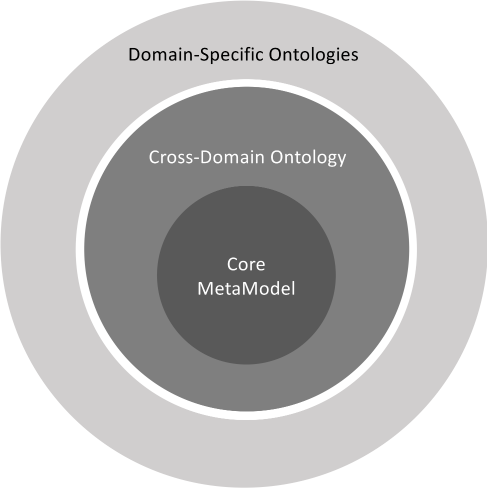
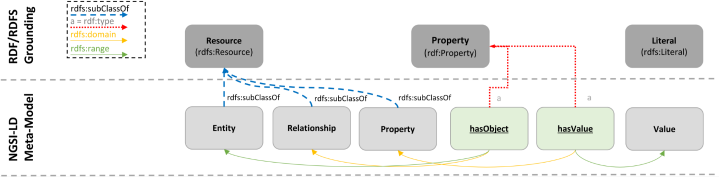
 and
and